 |
The big race of small computers
Once it still would have happened. "Race megahertz - a contagious thing, and, alas, inevitable. Year by year, the processors of personal computers become more powerful, forcing software manufacturers at least some use of new opportunities. Now the turn and to handheld computers, and with them also to the numerous army "of computer-related" portable devices under the vague name of "gadgets" ...
The British company ARM, specializing in the design of microprocessors for portable digital devices, announced a new processor family, ARM11. The first industrial batch processor XScale, which uses architecture ARM11, will be released towards the end of the year (fourth quarter 2002) Corporation Intel, and with them are likely to appear and the first devices based on them. In the production processors will be used 0.13-micron technology, which will disperse the most successful instances of up to 750 MHz. In the foreseeable future, with the transition to 10-micron process, according to experts ARM, clock speed will be over 1 GHz. Completely unclear what to do with a similar margin performance. But it is not clear just from the height of the current level of industrial development of portable computing. Tomorrow gigahertz handheld seem commonplace, and the next day cause irritation of insufficient speed. All of these are typical signs of madness "megahertz race" ... From a user perspective rapid growth of computer performance has negative and positive sides. Everyone who owns a personal computer or use it at work for more than two years, knows how much it costs to constant updating of technology to try to keep a certain level of computing power. High-quality computer, assembled one of the reputable world producers, costs money, but depreciates so fast that after only six months, no punching in and half of its initial price. Slightly better is the case with self-collected cars, but this is not the most reasonable value for money - in terms of their savings. The positive side - thanks to fierce competition between manufacturers of components, upgrading of computers is relatively inexpensive. In practice, two years of operation, the computer in its modernization have to invest as much money as you need to buy a new car. True, these investments are stretched in time, and therefore do not become private (and corporate) user burden. You can also upgrade your computer is gradually replacing the graphics accelerator, sound system, processor or hard drive consistent financial opportunities ... What do the user handheld machine, device or "smart" phone? Portable Equipment lived much longer than the PC. Many owners of the first Palm Pilot `s and now work with their machines, without feeling a special need to replace the computer. Even in a family of Pocket PC PDAs difference between the first Palm-size and modern models are not so big to think seriously about the urgent replacement machines (any upgrade is simply not possible). What to say about simple machines Palm, whose programs undemanding to computing resources? .. Time takes its toll and we do not consider a PDA only as a dock or a PIM means quick access to the stored textual and graphical information. Today, the CCP is capable of playing digital music and video, run the game and display full-color graphics. All this represents a considerable burden on the CPU, although the applications themselves are still significantly inferior to similar programs for personal computers - primarily because of the strict hardware limitations. However, it does not lack handheld machines, as they feature. Low screen resolution (from 160x160 to 240x320 pixels - a computer with a touch input information) is due to its small size.To play a movie with a similar resolution sverhproizvoditelnogo processor is not required. Same with sound, and gaming applications. Textured games, if any, in versions for Pocket PC (such as would have appeared), large capacity requirements of the processor fails to present - even if that rendering will be done exclusively in software mode (not insert the same in the Pocket PC special graphic accelerator). But in a real operation is not so simple. Sufficiently powerful family of handheld computers Pocket PC 2002, equipped with processors with such frequency over 200 MHz, significantly retarding while rendering graphics, playing video files or running complex games. This can be blamed for the imperfection of the software, but programs for the PC, too flawed. However, we can not accept delays in their implementation and immediately think about upgrading your computer. In the case of the CCP, we have to be content with what we have. There is one circumstance that makes the manifold increase in processing power for handheld computers inevitable. The future of the CCP - integration with wireless devices. Today, every (or almost any) Pocket PC you can turn your device through plug-in GSM or cell phone with built-in modem and an infrared port. Tomorrow (or rather today) wireless module with support for GPRS protocols will become an integral part of any handheld computer. Moreover, it is inevitable and predictable process. Pocket PC and so is used for communication - as long as only a desktop computer to access the videos stored on your hard drive information. Agree that this supplement elementary function, coupled with a desktop or portable machine, mobile access to Internet resources - the dream of any user of a handheld computer. Actually, this was the basic idea designer of the first PDA - a versatile and extremely mobile tool to make your computer a truly personal and enables you to work anywhere, including on the road. Looking closely to the latest models of mobile phones, it is easy to see that they are moving closer to the handheld computers in terms of functionality, while gaining quality media - such as embedded MP3 players and color camera. Providing simultaneous (to the extent necessary, of course) of the mobile device - whether it's a smartphone, PDA or communicator - as a device for voice communication means for wireless data, color photos and, especially, video camera, voice recorder, audio player, digital VCR, game console and organizer - that's the problem for the XScale. Not for nothing that the company-developer declares support for new processors multitasking operating systems, multimedia applications, coding and decoding audio and video. With the release of ARM11 family processors booming market for mobile devices will receive an additional incentive. The same can be said about the industry of processors, because competitors would not doze off (unless, of course, Intel does not definitively establish itself as a monopolist). It seems that the stagnation that has gripped the past year or two high-tech industry, is nearing an end. Moreover, the main events will relate predominantly mobile devices. In fact, we observed a similar breakthroughs - more than doubled (from 400 megahertz processors family ARM9) increase the clock speed - a processor for personal computers? And the old CISC microprocessor architecture, which with each new implementation absorb only the elements of a more progressive (or fashionable?) Architecture RISC? Handheld computers have moved to RISC processors quietly and gradually. But moved it? Anyway - Pocket PC and communicators based on this platform. Following the ARM11 necessarily follow the next generation of processors. Their clock frequency will increase, although perhaps not so surprising pace. (And perhaps even more impressive than it is now - who knows?) By the way, the growth performance of processors for handheld still constrained and highly technological limitations. One of the main things - energy consumption, which have small computers should be minimal, and the closely related heat dissipation.True, ARM promises outstanding options for saving its processors and accordingly, no problems with heating. And what we get, the usual PDA users and potential buyers of new technology? Firstly, an additional reason to earn more, because ARM11 processor family will be produced primarily for mobile-class Hi-end. Secondly, a headache when choosing a device, because the diversity is expected unprecedented. Third, many rich portable devices with unprecedented capabilities - such as phones with built-in color camera, or handheld computers with TV tuners and video capture tools. More specifically still impossible, as it was impossible a few years ago seriously talk about a hybrid cell phone and digital camera. Well, who needs this expensive toy? Nevertheless the "toy" has appeared, had found their consumers, and even appeared in a number of commodities for which demand exceeds supply. By the way, digital photography from the introduction of mass-produced processors fundamentally different levels of productivity will benefit. In the amateur cameras of the middle class should expect to see more variety of processors, digital zoom, the new interpolation mechanisms to increase the resolution, regardless of physical ability photosensitive sensor camera. For professional equipment all of the above is unlikely to have any value, but performance processors will be useful here, since their ability to allow us to construct more sophisticated scheme of electronic image stabilization (shooting eliminate the effect of "shaking hands"), light metering and automatic exposure settings . And from an entirely unexpected one can mention the ability to input information into digital portable device (actually, not only for the PDA, but for the communicators and smart phones - anywhere you want from time to time to enter any text, such as the title tracks to iPods MP3) ... Perhaps it is due to new processors our pocket machines learn to recognize not only the individual letters (which they still do not really know how), but a cursory letter, getting used to the handwriting of the host computer and arranged under his arm, and not vice versa. And what's up with voice input, which exists only on desktop machines in the form of terrible quality trifle, but not as a tool for serious work? Imagine, you're mumbling into the microphone, and the on-screen handheld computer having a line of text ... That's where the freedom for creative people! Marina's crying and Dotsenko. So what-what, but naboltat couple of masterpieces of native literature can be in one evening. It would be a coma or, more precisely, what to write. The authors, translation:
Palm m505
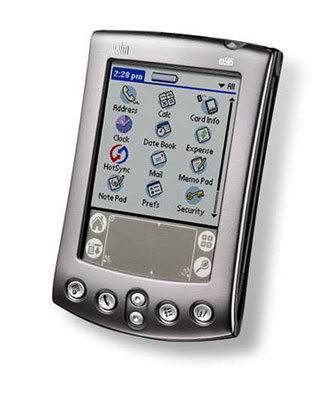
Model m505, the newest in the line of Palm Inc., Unique in that it has a color screen and a slot for cards SecureDigital / MultimediaCard - all in a relatively small package (no more than the Palm V). Differences in size are minimal - in hand by turns one and the other one can only observe that the m505 a little thicker. The difference in weight is more noticeable - color screen with backlight make themselves felt.
True, one has only to enter the room, as m505 loses all its advantages: the image darkens, cease to be distinct. To return him to paint, you must turn on the backlight, which is not as powerful as the iPaq - size does not allow. So it is not only significantly reduces battery life, but do not always save the situation. In addition, the contrast is not configurable, and the famous black netting around the pixels, the scourge of low resolution color screens, though was gray, but not disappeared. Fortunately, the summer begins, sunny days will be enough - it's time to buy a m505 and enjoy its beautiful 16-bit screen capable of displaying over 65,000 colors. Photos, which can be viewed using the included software PhotoSuite, look great. And another nice detail - the graffiti area when you turn on lights, too, is highlighted.
Another interesting fact: 16 MB SecureDigital-cards, which offers a Palm, a user accessible only 14.6 MB. The remaining space is reserved for the protection of the content from unauthorized copying. When the card is inserted into the Palm, it automatically turns on. In the shell program introduces a new category of the same name, noted a small icon card. It put everything recorded on your program. They do not run directly from the map. Clicking on the icon of the application, it is automatically copied into RAM and run from there. It takes about a second, depending on the size of the program. After exiting the application, it also automatically erased from main memory. The good news is that the PalmOS 4.0 allows programs to work with databases located on maps of SD / MMC. Supplied with the m505 software, including Documents to Go and PhotoSuite, already use this feature. Old programs written for the PalmOS version 3.5. and below, such "skills" do not have their bases must necessarily be copied to main memory.However, the configuration parameters can be set so that the old program, or copied to main memory all of their libraries and databases at once, or load them one by one as needed. This lets you work with programs that are of a size exceeding the amount of free space in RAM. Of course, it's not as convenient as AutoCF, used by Handera. But given the fact that new programs are already able to store their data on maps, the problem is not here. By the way, Palm Desktop fourth version can save files not only on the Palm, but also directly on the SD / MMC-card. And now you can record not only files with PDB and PRC, but also any others. This feature PalmOS 4.0 is used, for example, a camera Kodak PalmPix devices m50x, which allows you to save photos to a memory card in the format of JPG.
Not for the faint of heart - some unfortunate when you try to remove the heard a noise like breaking off contact. Fortunately done without damage, but still just better to check this point in the store because some of the cradle do not have these drawbacks, and the Palm there is a part, and the great beyond. "
True, it was the promise that this new standard will last at least two years. The same connector is a m505. The truth here is the devices compatible with it, no.
 |
Screen
The screen of this model has a standard for most Palm-device resolution 160x160. He began to cause controversy even before presentation to the public. People who saw him at the shows, could not converge in opinions. Someone insisted that the screen is muddy and difficult to read, others compared it with the iPaq and claimed that no one has such wonderful displays. It turns out that those were right, and others. Specificity of the used reflector screen is that it looks great, even with the bright sun! A flaming display Palm 3c for the fact that the colors fade in bright light.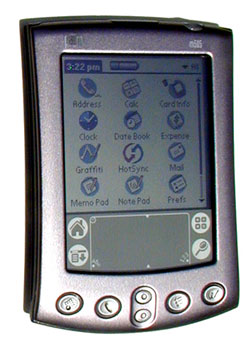 |
SD / MMC slot
Handspring paved the way and now Palm is in her footsteps, adding to their new model slot prospective standard SD / MMC. Despite the fact that many firms engaged in the production of accessories and additional devices for Palm'ov, announced the development of relevant modules, they will appear more soon. This is largely due the fact that the standard SD / MMC not yet fully approved, and specifications may be changed or supplemented. So until that time slot can be used only c memory cards. As an option already available modules on which programs are written large. For example, maps of cities in the U.S. or the game.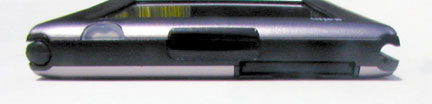 |
Processor
The combination of 33MHz Dragonball VZ processor and the new m505 PalmOS 4.0 creates a large supply of power. The image on the screen is updated quickly switching between applications takes place without annoying delays. Apparently, the new version of the PalmOS has been some action to increase the speed of graphics operations. In general, we can say that performance is enough even for programs that operate on large databases or contain many graphics.Battery
Requirements for battery m505 grow already from the use of more energy-resolution color display. Features screen forces the user to frequently sit and use the backlight. Despite this, the owners reported that, on one charge can work out a new Palm 5, 6 or even 8 or 9 hours - a very decent figure for a color screen. So if your cradle or a special charger for the day are not very far from you, then you're unlikely to encounter the problem of a completely discharged battery. The more so that charges up to 50% in 15 minutes, and fully charges the battery in an hour.Calls, and alarm clocks
As well as a "little brother" m500, a new color model may announce the beginning of the meeting or important matter in three ways: using the normal "Tweeters", vibrating alert and flashing signal lights. Vibrating alert is very useful for those who do not want all turned around when the Palm is trying to recall something. A flashing light may be useful to someone, but rather it is just a little, but still a nice bonus. Call type is given for all programs at once. It's not very convenient as I would like to during an important meeting of the Palm quietly humming vibrating alert, recalling something, and next morning you woke with a loud beeping alarm. However, certainly in the near future will be written in the appropriate hack, so that experience in this regard is not necessary. Now, a reminder has built-in Datebook button Snooze (Take a nap), after clicking on which the alarm will not bother you for 5 minutes, and then again begins to ring. Again, unfortunately, a five-minute interval can not be changed.Case and Stylus
Corpus, in contrast to the m500, is almost entirely metal. Feels that he is strong, solid. Plastic grooves to hold the stylus. Strange, but these grooves are different from the Palm V thickness and depth. Apparently, in accordance with its plan to squeeze out of the users as much money, they want to get to say goodbye with all accessories, bought for the Palm V. Includes stylus, carrying case and a voice recorder, which is inserted there. More unusual is that the left slot is shallower than the rule. In Palm m505 FAQ is explained by the peculiarities of the internal structure: some detail prevented the left slot to make the same long, as a rule. As a result, the pen can be inserted just right, the lid - just to the left. Again discriminated against lefties. In addition, m505 with great reluctance to part with what has been inserted into the groove. Many are literally broken nails trying to pull the stylus out of its socket. Stylus itself is a metal rod with two plastic taped screw [tricks]. Unscrewing the top, you'll see her pin, which is so convenient to press the button to your favorite Reset.Credle
Credle new, connected to a port USB. Like I said, Palm m505 for everything keeps very tight - and for the stylus, and a cradle (c SD / MMC-card also need to be careful). Some buyers of freshly bought m505 tightly stuck in the cradle, as if glued.In order to get the Palm out, you need to strongly pull him over, while trying not to break anything. |
Cover
The set comes leather flip cover, which is inserted into the left slot for the stylus - to insert it into the right, you need to use force, but the word is not very well with prices in the $ 400-600. In principle, we can cut the tip of the probe cover, then he will go without problems and in the right slot. Unfortunately, the provided cover is hard, and there are no pockets in which it was convenient to put the memory card. The reason is simple, the site Palm cover with pockets is $ 29 - some customer care.Universal Connector
Palm Inc, has always adhered to the rules: a new model range - the new connector. The company has not changed him, and this time, representing Palm m500, carrying on board is absolutely not compatible with older models, Universal Connector, and provoked a new wave of indignation.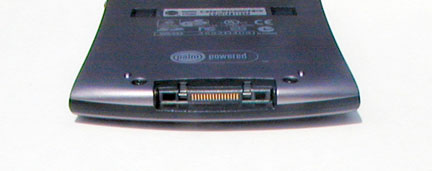 |
Conclusion
No matter what, m505 as a whole leaves a very pleasant impression. The screen is not perfect, like everything else in this world. Batteries do not work as long as a m500, but fast charging. Device for SD / MMC and Universal Connector is not, but always coming soon. This is the best Palm of all that exist at the time when I put this point. Point. Characteristics of devices Palm m500, Palm m505 Sources, Materials:Just Imageon!
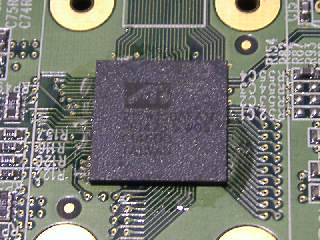 |
| ATI Imageon 100 |
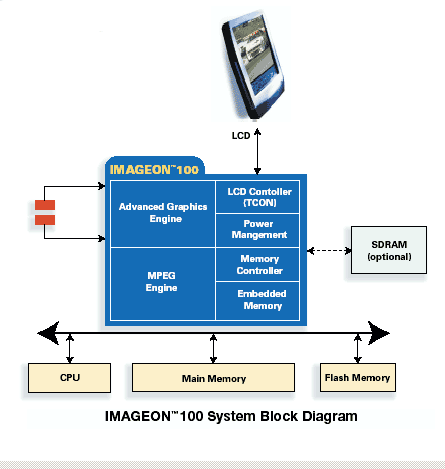 |
| Scheme of work Imageon |
Tell me who your @ migo and I'll tell you who you are ... or at the completion of a number of Pocket PC
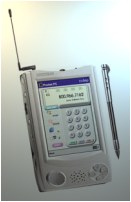
In the U.S., Britain and Russia have long existed a sort of club for fans of handheld computers, where it is possible not only to share experiences on the use of their handhelds, but also look at the latest novelties. Not so long ago, the regular meeting of so-called British "user groups" Pocket PC, which took place in the center of MSN in London. In addition Casiopeia EG-800 (industrial version Casiopeia E-115), a folding keyboard Stowaway, does not require special recommendations because of their popularity, and several other devices on a kind of mini-shows were presented two new devices that will soon appear on sale in the UK . Especially angliysikm Pocket'manam liked the Palmax PD600C or simply @ migo.
This device attracts attention even before his acquaintance with the specifications. Just look at votografiyu! His company produces Palmax Technologies, which specializes in Pocket PC devices and equipment for them. Talking about the technical characteristics, you will notice that the new product resembles iPAQ. Intel StrongARM processor with a frequency of 206MHz and 32MB of memory put it in line with the most promising members of the family. However, there is a @ migo and significant differences from the iPAQ. The first of them - a design that looks more like Casiopeia E-125. Here are just turning the device, you will not find a proper E-125 CompactFlash II socket type. Instead it has a built-PD600C memory expansion slot PCMCIA. Perhaps it is this characteristic makes the device attractive for corporate users, because the PC card slot makes it easy to connect the network cards, Nokia Card Phone or 2GB PCMCIA hard drive for storage of public information. Palmax PD600C screen capable of displaying over 65,000 colors, while the iPAQ only 4096. @ Migo is equipped with a lithium-ion battery, D-button cursor, and the usual four buttons for working with applications. In addition, on the side there are a number of additional useful buttons, such as power button, start menu, and others. There is jog dial, allowing control PDA with one hand. Unlike other Pocket PC, PD600C equipped with wheel adjusts screen brightness. Taking into account all these factors, British users have found that the @ migo a great addition to the market leader in Pocket PC. The new device is sold in the U.S. site UR There and in the UK on Peripheral Corner.
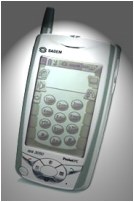
The second novelty presented by the London fans, became Sagem WA3050. This is one of the first "hybrid" Pocket PC and mobile phone. If we talk about telephone devices capabilities, this dual-GSM (900/1800 MHz) and GPRS module. Thus, the potential of this device in the 2.5-generation networks is quite large, it has enough "strength and energy for constant synchronization with the database, timely access to email, calendar and contact information. As the Pocket PC device is not particularly impressive. Black and white screen, although with a clear picture, not very comfortable for long life. A 16 MB memory is not sufficient to implement all of the platform Pocket PC. Pre-orders for Sagem WA3050 processed on site. Sources, Materials:
 |
 |
"Camodelkin: Kapka, or handheld hardware-software system with their own hands
C the onset of spring - the pores of hope, change, bursts of creative enthusiasm - HPCru is a new section - diy. Under her banner we offer to meet anyone who does not stop at buying a handheld communicator, a smartphone or any other mobile device of their dreams and continues to independently develop the purchased product in search of the ideal. Accepted for consideration by the stories with photos of the original solutions, including hardware changes, as well as software products of its own production is called "the soul" (not for money!) Who made your life better with a PDA and more fun. In return promise to publish a story on HPCru, and, therefore, known in some circles:) Please send your letters to editor@hpc.ru, but now present to you the first story. Now the world is very small PDA keyboard device that does not fit with my idea of a perfect PDA. Even when he was palmovodom I'm dreaming of a full keyboard. A little about myself. By my life, I "tourist weekend, often traveled to the woods outside of civilization, but to be severed from the virtual world can not. Back in the old days, sitting in a tent and talking in ICQ, I started thinking about an external keyboard for PDAs. Variants with tiny buttons on the case of some models, as well as folding, folding, and other keyboard does not suit me. When it's time to upgrade, I already knew that I needed to be completely happy - USB-host. We are almost at the same time, I began Toshiba e400, Keyboard Dialog KP-102UH and Optical Mouse Logitech M-BT58. Issue with increased energy costs decided fairly quickly, thanks to the use of external charging from four AA batteries. One such kit is enough for one or two charging or three to five hours. "Dialogovskaya" different miniature keyboard and the convenience of a laptop keyboard and a built-in passive USB hub. But typing while the CCP is just lying on the table, it was not very comfortable, and cradle included was not available. Had to invent how to make a stand from scrap materials. Complexity was also in the fact that infrared machines should be in the field of view port of the mobile phone. In this model Toshiba is it outside the box - in the bottom of the left sidewall. Fantasy quiet winter night gave out a scheme of mutual arrangement of devices for different ... The first version of PDA hardware and software system, or, in abbreviated form, Kapka located in the original box from under the keyboard. To cover the box, I cut out the shape with compartments for PDA and phone number of a piece of foam, and closed the cover sheet from the usual black folders for papers, joining together a transparent adhesive tape.
Have passed since six months. During this time the list of peripherals Kapka widened, prompting a desire to modify and "body." The current version is based on the cover of the student's notebook to flip units, freed from the past. Top clip is from a folder, which in life hold the sheet of paper, and now holds the PDA. Availability Stitched Windows Mobile 2003 SE with built-in screen rotation allows you to deploy handheld infrared down to landscape mode, and accordingly move downward GPRS-module:), whose role is make a phone Siemens ME45.
In order not to touch the phone while a voice call, a headset. Active hub Genius UH-401 is powered from the same finger batteries hidden in the roll-stand for hands. To a hub connected to a keyboard, mouse, and Chinese media card reader on the seven types of memory cards. At the request of Kapka can connect and external speakers. This is going to set a few minutes, the main thing - do not become entangled in wires. Before you - its scheme.
 |
| Handheld hardware and software package, Version One |
 |
| Restyling, second edition |
 |
 |
| Kapka "in the section";) |
- Scheme Kapka:
- Pocket PC Toshiba e400 (Pocket PC, Windows Mobile 2003 SE, 300MHz, 32 MB RAM, 32 MB ROM, 512 MB MMC card)
- USB host cable
- USB-keyboard notebook format Dialog KP-102UH, built-in USB-hub (5V, 10 ° mA)
- USB-optical mouse Logitech M-BT58
- Connecting the mouse to the hub keyboard
- External charging of the batteries 4xAA 2000 mAh Ni-Mh
- Adapter to plug into a network and an autonomous charging
- Charge jack
- Cell phone Siemens ME45, infrared top in the center (on the PDA below the orange LED)
- Cell phone headset for receiving calls
- column old fart nouneymovy (possibly, Creative), optional;)
- Built-in speakers
- Base - hard cover from the notebook with removable blocks
- On the basis of - part of a device with a clamp, which is attached PDA
- Cushion for the wrist and prevents the "escape" key - from scrap materials.
New Edge, or The Tale of the American left-handed and steel Visor `e
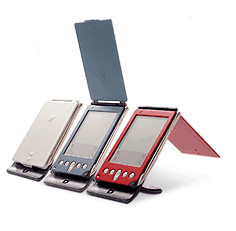 |
Housing
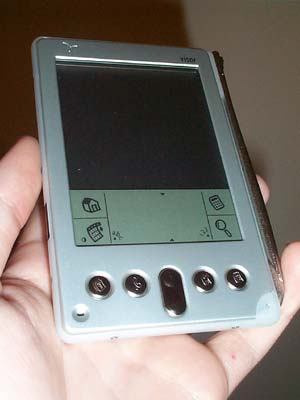 |
Cession number 1
 |
Cession number 2
The second assignment is intended as an original design solution. This refers to the stylus, which is now mounted outside the enclosure. To get him comfortable right thumb holding Visor. In this case, it is conveniently leaves on the tracks.If you pull it differently, then there are distortions and stylus, and strives to slip and fall. One gets the impression that all these innovations devised a lefty (Lefty?) And left-handers.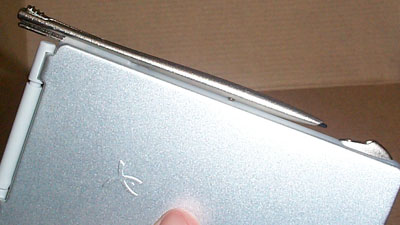 |
Concession № 3
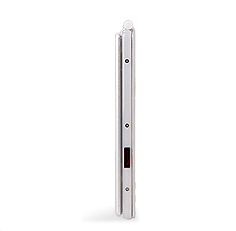
External SpringBoard-slot is no longer a designer, but rather an engineering discovery. He tacked on to Edge from behind and kept sufficiently tight. Its advantage is low weight - not heavy lid. But how ugly it looks with the Edge! It is twice as thick (almost like Prism). By the same slot is not suitable Visor'u color. As a result, it looks like a foreign body.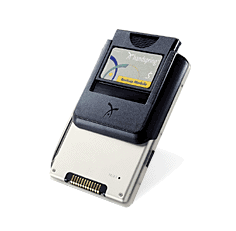 |
Springboard
As already described above, connector SpringBoard is designed as a separate entity which is fastened to the hull rear. But in order to attach it there, you must first remove the lid, leaving the screen unprotected. In the sidewalls are special runners, which enters the slot into place and locked. It connects to the Visor `y through a series of contacts that were previously hidden under the hood. Otherwise, it's all the same slot, nothing new. Here you can give some advice: if the module sits very tightly, it is best to remove it along with the slot, and then pull out.Cover
As for the cover, it is also made of anodized aluminum and weighs quite a bit. Two fixed positions - about 120 and 270 degrees - quite convenient. If you liked the cover on the third model, Palm, then enjoy this one. If you do not like it .... anyway enjoy. She simply does not have flaws. It is very durable, so Edge can be worn in the back pocket without fear of crushing the screen.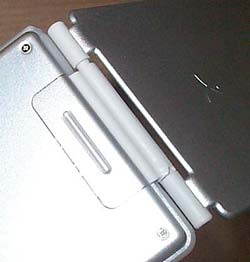 |
Stylus
 |
Screen
Surprisingly, this is the only representative of the latest wave of PalmOS-novelties of the screen is absolutely nothing to say. Competitors to increase resolution, using new technologies, and Handspring actually offers the same screen as on the Platinum. Yes, I must admit, the picture became clearer, brighter. And at the same time, less green. Illumination is also improved, but it still does not compare with an inverted illumination on Palm III.Credle
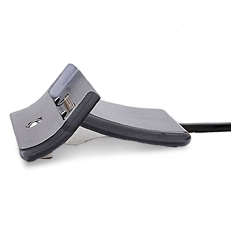 |
Knacks
 |
"Camodelkin: PDAs in the road - what could be easier!
 |
 |
 |
- As for my gentleman's suitcase set involved a case for carrying a CD with lessons envelopes, which are mounted:
- four boxes for the batteries for 4 * AA (for charging PDAs)
- Keyboard "Ray-805" without the lid (the sensor passed back to top)
- tester to control the charging and PDAs by the solar panels and other sources
- spare stylus
- cases for storage of memory cards
- The set of switches for switching batteries
- cvetodiody bright glow to work in the dark
- the solar battery (connected via an optional connector)
- portable hard drive ASUS WL-HDD 2,5, storage and backup media that connects to the PDA through the CF-LAN card or a Wi-Fi
- a card reader to record the various flash memory cards on the screw.
 |
 |
Subscribe to:
Posts (Atom)