Mobile panorama of the week. Issue 25 - February 29

The past week has fallen to peresmenok - a major exhibition has been completed and even the most lazy journalists have time to take stock of Mobile World Congress 2008, and before another major exhibition remained decent time and Producers saved up announcements of new products, which is scheduled for demonstration at CeBIT 2008. Nevertheless, there was a rather interesting event, worthy of our attention.

Mobile-car racing

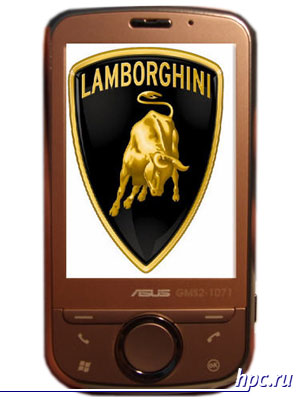
Using the most prestigious car brands for consumer electronics phenomena often. One of the most stable co-operations of this kind is Acer and Ferrari, thus produced laptops, media centers and even PDAs. Company ASUSTek couple of years ago started a similar way to work with the auto-concern Lamborghini and has developed a pretty decent line "racing" notebook. Now it is obviously going to go further. French resources Mobinaute reported that at CeBIT 2008 represented the first communicator ASUS brand Lamborghini. Name ASUS-Lamborghini ZX1 is built along the same lines as the marking of laptops - ASUS-Lamborghini VX1, VX2 and VX3. Communicator must be powerful, productive and impressive design. Most likely, the trump card of the communicator will design and content. Since the breakthrough in the field of hardware for Windows Mobile is not happening already quite a while, even the characteristics of top-end models sound pretty mundane and already familiar. In such circumstances, producers have come up with new solutions in design and user interface to seriously stand out and attract attention. Mobinaute lists options such as a processor with a clock frequency of 520 MHz, support for third-generation networks, wireless networks Wi-Fi interface and Bluetooth, and GPS-functions. ASUSTek obviously have to try not to drop the honor of the brand Lamborghini. Of course, will be used symbols and colors of Lamborghini. The source notes that the novelty gets interesting-oriented interface to manage the fingers without the stylus, like a mobile phone iPhone. Appears in selling ASUS ZX1 Lamborghini is expected in the summer and costs about 650 euros, that is closer to a thousand dollars. Get pictures of the communicator to start Mobinaute failed, had to settle for the layout, concocted from another model communicator ASUS and splash in the style of Lamborghini. As you can easily see a lot of nuances remain unknown, Mobinaute able to open only the "tip of the iceberg," and it is possible that at CeBIT is waiting for us a big surprise. One thing is for sure - Notebook ASUS-Lamborghini has original, striking design and attractive features, will be strange if the first communicator Lamborghini will not have the same charisma.
Mobile panorama of the week. Issue 25 - February 29
Thus, according to the resource Mobinaute, might look like ASUS ZX1 Lamborghini

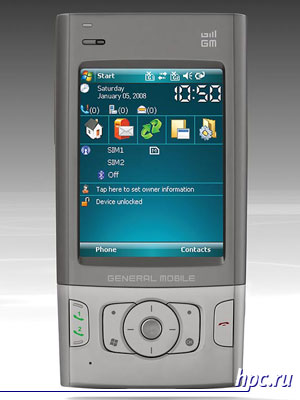
General Mobile DSTW1: Communicator Two-in-one

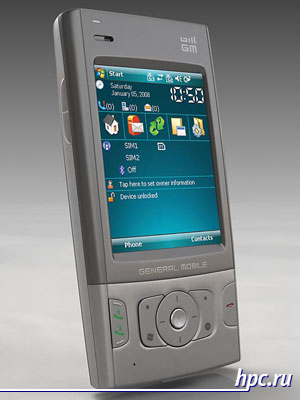
Mobile phones with two SIM-cards gradually cease to be exotic, but among the communicators based on Windows Mobile with similar features there is a clear deficiency. Benefits "dvuhsimochnogo" phone visible, but with the realization of this concept raises a number of difficulties. Nevertheless, last year was presented, several mobile phones designed for two SIM-cards and really easy to use, among which is the Samsung D880 DuoS. This made the idea more popular and other manufacturers. Little-known company General Mobile has prepared a lineup of mobile phones with support for the DST (double SIM technology), among ordinary phones there wormed communicator General Mobile DSTW1. It should become one of the first Windows Mobile devices, allowing to receive calls on two phone numbers simultaneously. If you believe the manufacturer, so it's all the world's first such device. Laurels pioneer can not get General Mobile.For example, in early January at CES 2008, the company demonstrated a model for Haier HG-N99 labeled with such opportunities, but its release date yet to be determined. Perhaps DSTW1 twins appear under other brands as General Mobile does not engage itself develops and manufactures mobile devices. The model created a fairly well-known Chinese manufacturer TechFaith Wireless, and was previously known under the code name Cynthia.
Mobile panorama of the week. Issue 25 - February 29
General Mobile DSTW1: Simka two in one device
Aside from supporting two SIM-cards, then the model is the impression of a rather mediocre. All the characteristics indicate that it is simply the workhorse of business-oriented users. It is quite logical, since most begs the purpose of such a device - a corporate and a personal phone in one. Not impressive characteristics allow us to make model of affordable, which adds extra advantages in the eyes of corporate clients. Network support GSM / GPRS / EDGE, no 3G, and other frills, easy-TI OMAP850 processor at 200 MHz and the Dragon Fly to 104 MHz, a standard 2.8-inch touch screen in a diagonal, QVGA (240x320 pixels), 2-megapixel camera work with Windows Mobile 6 Professional. Like many other low-cost solutions, the communicator does not have wireless networking Wi-Fi. Perhaps the only distinctive feature - it is slightly larger than usual amount of internal memory, not 128 MB and 256 MB ROM.
Mobile panorama of the week. Issue 25 - February 29
General Mobile DSTW1
General Mobile DSTW1 a traditional candybar design is not flashy, but nice. Dimensions and weight can not be called small, they reach 117x61x18 mm and 144 grams. Miniaturization has never been a strong point of TechFaith Wireless, but in this case is not the point. The success of the model will depend on prices, which prompts the company, while the recommended value is not defined. Communicator must be on sale very soon, the yield on the European market is scheduled for March.

GPS-smartphone Samsung, work on the bugs

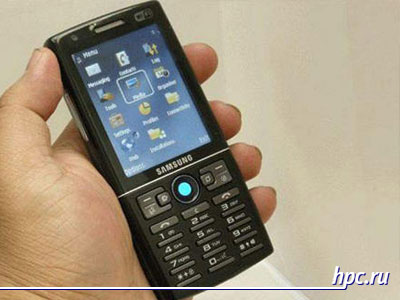
Product Range Symbian-smartphones from Samsung is about to be added a strong novelty. In contrast with the new flagship of the Samsung G810 it will look somewhat pale, but those who seek a middle ground, a smartphone should be like. In autumn last year, Samsung has started to develop the line of smart phones with built-in navigation functions. Model Samsung i550 was one of the first signs of this trend. Model is well balanced and attractive. It is not focused on tehnomanov combines a fairly strict design and classic form factor with good functionality. In one device, there are quite large for Symbian-smartphones display with a diagonal of 2.6 inches, GPS-module, FM-radio, 3.2-megapixel camera with autofocus and flash. But here there is significant from the standpoint of many users lack - lack of support for wireless networking Wi-Fi. Competing products from Nokia in the Finnish equivalent of S60 called the Korean manufacturer to produce and upgrade as soon as possible.
Mobile panorama of the week. Issue 25 - February 29
Samsung i550w
This update is really planned to Samsung. It is expected that the upgraded model will receive a regular name Samsung i550w, the major change it will become the new support for Wi-Fi. Additionally, you may be expanded capabilities of mobile communication networks of the third generation and higher. The emergence of Samsung i550w in the European market is expected to close in the second half of the year. The official announcement of new items not yet taken place, may undergo changes not only the communication capabilities Samsung i550.

A prototype of Android: a heartwarming

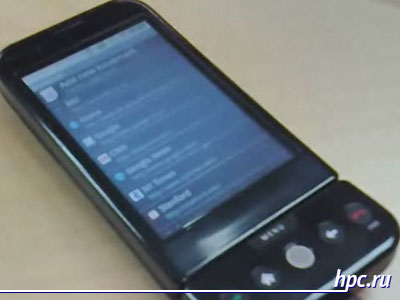
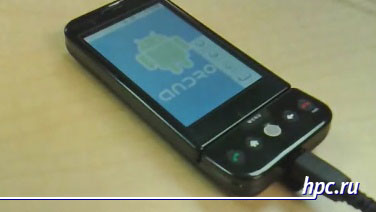
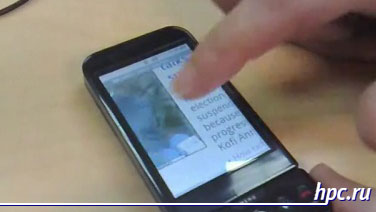
The first smartphone based on Android platform should appear only in the second half of this year, and now are being developed, creating a vast database software, and so on. At the recent exhibition Mobile World Congress 2008 is widely demonstrated prototypes Android-smartphone with QWERTY-keyboard, but working prototypes of the second model, which is lit up even in a video announcement of Android, equipped with touch screen, showing no. Darren Waters (Darren Waters), a journalist known resource BBC News met with Andy Rubin (Andy Rubin), head of mobile platforms of Google, and took an interview. During the interview, Rubin has corrected the omission, and demonstrated a prototype of Android-smartphone with touch screen. Despite the fact that the software is still in the stage of "pre-beta", the demonstration was quite successful.
Mobile panorama of the week. Issue 25 - February 29
Android prototype
Browser responded to management as through touch, and using trackball. Show up scrolling and scaling Web-pages, with a prototype using the third generation. In the Google Maps application was demonstrated by the regime Street View, as well as pictures of real places featured in the video it was clear that the scrolling and zooming map is quite smooth. As noted by Rubin, the device runs on a processor with a clock frequency of 300 MHz, which relates it to the smartphone category average, but in the video smartphone coped with the tasks flawlessly. Interestingly, for displaying 3D-graphics on a smartphone running a demonstration of the game Quake, the test was passed without any problems. In this note, written by Waters, does not explain what processor is used, but in the video is a refinement of that prototype is built on a Qualcomm MSM 7200 chipset.
Mobile panorama of the week. Issue 25 - February 29
Generally, when you look at the prototype and its work unconsciously begs comparison with the mobile phone iPhone. As noted by the creator of Android, the phone from Apple - it's an excellent product version 1.0. As planned by the developers, Android, its open, allowing developers to fully use the features as Web-based applications and traditional programs, leveraging the hardware capacity of mobile devices from 3D-graphics to multimedia functions. As a result, the creators of Android has all the chances to create a revolutionary phone version 2.0.
Mobile panorama of the week. Issue 25 - February 29

Nanotechnology, or the dream is not harmful

Hot Finnish guys look boldly into the future of the great Nokia. The exhibition Design and the Elastic Mind at the New York Museum of Modern Art Nokia Research Center and Cambridge University was presented a concept ahead of time for at least 7 years. Concept called Morph will be built using certain nanotechnology, which is Nokia does not specify, but it sounds impressive and fashionable.
Issue 25 - February 29 "title =" Mobile panorama of the week. Issue 25 - February 29 "width =" 400 "height =" 300 "/>
Concept called Morph will be built using nanotechnology
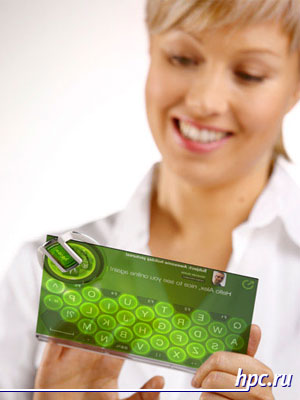
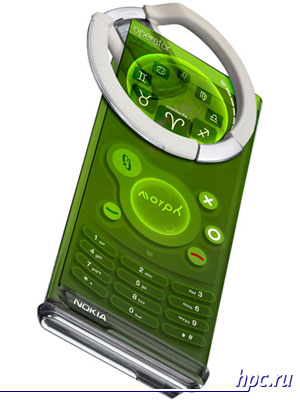
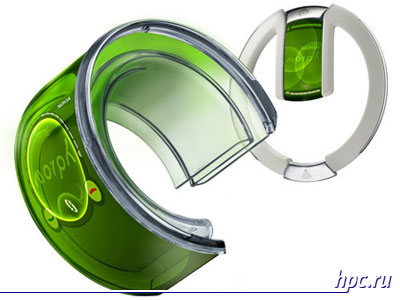
Fully in line with the latest design trends with an eye on the distant future, Morph is a flexible, extends the device with a solid touch screen. It is easy to change the form and transformed as a result it can be worn on the arm as a bracelet, as well as use for typing using the onscreen keyboard. Among the additional features mentioned player, connected to a wireless headset and so on. Triumph of nanotechnology will be implemented in Morph features such as flexible materials, transparent electronics and self-cleaning surface. Frankly, more than an impressive task for researchers and engineers, Nokia.
Mobile panorama of the week. Issue 25 - February 29
Concept Morph: On-Screen Keyboard
So far, everything looks fantastic too, but Nokia is planning to see some elements of the concept in a real handheld devices within 7 years. Initially it will be top models, it is not surprising. Hope to reduce the cost and integrated approach to functionality in future implementations Morph give all the same nanotechnology. Called the time of appearance of devices with fully realize the potential Morph Finnish manufacturer has not yet decided.
Mobile panorama of the week. Issue 25 - February 29
Concept Morph: phone mode
Mobile panorama of the week. Issue 25 - February 29
Concept Morph ... transformed into a bracelet
The authors, translation:

Pocket Navigation

Pocket Navigation
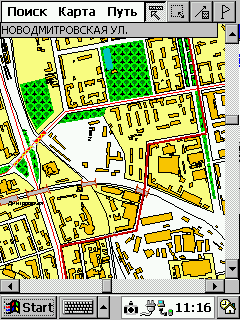
In several previous articles you could meet PalmGIS - electronic map of Moscow, running on handheld computers running Windows CE and EPOC. Today, we conducted a small field trial: see what PalmGIS navigation capabilities in real conditions of the city. Let's try to pave a few routes and follow the movement of his car with satellite navigation GPS.

For these tests have the following equipment:

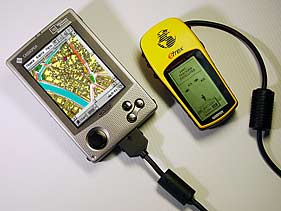
Basis Navigation System - Pocket PC Cassiopeia E-100 (Windows CE) with an installed electronic card PalmGIS GPS. By Cassiopeia via special cable connects the GPS-receiver Garmin eTrex. It determines the position of the object and sends them to a PDA. Signal processed by the program PalmGIS, and on-screen handheld point occurs, indicating the position of the car. So, let's begin. GPS-receiver - on a shelf under the front window, connect to it Pocket PC, run PalmGIS. While warming up the engine, enter a start or end of the route, and eTrex catches needed 4 satellites. Appears on the map purple point - this is our car. Let's go!

The first route - from Nikoloyamskaya street to Kolomna. Check the accuracy of GPS navigation PalmGIS

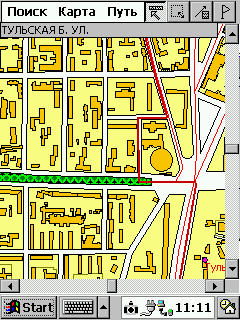
Purple dot moves along the red thread of the route - it is we are going to Moscow. Cross the Taganka area. Doubts arise at the end of the street B. Bricklayers - PalmGIS offers to go to the right and merge onto Simonovsky shaft on a side alley. Why - it is not clear, because the main road goes straight. This way we know well, so do not believe the map and go straight. A few minutes later once again go to the Route and in full agreement with it get to Kolomna, the benefit is a straight line. On the broad avenues of claims to PalmGIS virtually none. The accuracy is quite satisfactory - the deviation does not exceed 15-20 meters. Satellite signal is lost.

Now change the situation. We are moving to unfamiliar areas, and guided only information PalmGIS

In this situation, need an assistant, which monitors the movement of the vehicle on a map and warns of the bends. Watch the road and follow closely the card is practically impossible, then needed a voice interface. We go from Kolomna to Altufevskoe highway. Nagatinskaya street, turn right onto Varshavka ... Incident happened when the purple dot close to the area of ​​Serpukhov outpost. Here the situation is repeated street Large Masons. Despite the existence of a direct passage to the street Mytnaya, PalmGIS invited to go further left, the Serpukhov shaft, and then get on the streets Mytnaya. Eksperimet is an experiment - we blindly obey the advice of the card.
Pocket Navigation
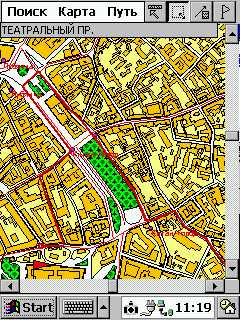
Conceding a stream of cars on the street Mytnaya, we go out on the yellow turned to the left. And in vain - the first right of way, which we have proposed to go, was entering the territory of the Danilov market closed iron gates. More or less the carriageway was only Havskaya Street, fourth (!) Right on the view PalmGIS. Having strayed on back streets Shabolovka Yakimanka instead we ended up on the Garden Ring. Frankly, the last chance to return to the route was lost due to negligence of the crew, not the fault of the card. PalmGIS regularly show our movement. Even in tunnels at the Garden Point continued to move, despite the short-term cessation of signals from satellites. As the old route we went, finally and irrevocably, with the Crimean bridge paving a new one. Now he is on the Garden Ring to the 1 st Brest street. As you know, Mayakovka Garden Ring dives into the tunnel, but we need to go right, up to Tver. PalmGIS shows that need to keep to the right, but the tunnel is not labeled - the situation is obvious. At junction before Savyolovsky Station we offer taxied to Novoslobodskaya street toward the center, then unfold. This way there.Perhaps he is shorter, but faster would be another way: through the tunnel to Suschevsky shaft. We're going into the tunnel - at the same time check, as the navigation system will behave in a long winding cave. Who knows - this tunnel describes a semi-circle, away from him to turn right and after 50 meters - right again, and soon enter a very broad bridge.
Pocket Navigation
As expected, the point for some time continued to move right, and then froze on the spot. Only about a minute and a half in GPS-receiver to understand: what is wrong, he had been deceived. However, immediately orient and showed the new location of the machine. The main surprise was waiting for us at the end of Butyrskaya street. PalmGIS proposed to cut corners and fly like unto a bird through the Savyolovsky railway before publishing "The Young Guards". Well, there are no moving! There is a boardwalk crossing the road, absolutely impassable for a car. Maybe in a jeep there proedesh ... Breaking a car we did not, and crossed the railway a little farther in the usual way, on overpasses. Then everything was like the truth, except the offer to go to the Ogorodny travel in the opposite lane. The signal from the satellite data was permanently lost only after entry into the yards Otradny. Domestic multi-storey box perfectly resists ingenious navigation systems of the West.

Third test: we were going out of town. Will PalmGIS useful in a suburban trip?

We go with Altufevkogo highway in the direction of Sergiev Posad. Point moves on the map, the deviation does not exceed 20-30m. Leave on Ring Road. With increasing speed, there is a feeling that the point a little behind the real machine. On the map are not designated traffic police posts and watching the camera - we need to expand the database:)) Departure for Yaroslavl highway - on the declining arc with two short tunnels. Navigation system, as usual, did not notice the lack of signal, and we drive in Mytishchi. Everything. Hence, the orientation of PalmGIS does not make sense. Yaroslavka on the map is not marked. Some surrounding facilities are available, but the farther - so they are fewer. After a while the point moves over the white desert. But we do not turn off PalmGIS - what happens when you exit overseas maps? Have to wait a long time - in fact PalmGIS included Zelenograd, but he is pretty north of Moscow. Well that's all. Point reached the edge of the map and got stuck. And after a few seconds disappeared altogether. Summary - in a suburban trip PalmGIS virtually useless.

Fourth test. Let us see how behaves PalmGIS in central Moscow. Wander a little on the streets.

I will not fully describe our trip. I can only say that the desired structure on the street Pipe in the database was not, and the proposed path to a nearby house led us to the fence with a "brick", for which there was a building. I had to leave the car and walk about 100 meters. But on the way back PalmGIS completely rehabilitated, placing us in a roundabout way to the Garden Ring and saves you from standing on Sretenke.
Pocket Navigation
Distressed only work of navigation. There was a feeling that the GPS-receiver is constantly losing the signal. Point it stopped, then abruptly caught up with the car. And then completely stuck in one place. I thought that the signal interferes with dense buildings center. And the next day found out that Cassiopeia For unclear reasons, has failed connector that connects to the serial cable. That is, he just hung out in the nest, unable to provide any connection. Kasya had to pay for repairs, and the test result N4 invalidated. By restoring the device experiment will be repeated. Except for the failure of the navigation through the fault of the iron work PalmGIS can recognize quite decent. After spending a minute on a route on an electronic map, you can save 15 or more. And furthermore, if to the traffic situation and make a trip to Earl's own corrections. Paper atlas, in any case, we do not need.

To summarize

The navigation system really works. Small deviations, delays at the beginning of the movement and at bus stops, in my opinion, are forgivable. In the end, we used the GPS-receiver is very simple and the testimony of his very approximate. He is positioned as a GPS-receiver is an entry-level, intended for tourists, bikers, etc. But even this accuracy is quite enough for orienteering in the city, especially because the card is integrated opportunity override location. In tunnels and under bridges of any GPS-receiver loses its signal. However Tested Our model for some time after the loss of the signal continues to develop the movement in the same direction at the same speed, waiting for the resumption of the signal. So that the passage of bridges and tunnels, straight passes almost imperceptibly. The main problem - inconsistency route graph to the real situation on the road. I'm not surprised. According to the developer - the company Kiberso - PalmGIS graph uses data from the traffic police. That is, for the exact count is important good organization of the movement. How are we organized movement, we know. Therefore, the graph is the same accuracy. But even in this matter is not so bad, if you use an e-card with his head. I recommend to use the routing functions only to establish a common plan of motion. That is: to get from point A to point B, you need to pass on such a street. You can be sure that the proposed route is close to ideal. But the complex interchange of PalmGIS pass is not necessary. Firstly, it is easy to get lost, because you specify only the general direction of motion. Second, and the general direction indicated serious bugs. Another problem in finding the way: PalmGIS looking for the shortest path. But the best route may not coincide with the shortest! Direct way on lanes could easily be longer than a detour on the motorway. Do not forget about the state of the roads, the number of traffic lights, speed bumps and other such factors which PalmGIS, alas, does not account for. In general, the proposed road map should be treated creatively. If suddenly for no apparent reason are invited to leave the broad streets and, having strayed on back streets, back on the highway, then I recommend this question. Huge opportunities opens the manual editing of the graph. You can prevent a fare on a particular street or, conversely, to allow it. Refinement route graph is its actualization. From time to time such work should hold the developer of the system, but his ability is not limitless. Therefore, to help themselves. Perhaps some time will be able to automatically update the graph and send you information about traffic through the paging or short message SMS.

The overall conclusion after field tests:

The technique helps those who help themselves. PalmGIS-PalmGISom, GPS-GPS'om, and his head still think it is necessary. Information about the shortcomings of the program and manifested errors will be communicated to the developer PalmGIS - Kiberso firm. Request to all who noticed discrepancies in the PalmGIS, send them to the product description on our address: developers@maccentre.ru. The authors, translation:

Real GPS

It all started when that lazy beach told one friend the captain referred to satellite navigation devices. News is that the receivers have become quite compact and cost 300-400 dollars and sizes, and prices immediately conjures up thoughts of cellular communications, so that by itself has matured a question: how much monthly payment? As stated by the captain - no way! It was so surprising that information about the availability of services to remember. And then in the subconscious mind to this news were glued to various everyday situations, and at one point, when life was first exposed me to a GPS-receiver, I showed him the real buying interest.
Real GPS

Cases of life

At a friend's dacha just outside the fence begins a fairly large timber. Morning walk deep into the forest on well-trodden path over the desire to wander through the less civilized corners, resulting in a clear direction, "tries House" ("home" - it.) Has been lost. Not to say that was terrible (far away could not), but the discomfort was present. That would at least see the direction (azimuth) and distance to give friendship forever! Summer at the weekend really want to get out into the countryside. Lie somewhere on a sandy beach, swim ... However, in the nice days all known vacation spot is always crowded. In this case, it becomes an obsessive idea, if the turn from the main road in an unfamiliar primer, then you can get into a wonderful and completely "wild" place on the shore of a secluded lake. In this case, you need a good map (maybe even the military) and a clear understanding of where you are. Need skills orienteering, but I have this sport will never attract. But the good old "personal assistant" I'd love all the dirty work commissioned by the "fox hunting". By the way, mate skills are needed, and during long trips to Golden Ring Road, or travel on the sea. " Continuing to look into ambiguous direction signs and settlements - it is very responsible and tedious. And when at one point, a sign of "road repair" offers you to turn off the highway, one can only hope for a "caring and considerate" highway maintenance workers, who noted the detour route diverse signs and direction signs. In other words, you have to blindly rely on a cloudy alcohol and abusive thoughts brain proletarian road work. Agree, very uncomfortable. But if on the map, even if it is not enough detail, you could see his position, the problem of displacement in a given direction would be solved. Compass? Compass would be enough if you move a tank, but the roads are discharged fancy pretzels, and then the polar star will not manage. And how do you a story: you arrive in Italy. Take a rental car. Want to travel around the sights of Rome, a ride to the coast, and maybe you never know, and to get to Venice. And then there are numerous problems: the Italians for the most part do not speak in English and travel instructions give very stupid. Features markings and signs to unaccustomed confuse, so that huge amount of time necessary to spin in the same area to find the right place. It is clear that one can learn the Italian language and get used to one way traffic, but this takes time. In addition, for certain, in other cities and countries - just other features. What will happen now, and the Finnish study? What would help device that allows its own, without tedious negotiations with the aborigines, deciphering maps and road signs, get directions and move on it!

Advertising euphoria

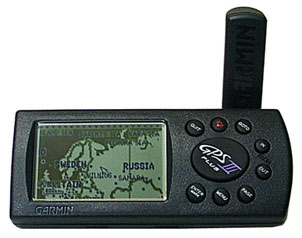
Ironically, it is the latter situation (and not significantly more frequent domestic cases listed above), it was she who gave an impetus to ensure that surfaced in the head words of Captain of satellite navigation.And what happened? The first caught the eye of the consumer electronics store (it was not in Moscow) found a nice compact device that contains a map of the world with detailed, up to the street (!) And allows fat point mark your position on the map! Moreover, the machine knew where to find a decent hotel or a meal and tells you to stop the arrows, driving directions! To me it made a strong impression, but not enough to just lay out for a pilot pocket $ 600, however, the idea that we ought to find out more detail on the navigation system, the receivers and their cost, finally emerged and began to demand immediate access to the Internet. The first thing they found firm-mother of a beautiful box with the name of Garmin III Plus. Next went to competitors sites dedicated to GPS - the amount of information grew, like a snowball.
Real GPS
It turned out that the system GPS (Global Positioning System - Global Positioning System) was developed and implemented from the U.S. military, to "hang" around the globe 24 satellites so that the American soldier, ship or plane could at any point on the globe to determine their exact coordinates. The system was open to "civilians", but with a strong coarsening of reading the receiver (in this case, the military removed the limitation of accuracy). The principle of the Global Positioning System is based on determining the distance to the satellite's signal delay time from him. Installed on satellites atomic clock, issuing the air "time signals. Thus, to determine the physical position of the receiver requires 3 satellites (assuming that the receiver is also an atomic clock) and 4 satellite - if not hours (and they could not be). In addition, the satellites being driven information about themselves, their coordinates, deviations from the orbit, and other complicated nonsense, which is processed by the receiver. Well, to improve positioning accuracy, uses a system of differential corrections. This service is for money, and Russia as a whole is not threatened (need a network of stations with known coordinates, which broadcast information to receivers on radio frequency - until this luxury available only to Petrograd). Having read various literacy classes in satellite navigation, I have become the ultimate fan of GPS systems and even confidently decided to have a domain named gps.ru, to carry education to the masses. It turned out that such a domain exists, and how! The presence of a powerful party in Russia overwhelmingly surprised. Discovered conference site gps.boston.ru struck by experienced and knowledgeable people, limiting information about various aspects of the Global Positioning System. Here, in particular, it appeared that pohodniki long been using handheld receivers for laying tracks and clear their passage. Hunters and fishermen noted the coordinates of the cherished hunting and fishing towns, and car safety exchange routes with an indication of gas stations, and that greatly amused, cops with radar. In addition, there are geodesics resources that explain the basics of map lovers of wisdom. However, along with joyous amazement, began to arise a feeling of fear that all the charms of handheld navigators - is often the advertising propaganda. It turned out that the receiver should see a large portion of the sky with satellites, and in direct line of sight, there should be no less than four, otherwise you may experience severe error. What's in a wooded area, as well as in the narrow streets with tall buildings, where the sky is poorly seen, the receiver can and does "lose-coordinate." In the cities, and possibly a large number of radio interference, interfering sure reception. All these clouds obscure the radiant sun began to GPS. Greatly added pessimism translated articles of the American journalist who has tried in the car navigation system. It is intrusive female voice made him turn where he would not, showed a large and beautiful screen that it rushes straight through the house, and eventually, under the guise of a trip to the library gave host to a wasteland.After this enthusiastic exclamations of users in the Internet-conference turned to me screaming fans who, like the Wright brothers at the beginning of the century, even on the table - but to fly! All the negative information was issued in a number of doubts are battering the mind.

Theoretical concerns

The first fear to the introduction of satellite navigation in the life of an amateur was a matter of sensitivity and reliability of the device. If the streets of the old town or in the woods, electronic Susanin considers the mission accomplished, then kill him - hence, at best, lose a few hundred dollars, and at worst - a big problem with the output, in the truest sense of the situation. The second question concerns the accuracy of maps. Having learned from bitter experience, walk on the road maps in a completely unfamiliar area, I could rightly assume that the streets are painted strings rather roughly correspond to their actual geographical location. If the card at one point, you "jump" from one street to another, to navigate just confused. In short, we had to learn how document maps represent the real picture of the area. However, if you find that accurate maps indeed correspond to, or only good (military) maps give a complete answer, you have to figure out where to get them. In this case, you must be sure that in any place (whether it be Europe, Moscow and Arkhangelsk Oblast) on hand will be carefully crafted cartographic material. Here with some thoughts I began to inquiries of experts, and then to research specific equipment.

Analysis of hardware and software

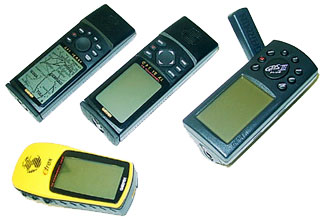
Consumer receivers can be divided into three groups: - First, the smallest, is the "sensors" that receive satellite data, process it in the form of standardized records issued in the port. - The second group includes devices with LCD display that shows the route, tracing the path, direction and speed, etc. Thus, leaving the road the car and memorized in the GPS-receiver, its location, can be safely disposed of into a thicket, there to roam your heart's content and flag devices of different mushroom places, then return safely to laid track to the car, and a year later without any difficulty to repeat the procedure using the stored information on nautical points (waypoints). - Third, the most expensive group of devices includes the possibility of navigating the map (moving maps). Cards are issued by manufacturers and third parties, and in some detail illuminate life abroad (in America and Europe). However you can not even look in the annals of corporate Russia - it's just a huge white spot. Just look at the detailed map of roads, which offers Microsoft a package AutoRoute, to learn that Moscow Ring Road and lives one to two or three highway, make maps of roads in our city look like a pacifist character.
Real GPS
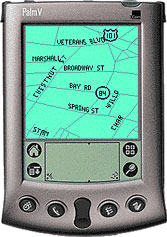
All of the above devices can connect to desktop and handheld computers. This means that even a primitive receiver in a standard CompactFlash, which is attached to your PDA or HPC, you can make a powerful navigator with a map. Participants recommended that the GPS-motion version of the proven personal experience with the Palm-cars. The most common products for navigation on this platform are the packages and Atlas HandMap. The first handles raster (Bitmap) images and can thus use any paper maps, scanned and downloaded to your computer. Product features rather wide: from scale maps and automatic podgruzki detailed maps of sites, to route planning and navigation on the map in the on-line using GPS. The second package uses a proprietary vector format of the cards, but allows "manual" the preparation and loading of cartographic material. Thus, in the arsenal of cards are cards for HandMap St. Petersburg and Moscow, created by enthusiasts from Russia.The guys who use handheld computers such as PalmPilot (Palm, Visor, and others like them), say that better could be wished, but I began to study the practical navigation with Pocket PC. The platform seemed to me more attractive to the task. Arguments in favor of Windows CE devices were as follows: - This is a separate class of handheld computers that have "vzroslye" interface and software. - It's not notebooks: use Windows CE as a notebook terribly uncomfortable, and Palm offers here 100 points ahead. This machine, "feeding" the standard formats of data from desktop machines and, more importantly, adapted for this! Try to stuff 80 MB of raster map data (detailed map of the Moscow region) in Palm - will not work. The only representative of the Palm kingdom, able to do so - is TRG. But I'm afraid he will not be able to digest such a voluminous piece of information, so even a standard "adult" format. Moreover, a popular collection of roads in Europe with detailed maps and databases for museums, hotels and restaurants and is published by Microsoft, "mate" for Pocket PC. Unfortunately, Pocket Streets can not work with GPS, but I hope this is temporary. In any case, world maps of this quality for the Palm platform simply does not exist. - The third argument in favor of Windows CE is the availability for the platform version of OziExplorer - a program that, according to Russian and foreign specialists, is today a leader in GPS-navigation. The developers also argue that in addition to Windows CE, no "pocket" of the platform will not be supported. The latter (shareware) software product, we'll talk, and while the basic arguments can be added: the presence of a bright color screen that plays cards almost in print, and a very voluminous work of Russian programmers who have created an excellent map of Moscow for Windows CE. PalmGIS package allows up to orient the house in Moscow, run routes, taking into account traffic signs and traffic jams, and work with the card in motion with the help of GPS-receiver. With practical exercises with the packet and the receiver Garmin eTrex company I started.
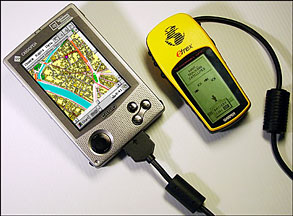
Real GPS

Practical experience

Connecting without a problem in GPS-receiver to a Cassiopeia E-115 and setting her bag navigation Moscow PalmGIS, I started riding around the city. On the first day of doubt in the sensitivity and accuracy of the navigator vanished: priborchik, "thrown" to "torpedo" and randomly hanging out there, consistently "caught" from 3 to 6 satellites and showed the accuracy of 6-10 meters. This is enough to position your location on the map. When you see a map of Moscow just crawling through the streets of the circle, dying at intersections at traffic lights and turn with exactly one street to another, you feel just the joy of children! You guessed it, the card also had no problems: small errors in the suburbs do not confound the situation, and determine its location on the map has always been pretty easy. In the evening, when the city traffic died down, I tried to check the "conditions of poor visibility." It turned out that I can not remember where in Moscow are the narrow streets with tall, obscured the sky, the houses. Came to mind just blocks near Suharevka - where I ride. No coarsening of accuracy, signal loss and unexpected testimony maps I discovered. Left open the question of radio noise in the European cities with narrow streets and tall buildings, but otherwise all the issues raised in the "theoretical concerns" were filmed in one fell swoop! The next study was based on a package loaded with OziExplorer CE "kopeck piece (1 cm - 2 kilometers) of the Moscow Region and a trip to Sergiev Posad. The accuracy of mapping data was excellent! Track (path, "drawn by" GPS-navigator) lay precisely on the streets and highways. Only in one place, we "ran off the road," but this did not prevent navigation.It was interesting to watch as the arrow on the roundabouts, showing our position, began to unfold, just repeating the movement of the machine. Missed a turn in the same place, we drove on without any problems on the fork and rebuilding on the fly route and outlining a "bypass" route, came straight to Laura! It was nice overlooking the predictor sit and talk that through the two-kilometer bridge will then be possible to turn right! Thus, the accuracy of topographic maps, receiver sensitivity and a hardware-software does provide a comfortable navigation, and the possibility of a dignified exit from any difficult situation. However, in the way of preparation for the journey there are various subtle points to plan routes, preparation of graphic material and a map to the area. But these details - the following materials. The authors, translation:
StreetFinder GPS for Palm

StreetFinder GPS for Palm
The first GPS-receivers for PDAs were not successful in design. In contrast, recently appeared StreetFinder GPS from Rand McNally - very good, easy to use and nice solution that reliability in the car. What is GPS (Global Positioning System)? This is a global positioning system the user is geographically. In the GPS system involving 24 satellites, transmitting information to Earth. Program StreetFinder GPS receives signals from 3 to 12 of them.
StreetFinder GPS for Palm
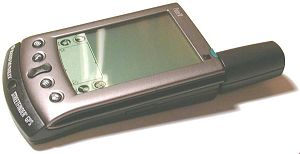
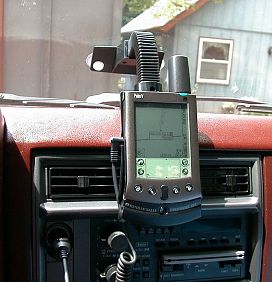
The first device, got into my hands, was one of the first models of GPS-receiver for the Palm III, gray, large oval dish that resembles a radar plane AWACS. Palm IIIx easily mounted on a car windshield with a special attachment. Attaching firmly hold the device in the window, not allowing it to fall. The work of this model, GPS provides an accumulator battery can be recharged through a car cigarette lighter socket. Solution is quite good, especially for a car, but a problem with poor communication satellites GPS. I guess the problem was in the Palm, because after the Palm V model, I forgot about these difficulties. What kind of a nice little GPS-receiver! Its form factor fits perfectly into the frame design itself Palm. The device works equally well on the car adapter or two batteries of Class AAA. His attachment to the glass is very different from previous models, but I liked it less than the model Palm III. Maybe it's a subjective opinion, however, worthwhile to be taken into account. Mounting normally holds PDA, although its truck toughness, perhaps not enough.
StreetFinder GPS for Palm
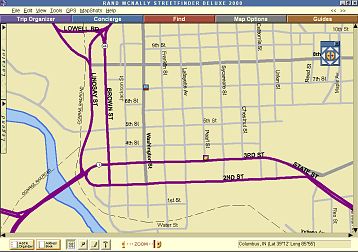
Software that is included with every unit, is excellent. You get the software StreetFinder Deluxe 2000, by which you can download a map of Palm. In general, work with the GPS-kit is surprisingly simple. You turn on the Palm, select the program "StreetFinder", and can work with. At the first use of GPS should be noted item "Disable Auto Power off", so that Palm is not switched off during the trip. Now everything is easy. You zoom in and out images as desired, and as the route along the route, it is displayed on the screen, even if the signal is distorted when moving uphill and downhill. A small mark, appearing every second on a map helps determine your location. You can also include a text description of travel to define the interesting places that you would like to visit on the road. Upon arrival at your destination, you can click on the icon search, get all the information about restaurants with all the details about their location, addresses, phone numbers and even prices on the menu. The wonderful thing. Of course, such opportunities are limited and depend on which card you have chosen in advance. It is worth remembering that every card has a border). In any case StreetFinder GPS - is an example of a sufficiently high technology, requires no wires between the Palm and GPS. True, there are no such features as the definition of the speed with which you move, or direction, but GPS StreetFinder always qualitatively show you where you are. Sources, Materials:

Practical aspects of connection and use of domestic GPS-navigators in conjunction with Palm computers

Briefly about the GPS system

GPS (Global Postioning System, code name - NAVSTAR) - satellite system, developed and maintained by the Ministry of Defense. Provides the ability to accurately determine its location on the earth's surface subscribers with GPS-receivers. When designing a system primarily meant, of course, its military uses, but domestic component of the application of GPS-navigation has become so popular that in May 2000. decision of the U.S. president had been cleared of all obstacles (called Selective Availability - selective access) that first deliberately introduced into evidence for the underestimation of the accuracy of satellite positioning household (not military) devices. Before this event, the accuracy of the receiver did not exceed + /-100m 95% of work time and only the remaining 5% of the time, the receiver is working at full capacity. " To the receiver can determine the coordinates, he obviously should be able to "see" the sky - that is, inside the system will not work. Modern receivers, as a rule, all 12-channel (ie, allow you to track up to 12 satellites simultaneously) and others have similar characteristics, differing mainly by the presence or absence of built-in mapping capabilities. The process of determining the coordinates of the receiver looks like this:
  • when you turn on the receiver after a sufficiently long interval (so-called "cold start"), the receiver begins to receive signals from satellites and determine exactly which satellites from all groups are available from this location. Group of satellites that are visible at a given point called the "Almanac." After turning off the receiver, while keeping in mind the latest almanac in the case of reclosing after a short break, while fixing the receiver increases significantly (hot start).
  • Receiver, receiving from satellites exact time (which last well synchronized with each other), the delays calculates the physical distance from them (the speed of propagation of radio waves is known). Having appeared in three or more satellites, the receiver, the method of triangulation is obviously an opportunity to determine their exact position in 2D-space. Having appeared in four or more satellites, the receiver can also determine the height and the subscriber above sea level, which, however, is calculated with a known higher accuracy than the coordinates on the earth's surface.
Obviously, the more satellites the receiver is able to interrogate and more spaced out, these satellites on the celestial hemisphere, the more accurate will be his testimony. At this time (after the abolition of the United States of SA), positioning accuracy ANY GPS-receivers under normal conditions is not more than 5-15 feet.

How to connect the GPS-receiver to the Palm (and what receivers can be connected)

Unfortunately, as a rule, mapping capabilities that can provide advanced GPS-receiver, are insufficient for a meaningful and easy to use all the opportunities that can provide the user system GPS. Especially frustrating situation with Russian maps, which are presented in receivers particularly poor. The possibility of the same load your own maps in most receivers are also missing due to the closure card formats almost all manufacturers of GPS-navigators, and for regular updates of existing maps can only dream about. Exit the author seems to be connected to the receiver of the independent predictive device, which will be able to perform these and many other useful features. It is obvious that under this article, such a device made by the CPC brand Palm. In order to implement a bunch of PalmGPS, you must first verify that your receiver has a serial port for connection to the computer (as a rule, many modern receivers have it) that the receiver is able to give the data using the protocol NMEA-0182, -0183 or EarthMate (proprietary protocol for their company DeLorme receivers of the same name EarthMate). To implement a physical connection is needed, obviously, a connector for the GPS-receiver, a connector for Palm'a and that's all it is necessary to build, given the characteristics of the contact wiring specific receiver and Palma.Way easier - as a rule, you can always get a cord to connect the receiver to the serial port (from the manufacturer or, if the receiver is the production of such well-known companies like Garmin, Magellan and some other third-party cables). Also, as a rule, is not difficult to get a cable for connection to a PC and Palm. When connecting these cables, you should not forget about the null-modem essence of both of the above cables as well as the fact that the final connection is Palm-GPS should also get a null modem (due to the fact that both Palm and GPS - the essence of DTE-device). Thus, besides these two cables, we also need a null modem adapter / cable, which we "deploy" one of them.

A detailed overview of the software (Atlas and Tracker from GPS-Pilot, HandMap of Evolutionary Software, TZ-GPS, NMEA Monitor) with the peculiarities of each

To work with GPS-receivers, the software that exists at the moment Platform Palm, can be divided into three categories:
  • Software for raster maps
  • Software to work with vector maps
  • Utility software
Let's discuss each of the categories.

Software for raster maps

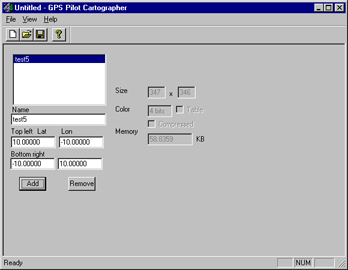
The choice is small - products company GPS-Pilot - Atlas, Tracker, Fly. In all three programs, maps downloaded program Cartographer (Fig. 1), which can be defined as a desired color derived maps and coordinates of the corner points of a convertible piece of card to bind her even when converting. If this is not done with the conversion, then after binding can be achieved even at Palm'e (two-point and direction to the north).
Practical aspects of connection and use of domestic GPS-navigators in conjunction with Palm computers
GPS-Pilot Cartographer
Practical aspects of connection and use of domestic GPS-navigators in conjunction with Palm computers
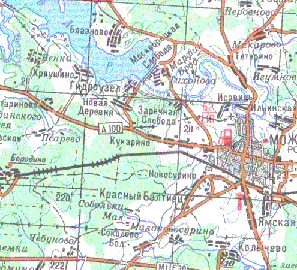
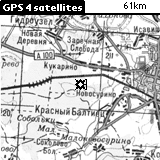
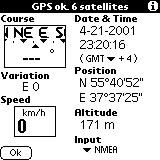
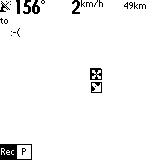
GPS-Atlas is designed for easy orientation on the map. As mentioned earlier, the raster map is converted to a format Atlasovsky program Cartographer. Location marked arrow on the screen, and the map with respect to the center moves. If you scan the same card in several scales, and to bind each of them, by pressing the scroll up / down Atlas will switch between the scales. This feature becomes extremely useful in the manufacture of, for example, a larger map of settlements, combined with small-scale road map of the area. Over the actual working screen, placed a service cap, showing the amount of "catch" the satellite, speed, scale maps, etc. The picture on the right shows another possible operation screen of this program, which displays in detail the speed, position, direction, altitude, etc. Immediately select the protocol that will communicate with the receiver and Atlas.
Practical aspects of connection and use of domestic GPS-navigators in conjunction with Palm computers
The main working window
Practical aspects of connection and use of domestic GPS-navigators in conjunction with Palm computers
Alternative operating window
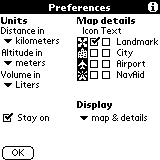
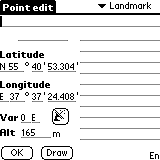
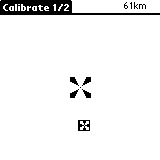
Below shows the settings Atlas'a (where, in particular, can put daw that Palm itself will not turn off when running Atlas), the screen defining a new "point"-a landmark, which can give the name and determine its coordinates (or get them from the receiver). These points will be displayed on the map and they are also necessary in case of linking maps on the fly - see Figure 7, which depicts the calibration process (tying cards) by two points.
Practical aspects of connection and use of domestic GPS-navigators in conjunction with Palm computers
Preferences window
Practical aspects of connection and use of domestic GPS-navigators in conjunction with Palm computers
Calibration
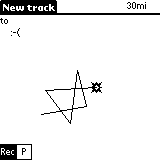
GPS-Tracker Atlas'a differs from the first routing engine. Uploaded on Palm cards will be available in both applications at once. Settings screen calibration, identification of new points in both programs are also identical. The only difference - a permanent record of passable route, which then can be comfortably held in the opposite direction:).
Practical aspects of connection and use of domestic GPS-navigators in conjunction with Palm computers
Route:)
Practical aspects of connection and use of domestic GPS-navigators in conjunction with Palm computers
Record in the process of motion
Practical aspects of connection and use of domestic GPS-navigators in conjunction with Palm computers
Information about the route traveled by
GPS-Fly - product specific and intended primarily for pilots of aircraft and other aircraft. As part of this article will not be considered.

Software to work with vector maps

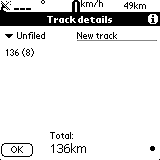
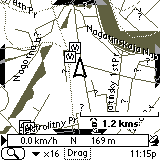
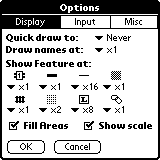
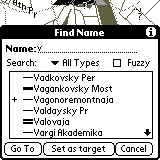
At first glance, this choice a little more, but on closer examination it becomes clear that here we have to stop by just one product - a program HandMap of Evolutionary Software. The reason - the closed card formats in other programs and policies, in which maps are produced and sold solely by the developer. HandMap in this regard has a bit wiser - sold only shell, and the cards can do for yourself. In connection with what is already there at least two cards for Russian cities - Moscow and St. Petersburg. Fig. below shows a map of Moscow. The arrow shows the current location and direction of motion appears in the presence of module installed GPS-Tracker (which comes bundled Professinal version of this product). In the information box at the bottom of the screen displays speed, direction and altitude above sea level. Figure 12 shows the settings window. Figure 13 shows how you can find a particular street (or other) on the map. Unfortunately, the card format does not use international character sets, so that all object names typed in Latin.
Practical aspects of connection and use of domestic GPS-navigators in conjunction with Palm computers
Map of Moscow
Practical aspects of connection and use of domestic GPS-navigators in conjunction with Palm computers
Settings window HandMap
Practical aspects of connection and use of domestic GPS-navigators in conjunction with Palm computers
Search for streets
Practical aspects of connection and use of domestic GPS-navigators in conjunction with Palm computers
Information from the receiver

Utility software

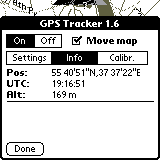
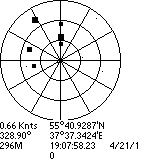
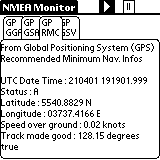
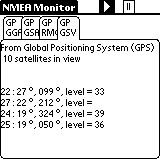
Personally, I opted for two frivarnyh utility, which I quite actively used for navigation. The first utility is called TZ-GPS and the only of its function - the image of "heaven" with the fixed points of satellites, as well as information obtained from satellites - that is, the exact time of the calculated receiver coordinates, speed in knots:), etc. Handy when you start working with the system in order to understand exactly how many satellites to "catch" and when completed the process of fixing the receiver coordinates. The second tool - NMEA-Monitor is designed for display in real time throughout the performance information obtained from satellites in the on-line. Convenient to determine the reasons for too long, the process of finding satellites, etc.
Practical aspects of connection and use of domestic GPS-navigators in conjunction with Palm computers
Program TZ-GPS
Practical aspects of connection and use of domestic GPS-navigators in conjunction with Palm computers
NMEA-Monitor: coordinates, etc
Practical aspects of connection and use of domestic GPS-navigators in conjunction with Palm computers
NMEA-Monitor: Almanac

Advantages and disadvantages of using this binder

Advantages: long battery life Palm'a and availability of sufficient quality thoughtful and worked a variety of software for GPS-navigation for this platform, makes this a bunch of almost perfect integrated solution. The absence of color seems an inconvenience at first glance, but due to this we are strongly committed to winning in the long battery life, small-scale maps obtained (a vector map of Moscow - only 200Kb), etc. Disadvantages: all the same absence of color, or rather a side effect of the lack of color screen: its liquid-crystalline structure makes it virtually impossible to continued work with the device in extreme cold - the screen freezes. Another problem is the same plan - an unpleasant job Li-Ion Battery (Palm V, Vx, Sony Clie, etc.) That's all the same cold. But, in principle, the constant use of GPS-navigation on the march and did not want to - so the device can be kept close to the body warm, and just get to see your current location or to note the next point on the route. Using the same ligament in the car or just warm, is the author of more than convenient.

Law

Technically, under current laws, using GPS-receivers in the territory of the Russian Federation, you have no right. For accuracy of determining the coordinates of the receiver should not exceed 100m. It is clear that these receivers do not exist, especially after May 2000. Those permits that are issued by firms such as Boston PiSi formally valid, can not be and if there are you seriously the claims of bodies, not save. To avoid foul language on this in the description of our legislation and integrity of the firm and I will stop. One good news - there are rumors, it's all in the near future showing more than would be canceled. And we will finally be able to use our devices freely. The authors, translation:
Commercial GPS - devices and commercial software for Psion

With an assortment of commercial GPS - devices are available on the website of "accepted" that "nests" in the walls of the Moscow Aviation Institute. By its tenth anniversary, "Princeton" has released a gift set of two multimedia CD-ROM, on GPS in general and of themselves, loved ones, in particular. If desired, with their contents can be found.

GPS: a walk in the third millennium
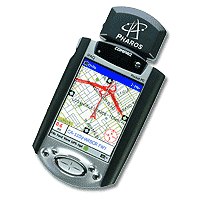
Recently had a chance to touch the technologies of tomorrow ... This, I thought that tomorrow, because I was blissfully unaware of how these technologies become commonplace for us today. So that would be correct to say - had a chance to touch the technology of today, which left a fantastic impression of tomorrow. It was during a leisurely Sunday stroll. We walked together with a buddy - with decent earning family lord, from head to toe "packed" naisovremenneyshey portable equipment (and, frankly, a bit on it, on this technique, nuts). Our route lay through the city streets and a little more flattering - if allowed to be called a small forested Moscow park in the immediate vicinity of the benefits of civilization (no need to go anywhere, put on his shoes - and you're outdoors). The purpose of walks - hit me in the heart of the satellite navigation receiver GPS, which a friend just purchased an e-commerce. And along the way to understand - what this nonsense can be helpful (you can see, for example, using GPS to find their way from pub to our house). The program has been implemented only partially. I was genuinely impressed, but the practical use of the GPS receiver could not be found. To travel (a satellite navigation system can be useful only moves in space man), must travel ...
GPS: a walk in the third millennium
ETrex GPS Receiver
GPS Receiver eTrex (without supplementing the title words) - the most affordable in the Russian market model manufactured by Garmin. This kid is worth something around a hundred dollars, but with a strong desire can be found cheaper (a friend gave him 115 conventional units in the course Russian rubles). Applied surprisingly easy to use, simple and reliable. Any more or less people traveling - on foot, by bike or by car - will not lose anything (except, of course, money) to purchase such things. But the fun will receive a "full pockets." Only one upset - eTrex does not work with loaded into its memory topographic maps (although it can communicate with the PC). And the supply of "card" service model, which differ in the addition of a word in the title (the "cool" - eTrex Vista), are significantly more expensive ... The owner of a handheld computer with a eTrex immediately arises the idea - it would be good instead of monochrome, the small screen is the receiver to use color and relatively large screen PDA. Detailed map of the terrain, the possibility of plotting, calculation of distance traveled and remaining, the definition of velocity, altitude above sea level - and all this together with the usual for any PDA functionality. Not the device - a dream ... Although he eTrex, without a pocket typewriter, an unusually good - and in terms of value, and their protection from external influences. Say, eTrex possible without special effects to drop into the water. PDA in such cases comes the inevitable skiff.

Sputnik, the satellite, I - Earth!

System GPS (Global Positioning System - Global Positioning System) was invented in the U.S. in the early 80-ies. During a military operation "Desert Storm" GPS has been tested in action - for the targeting of U.S. missiles. And in those same years, began the active promotion of satellite systems in civilian life. GPS first became widespread in America, then moved around the world. To date, existing navigation systems, only two - the American Navstar and our GLONASS. Although the Russian system is used by military and civilian applications is closed. The operating principle of GPS is as follows. The far-Earth orbit (about 20,000 kilometers) removed 24 space satellites covering their signals all the Earth's surface (except the poles). Terrestrial part of the complex are special powerful transmitters whose signals are detected by receivers satellite and relayed to the surface of the planet. In addition to transponders installed on satellites accurate atomic clocks.To determine the coordinates of a laptop (or placed on board an aircraft, ship, vehicle), the receiver is enough to catch radio signals from three orbiting satellites at a time (the minimum number of channels is usually more). Calculating the time delays specially coded satellite signals (the time of the radiation signal is compared with the internal reference clock receiver), GPS receiver can determine its own geographic coordinates to an accuracy of 10-100 meters. The military receiver positioning accuracy is significantly higher, but these technologies are closed to public use. The Doppler frequency shift of the carrier wave receiver is able to determine the direction and speed of their movement (in a pocket or hand of the owner).
GPS: a walk in the third millennium
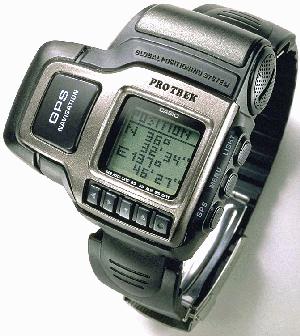
Watches Casio ProTrek GPS
GPS receivers are manufactured by some 150 companies worldwide. The most popular (at least, we have) - Equipment American company Garmin. In addition to widespread eTrex, in Russian shops can be found quite unusual device - like a GPS receiver built in the electronic wrist watch (model Casio ProTrek GPS). For the owner of a Pocket PC or laptop particular interest in the form of GPS receivers connected to the USB port or insert a CompactFlash slot modules. True, the receiver connected to a laptop, can only be used as a stationary device, installed in the wheelhouse of the boat or in the spacious cab of the truck. A card CF, connected to a PDA, you can use exactly the same as the portable receiver GPS - on the go, in a way, in the same car cabin, the ship cabin and, in general, wherever and however you want.

GPS for Pocket PC

Skimmed briefly on the technology of satellite navigation, we call attention to the practical side of things. Modules GPS, if you believe the prospectuses of companies that produce handheld computers and peripherals for them are available for all common platforms. In this screen Palm `and that the color that is monochrome, from full-screen handheld GPS receiver does not differ greatly. And the area of ​​the screen is small and the graphics so-so. (Incidentally, I'm an expert on this part, frankly, a little - perhaps screen Palm `namely, what is needed, and is a picture of heavenly beauty, are reminiscent of Ilya Glazunov's" Peter smacks his son, Zurab Tsereteli). But the class computers Pocket PC for use as a satellite receiver is almost perfect. The cards have a high degree of detail, and color presentation of information makes the orienteering terrain in this colorful show ... Wonderful (though inexcusable expensive) machines - these Pocket PC ... A proposal has a little bit. In the price of computer companies you can hardly find an abundance of models connected receivers. Yet this technique to the amateur and the majority owners of the CCP, it unnecessarily. The cost of that is, ranges from 150 to 300 dollars. You can find and more expensive - if you really try. True, this money will have to add the cost topographic decent program, without which the GPS is empty fun. Well, like LaserMap or her of such. Typically, topographic software can work with modules GPS - if it's high-quality, full-featured program. Among the different models of plug-in GPS, I drew attention to the product Taiwanese ACK Tech - mainly due to the fact that the receiver is quite new and very good looks.
GPS: a walk in the third millennium
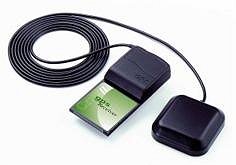
CF / GPS Reciver
Constructive module CF / GPS Reciver (such trade name) is designed as a CompactFlash card with a thickening at the top (where it is installed, all e-filling). Planar antenna is mounted on a hinge - stowed receiver takes the same space as the adapter "PC card - CF", that is quite a bit.Features priborchiki - Full compatibility with Pocket PC and Palm TRG-PRO. Simultaneous reception of signals from 12 satellites (12 channels). Maximum update rate (it is adjustable) up to 10 times per second. Dimensions, as I said, small, all the rest - the wisdom of specific techno ... Power consumed by the receiver, half a watt. The scale of the CCP, we should recognize just awesome. Not having sufficient experience in using GPS (on the part of wandering I am not Maclay), can hold only a rough parallel with the portable eTrex ... When I gave him second-hand and, accordingly, ponazhimat button, I noticed that the update rate is directly affecting the lives of batteries (in the eTrex - a pair of standard AA dry cells). What will happen to the battery handheld GPS unit when working at the maximum refresh rate, it is easy to predict - will die in minutes. However, no one is forcing to keep the GPS receiver turned on permanently. And the maximum value of the upgrade is not always necessary. In the car, when feeding a small computer from the cigarette lighter socket - no problem, in the harsh field conditions - only if necessary. Rotating antenna seems certain goods, especially in areas of poor reception of satellite signals - under trees, among the city buildings. Oriented the antenna can always find the best position, although the simpler elementary povertet themselves "pickpocket" - small is gizmos. Something like this and come with eTrex, when the satellite signal "go" ... I do not know - good or bad - but the factory specifications on the modulus values ​​are set ACK receiver start: 8 seconds at the "hot" start, up to 48 seconds - when the "cold". This is the time during which the receiver finds the satellite signals and is included in operating mode. In my opinion, a portable receiver (I can not get rid of the baby eTrex - very much like) to run much faster. Sorry, no it under his hands to check. With regard to practical application, at first glance a product of ACK must be no worse than others. Made it soundly, durable, compatible with all than normal and nothing special is no different. Normal module GPS ('d say it's someone I ten years ago) ...

Who will actually be

That is the question ... I would even say - the question of questions. For all the appeal of the plug-in GPS is far from ideal client a Global Positioning System. On the first limitation we have already said - a small amount of energy batteries PDA. With the module connected to the owner will inevitably have to seek external power supply, most likely from an onboard vehicle network.
GPS: a walk in the third millennium
The second limitation is typical for all PDAs. Inserting a free CF slot module GPS, we are deprived of access to that slot. That is, memory modules, wireless adapter Bluetooth, camera and everything else will have to leave in your pocket. And many handheld machines with memory napryazhenka - where to store the topographic map, if memory barely enough for basic job application? Next come the limitations GPS itself. In America and in Europe satellite navigation receiver will be a real helper, since it maps to the public (which exist in paper and electronic form) applied every forest tree stump, and every city street. As for us in Russia more or less distributed maps of Moscow and St. Petersburg, there are maps of suburbs and not just the Russian hinterland. That is to get pleasure from observing his movements directly on the color map, displayed a handheld computer, it will not always. Finally, the use of GPS receivers on the Russian territory subject to certain legal nuances. The device must be registered in Gossvyaznadzor and get the proper permission to use it. Why this fuss - is clear. The state is afraid of spies, although the spies are unlikely to buy GPS equipment in Russian stores.From this situation - the watchful guard arrested carefree tourist, beat him, "demokratizatorom" on the head, and selects the receiver. It is in the best case. At its worst - an article for espionage. Incidentally, many owners of GPS receivers that prospect does not frighten. I would, for example, even the thought of voluntarily go to Gossvyaznadzor to spend a day in the dusty corridors, there would be (well, that I still have not bought a GPS) ... This disadvantages. And the pros? They are much larger. With the GPS unit or a portable receiver you will not get lost in the stone jungle of Moscow, St. Petersburg and even thousands of thousands of foreign cities, towns, villages and hamlets. In the presence of Pocket PC you can safely consider its position with respect to streets and houses, reading the screen name of the first and numbers second. Zaplutat with such a powerful hint will only a complete idiot. In fungal and fishing wanderings GPS receiver easier terrain orientation, and routing. Even without a map you'll never lose orientation (only in dense fog, which turns out to be confusing and GPS, screening of satellite signals). In addition to the above, you will always be something to do on the walk - Have you eTrex, ACK or similar chepuhovinu. It's so funny - to calculate their geographic coordinates of the three broken civilization pines ...

A few words is not the topic

I do not know how someone while I was not tempted by the GPS receiver. But found in the prospectus of the company ACT Tech Corp. such a thing - in FM tuner for the slot CompactFlash Type I. Card on her two tiddly buttons - channel scanning and the power switch. For audio output using a sound system handheld computer. Operating Range - 78-108 MHz. Toy? Toy. But what is attractive. Since then I have about the fun begin dreaming. Why on this? It is hard to say ... Say, planned to strike at the heart of my friend's computer-based. Or just - it wanted. The authors, translation: