Great joys and small troubles or five months with Casio BE-300

Time flies. It seemed only yesterday that I brought home a blue box with a handheld Sasio BE-300, and that's on you - almost half a year has passed ... I have to say - a good machine and money to their small stands. The closest her rival - fiscal Palm m130 with a color screen. This class of similar computers (if you do not pay attention to the soft fillings), intended for either constrained in the media user, or for a person who has enough attractions and in addition to the CCP. So, a competitor of BE-300 (diminutive nicknames over time as something of themselves "resorbed, now I call her just" BE-s three hundred ", without any kind of familiarity) Computer wonderful in all respects. But look what happens - m130 is cheaper and has less than BE-300. It lies almost in all stores, and BE-300 will have to search (the price for it in Moscow shops remains unchanged - 235-275 dollars). What does this mean? The high demand for the Casio BE-300 and a lack of demand for Palm m130 (relative, of course, just all ran to deliver the first Cheap Palm with a color screen and is clearly overdone). That is, BE-300 is quite competitive and today, after nearly a year since release. Without hardware upgrades and major changes in computer software and can now cope with the tasks assigned to it. Although ... That "while" and we'll talk.

Hardware romp

The first step is a reservation - all comments about the Casio BE-300 have emphasized the subjective nature. To a computer that is always with me, not an open mind. This helper, and entertainment, and even a friend. (Oh, Satan - we have the glands begin to humanize what is going on, when computers will be embedded in watches or directly into the brain?) Here and sympathy. This and other demands.
Great joys and small troubles or five months with Casio BE-300
From the very chepuhovogo - translucent plastic cover, which is completed BE-300, went to the farthest corner of a desk drawer in the first day. It's awkward and dysfunctional. The cover is designed to protect from damage the screen and the hardware buttons on the front panel. And it properly protect them, but requires at the same time more security for itself. In a folding cover increases the size of the CPC so that clings to the surrounding objects (eg, burgher my stomach). Nothing terrible happens, cover with a contemptuous crash falls off, that's all. In place of the installed without problems. Then he flies away. And it also opens with a bang. Intermediate position, as indicated by curly cuts in the computer, keeps the lid in half-state. Throws further - Cracks ... In short, put this thing and do not recall more than five months. I take the leather cover ... No, do not use it, just asking prices. Nothing decent does not get, and if they come across, it is very very prohibitive - toad strangling ... Even before the screen lid was dismissed stub communication (or system) connector. Stub it is designed as a miniature plastic strip with a projection for a coin, screwdriver or other means at hand (personally, I set out to use the nail varnish one lady, but ran into confusion and retreated). Stub bounced itself and lost. And with delight found, was placed in the same drawer in the same corner. I understand the electrical connectors must be protected - from dust, dirt, from all piggishness. But while the developers would be nice to try out their own invention in practice. Do not know a single user, who would not lose the damn plug (not only on the BE-300, they are a disgrace to all parked their cars) ... However, a trifle, of course. No protection system connector - and is not necessary. All-time active service with the connector contacts slo nothing had happened ... Or am I chistyulya? Housing machines does not cause any objections.True, at first I thought that painted silver inserts on the sides of the body lose their color - the guiding slots wiped off the cradle projections. But it was limited to a pair of dark stripes, which to the naked eye can hardly see ... Oh, those experiencing a private owner! Buy an old car and rushes around him, like Kvočka. Scratch a breeze - preinfarction state, some nut came off - the direct way in the mental hospital ... so then - the car, not a pocket toy. (Do not worry, I'm with myself).
Great joys and small troubles or five months with Casio BE-300
A more or less serious. No matter the connection holds the cradle and the connector device. No, everything is fine, any damage ... but no machine in the cradle got some mobility. Anyway, cowboy energetic movements (such as - cast machine with a blunder in the "bed") is best avoided. Painfully delicate design .... As a positive example we can recall the construction of the cradle of computers Sony CLIE. I had to deal with the very first model - with the S300. Blade and guides hold the machine securely and safely. Your computer can "pull" from the "crib" in either direction - by ourselves, up, sideways. Nothing terrible happens, the contacts remain intact, no loose or creaking ... And the most ugly design - a Palm m130 and referred to his predecessor, m125. Not only is the cradle of models borrowed from the older series and not as it should be adjacent to the lower edge of the casing PDA and it will connect with some terrific gnashing of teeth.

On starvation rations

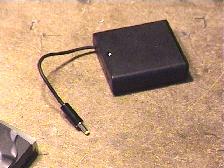
All this is nonsense - compared with the problem of power BE-300 ... This is a problem because the problem. What 6 hours of battery operation? What 4:00 listening to music? A 2 hour with a small tail do not want? That's how much work Casio BE-300 with all of the maximum brightness of lights, and when you run demanding applications, such as playing MP3, video, or three-dimensional toys (there are, for example, known to all holders of BE-300 remarkable "letalka-shooter» Metallion). Negligible capacity internal battery - a headache for all owners Casio BE-300. An external battery, whose image can be seen on the package computer to our brother in that bull red rag. Where, you say to me, buy this imported battery? "Expensive", - said Moscow sellers - for eighty dollars, this battery no one will. " "No more is spent on the BE-300-money - I object -" or do you advise me to give up on a hand machine and spend another two hundred fifty bucks on a color Palm? »Where, you say to me, to go" behovladeltsu? Who complain to the vest? Output, of course. It is only necessary to have a soldering iron and hands to it - to dazzle the external battery pack itself (an article about this homemade published recently). But the fact of the matter is that - blind. A machine, meanwhile, branded. Made in Japan. Impossibly beautiful and elegant as a Parisian mademoiselle ... As to the overseas quirk prisobachit box with batteries? Pharmacy gum? Corn plaster? Fabric Velcro? Oh, do not make me laugh ...
Great joys and small troubles or five months with Casio BE-300
The external battery pack, hand ...
Seems to have to wait for the promised MakTsentr industrial unit, which must somehow be attached to the computer (otherwise, what a commercial), the slots for this machine is on the case - this time. And two - regularly ask them the same firm an extra battery (water, as you know, sharpening stone).Eighty dollars is not the money to move to another platform. But with such a microscopic energy stored on board the BE-300, rather useless toy than tool. By the way, the recommendations of the Casio itself to the limit to reduce the screen brightness to prolong the battery life of the computer, I do not accept. What does it mean - to reduce? I do not see it. I do not see, if you do not bring the screen brightness for at least three-quarters of the maximum ... The Palm m130 brightness cut is not necessary, but on the BE-300 can not get away. It's a shame, you know! For the blood shed ... The problem is, in fact, very serious. Use a PDA only to lie on the couch and read a detective - an expensive (for reading on the couch I have a laptop, which on its own battery, by the way, working longer BE-300). Take the same machine with them to the middle of the day to hear the plaintive squeak of the system power - they say it's time to recharge - also to anything ... or Casio BE-300 for anything worthwhile is not suitable, and we really should not have to spend money on it?
Great joys and small troubles or five months with Casio BE-300
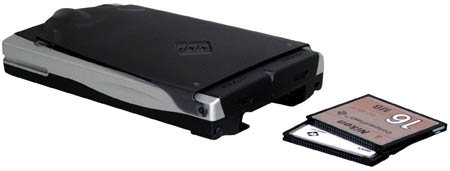
I think that these glorious cars must be sold together with the memory card (it will not buy all the owners of BE-300 - at the nominal 16 megabytes of "RAM" at considerable appetites programs for Windows CE does not earn a lot) and an additional battery (plus cables, adapters, branded pens, wallets, covers - all of the useful and useless "pocket-computer" small things, the acquisition of which is absolutely impossible to resist). Exact - next. If you have money, you take the car with the additions. No - I dig a bit and come to the store at another time. The most curious thing that even a fully-equipped memory card and extra battery, the machine remains the best value and the cost will be no more than 380-385 dollars, a hundred-odd cheaper than the very low-cost PC-class Pocket PC. In this case, the user remains the possibility of gradual modernization - a kind of loan, when the basic configuration is already in his pocket, and eventually those sweet makeweights, which we just talked about.

Case system

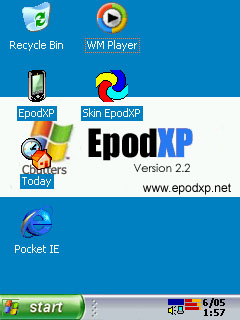
Oddly enough, but personally I have no way offended by the fact that the Casio BE-300 is installed truncated version of the operating system Windows CE 3.0. Moreover, if the system is truncated and then it is done correctly and not without good cause. I do not remember in his typewriter single critical failure that plunged me into the hopeless despair ... And the Pocket PC such an accident happened! (I assume only from personal experience). System menu by which users interact with the handheld assistant, not the top of programming art. There are some "bugs", not without reason, Casio has produced several packages upgrade operating system components. But, in general, to communicate with the newly purchased computer is very simple. For the inexperienced user, this is the same elementary simple machine, like the computers of the family Palm. Then, when there is a desire to see on the PDA is something more interesting rectangles menu system, you begin to pile up a variety of shells. I've tried them all. Began with a package of SQ, which is "lived" on my machine for three months. Then looked closely at KCmenu II. Found this shell beautiful, spectacular, but extremely uncomfortable. Experienced a variety of shells, whose names as primitive as the programs themselves - «menu number so and so" and point. Now happily relocated to Epod version 2.2 (for the quality of Russification which bow maestro Shveps `y).
Great joys and small troubles or five months with Casio BE-300
Favorite EPOD 2.2
My favorite Epod (I recently had a very different opinion about him, from what does not refuse - saying that gladly move to Epod, if we detect any outstanding qualities, found and moved) requires the mandatory presence of a memory card and takes on her some space. This is the only drawback shell, although not as significant. Not greedy enough when buying flash memory cards, and the problem is removed. On a 64-MB card can fit everything you need (including business applications, dictionaries, books, toys). A few words about Russification. With each new version of localization professionals RussKey MakTsentr can shoot two birds - translated into Russian system messages on-screen keyboard, menu names, and to catch minor "bugs" without which it is a part of the operating system. Running more advanced, a test version of a full translation of BE-300 in Russian language RuassKey 2.0, I was glad to find that all the programs, starting with a notebook and ending with the browser to work fine with the Cyrillic alphabet, interact with each other and do not create absolutely no problems. For the first time since the acquisition of BE-300, I realized what is this wonderful thing - a pocket PC. Previously, we had talked more to the touch. He - in English, I - in Russian.

Software suffering

Yes, with programs for the Casio BE-300 case nevazhnetskie. Few programs, as necessary and useful - even less. A truncated version of the operating system Windows CE 3.0, the application processor once popular family of MIPS, a limited amount of memory (a flash memory card suitable for storing programs and data - like disk drives for personal computers), all of which reduces the number of programs suitable for running on the BE-300. In addition, for the normal installing programs on the Casio BE-300 uses a unique system of timing. Therefore, in order to properly "register" program from the created for the Pocket PC or older machines, and capable to run on the BE-300 (which can be determined empirically, downloading free programs from the internet and trying them one by one - a typewriter from these experiments did not will, if correctly remove the "tracks" erasable applications) have to replace full-time synchronizer PC Connect the standard Pocket PC Software ActiveSync. However, they do not work, forcing disconnect one and then another (the fact that written specifically for the BE-300 programs are installed only through a PC Connect). In short, no adventure is complete ... everything you need from the software is. Text editors (unpretentious), table (smart), planners (alas, only paid) games. But the number of programs for the BE-300 is huge for a "full-fledged» Pocket PC in hundreds, and for the Palm - the thousands. What to do? Part of the problem is solved with a software emulation of other computers and game consoles. For example, installing the emulator NES (the most stable and not demanding compute-intensive PDA), you get a colored pocket gaming console - the same Dandy, that in the early nineties brought to mind all the underage Russia (in the West, he pohozyaynichal still in the eighties). Toys to the NES on the Internet as much as necessary (in my estimation is not less than five hundred). On the BE-300 are almost all - with very few exceptions (the dignity of not machines Casio, and quality written software emulator). Drawback - the use of management games, hardware and software buttons. That is, the playing field is not controlled by a stylus. Usually in the game for BE-300 (or any PDA), game objects can be manipulated by touching the pen to the screen. Here we have to remember the skills to use the gamepad - if they are, these skills have ever been. Improved emulator - SNES. This is different and higher level of quality.Stereo (which is on a typewriter can be heard only through headphones or external speakers), great graphics - Super Nintendo's own persona. Under the SNES emulator are not all games have to be selected empirically. Also can not do without utilities distribution of RAM, since most games require more memory than required by the system BE-300. Of the computer "software-bogus" comes to mind emulator ZX Spectrum. Given the number of programs for the old platform (hundreds of thousands!), Their free and available (downloaded instantly as it is very small in volume), the life of the owner Casio BE-300 looks in pink. Alas, it is not. Emulators, emulators, but for the BE-300 has not written a decent text editor, even remotely approaching the functional saturation of Pocket Word. The same applies to other business applications - program planning, presentations, browse databases (there are a couple programs, but to me they liked) and so on. In any case, the number and variety of computer software Palm still unrivaled. Machine Pocket PC to this program far in abundance, and Casio BE-300 - so far. After a weak battery is a second reason for my doubts - do not hurry I with the acquisition of BE-300. To be honest - today I would take a color Palm ... I guess ...

Good man, sit down - three

The final score, which I dare to expose the Casio BE-300 is a sturdy trio - on the traditional five-point scale. True, the five do not shine nobody, and the computers Pocket PC 2002 only to pull a three-minus. This seemingly low estimate reflects my personal attitude to the situation in the market of handheld PDAs. Popular Computers Palm, get on my amateur exam quadruple-minus (for lack of multimedia capabilities), have leading positions not only because of some supernatural qualities (they simply do not) but because of the availability of these machines to the widest range of users. Hence the huge number of programs, including - free. Whether today is the same abundance of programs for the Pocket PC, who would have paid attention to the cost of computers themselves? Would buy it. And on the other computers would not pay attention.
Great joys and small troubles or five months with Casio BE-300
However, it is not so - in a sense is not so primitive. The unprecedented success of expensive iPaq, suddenly overshadowed the ubiquitous Palm, - in their perfection, flawless construction, and not the quantity of software. Success is always caused by a number of reasons, especially in high technology fields. Attempting the same company to release a cheap Casio Pocket PC analog clearly failed. Among the simplifications that radically affect the final cost of the BE-300, is very, very controversial. "Dohlenky" battery, and the absence of infrared port - the most obvious. Computer can be used in conjunction with a cell phone, but only if the cable connection. It's awful inconvenient and, in general, is problematic. Where to find drivers to support the exchange of BE-300 with a cell phone? Do they exist? And will it work like a symbiosis without the proper software? It seems that once again will have to experiment ... Meanwhile, an infrared port (which cost - a few cents!) Completely would remove any difficulty. Notice in the cheapest Palm IR port is installed and working fine ... Therefore, to cell phone buy Casio BE-300 is useless. Alas. Another significant limitation - the specificity of the operating system installed on the BE-300. Say what you like, and programs for this machine is woefully small. Moreover, the company promised Casio upgrade your operating system to Windows CE.NET status in no way changes. Quite the contrary - is aggravating scarcity of software. Judge for yourself, and programs for Windows CE.NET still not enough to swear by. And we, the owners Casio BE-300, will also seek out special editions - for processor MIPS.And check the program for the demands to the amount of RAM, which is in the BE-300 does not add any means ... The very same Windows CE.NET for the BE-300 has already caused in the camp of frustrated users. The same truncated version of the base operating system with some, perhaps curious about the changes. But, I repeat, truncated.
Great joys and small troubles or five months with Casio BE-300
Metalion looks on the small screen just fine ...
Summing up, frankly - I machine and was delighted and disappointed. Cheered the high quality of performance (Casio - a Casio), balanced performance (same Metallion looks on the small screen just fine), an acceptable set of features (music by stereotelefony sounds great, read books on the BE-300 is a pleasure and Scribbles handwritten notes funny entertainment ) and, of course, reasonable cost. Color PDA for two hundred and fifty - is not a miracle? A disappointment - permanent "hungry syncope, multiple hardware" Beheading "and a small amount of programs. It's time to exclaim indignantly - and what do you want? It wanted to. And leave it in the near future is not going to. And what happens - let's see ... Believe me, no - not a hand rises to disable it from the mains. Like saucers of milk deprive a helpless kitten. And she lives in his crib, only occasionally going on a short journey into the next room - to entertain me with new books, so crazy games "in line" ... to more serious travel in my pocket, it has not yet matured. The authors, translation:

Mobile panorama of the week. Issue 2 - June 6

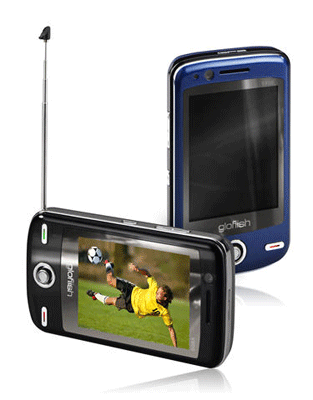
Triplets glofiish with different talents

Last week in Taipei hosted an international IT-exhibition Computex 2008. Many Taiwanese manufacturers showed her not only the latest in the "big" IT-industry, but also interesting mobile news. Among them was and the company E-TEN Information Systems, to present 3 of fundamentally new model of Windows Mobile smartphones, and one showed again to be forgotten. This "conditional" new model was the communicator glofiish V900, which the company demonstrated at CeBIT 2008 in March. Remember, this is a fundamentally new for E-TEN communicator with a broadcast standards DVB-T / H and T-DMB/DAB, new design and new proprietary cladding.
Mobile panorama of the week. Issue 2 - June 6
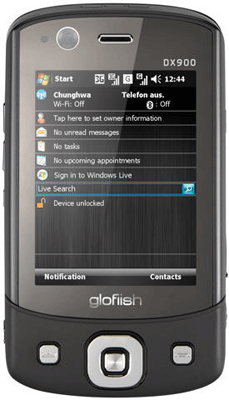
The most remarkable novelty in the line became glofiish smartphone DX900. The appearance of this model has predicted the rumors turned out to be entirely justified. The company is positioning device as the world's first Windows Mobile device with podderzhkooni still can not go on sale. As an example, the communicator General Mobile DSTW1, submitted shortly before the CeBIT 2008. Nevertheless, one can say with certainty that this is the first dvuhsimochny device from a reputable manufacturer, as well as the first such device to support both network standards GSM / EDGE, and UMTS / HSDPA. Communicator glofiish DX900 will maintain continuous access to two mobile services without having to switch between them, reboot the phone and much, much less without the need to change the SIM-ki from one to another. Advantages of this approach can evaluate employees with two mobile numbers for both work and personal life, travelers and travel for local and domestic calls, as well as those who prefer a different tariffs for voice services and data-centric. With the exception of support services, mobile TV, DX900 has all the merits of the communicator glofiish V900. Not only did he practically copied the main characteristics of V900, but closely follows the design.
Mobile panorama of the week. Issue 2 - June 6
glofiish X900 - the third of this series communicators brothers. It is quite similar as the V900, and DX900, and repeat their main characteristics. This model is designed for those who need just a powerful communicator, no such non-traditional skills as a dual-SIM or mobile TV.
Mobile panorama of the week. Issue 2 - June 6
We present the characteristics glofiish DX900, V900 and X900:
  • Operating system Windows Mobile 6.1 Professional
  • Mobile networks UMTS / HSDPA (850/1900/2100), GSM / GPRS / EDGE (850/900/1800/1900 MHz)
  • 2.8-inch touchscreen display with VGA (640x480 MHz)
  • Samsung S3C6400 CPU with 533 MHz
  • 128 MB RAM, 256 MB ROM internal memory
  • Slot for microSD memory cards
  • The main 3-megapixel autofocus camera, front VGA-camera for video calls
  • Local communications Wi-Fi (802.11 b / g), Bluetooth 2.0 + EDR, USB 2.0
  • GPS-module SiRFStar III, FM-radio, video
  • Lithium-Ion Battery 1530 mAh
  • Differences from the X900: Digital TV DVB-T / H and T-DMB/DAB (V900), technology is dual-SIM (DX900)
Of course, these three models will differ in size, weight and price, but to date accurate information about these parameters are not known. As a competitor V900 can be called a monster TV GSmart t600, losing the novelty of such a parameter as a physical screen size - 2.6 inches vs. 2.8 inches diagonally, as well as support third-generation networks, the volume of built-in RAM and the characteristics of the camera. glofiish DX900 yet has no competitors, but the timing of issuance of this device are not yet defined and, at the time of start of sales, the situation could change. Glofiish X900 model as the most versatile of the three has provided the most extensive range of potential competitors. As a minimum, can be called HTC Touch Cruise, who looked pale against the backdrop of new items, thanks to the characteristics of the display - the difference between VGA and QVGA can be principled when choosing a device for navigation. The portfolio of E-TEN, it is the successor glofiish X800, bringing to a new level of design (new smaller), is based on another processor and has a large amount of RAM, which gives hope for increased productivity, and also received a 3-megapixel camera instead of a 2-megapixel .
Mobile panorama of the week. Issue 2 - June 6
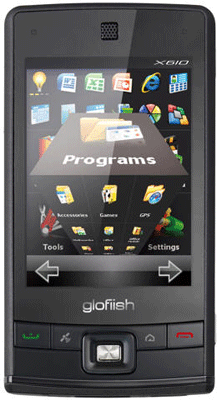
The latest novelty, presented at Computex 2008 by E-TEN, does not apply to a new generation of powerful communicators, and extends over the budget segment. glofiish X610 model continues to work glofiish X600, virtually repeating its basic performance characteristics. The main differences are reduced to slightly changed design with fewer hardware buttons and screen so-called "no skirting, the new operating system Windows Mobile 6.1 and focus on the management of your fingers. Interestingly, the company announced earlier about the ongoing development of his own "finger-oriented" interface, but the "communicators did not work with a company obolochnoy, nadstroennoy on Windows Mobile 6.1, but with well-known Spb Mobile Shell 2.0. It is not known, over whether E-TEN to mind the proprietary interface, or both, and will release these models are preloaded with Spb Mobile Shell 2.0. When glofiish X610 will appear on the market, competing with them will be models such as, for example, HTC P3470, Toshiba G810 and RoverPC S7. They differ from other new items processors, the HTC P3470 and RoverPC S7 uses Texas Instruments OMAP 850 CPU at 200 MHz, while the Toshiba G810 - Qualcomm MSM7200 400 MHz, more memory (128 MB RAM and 256 MB of ROM for HTC P3470 and Toshiba G810, 64 MB RAM and 256 MB of ROM for RoverPC S7), and the HTC P3470 is also lack of support for wireless networking Wi-Fi.

Geniuses from Gigabyte

Gigabyte Communications also introduced at Computex 2008 a clutch of new products from 5 models - GSmart MS802, MW702, MS820, MW720 and MS808. Couples GSmart MS802/MW702 and MS820/MW720 differ Mezhuyev is only communication capabilities and the presence of frontal camera for video calls, the MS802 and MS820 is designed to support third-generation networks, while the MW702 and MW720 - only GSM / EDGE. Communicators MS802/MW702 are heirs pair MS800/MW700, which was announced earlier this year and has already sold in several regions of the world. Recall that it rivals glofiish younger models with a QVGA-display and communicator ASUS P560. Like its predecessor, MS802/MW702 are versatile GPS-communicators, for their dignity can be safely attributed Processors Marvell PXA 270 520 MHz, and internal memory 128 MB RAM and 256 MB ROM. Perhaps the most important difference of novelties from MS800/MW700 is a better quality camera - 3 megapixel instead of 2 megapixel, and twice the amount of RAM. In this way they approach the top of the range glofiish.
Mobile panorama of the week. Issue 2 - June 6
Issue 2 - June 6, "title =" Mobile panorama of the week. Issue 2 - June 6, "width =" 400 "height =" 300 "/>
Mobile panorama of the week. Issue 2 - June 6
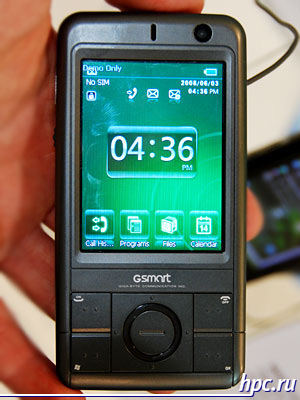
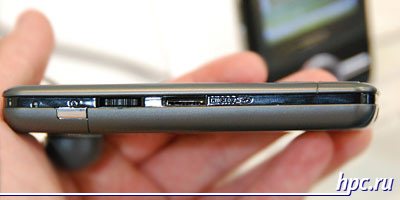
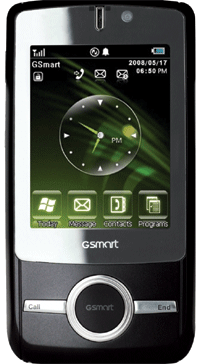
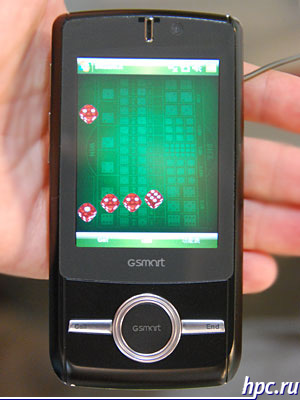
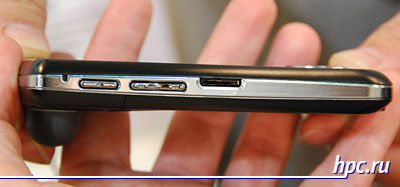
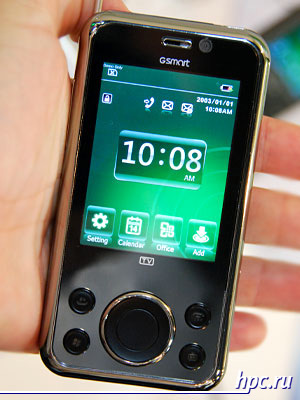
The first appearance of Communicators GSmart MS820 and MW720 can be attributed to the "MWC, however, if the model were not shown in every detail and not all the information about them was disclosed. Of the entire series GSmart them immediately identifies unusual design, but the main highlight was the motion sensor G-Sensor, which is used to control games and applications. With this sensor can control games and multimedia programs, tilting or moving the device in space. Such control system is already strongly interested in manufacturers of mobile devices, widespread use has not yet received, but the experimental realization begin to meet from time to time. In addition to the design and motion sensor GSmart MS820 and MW720 and MS802 are different from MW702 display with a resolution VGA (480x640 pixels). The result is pretty powerful solution for GPS-navigation, a separate interest is the possibility of using the G-Sensor in the navigation application until this issue is not clear. As potential competitors GSmart MS820 can be called HTC Touch Diamond and glofiish X900, though, of course, HTC Touch Diamond is noticeably large multimedia orientation and image component, it is a product of a different class. It may be noted that the GSmart MS820 deprived FM-receiver. Furthermore, the model GSmart more on the stated dimensions in comparison with the HTC Touch Diamond and glofiish X900.
Mobile panorama of the week. Issue 2 - June 6
For comparison:
  • Dimensions GSmart MS820: 111x65x19 mm
  • Dimensions HTC Touch Diamond: 102x51x12 mm
  • Dimensions glofiish X900: 106x61x17 mm
Mobile panorama of the week. Issue 2 - June 6
The most functional model among those represented Gigabyte innovations - is the communicator GSmart MS808. It is interesting that while this model is no pair without the support of 3G. On the one hand, it emphasizes a top news, on the other hand recalled predecessor - GSmart t600. GSmart MS808 and t600 are similar in design and the main "focus" - a device to watch TV on the go. However, the MS808 is much broader functionality, but features a more balanced, and it is not only a new support for third-generation networks. Display both models has a resolution of VGA, but it is more MS808 - Diagonal 2.8-inch vs. 2.6. It's not so much, but when watching TV gives great comfort. In addition, MS808 has a more productive processor, a large amount of RAM, 3 megapixel camera resolution, instead of 2 megapixel. Supported by a slightly larger range of standards for digital broadcasting. Plus, this, TV-MS808 features a rounded out by GPS-functions, which makes the model truly universal. The user does not have to choose what he wants more - a model with a TV-tuner or model of GPS-enabled, because there is something, and another. A similar approach was "all at once," demonstrated in glofiish V900.
Mobile panorama of the week. Issue 2 - June 6
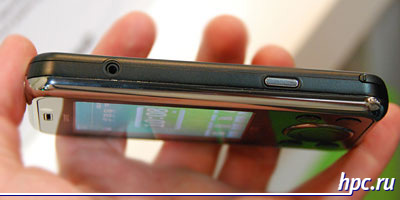
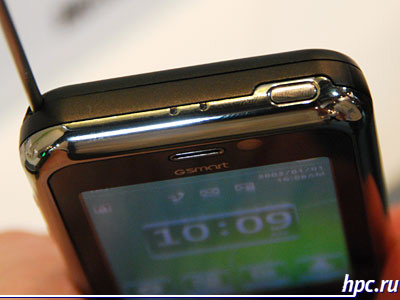
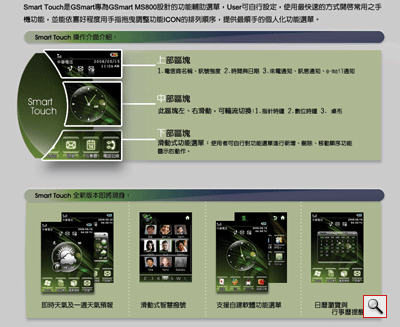
Special mention deserves the proprietary interface that Gigabyte is going to install all the new models. Smart Touch is built on a standard interface, Windows Mobile. Like many other manufacturers Gigabyte is trying to offer their solution, which simplifies the treatment of communicators and make the interface easier to control with your fingers. All new items shown can be expected on sale in late summer and autumn this year.
Mobile panorama of the week. Issue 2 - June 6

GPS-fashion from Mio

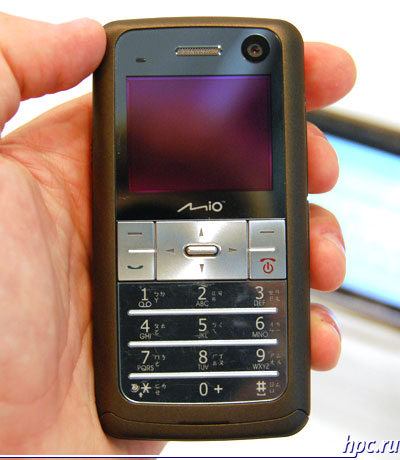
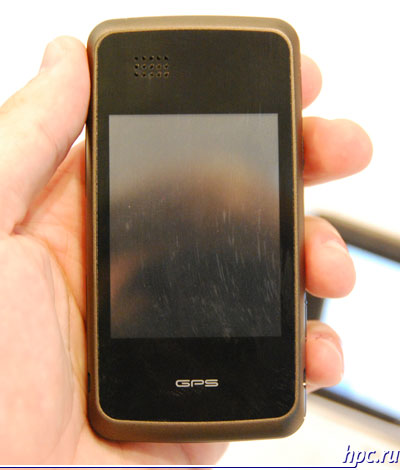
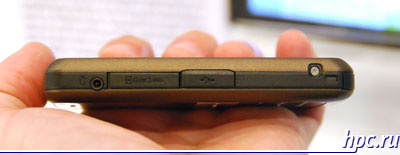
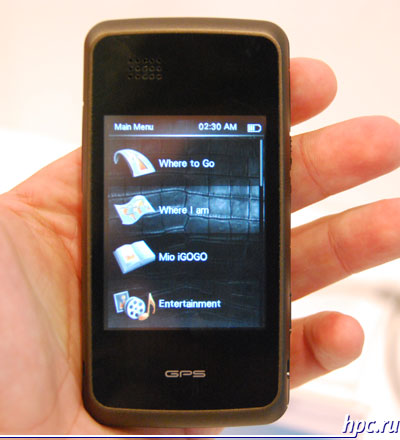
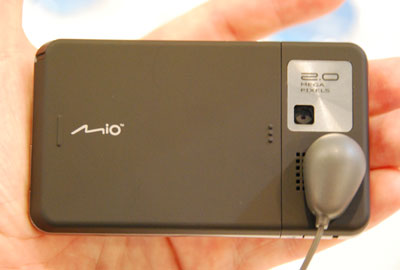
Mio Technology booth at the greatest attention was attracted by two models - Mio Leap K1 and Mio Leap G50. The first of these is a rather unusual device - two-way navigator phone. On one side of the hull is a relatively large touchscreen (2.6 inches diagonal), and with another - a small display (1.69 inches diagonally) and a keyboard underneath. A number of online resources reported that the Mio Leap K1 is a full-fledged PDA, but it's not quite true. Instead of the standard Windows Mobile is used by Windows CE 5.0 platform with a special wrapper for access to basic functions like a set of simple navigation that is Mio Leap K1 is exactly the navigator with the functionality of the phone, not more. For other characteristics the model can be attributed to the middle level: there is a 2-megapixel camera, slot for cards microSD, supports Bluetooth and USB, working in three frequency networks GSM. The device has dimensions of 105.1 x53, 5h14, 5 mm and weighs 125 grams.
Mobile panorama of the week. Issue 2 - June 6
Mio Leap K1: phone side
Mobile panorama of the week. Issue 2 - June 6
Mio Leap K1: navigation side
Mobile panorama of the week. Issue 2 - June 6
Mio Leap G50 model fully complies with customary notions about Windows Mobile device. It is not too functional communicator with the rate of the design.Earlier Mio Leap G50 was also known under the code name Mio Lovebird, in January, this development was even received the prestigious IF Design Award 2008 for the combination of design and functionality.
Mobile panorama of the week. Issue 2 - June 6
It complements gradually sprawling family of small and attractive GPS-communicators mid-level support work in the networks' GSM, not 3G. Among his competitors may be called HTC P3470 (HTC Pharos) and ASUS P320 with RoverPC S7. From the first two models he has a more productive processor, also among the differences - a flash drive of 2 GB. On the rest of the functionality of your device impresses serednyachki, supports networks GSM / GPRS / EDGE, a 2-megapixel camera, QVGA-display. From lapses in functionality are the lack of support for wireless networking Wi-Fi. Work is performed under control of the new operating system Windows Mobile 6.1. By the way, the communicator is a really small, it almost does not concede even one of the leaders in the compact - ASUS P320, but at the Mio screen of standard size (2.8 inches diagonal vs. 2.6 inches). For comparison:
  • Dimensions Mio Leap G50: 98h58, 5h14, 2
  • Dimensions ASUS P320: 99x55x13 mm
Mobile panorama of the week. Issue 2 - June 6
Manufacturer plans to release two new items in the third quarter, initially they will only appear in the Asian market, but for those will be released internationally.

HTC Touch for professionals

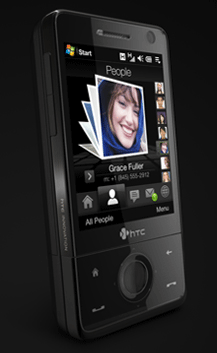
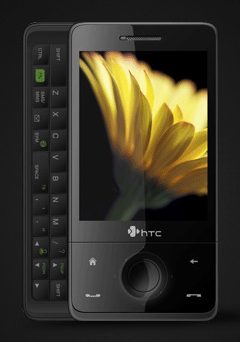
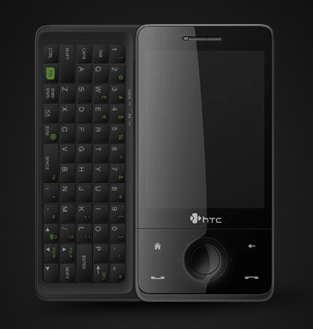
A little lost in the crowd of new products once the announcement of HTC. Eminent manufacturer of Windows Mobile devices presented to the public variation communicator HTC Touch Diamond in a different form factor. Model called HTC Touch Pro, formerly codenamed HTC Raphael, executed not in the form of a monoblock as HTC Touch Diamond, as well as a slider with a sliding side QWERTY-keyboard. New design is largely inherited HTC Touch Diamond, it also uses a new proprietary interface TouchFLO 3D. In this case, the device has a more "professional" focus than the HTC Touch Diamond, it emphasizes the title, the presence of QWERTY-keyboard, and such nuances as a microSD card slot instead of built-in flash memory, albeit a large amount. New supports cards microSDHS that potentially gives more than 4 GB embedded in HTC Touch Diamond. Also HTC Touch Pro increased the amount of internal memory, a ROM, and RAM.
Mobile panorama of the week. Issue 2 - June 6
HTC Touch Pro definitely opens a new era in the development of lateral sliders HTC. A simple comparison with the famous HTC TyTN II (P4550 / Kaiser) reveals interesting features. For example, the keyboard in HTC Touch Pro is put forward in the opposite direction, with the buttons arranged in five rows, instead of four.The novelty does not provide for the possibility of climbing on the screen at an angle to the keyboard, which is a proprietary "chip" HTC TyTN II. This somewhat reduces the ease of use when trying to install a device on a desk or other horizontal surface. In comparison with the HTC TyTN II HTC Touch Pro for improved display quality: for the same amount of screen resolution has increased from QVGA up to VGA. You can also note the new processor with a clock frequency of 528 MHz, which grew considerably the amount of memory. In size HTC Touch Pro significantly outperforms models such as Sony Ericsson XPERIA X1 and Toshiba Portege G900, with whom he will compete at the time of registration. The truth of these models display some more - 3 inches diagonally. Also communicator HTC Touch Pro is much smaller and lighter than the HTC TyTN II: Dimensions HTC Touch Pro - 102h51h18 mm, weight - 165 grams with battery Dimensions HTC TyTN II - 112h59h19 mm, weight - 190 grams with battery Dimensions Sony Ericsson XPERIA X1 - 110x53x17 mm, weight - 145 grams Dimensions Toshiba Portege G900 - 119x61x22 mm, weight - 196 grams with battery
Mobile panorama of the week. Issue 2 - June 6
Exact release dates and prices are not yet defined, Sales communicator will be closer to the end of summer. As reported by informed sources, the cost of HTC Touch Pro will be about the same as that of the HTC Touch Diamond. The authors, translation:

Pocket PC Pocket LOOX: first among equals

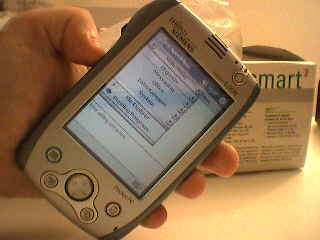
Fujitsu-Siemens Pocket LOOX - first submitted by the public pocket computer with the new generation Intel XScale processor at the core of PXA250. Even in Russia, where the premiere of new devices are carried out much later than in Western Europe and North America, he was introduced at the end of March. Was presented, but on the shelves did not appear (it is connected, obviously, was that Intel simply did not have time to make enough chips XScale). And now, after so many months of waiting, Pocket LOOX seem to still sell. By the way, will sell is not "the first PDA with a processor with the next generation." Toshiba and Hewlett Packard had before. Nevertheless, by design, the richness "stuffing" and Extensibility Pocket LOOX remains one of the most advanced handheld computers to date. So, offering you his detailed review based on the experiences of foreign experts from the "living" machines. In Moscow, unfortunately, Pocket LOOX is not yet available.

Set

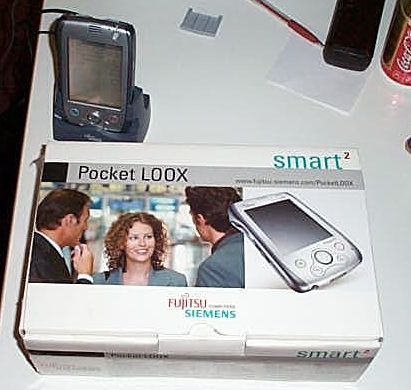
So, the box:
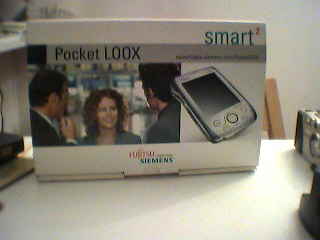
Pocket PC Pocket LOOX: first among equals
Front
Pocket PC Pocket LOOX: first among equals
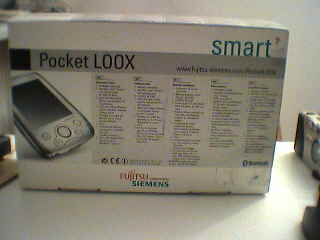
and back
Pocket PC Pocket LOOX: first among equals
Pocket LOOX next to the box
Since the test involved is not the final release version sample in the box did not have a CD with Microsoft ActiveSync and some additional software. But the box was cheholchik (very simple, made of thick black material with Velcro) and cradle synchronization.
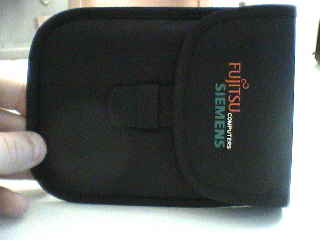
Pocket PC Pocket LOOX: first among equals
Case Included
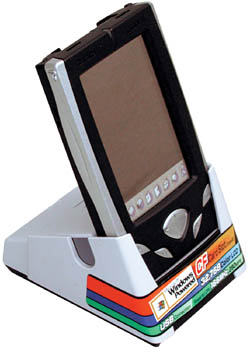
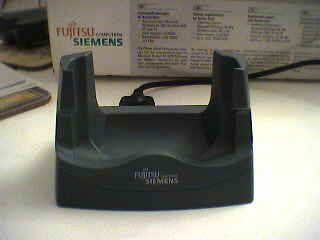
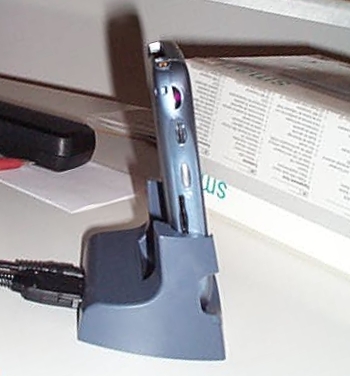
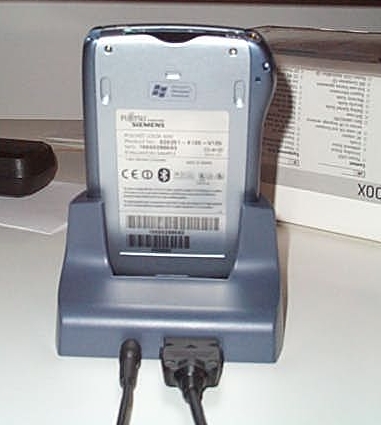
The cradle is very nice. Pocket LOOX is inserted into it quite reliable and durable. Maybe even too well, because to him to pull himself pridezhrzhivat cradle. In addition, the buttons are arranged so that the process of taking out the PDA from the cradle is very easy to accidentally press SpeedMenu. Behind, as in any cradle, power socket and cable for PC connection.
Pocket PC Pocket LOOX: first among equals

Design, cabinet, screen

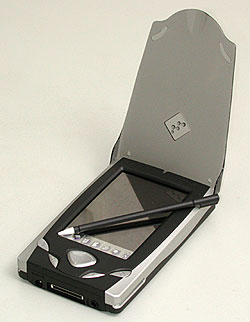
Pocket LOOX Vesma looks solid and gives the impression of quality made machine. Despite the fact that the body is made of plastic, it does not look "cheap stuff", and besides quite durable, no creaks and wobbles, as if it should be compressed. Blue-gray ends well with a silver front and rear panels. In general, things stylish:
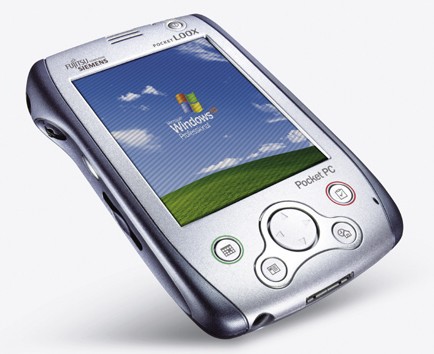
Pocket PC Pocket LOOX: first among equals
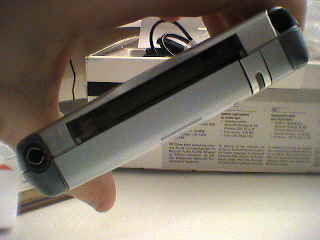
Not trusting the official data, the owners LOOX decided to measure it yourself.It turned out, surprisingly, that the weight of the device, even a little less than the stated amount. After weighing on two scales - electronic and traditional - it turned out that the Pocket Loox weighs 175 grams, as stated in its characteristics and is written on the box, and 169. Well, so much the better for it. It turns out that today is the easiest Pocket PC with a processor with XScale. Declared Weight Compaq iPaq Series 3900 - 184 grams, and the Toshiba e740 - 190 grams. In general, the modern models only Toshiba e310 and NEC MobilePro lighter than Pocket LOOX. But in these two times less internal memory, a weaker processor and only one expansion slot. Pocket LOOX looks pretty "well-fed," but this is misleading. Its maximum thickness 18 mm, which is not much more than the same iPaq 3900 (15,9 mm). Begin to consider. At the bottom of the power supply, communication port, covered by a lid connector for expansion modules:
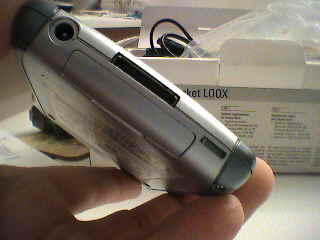
Pocket PC Pocket LOOX: first among equals
Only the top slot for Compact Flash cards and the edge of the charging indicator:
Pocket PC Pocket LOOX: first among equals
On the left side, by tradition, are (from top to bottom) infrared port, dial Jog-Dial (as it just is not called, but the essence - a switch that wiggle up and down allows you to move between menu items and keystrokes to select them), the button fast the menu SpeedMenu, slot cards Secure Digital / MultiMediaCard. By the way, while removing cars from the cradle arm very naturally falls on the button SpeedMenu and, of course, includes the PDA without your wishes.
Pocket PC Pocket LOOX: first among equals
Right-left power button and the recorder on / off switch built-in transmitter Bluetooth: Rear only a hole for soft reset. Please note that back in the cradle there is a place to connect the machines together with a plastic plug-ins.
Pocket PC Pocket LOOX: first among equals
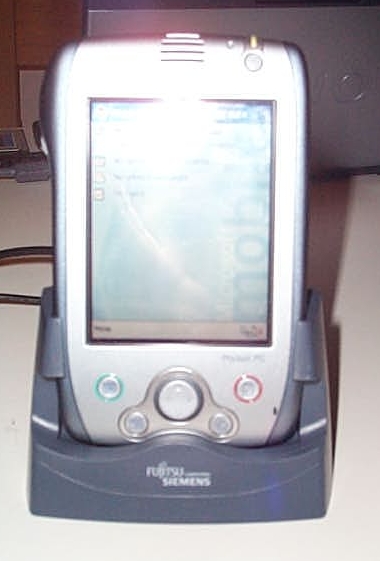
Unfortunately, the next picture turned out badly because of the bounce flash. On it - the front panel. Above right - the charging indicator, close button on / off, even to the left speaker grille. Lower right shows a small hole is very sensitive microphone (even at the average level of sensitivity he had no difficulty recording the human voice from a distance of about one meter). The speaker is, incidentally, is also quite loud. His audible even through the noise of the engine and with the windows open in the car on the highway. Joystick, perhaps too small for easy navigation, but rather sensitive to depression.
Pocket PC Pocket LOOX: first among equals
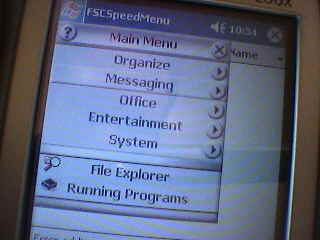
To see what else, and to run programs on the Pocket LOOX one is enough left arm - all controls are within reach of the thumb. Just click SpeedMenu and the device turns on. Navigate through the menu by using Jog Dial.Pressing the SpeedMenu returns one menu level up. The bottom of the menu itself is a file manager, and a list of running applications. Of course, the text entry will need to take a second hand and get the stylus.
Pocket PC Pocket LOOX: first among equals
Here is the "quick menu"
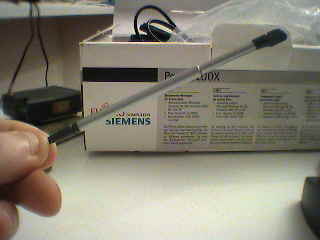
The stylus is attached to the springs, (as opposed to earlier models of iPaq is symmetrical, so it is impossible to insert "other party") pocle which he has a habit of getting stuck tightly. At first glance, the stylus is unusually short, but upon closer examination it appears that he is drawn as a telescoping pipe cleaner. The stylus is good - not too heavy nor too light, with a fairly robust and does not bend even in the push condition.
Pocket PC Pocket LOOX: first among equals
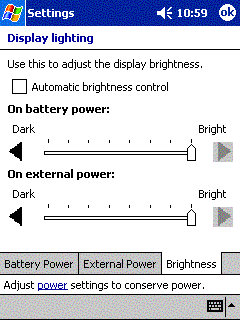
Transflective screen, as on the last series iPaq, much brighter than the iPaq 3800 and with very good contrast. He has eight brightness settings, plus the possibility of automatic adjustment. And to change the light Pocket LOOX reacts much faster than the same iPaq, which is always required "time for reflection."
Pocket PC Pocket LOOX: first among equals
Adjust the brightness of light
In this case, even the first level of illumination is sufficient to distinguish the image on the screen in the dark.
Pocket PC Pocket LOOX: first among equals
Touchscreen requires more hard pressed than most PDAs, but soon get used to it. In such rigidity is even its own advantages, especially when entering text in the program Transcriber (handwriting recognition). The fact that a soft-screen electronic "ink" slightly "blurred", which leads to a deterioration in the quality of recognition. On a more rigid, like a Pocket LOOX, this is not happening. At least, the machine recognized the test phrase "quick brown fox ..." three times in a row without a single mistake.

Performance

First, the performance was verified using the Virtual Office Benchmark. Its principle of operation of this - it plays on your PDA number of consecutive identical action (for example, draws triangles), and considers how many times this action computer time to run for a certain period of time. Each test was run ten times to avoid accidents and mistakes in the testimony. The higher the number in the results table, the better the result. The results of each test for the Pocket LOOX, for clarity, compared with the results, which showed two other handheld computer with Intel XScale - Toshiba e740 and Compaq iPaq 3900, as well as "handheld" from the previous generation processor - Compaq iPaq with Intel StrongARM 206 MHz. The most difficult was to render test results that showed different values: from 25.25 to 26.82. The table made usrednennny result. Once again I must remind - in testing is not the final version of the device, but the ROM version from her very recent, on June 30:
Pocket PC Pocket LOOX: first among equals
Thus, the test results:
Pocket Loox 600 iPAQ 3900 Toshiba e740 iPAQ 3800
CPU: Floating Point 12.65 12.66 12.65 8.05
CPU: Integer 26.95 26.94 26.99 15.55
Graphics: Bitmaps - BitBit 26.35 24.13 75.53 16.49
Graphics: Bitmaps - StretchBit 0.80 0.80 0.25 1.10
Graphics: Filled: Ellipse 1.06 0.52 1.00 0.54
Filled: Rectangle 1.35 2.10 5.10 0.56
Filled: Rounded Rectangle 0.96 0.50 0.75 0.52
Memory: Allocation 10.70 11.16 11.49 8.71
Memory: Fill 0.93 0.92 0.95 > 0.54
Memory: Move 0.37 0.37 0.39 0.87
Text 3.11 (ClearType is turned off) 2.97 (ClearType enabled) 3.13 1.65 2.22
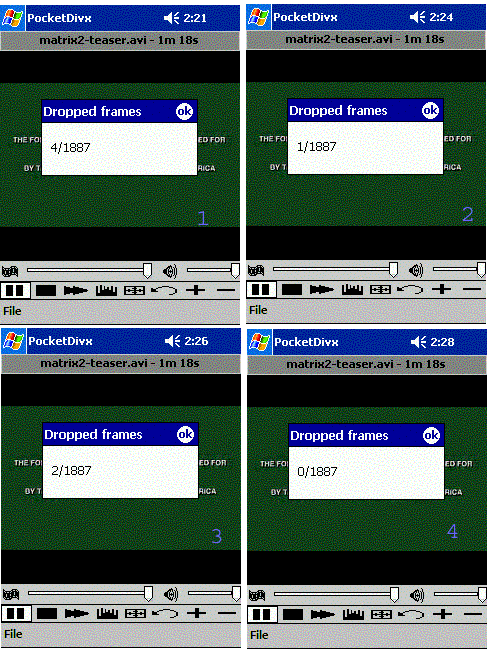
What did the tests: Floating Point - floating-point operations are needed in high-precision mathematical calculations, which, for example, can be used when working with spreadsheets in Excel. Here PDA XScale showed equal performance, and two times higher than the old StrongARM. Integer - integer calculations are used for basic arithmetic operations where there are no fractions. Again on the XScale devices are similar in performance and greatly outperform iPaq 3800. Bitmaps - BitBit - drawing a bitmap (BMP) image while preserving the original image size. Here Pocket LOOX slightly ahead of both the iPaq - old and new, while there is a huge gap between Toshiba e740. How do you explain this gap is unknown, and in "real life" he does not manifest. Bitmaps - StretchBit - rendering bitmap image by resizing the original image. Completely incomprehensible test. Pocket LOOX and iPaq 3900 on a par and three times faster than the Toshiba, but at the same time (fantastika!) is noticeably slower iPaq 3800. Ellipse - from top left to bottom right and fills an ellipse is drawn in red and blue zelnym. LOOX ahead of all but the gap is not great. Rectangle - same with the rectangle. Here Pocket LOOX all behind, and from e740 to four times! Rounded Rectangle - again the same thing, but a rectangle with rounded edges. Here LOOX consistently shows the highest result. Why do I have a very similar drawing two very similar rectangles PDA show such different results are difficult to explain. Allocation shows how fast the Pocket PC can be booked and osobozhdat memory. This operation is a variety of applications and perform in their daily work more often. The new processors faster than the StrongARM, but a little different. Fill - a block of memory (500 Kbytes) is filled with data. Fill rate shows how fast your computer will run. And again XScale faster than the StrongARM, but within their own "caste" preserves parity. Move - the transfer of a block of memory. PDA XScale again close, but (again, fantastic!) Strongly lose old StrongARM. Apparently, this explains the low growth performance of new processors otnostitelno StrongARM. Text - shows how fast the text is drawn on the screen. Note that the use of ClearType font smoothing slightly reduces the speed of rendering. Now one of the most interesting stages of the process - testing the multimedia capabilities. Let's start with the video in MPEG4. When a site is PDA Buyer's Giude preparing a review Toshiba e740, his team searched the movie trailer of "The Matrix" volume 2.6 MB (and very decent quality), with caching turned off. Of the 1,887 personnel Toshiba e740 missed 164. The first show of the same trailer on the Pocket LOOX is issued on 18 missed shots. Then testing was conducted four times - all on a self-powered and without caching, with all settings left in the values ​​of "default".Result in the screenshots:
Pocket PC Pocket LOOX: first among equals
So it is quite possible that in the first pass 18 frames was a simple accident. In addition, it should be noted that the PDA Buyer could not test the iPaq 3970 in conjunction with Toshiba - the first refused to play DivX in general. However, after installing the patch, which eliminated the problem of display (the display could not display DivX), iPaq video still shows and never missed a shot voobshe. To complete the picture, and testing was conducted DivX playback from a memory card (before it was about the clip lying in the main memory). Five repetitions - and no one missed shot. The next step was the testing of MPEG video in the program Pocket TV. Each of the five clips played over the three times, before each playback LOOX perezegruzhalsya and recharged. Clips played as a CF-card and from main memory. Thus,
  • starwars.mpg - a two-minute trailer for "Star Wars", 114 Kbps, 160x120 resolution. Video recorded at 23.976 fps, Pocket LOOX issued in 1923
  • topgun3d.mpg - 30-second clip about the movie Top Gun, 256 Kbps per second, 160x120 resolution. Clip recorded with frame rate 27.97 per second, LOOX play it at a speed of 24 frames
  • XPsmartTagsPPC - advertising the new features Microsoft Office, 345 Kbps, 240h160. Advertise recorded at 25 frames per second, played at 19
  • ipaq.mpg - Advertising iPaq (sorry, no advertising Pocket LOOX). 414 Kbps, 240h160, 25 frames per second. Playback - 13 frames per second
  • monstersinc-high.mpg - Advertising famous Disney movie "Monsters Inc.", 600 Kbps, 320x240, 24 frames per second. Playback - 7 frames (if the file is in main memory - 9 frames per second)
Note. Need to be reminded that this is not the final version of the device and not the final version of the ROM. Before they go on sale it will probably be updated. In addition, the developers Pocket TV for testing got much better results similar to those that were on the other XScale-machines. So that we can hope that with the change ROM video performance Pocket LOOX increase. A small addition - Quake on Pocket LOOX provides 7.9 frames per sekndu against 7.2 for Toshiba e740. Now that excites buyers handheld computers almost above anything else - about the length of battery life. To check that capable Pocket LOOX was conducted two tests. For the first volume and brightness were set to maximum, but with the expansion card in the regime of infinite repeat scroll video WMV. The video has been dynamic, with lots of sharp change of personnel and loud music. Surprisingly, a warning about low battery (which included a 20% charge left) appeared already cherz 2 hours, 2 minutes. Video continued to play without reducing the volume and brightness, eight more minutes and stopped at 14% battery charge when the Windows Media Player has refused to continue the conversation. After that, machine managed to work another 17 minutes, until finally, at 9% it is turned off and switched back to a single charge refused. The total time of use was approximately 2.5 hours. The second test was conducted in the same way, except that the volume and brightness were exhibited at the averages. After that, more than 2,5 hours of videotape she had already endured. In this case, with each successive test time slightly, on a couple of minutes, but increased (the latter recorded for 2 hours and 33 minutes). It is interesting that out of testing (during setup, work with Bluetooth, etc.) Pocket PC worked without podzyaryadki more than 5,5 hours. Perhaps it is a more accurate picture of how it will work in everyday life.

Bluetooth

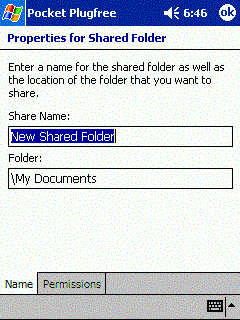
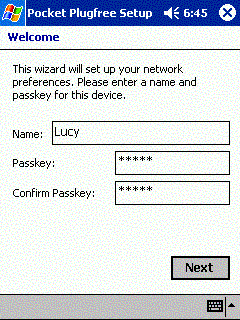
Built-in wireless Bluetooth - did not feature Bluetooth, as it was during his early development. They are equipped and HP iPaq, ending at ** 70 :-), and one of the modifications Toshiba e740.Nevertheless, this function has been relatively new, so dwell on the possibilities of wireless Pocket LOOX. Pocket LOOX successfully connected to the two available anywhere as hand devices - laptop and cell phone. But before attempting to establish a connection, you need something to configure. When you first run Pocket Plugfree - Program for working with Bluetooth on the Pocket LOOX - need to specify an arbitrary PDAs to other devices to identify it in the network, and a password to connect paired devices:
Pocket PC Pocket LOOX: first among equals
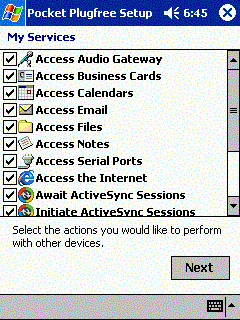
You will then see a list of functions, of which the most interesting for us to be connected to the serial ports (serial ports) and work with ActiveSync:
Pocket PC Pocket LOOX: first among equals
The program then asks the question, if you want to select the folder that you will have access to wireless devices on the network:
Pocket PC Pocket LOOX: first among equals
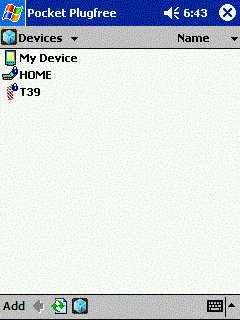
Now Plugfree start, looking for other wireless devices within range and, if they exist, and they turn on the transmitter, finds:
Pocket PC Pocket LOOX: first among equals
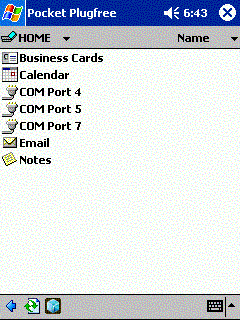
Choosing a laptop (he called HOME) and the Pocket LOOX begins to search for possible ways to interact with him, and then displays this list on the screen:
Pocket PC Pocket LOOX: first among equals
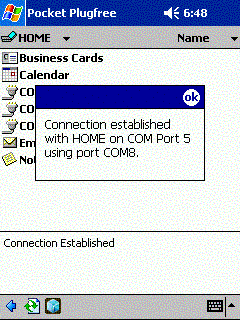
When one of the COM-Port, Pocket LOOX is connected with it:
Pocket PC Pocket LOOX: first among equals
Pocket LOOX is Bluetooth-peredtchik Class 1, which means that he can communicate with devices located on it for 100 meters. During testitrovaniya relationship remained at a distance of 40 meters with a little. With the T39 is not everything went so well - the phone has Bluetooth Class 2, which connects only to within 10 meters. However, at this distance, the installation of communication and "pairing" phones have passed without any problems. Unfortunately, work with ActiveSync test failed. Vaio notebook easily contacted PDA, ActiveSync has found that a certain device tries to connect, but, of course, the virtual COM-port can not completely replace the USB, and drivers have been installed for the USB-only connection. So that ActiveSync does not realize who is trying to contact him, and the connection is not established.

Conclusion

As always, potential buyers are most interested in ease of everyday use: the duration of battery life, screen quality, etc. The ability of the battery are described in detail in the second part of the review. Need only be noted that drawing conclusions until the release version of the sample device early. The screen is excellent - not zamylenny such as the iPaq 3600 and more vivid than the iPaq 3800.Usually enough for a comfortable work weakest illumination. Gamers will appreciate the ability to simultaneously use two hardware buttons. The speed of Quake though not much, but higher than those of competitors, demanding to hardware resources Argentum is also working on cheers. In addition to the standard for Pocket PC 2002 software for Pocket LOOX have a few "bonus" programs. Read more about them. LX BackUp allows you to easily save the entire contents of RAM to Flash-card (unfortunately, not the ability to selectively archive data). Pocket Plugfree, which we have discussed above, provides a wireless Bluetooth-tuning the network and interact with other devices. Battery Gauge graphically shows how much spent and how much is left on battery power, Backlight allows you to configure the eight levels of brightness or turn on auto-regulation. CPU Setting allows you to slow down the processor to conserve battery power. In addition, the package includes a program NYDITOT Virtual Display version 3, which will turn the image on the screen and change the resolution. Sound, even in the dynamics of clean and quite loud. Well distinguished all the words. No claims, and the phone jack. Testing was conducted a few days, but during all that time did not reveal a trace of dust under the screen. But this is a problem many PDAs. Another of the interesting observations - if you insert or remove the CF-card, Pocket LOOX some reason self-activated. Thus, the overall impression of the machine. What she is good and the bad. Should I buy it? First up:
  • Perfectly implemented Bluetooth, so even a class 1 (with a radius of 100 meters to applicable)
  • Successful design for single-handed
  • Bright, high contrast transflective screen with a uniform illumination
  • Perhaps, after all the fastest XScale-PDA in the field of video games
  • The easiest among PDA devices on XScale
  • Variable speed of the processor to be extended, according to preliminary estimates, the term avtnomnoy of about one-third
  • A good set of additional software
However, there are drawbacks:
  • As is the case with all new Pocket PC, Intel XScale does not show all that he is capable. Because of this - low growth proizvodtelnosti compared to previous models based on StrongARM
  • An Inconvenient Backup program
  • Program to monitor battery charge does not show interest - only the schedule
  • Very simple case included
  • One of the main drawbacks - battery life is less than desirable
In general, the Pocket LOOX leaves a very pleasant impression. You can not even focus on the fact that in most tests it really is not much, but it is superior to other PDAs. The difference in performance still too small and it is worth bragging solely for promotional purposes. The point rather is that this PDA is working exactly as it should. When testing other models in their daily work with PDA often have a sense of dissatisfaction: everything seems to be great, but different minor setbacks severely spoil all impression. Then design a la - "Made in Nizhny Tagil, a very valuable bonus program is not working correctly, then the equipment is very poor. Some PDAs can exceed the Fujitsu-Siemens Pocket LOOX for individual parameters. Somewhere slightly better screen, somewhere a little more software bundled somewhere attractive, futuristic design. But by the sum of the Pocket LOOX, according to those who held it in his hands, can compete with any other handheld on the market. Sources, Materials: