With fotokombaynom in your pocket. Part One, the theoretical

Digital photography is still very young. Just think, from idea to the public dissemination of digital cameras, as a mass commodity, barely more than 15 years. In the mid-eighties Sony Corporation took up the project Mavica, then seemed quite fantastic. But today digital cameras are traded on markets. On electronic markets, of course ... It is sad to admit it, soon the good old film camera will go into retirement, adding to the collection of the greats, but sunk into oblivion technologies. Whatever else is said today by professional photographers, and the days of traditional photography are numbered. This can be seen, looking more closely to themselves photographers and reporters, most of them pulls out her wardrobe trunks followed the usual film-SLR digital camera. We, the humble amateur, technological battle in the pictures cause of practical interest. We want to know - when? When a decent digital "Soap Dish" will be equal in value to the "soap box" film? Technical parameters and quality of the images they are already very close. In the meantime, we, if we decided to try digital photography, in fact, must either settle for cheap "digital cameras" entry-level, or save money for a good camera. Again - that stash, if you do not know, like it? Suddenly this expensive toy, a digital camera does not lie in the soul? Do not catch the fancy, will not cause the desire to roam with it on cities and villages, as we walk around today with the correct film camera? Let's take a closer look to the capabilities and features of the cheapest digital cameras. And, given the specificity of the CCP, to embedded in PDAs and cellphones cameras. You may not believe, but between frivolous digital "soap box" for $ 50 and an integrated photo module PC Sony PEG-NR70V for 649 dollars total more than between foster brothers. The same is true of the latest mobile multimedia phones. Cameras built into these curious devices - the same elementary simple soap dish.
With fotokombaynom in your pocket. Part One, the theoretical
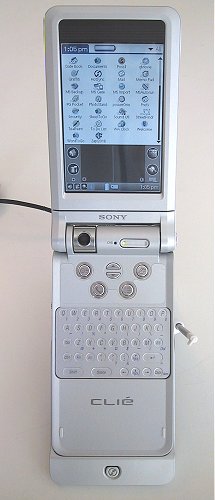
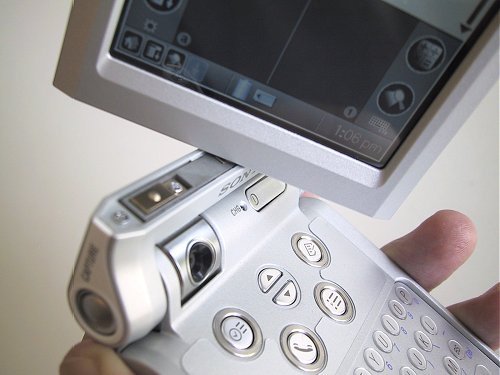
Sony NR-70V: "eye" camera at the junction of the two parts of the body ...
Now compare the cost of kits KPC plus digital cameras and cell-phone plus camera "with the value of the combined devices. And get absolutely incredible difference.

Very cheap digital camera: a brief digression

Let's start with the actual entry-level digital cameras. It is from those that are sold for 50-70 dollars. To know a bit about their device, it will be easier to deal with the combined apparatus. And easier to assess the advantages and disadvantages thereof. Cheap digital camera is very often a sweet bait to unsuspecting buyers. Shops spread of digital technology that small things on the most prominent, accompanying her gaudy price tags. A small price indeed several ogoroshivaet. Is normal "digital camera" may be cheaper budget film "Soap"? Normal - no. And the easiest - yes. However, consider a camera of this class as a real digital camera is not worth it. This is not the camera, and web-camera with an optional opportunity to receive photos. That's it.
With fotokombaynom in your pocket. Part One, the theoretical
Own web-camera - a device for digitizing three-dimensional objects and the subsequent broadcast video feed via the Internet - are classified in two groups. The first group includes cheap device, equipped with plastic optics with an aperture of low luminosity and light-sensitive sensor, built on technology of CMOS. This sensor differs a low cost (due to the adaptability of production) and, unfortunately, low settings.For him, for example, is characterized by a high color noise, low speed and light sensitivity (ISO 50-100 units is high, but usually much less - manufacturers simply do not indicate the parameters of sensitivity, so as not to alienate a potential buyer). The second group is expensive (from $ 100 and above) web-camera with glass optics, light-sensitive sensor, built on technology of CCD, with integrated microphone and Shutter, allowing to use the camera as steady-state (tied to a PC) camera (and, by Incidentally, the projection scanner). The high cost of devices of this type is due to the complexity of the production of CCD matrices. Actually, it's also affects the cost of normal digital cameras, which use only the sensors CCD (except the expensive semi-professional cameras Canon - it uses sensors CMOS, but the product of advanced technology). Go into the details of technologies CMOS and CCD is hardly worth (too long story). We only note that the advantage of CMOS, in addition to cheap, even in the life of the sensor, and the advantage of CCD - a stable photographic parameters. In other words, web-camera with a CMOS sensor will last a long time, but eventually lose its sensitivity. A camera with a sensor CCD, most likely will work for less, but the sensitivity matrix at the same time decrease slightly. By the way, a solid cost CCD sensors due to the extremely low yield of products in the manufacturing process. Percentage of defects at the most advanced, most new plants reach 98 percent. Two percent of suitable sensors! .. Web-camera, as though she may be perfect, realizes only half embedded in its capabilities. To supply the light-sensitive sensor and focal plane, as well as to preserve the digital images of the camera is connected to a PC via a serial interface. Once it has been a slow COM-port, today - Bus USB. And what if a web-camera to add the electronic memory and built-in power battery power? Get a digital camera ... And not only a camera but a video camera. So the producers and they have done - they took the normal budgetary web-camera and use it to make a simple camera. More precisely - the multifunction device, functions as a web-camera at the camera like no one takes away. Cameras Entry-level based on the CMOS sensor produces a lot of Asian electronics companies. Usually these are small firms, which stars from the sky is not enough, but boldly explores new markets. As a result, there are absolutely previously unknown branch - like the industry of the same unpretentious camera. Today, entry-level cameras are available even hundreds of thousands - millions of copies. And it can be understood by the camera for $ 50 is available to people with any income level, introduce them to modern technology. Can not keep and call a couple of active players on the market of cheap digital cameras. This German company Agfa and Taiwanese Aiptek. Why them? Solely for personal reasons - a cheap camera Agfa became the first digital camera I've tried in the action. A baby Aiptek I use during the last year and should be recognized, very pleased with this erundovinkoy ... Although the camera from Jenoptik Rekam or no worse. And all the rest, I think, too ... How is the entry-level digital camera? Oddly - very similar. Sometimes there is even a suspicion that the e-filling chamber produces one or two companies, and all others involved in a production of constructs and the final assembly of cameras.
With fotokombaynom in your pocket. Part One, the theoretical
This assumption has some justification. Judge for yourself, the characteristics of sensors, the vast majority of camera models cost the same - to allow 350 thousand pixels (ie VGA - 640x480), the sensitivity level of 50 units ISA (sometimes interpolated to 100 units), a high level of color noise (also virtually the same on different models ).All cameras are equipped with lastikovymi lenses with simple odnolinzovuyu (lens can be glued from two or three component) design. Mechanism of aperture and focal plane there. Lens aperture, and so low (about 4,5-5,6 units, although this option is specified by the manufacturer is extremely rare) to reduce its aperture. And instead of the gate in the cells of this type used the mechanism of reading the state of the sensor. At the moment the shutter actuation circuitry, the camera captures the brightness level of illumination of light sensitive elements that make up the sensor. A simple, but cheap. Thus, the sensor is always exposed to light flux (which is obviously not conducive to longevity), and when you connect the camera to your computer immediately start working as a web-camera. And yet, some rudiments of exposure automation in budget cameras have. These include the compensation scheme chamber (the level of image brightness varies by electronic means), and built-in flash, which is not in all chambers (built-in flash increases the cost of the camera for at least 5-10 dollars). God knows what, but - working closely ... Suspicion confirmed the origin of the cheap cameras and implement control systems. In these cells have no home "goodies" Digital camera - color LCD screen. There is only symbolic panel that displays the current camera mode. That is, a set of two numbers or letters are constructed from the segments. When you turn on the camera panel displays the number of remaining shots, by pressing the control button - the current mode (resolution, voice recorder function, memory clear, and so on). And the control buttons are only two (if the camera no flash) - the button on the camera she's mode dial, shutter button and ... as a viewfinder with optical prism - as in any film, "soapbox". A mechanism for focusing simply not available, the lens set at hyperfocal distance at which all objects are placed on 40 cm (the value depends on the optics) will come in the picture sharp. It remains to add that cost cameras installed conventional (non flash) E-SDRAM memory, the volume of which (8-16 MB) is enough to save 26 shots resolution of 640x480 pixels or 106 image resolution of 320x240 pixels. Memory card slot is missing, so immediately after the shooting will have to rush to the computer in order to save captured frames. If you do not, two fresh element AAA, which is powered from the camera, keep shots within a couple of days. Then blame yourself.

Can I remove them?

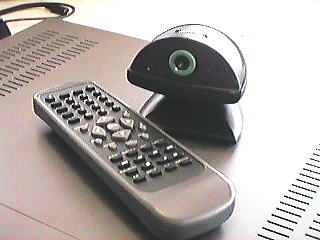
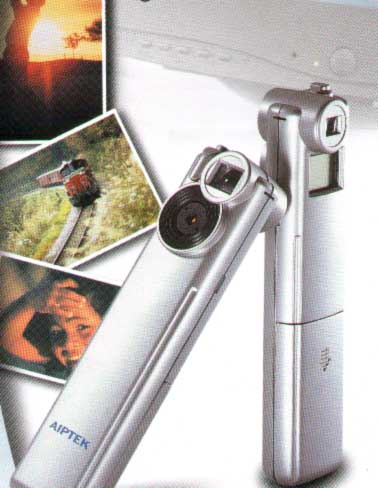
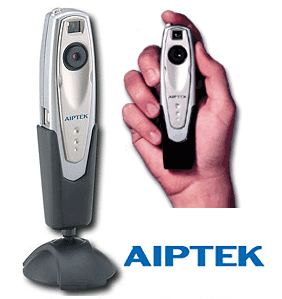
I have to say - you can shoot. Despite the primitiveness of the device, a full-fledged digital camera, albeit with very low performance. For maturing the new foundation pictures teen fit perfectly. And everyone else - if you do not expect from the future of artistic shots of heights (and photographic prints on paper, the entry-level cameras are only designed to receive images for screen display). As an example, talk about their fotoigrushke - the camera Aiptek VoiceCam VGA. This model sells well in Russia, is inexpensive (around $ 55) and their money is completely justified. Anyway, this is not a pity fotoapparatik scratch, break or lose it (not to mention the "present"). So he "lives" in my pocket for a year, accompanying me everywhere. As with most digital cameras, entry-level, constructive VoiceCam has an unusual appearance. Outwardly, this tiny (ochen!) plastic box, elongated. The size of this camera is identical with digital recorders, and looks very similar.
With fotokombaynom in your pocket. Part One, the theoretical
Functionality of the camera are quite diverse. Firstly, a web-camera with a resolution of VGA. Secondly, proper camera with two work permits (maximum - VGA).Third, when you install a 320x240 pixel resolution VoiceCam can serve as a digital camcorder, allowing you to capture a sequence of 106 frames with a frequency of 9 frames per second (on the screen looks very even nothing). Fourth, it is also a voice recorder (can not remember exactly, it seems to 13 minutes playing time, if your camera is not pictures) - the camera is and microphone, and speaker. True, the sound sequences the camera can not record, but mixed up the pictures and voice notes are easily remembers. Unfortunately, the voice notes are written on a personal computer can not ... But what do you want for $ 55? In fairness I will note - a year of intensive use (hundreds of pictures) I've never been able to get a photo of satisfactory quality. All images must be processed in Photoshop, leveling differences of brightness and removing color noise. As for the recorder, the voice recording is possible only in extreme close-mic - camera suffers from a fair deafness. Quality is also not so hot ... but as a cheap digital "pominalnika - amiss. The beauty of this lovely stuff - the amazing versatility, simplicity, cheapness and ease of use. Let the photos are nevazhnetskie, but all I wanted to capture and preserve the memory, I photographed and preserved. After processing in a graphics editor, most pictures takes the form divine. And most importantly - those tiny digital tchotchke is very pleasant to hold in their hands. They are virtually weightless and completely unlike the "older" cameras. Where I could not calm the usual pictures of the camera (in the subway, in a store, for any extraordinary circumstances - when all the angry and the shooting is clearly not located), a small Aiptek `nd I was shooting without any kind of problems. Surrounding simply not recognized in VoiceCam digital camera. Maybe she reminded them player MP3 ... It is time to look at the more expensive "relative" cost camera - built-in cameras to PDAs and cell phones. And along the way to master the basic skills with these toys. Still shooting integrated camera has a number of special features. Method "saw - brought - removed" is not always pass. Like and small science. But without it - one of frustration. The authors, translation:

With fotokombaynom in your pocket. Part two, the practical

And yet - how cool to have a PDA and a digital camera in one form factor ... great, no doubt. But this is not the same thing that the digital camera and a PDA separately. What good is a digital camera? Its utility. Taking from coffer cell, we take it in hand, is applied to the peephole viewfinder, shutter button feels ... We take to the hands of the camera and nothing else. To what "kiss" in the case of the Sony PEG-NR70V? Where to look? And where the shutter button to quickly "stop a moment? And that the press in order to select the desired resolution, adjust the exposure settings and enable flash? And where is the built-in flash on your camera? No flash ... On the other hand, even the most compact digital cameras (as described earlier "Soap" entry level does not count - yet it is not real camera) does not fit in your pocket. And the ones that fit, for the operational work will not do. Camera size of a credit card "looks great, but try to capture its hundred or so shots in two hours. Hands fall off ... So, a good digital camera - the device is clearly not a pocket. He needs a wardrobe trunk, or at least cover (you know, dear thing, plus optics, plus buttons that are easy to press by accident). This is not something that is "always with you." In any case, it requires attention and caution. A handheld computer - there he is in his pocket. The shape and design of the case and buttons - all of it is fit for work on the go, for extreme conditions, when even the strong and reliable notebook could easily become a costly, plastic "wood." Pocket PC is sturdy and reliable. Its easy to get out of his pocket and insert. If he had built a camera, and shoot them, you can easily ... There's your contradiction - seems to be better than a digital camera and then digital camera is worse. Let's look at an unhurried manner. What and for what applications do better. And as with these amazing hybrids controlled. It is impossible to lay those little things without cause. For the same money they paid. And even some money ...

With a camera in your phone

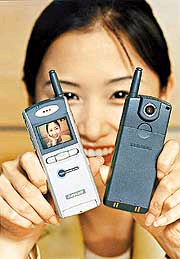
Let us turn to what we do not have - to mobile phones with integrated cameras. In South-East Asia, where this technique and produced similar devices are already popular enough (or at least known). In America - only just emerging. Concept phone with built-in photo module (in fact, a real smart - because of its extreme kompyuterizirovannosti) looks very attractive. Universal communication device, an electronic organizer, largely acting as a handheld computer, and yes even in combination digital camera. And all in a compact phone package that easily fits in your pocket, and in a holster on his belt, and in the business portfolio, and a purse ... Is it because such a demand communicator (just try to buy the same Treo - need a good search) that they adequately meet the specifications of the universal device for all occasions? A cell phone is universal - it is easier as a means of communication and compact as a PDA. And just more convenient to administer.
With fotokombaynom in your pocket. Part two, the practical
Looking through the posts of updates to foreign high-tech companies involved in the development of smartphones, I have defined for themselves are some common features phones with integrated cameras. On the phone, and kind, computer functions, these devices still do not talk - only about the photographic component. Thus, the modern smartphone with a built-in digital camera - it is a phone with a color graphic display that can display thumbnail preview images, and possibly pictures in full size format, but to show parts (moving image on the display - for a detailed view of fragments of images). However, the latter only an assumption, since the smartphone screen size of a large postage stamp can hardly be regarded as a tool for comfortable viewing images."Thumbnails" on this screen will look like painted rice grain ... Nevertheless, regular screen Smartphone allows you to use it as a viewfinder, built-in camera, and displays a menu of settings and controls.
With fotokombaynom in your pocket. Part two, the practical
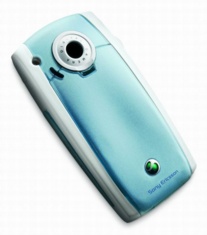
Cmartfon SonyEricsson P800: "eye" camera is located behind ...
Since the built-in camera is not really the main and auxiliary functions, it has individual buttons - control is carried out with the standard telephone keypad. That is key phone functionality is clearly overwhelmed. Purpose of the buttons have to learn, or to combine not cope. Next - a light sensitive sensor. Its physical size is small, and on the device is a type of sensor CMOS. That is, the sensitivity, dynamic range and excellent noise characteristics of the sensor will not name. Small and the resolution - the same level cameras for prints on paper are not suitable. The most that they can be used, obtaining pictures for viewing on a computer screen used as illustrations for the web-pages, e-mail messages and various directories (for example, to accompany the portraits of the respondents their address book). Separated from smatfona integrated digital camera looks pale. And together - is acceptable. Even a simplified optics, low light sensitivity sensor, the lack of exposure automation and flashbulbs are not significant drawback, since the photos are quite small, therefore, not "heavy" for sending them through a wireless connection (all new multimedia smartphone supports protocol packet data GPRS and service of short multimedia messages MMS). In other words - the photo module equipped with a smart phone is not designed to obtain high-quality photos, but remarkably suited for the rapid exchange of shots, carrying the load for informational purposes only. In practice, work with this smartphone might look like. Go, say to the store. Notice a product that I would like to buy (for example, a real digital camera, but not this built trinkets). It costs considerable money, so you need good 'wife'. " We photograph your favorite thing and send a snapshot of his wife. Immediately get an answer - "dreaming" ... Everything is clear, not destiny ... or other situations. Walk yourself to Autumn Park, notice the charming young lady. We photograph it, send a picture to someone. He instantly falls in love, does offer the young lady, will marry ... And so in a spirit of love Mexican TV series .... Say - self-indulgence? Course, pampering. Arrant self-indulgence. But without this indulgence life seems fresh.

Camera in a PDA

Choice, in general, is low. On the one hand - not once referred to me and already out of production Sony PEG-NR70V and coming to replace him PEG-NX70V (ie adapted to multimedia applications clone Palm `a), on the other - a classic Pocket PC 2002 and its latest modification, retrofit the merged photo module. This all the different and limited (except for rare "vagrants" exotics, such as PV modules for the Palm `s normal that we do not consider). Since Sony does not compare computers with what we dwell on a particular model - for NR70V (more advanced NX70V in Russia is not yet available). On the computer, again, do not tell (machine just class!), Only the built-in camera. And it has roughly the same features as the camera cellular smartphones. Sensor is a tiny physical size (by the way, this setting determines the quality of the camera - the sensor is more, the camera is better) and low resolution. What is a photograph of a resolution of 320x240 pixels? Nonsense, not a snapshot ... The newest model NX70V resolution is doubled (640x480 - standard VGA), but the image quality is reflected only slightly, because in the new and old models applied to the photosensitive sensor CMOS.
With fotokombaynom in your pocket. Part two, the practical
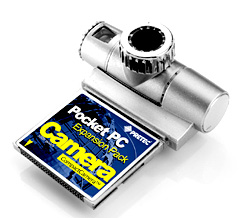
Furthermore - optics. By Sony would be expected of optics Carl Zeiss, which supplies it with full-featured digital cameras (among other things, some of the best in the amateur class). But it did not happen. Optics is, but some ... miserable. Automatic Exposure and Shutter - at pyatidesyatidollarovyh "shoot cameras." Flash, of course, no. Can I rent such a camera? Why not? Especially if the pictures are for viewing on the Pocket PC ... And for the serious amateur photography training, part of which is the fine art photography (and, to a greater extent than it might seem - every camera owner sooner or later tries his hand at the art of photography), it is unlikely Do. Is it too expensive like fotoeksperimenty? Should I put off for vague murky picture six and a half hundred dollars? .. I think we should. It also is not just a camera and a computer. And the built-in camera it - is not only a camera but a video camera and a small three-dimensional scanner. In any case, better to have a pocket-sized machine with such a makeweight than without it ... Around the same consideration and be guided by the owners of Pocket Pc, enticed by the acquisition of the merged photo module format Compact Flash. At approximately the same cash outlay, they get more than the owners of machines from Sony. All the same computer class Pocket PC to practice amateur photography fit better than the Palm. A photo module CF (eg, from Pretec) on the procedure of implementation of the integrated camera Sony. To learn more about what can shown in the photo compact device is possible from our review.
With fotokombaynom in your pocket. Part two, the practical
Digital camera on the expansion card Compact Flash
True, working with attachable modules is not such a simple thing. Firstly, the PDA must be a slot format of CF. Secondly, the camera has a CF slot and can not increase memory machines. And the pictures just need additional memory. Wow them stored somewhere? Released two - to change the outdated computer to a new model in which either there are two slots for flash memory cards at once (CF and SD), or compact SD card slot built into the computer, and CF slot is designed as a removable "jacket". Or the maximum free memory on PDA unneeded applications and to stock up on a removable memory card. In this case, work with your camera will be smack in the circus juggling - insert photo module and the memory is filled with images of the CCP, then dismantle the photo module and replace it with a memory card on which overwrites the photos. Repeat this tedious trick as long as the card runs out of flash memory or battery will not sit down the computer ... By the way - Join photo module is very voracious. They are able to put the battery svezhezaryazhenny Pocket PC for some one and a half to two hours ... What we have in the "bottom line"? What are the lessons? If you have a choice, it is best to stay on a tandem from the PC and Pocket PC photo module CF. In this case, the user will receive another benefit - the ability to use established skills. The fact that some attachable modules next to the lens mounted telescopic viewfinder - the same prism, in which photographers drop is not the first century.

As this shoot

Whatever we were rich, modest digital "soap box", a smartphone with built-in camera or in the same "photo-computer, the basic techniques of photography remain the same. They are due to design own cameras. First - composite solutions. To frame was more or less successful, remember the shortcomings of your camera optics. The simplest odnolinzovy lens - it's monocle (which may be options, but the general features of behavior "mylnichnoy" optics are similar).His features are soft picture (do not expect an abundance of small details in the picture, although the details of a cheap CMOS-sensor does not transmit at all desire), the uneven illumination of human box (in the center of the illumination is greater on the edges is less), defocusing at the edges of the frame. From this rule - the plot significant objects shooting always be placed in the center of the frame. Objects located on the edges, get blurred and darkened. That is, for large group portraits such as cameras are not suitable. Next - Focusing. Hyperfocal distance of the lenses installed cost "shoot cameras and built-in camera, should provide a sharp image at a distance of 40-50 inches to infinity. But this is only a theory that the practice is not confirmed. Due to the fact that the sensitivity of the sensor "walking", and the lenses are made of plastic and are prone to thermal deformation (and a number of technical reasons, chief among them - simplified requirements for quality optics), depth of field is limited to a fairly narrow limits. More or less harsh on the images obtained objects located at a distance of 2 to 5 meters from the lens. This distance should be the main compositional guideline. Because of the limited range is guaranteed to correct the focusing holder built-in camera, in many cases will have to forget about the landscape and macro photography. In many - but not all! Budget camera and a powerful graphics editor can do real miracles. With the help of Photoshop flaw image can be turned into advantages. Apply to, say, effective filters and turn zamylenny and clearly failed in this landscape art miniatures ... color noise. In the picture they look like patches of color in the shadows and as halos on the borders of the brightly lit and shaded areas snapshot. To avoid this phenomenon, try to have the subject in the area of ​​uniform illumination that is not in direct sunlight. If, however, have to shoot in bright sun, illuminate the face of the person you are photographing, a screen of white paper - like a mirror. Or move closer to the bright wall of a building. Usually this is enough. Backlighting and night shooting, "soapbox" is too tough. Although, again, pmozhno experiment. By the color distortion and an increase in noise level leads shooting in artificial light. The fact that the CMOS sensor is initially calibrated to the white sunlight. Correction function of the light balance, which is necessarily present in the vast majority of digital cameras middle and high price category, the entry-level cameras available. This means that the bulb will inevitably give yellow and fluorescent - a bluish tint. The position would save the flash, but it's not embedded cameras. A flash cost "shoot cameras" only lead to a "vypalivaniya - excessive illumination of a subject (remember, talk about cheap cameras, for which many of the flaws are forgivable). Support tools. Here again I draw attention to the editor, Photoshop. User to "Soap" it is necessary as anyone else. A set of filters to help get the most seemingly bad shots and in some cases to compensate for the technical imperfection of the camera. Of the tested me I can recommend two great filter. This ASF Digital SHO, which aligns the level of brightness of different parts of the picture, pulling the dark underexposed photos. And the filter Band Aide, allowing to reduce color noise ... However, Photoshop filters for processing of amateur photographs is very, very much. The choice is enormous ... more puzzling. The cost of graphic editor Photoshop with just two additional filters exceeds the cost of digital "Soap" in more than ten times. These funds could buy a second PDA with built-in camera. Or high-grade camera and a PDA separately. The authors, translation:

Little things in life for Pocket PCs Sony

Recently, Sony's handhelds are increasingly gaining market share. If before these wonderful machines were available only to users of the secured, then exit SL10 and SJ20 new era began for the Pocket PC, this Japanese manufacturer. No wonder that Sony has released the first handhelds, controlled the latest Palm OS 5. As a result, the Japanese giant has embraced the entire price range of the market - from low monohromnikov to the newest color multimedia processor. Complicated to imagine what would Steels with the platform, do not be among its licensees, Sony. Japanese mega-corporations, and here manages to establish and promote its own standards: from the high resolution screens HiRes (320x320) and HiRes + (320x480), scrolling wheel Jog dial, back-button, a virtual Graffiti area to its own proprietary expansion slot Memory Stick. All of this was not in the devices from ancestors of the genre - Palm Inc. (Unless, of course, is not considered a virtual graffiti HandEra 330, but it is more the exception than the rule.) In this case, for handheld computers from Sony, there are many peripherals, some copies of which are also unique and unusual for palmovyh. It seems that their owners will be interested to learn about the most outlandish and mineral supplements for their pets.

Pocket Games

It is no secret that even the slack in a multimedia program on Palm'ah entertaining play almost the most important role. This is understandable: nice to have a pocket game console and pass the time playing your favorite arcade game or chess. However, all palmovye in general and especially handhelds T-series made by Sony are far from perfect in terms of games (but very stylish) buttons. Their neergonomichnost in the case of T-shkami is small size and awkward stick.
Little things in life for Pocket PCs Sony
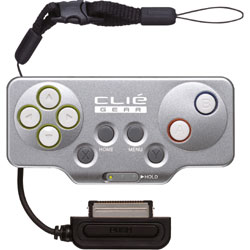
Solving the problem came in the form CLIÉ Game Controller PEGA-GC10 - the device that looks like a remote control from the game console Playstation. Accessory attached to the front of the PDA and connects to the handheld through the standard port HotSync. Its size is not too utezhelyayut design: 89h43h18mm at 30 grams. The only problem is that adapted its relative "freshness" and, accordingly, lack of support in older versions of the toys. Yes, and new releases, reviews of users, often lack of compatibility with Game Controller'om. However, the device because of the large number of players among the owners of handheld computers (on different surveys is the game took the second step in the priorities of the CPC after reading) seems to be not only original but also very useful. It is likely that smeknuv it, software developers will provide their toys support this enhancement, which is available now for just $ 40.

MP3-ctradaniya

Little things in life for Pocket PCs Sony
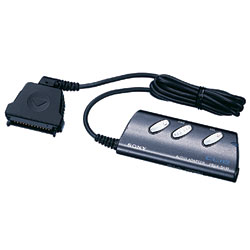
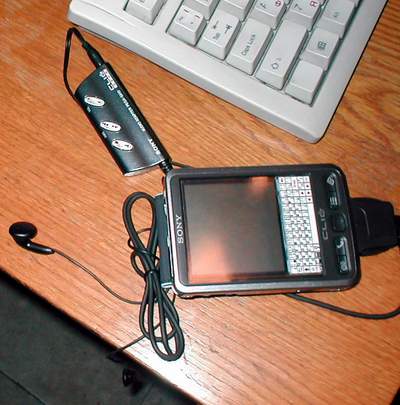
It is no secret that palmovye computers (and, hence, the handhelds from Sony) for the most part are not able to reproduce at least relatively high-quality sound. But the Japanese are known to be not of those who adapts to the situation. So is the case with MP3 and Palm OS Sony produces several models of audio adapters for their different series handhelds. Adapter itself consists of conventional headphones and easy, convenient remote control. The latter, incidentally, has a standard headphone jack, which will continue to replace a complete copy of a more attractive and high quality. With regard to software of the device, it is, as always with Sony, is made not only ergonomically designed and very thought out, but also has a nice appearance. It is worth noting that to manage an MP3-player can use the wheel on corporate handhelds from Sony. The program itself in the management standard and has enough settings for each user. It is worth a $ 99 solution.As mentioned above, there are different versions of this musical additions for Slie. At Sony CLIÉ PEG-SL10, if you remember, a connector for peripherals similar to their counterparts of the T-series. "If so - I thought - why not try to connect the PEGA-SA10, mp3-player designed for T-nis, the SL10?". Fortunately, the device model adapter was found at a friend and was immediately connected to my Slie.
Little things in life for Pocket PCs Sony
As can be seen in the photo, the adapter constructively approached without any problems. However, the software part of the work on the new machine refused flatly. The moral: if you want to buy a peripheral to his Sone, then you need to take care of the compatibility of all components. For this I recommend a look here at this address.

Compact digital camera

Little things in life for Pocket PCs Sony
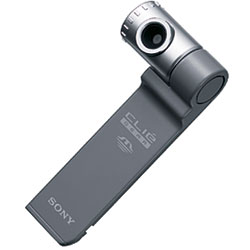
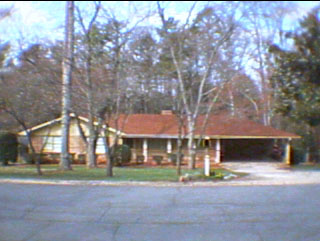
It is no secret that Sony is equipping high-end models of its handheld built-in digital camera, which, despite its functional poverty, coupled with the palm really able to benefit from its owner. What to say the ability to insert photos of the interlocutor in his own business card, he just "bimknul! But, alas, cheaper PDAs are not as interesting built-in features, so their owners can only envy the more advanced brethren ... or solve the problem with Sony CLIÉ Memory Stick Camera Module PEGA-MSC1. This accessory is different from the above method of connection - it connects to the handheld, not via HotSync-connector, and through the expansion slot. The Sony is traditionally a Memory Stick. Thus, the optional camera with a hardware point of view is nothing special. Thus, the picture resolution is 320x240 or 160x120, that quite a bit, but for viewing on a PDA is more than enough. Another positive aspect of low resolution may be the fact that the camera can not store a picture. For images using built-in memory handhelds, from which, however, then you can pass svezheotsnyatye photos on a memory card, but the fact is depressing. But if the images were high resolution camera, no built-in memory would not be enough to store them, so the lack of support for higher resolutions can be found reasonable. Also do not forget that the accessory is not a professional model and not even an amateur "bar of soap, a mobile solution that imposes on him some restrictions while adding new features. This camera is not equipped well as built-in flash, making it difficult to use indoors. However, MSC1 has very compact dimensions and its lens can be rotated. As for the program to operate the camera, it was a success. Go into the details we will not just say that you will like it. The only serious disadvantage of the considered device can be called a failure to store images in the camera. The rest of the functionality and quality of the photos are quite acceptable for a camera of this level. By the way, about the quality. Here are some pictures taken with a Sony CLIÉ Memory Stick Camera Module PEGA-MSC1:
Little things in life for Pocket PCs Sony
For the opportunity to make such snimkm with your PDA and Camera Module PEGA-MSC1 have to pay about $ 150.

Blue Smile Sony

As you probably know, all handheld computers from Sony are equipped with an infrared port for communication with other PDAs, telephones and other devices with infrared port. However, soon it will completely replace other vysoskorostnoy kind of wireless - Bluetooth. (Of course, the winners in the struggle between wireless standards too early to speak, but Bluetooth is currently bezagovorochnym leader.) This process is very slow, primarily because of the high cost of adapters. However, the technology is not only interesting theoretically, but it may well be useful in practice, especially in light of some motherboards equipped desktop PCs equipped with "blue teeth".
Little things in life for Pocket PCs Sony
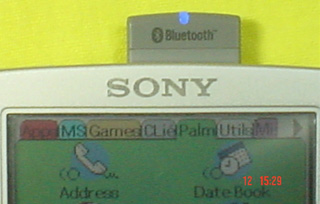
What offers its users a Sony? In the middle of this year, the company released proprietary Bluetooth Memory Stick PEGA-MSB1. It is slightly elongated memory card standard, Memory Stick with the indicator at the top. Describe the whole process of connecting and configuring cards, we think, does not make sense - for good instructions and documentation. As mentioned above, the card is slightly longer than usual, and therefore may have problems with some covers. In addition, this accessory will cost a tidy sum - somewhere around $ 200. And it is unlikely, therefore, will be available to users with low cost PDAs.

External Keyboard

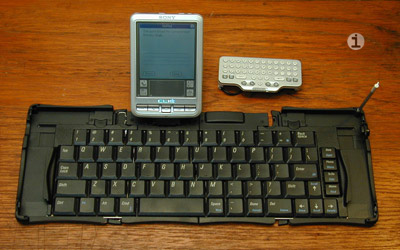
Alas, no one model of Sony is not able to work with external USB-devices (eg, a standard keyboard for a desktop PC), which possess even government employees from the mill Pocket PC (for example, the latest Toshiba e330). As a result, owners of PDAs from Sony is using a folding full-size or miniature keyboards to choose from. Fortunately, both copies of a range of accessories are available from Sony. A miniature keyboard is much more ergonomic traditional ways, and, hence, the rate of text entry, compared with the area of ​​graffiti, but it does not take up much space and is not very expensive - about $ 50. For beginners who learn the wonderful grafficheskie squiggles reluctance, it is fine.
Little things in life for Pocket PCs Sony
But those who are not satisfied with even this method of entry, Sony offers folding, closest to the standard parameters, keyboard. It is surprisingly miniature folded, the size of a small cigarette case. Such a little thing will not be difficult to put in your pocket and carry with them everywhere, and if necessary expand and work as a standard keyboard. True, the keyboard will cost more ($ 90), but the result will justify the costs. The authors, translation:

Hello, I'm yours Claudia!

This article focuses on wireless keyboards and peripherals, allowing to work with text on handheld computers - solutions based on infrared and Bluetooth. The advantages of such devices before the ordinary wire - are obvious: it is comfortable and functional, and, finally, just economically, because there is no need to change the keyboard while the PDA. To date, the Russian market can not boast an abundance of wireless "fold" for handheld devices, so the periphery line of Pocket Nature production company MakTsentr "of which we describe may well be your choice. Of course, if you expect a lot of work with texts on their handheld machine. But apart from these decisions in the testing took part and firm keyboard from palmOne, adapted from Russian developers to work with the Russian language on Palm and Pocket, as well as a curious device Pocket Nature IRWave - the original solution to the problem fast typing in the presence of an ordinary PS / 2, Claudia . In the first part of this review, we discuss three infra-red keyboard - "Ray-805", "Ray-807" series Pocket Nature and the Palm Wireless Keyboard. In the second - Infrared Adapter Pocket Nature IRwave.
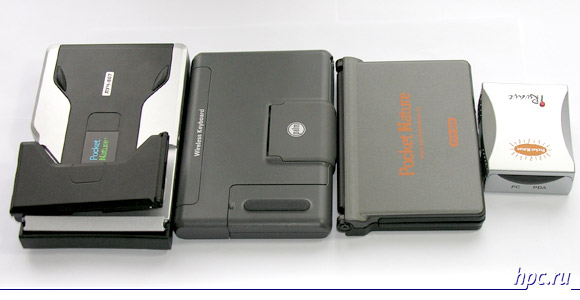
Hello, I'm yours Claudia!
Left to right: Ray-807, palmOne Wireless Keyboard and Pocket Nature IRwave
The third part of the review will be devoted to the latest radioklaviature with support for Bluetooth - "Luch-BT".
Hello, I'm yours Claudia!
All of the above models have been tested in a pair with a nice palmOne Zire 72 and good old Toshiba e750 - representatives of the two competing platforms - Palm OS and Pocket PC.

The training program

Corporate software disc MacCentre UniBoard includes drivers for all models of IR keyboards that I had, as well as for the device IRwave.
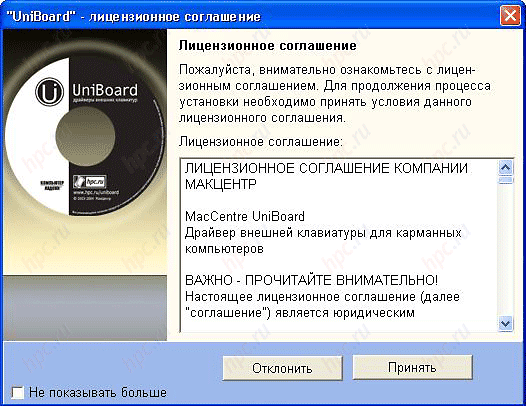
Hello, I'm yours Claudia!
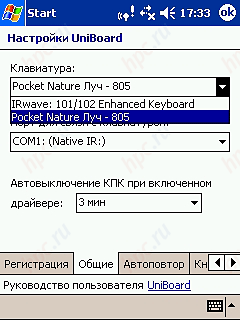
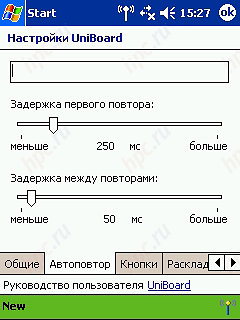
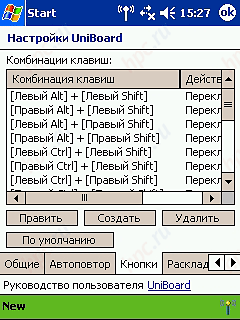
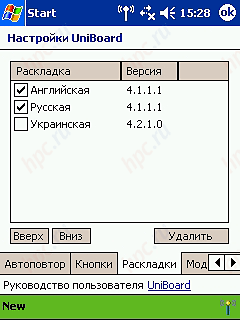
When you install you select the keyboard model and specify what your PDA. Often, the list includes one or two handhelds, while the rest simply select the appropriate operating system - Palm OS, Pocket PC 2002 or Windows Mobile 2003/2003 SE. For Palm-machines installed only the driver that corresponds to your keyboard. Accordingly, when installing a driver for another type of keyboard, the previous stops working or makes it extremely ill when typing characters at random so that you press. For the Zire 72, I used "native" to crack UniBoard MacCentre PaPiRus 2003, so immediately after the installation could include a driver and work. Communication with the keyboard on the IR port is emulated as work through the COM port, so long as UniBoard enabled sync with a PC fails, the handheld just seems to hang. C «Pokety" all the more fun. For each of the keyboard on the PDA set its specific module and the driver UniBoard, one size fits all. If your Pocket PC is installed native crack MacCentre Pocket RussKey 2003, the problems with the installation UniBoard should arise. In the "Preferences" icon appears UniBoard, clicking on which you can choose a keyboard from which to operate a PDA.
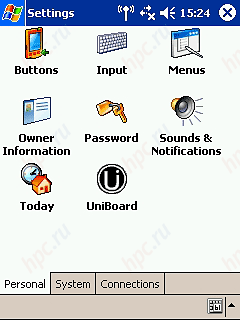
Hello, I'm yours Claudia!
Next, sets up the keyboard in its sole discretion.
Hello, I'm yours Claudia!
Curiously, I have both "live" on handheld units for the three keyboards, and I have no problem switching between them. Another nuance in preparation for working with IR keyboards linked to disabling the Pocket PC option "Allow all incoming infrared rays. If you tick this option when you connect UniBoard get here is this message:
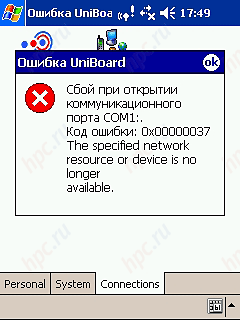
Hello, I'm yours Claudia!
UniBoard not find the keyboard
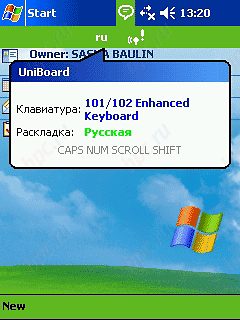
If all goes well, then run from the main menu (in Windows) command UniBoard On or properties UniBoard (in the Palm OS) click on the On. In The case of the Pocket PC in the process can obtain information about the type of the connected keyboard layout is used and activated modes NumLock, CapsLock, etc.
Hello, I'm yours Claudia!
Turn UniBoard in the "Main Menu" and clicking on the "status bar" can know which mode the keyboard works. Well, deep breath, think again (or at least make a serious face), and prepared to give a solo on a wireless keyboard.

Part One. IR Keyboard

805 rays of light in the darkness

Hello, I'm yours Claudia!
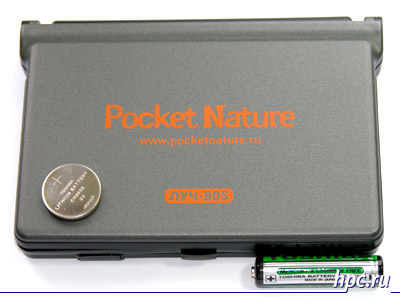
    Features Pocket Nature "Ray-805":
  • Platform: Pocket PC and Palm OS
  • Layout: QWERTY / QWERTY
  • Form Factor: Vertical foldaway keyboard to work with the CPC on weight and on the surface
  • Buttons (kol-vo/funktsional): 69 buttons, including: the call key applications pre-installed shortcuts keys with the ability to reprogram the user
  • Infrared sensor: bi-directional infrared transmitter with a range of angles from 0 to 130, with the possibility of the eight positions
  • Nutrition and battery life: work from one lithium battery CR2032 ("pill") within six months
  • Dimensions: 129 x 90 x 18 mm
  • Description and photos
  • List of compatible Pocket Nature "Ray-805"
  • Price Pocket Nature "Ray-805": $ 49
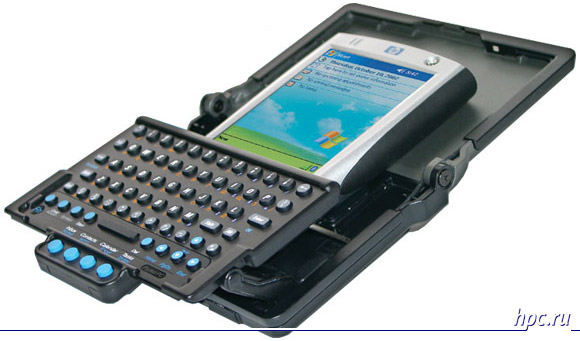
Keyboard "Ray-805" Series: Pocket Nature is designed to work on the weight of the thumbs of both hands, when the user is not possible to freely place the PDA on a flat surface. Thus, it can be recommended for use on the road.
Hello, I'm yours Claudia!
Luch-805: true, coupled with runs past HP iPAQ h2210
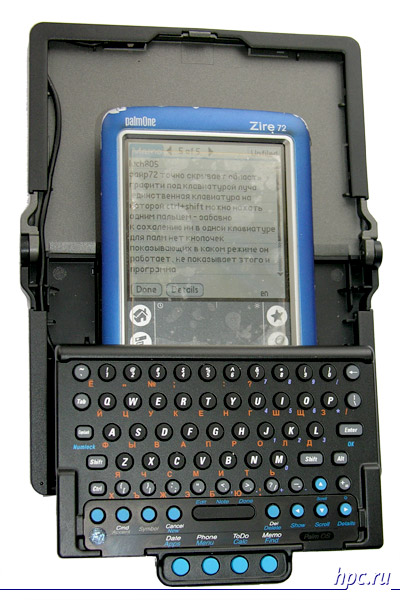
A box opens up like a book and placed vertically. The design of "Ray-805" provides accommodation between the PDA keypad and the back wall of the structure.
Hello, I'm yours Claudia!
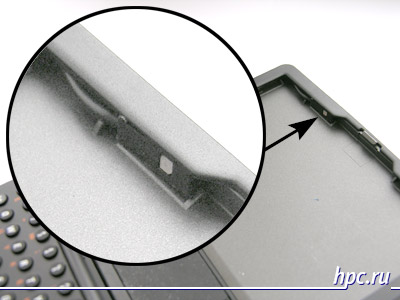
Infrared Ray-805 "settled down" under the rim of the keyboard cover
The upper half will serve a haven for the infrared sensor, which extends from the wire in the lower part, containing a small keyboard type ThumbBoard. I note a nice whitelist chip keyboard of this type - the keys Ctrl and Shift keys can be simultaneously push with one finger - very convenient to switch the layout, especially when working on weight.

Work with Palm

Zire 72 can be placed on "Ray-805" in two ways: so that his area of ​​graffiti will be hidden beyond the edge of the keyboard or in a manner that it can be seen. In the first case, a pocket computer sits like a glove. If you turn this construction, the handheld will not drop out. What his hot buttons are hidden behind the surface of the keyboard to work with the text is not affected because they are duplicated on the keyboard. In the second case, a pocket computer keeps well, too, besides allowing its owner to enter characters by hand, but still keep an eye on design at this location machines have vigilant.
Hello, I'm yours Claudia!
I regret to add that neither this nor the other keyboards for Palm-machines do not have lights, prompting mode in which it operates. Does not show it and the program. Otherwise, claims to work on Palm'ah not. On the general impressions of the keyboard - just below.

Working with Pocket PC

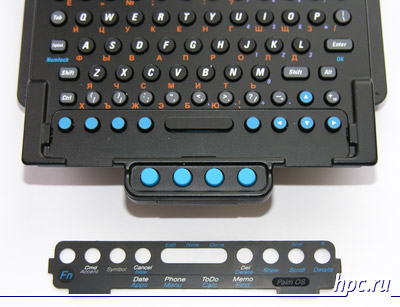
Construction, securely thin Zire, keeps well and Toshiba e750, but now Excursions in Istanbul on handling the keyboard have to forget. Turn the "Ray-805" with voodruzhennoy it Toshib'oy not recommended. Besides, with my "Pocket" has turned out quite a bunch of bulk. Despite this, I prefer to keep it in my hands, but I do not think the same opinion will be users with young palms. In e750, installed on the keyboard, blocking the buttons and the joystick, so that there occurred the way hotkeys on the keyboard. Cover, framing the understudies hot keys for "Ray," is lifted and rotated. On the one hand, there are labels that match the hardware buttons Palm, on the other - signatures slits mark applications Windows Mobile.
Hello, I'm yours Claudia!
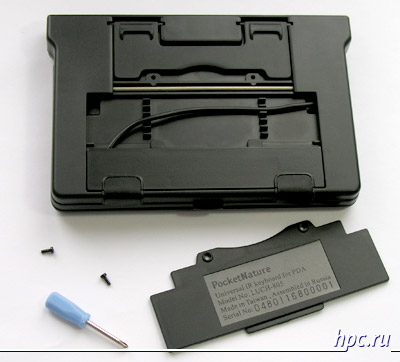
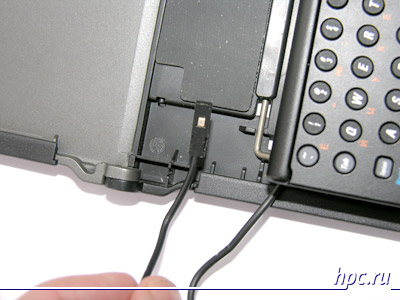
It is a pity that the developers have not provided additional stylus holder in most keyboard. The fact that all the time, insert-remove the pen from a PDA, voodruzhennogo in "Ray", it is inconvenient, as we are holding on to them over the edge of the top cover. So, turn UniBoard. Already, you can print? Yes, there it was! Fired my first trap. The fact that the infrared e750 is not on top, and on the left side wall. However, designers should consider this and meanness on the part of manufacturers of PDAs. The package includes a ma-and-scarlet screwdriver, which can be turned out two screws.
Hello, I'm yours Claudia!
Then open the compartment, which can pull up the excess cord from the infrared sensor to the panel, keyboard, and the sensor is placed at the left edge of the design - just opposite the infrared port on the CPC. Everything is ready and works okay.

Features of "Ray-805"

Unfortunately, the design of this model was originally designed for English users: in the first three rows - all 26 keys (10 - in the first, 9 - in the second and 7 - in the third). As a result, English letters can fit, but the Russian site, alas, is not enough: some Cyrillic "exiled" in the 4-th series. Printing is pretty fast, until you need to type characters from the right side of Russian layout. Takes a few moments out to find them in unusual positions. Cruising speed printing - 80 characters per minute (or 40% of maximum, developed on a conventional keyboard). Approximately the same rate, you can work on-screen keyboard, but "Ray-805" is more convenient for shaking. Meals made from button-type battery. After work, the keyboard consists of a small box, smaller PDAs.

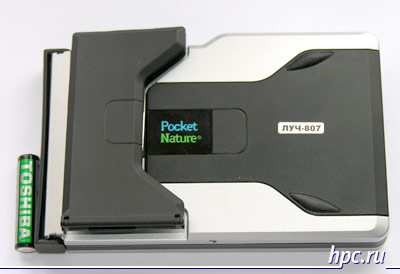
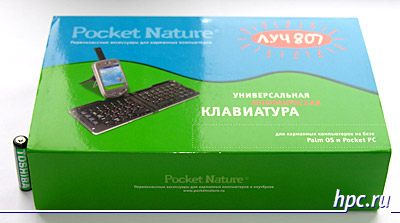
Pocket Nature «Ray-807", or to stop lying

Hello, I'm yours Claudia!
    Features Pocket Nature "Ray-807":
  • Platform: Pocket PC and Palm OS
  • Layout: QWERTY / QWERTY, divided into two parts
  • Form factor: folding the horizontal keyboard to work with the CPC on a solid surface, a stand for vertical positioning relative to PDA Keyboard
  • Buttons (kol-vo/funktsional): 67 buttons, including: the call key applications pre-installed shortcuts keys with the ability to reprogram the user
  • IR detector: two infrared transmitter: the first is a sliding folding of a stand for the PDA, is attached to the axis of the CPC with the angle of rotation from 0 to 180 degrees (myself sliding portion in the folded state is on top of the keyboard housing) and the second - on the front end of the keyboard
  • Power supply: 1 AAA battery
  • Dimensions and weight: 150 x 96 x 27.5 mm and 188 g
  • Photo and description
  • Compatible Pocket Nature "Ray-807"
  • Price Pocket Nature "Ray-807": $ 69
Hello, I'm yours Claudia!
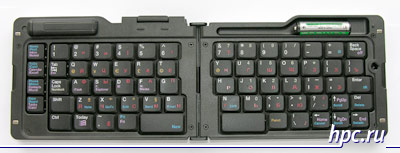
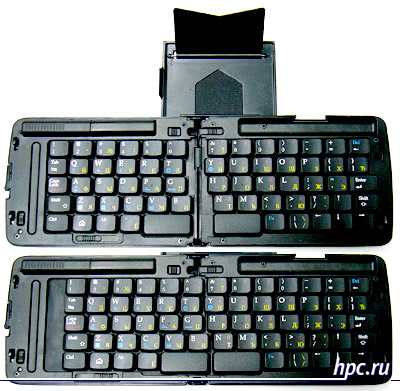
This keyboard can be expanded in the horizontal plane, forming a familiar design, divided into two parts, the smaller the size of their older "sisters" for the PC.
Hello, I'm yours Claudia!
Then crushes a tricky design stands for the PDA, grounded in the closed position outside the body.
Hello, I'm yours Claudia!
Luch-807: Infrared Sensors highlighted in red
Voodruzhaem on her PDA, it is focused infrared relative to the infrared port on the keyboard movable axle - and can work with. Many of the key "Ray-807" can serve as "hot" to briefly in the military giving orders.

Work with Palm

Not all the symbols on the keyboard commands executed in a hurry in the recruitment of a cherished hand. For example, the new document willingly run (attached Memo), but the cause-mail or NotePad and failed. In the same Memo did not introduce any special characters. If this function on the keyboard worked, it would reduce the time on the set of texts that contain all sorts of squiggles type mail "dog."
Hello, I'm yours Claudia!
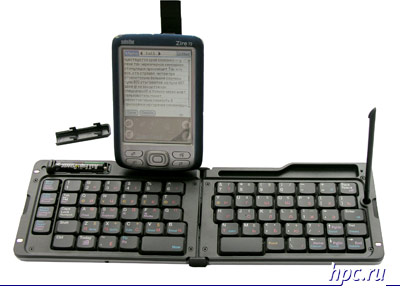
We can not say unequivocally that the blame for the outstanding team is the developer. Perhaps the manufacturer of the keyboard, causing signs, immediately assumed that some of them will be used by Palm OS, and part of a Windows Mobile, but that's just forgot to separate them by color or otherwise. However, it has additional advantages. The main job of putting his characters keyboard executes correctly. In addition, it allows the driver myself "hang" 8 applications shortcuts, and four other applications (Memo, ToDo, Contacts, Tasks) are some shortcuts. True, under the Palm OS I have not earned a standard procedure for selection using the cursor keys, and Shift. Pleased that two small cloves on a keyboard, in which rests against the lower part of the CCP, is ideally hold the Zire 72 from slipping, as if it is him and calculated.

Working with Pocket PC

As in the previous case, Toshiba "picked up" the keyboard as an abstract Pocket PC operating system Windows Mobile 2003 - no problems. Just as on the Zire 72, worked, not all additional commands labeled on keys. For example, failed to create a new document and edit an existing one. The settings can be programmed UniBoard keyboard shortcuts for launching applications, but does not activities such as editing a document. But under Windows Mobile 2003 duly published additional icons. By the way, characters © and ® available in all the keyboards tested, indicating a serious attitude to copyright.
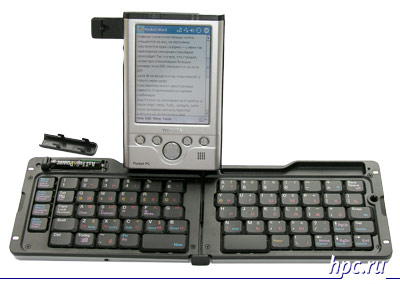
Hello, I'm yours Claudia!
The keyboard is not well suited for large PDA: two tiny teeth, in which the developer's idea, rests on grounds the CCP, poorly constrain such as the e750 Pocket PC, PDA and often moving out on the keys, making it difficult to print the numbers 5 and 6. Despite the fact that the strap holding the IR sensor is rotated around the axis and can be located at the side of the CCP (as pictured), his ray to finish up "the window" my PDA could not. You understand that working with one hand while holding the second handheld suspended three inches from the keyboard, not very inconvenient, so I really was going to "kick" absurd "clave" feet, but when the slope, I saw that modelka has the second IR sensor on the front end. With this confidence, the keyboard can be connected to any PDA equipped with an infrared port. Of course, working with the palm turned, but still partly covers his hands, not very convenient, but the machine will not slide and seal place in any weather. "

Features of "Ray-807"

Promuchavshis with the keyboard for half an hour, I realized how much need the LED, indicating the willingness to work. The matter was not in the driver and the settings PDAs (which is also sometimes the case), simply "dead" battery. In "Ray-807" very large dimensions in the folded position among the three considered. Nevertheless, her keys were a bit narrowish for my fingers. I always felt the edge of the neighboring ones. Care should be taken not to offend them naturally affected the speed of typing. My result - 135 characters per minute (68% of maximum). Despite some shortcomings, this model can be recommended to all, including the owners' real fingers ":) We say that a couple of minor design flaws developers," Ray-807 ".First, lightly holding a magnetic latch that attaches the pull-out design with an infrared sensor to the body of the keyboard when folded. The fact that it just stuck, so that the user does not have much "try" to latch came off. It threatens that tricky foldable design will attempt to open, which in turn can lead to permanent damage.
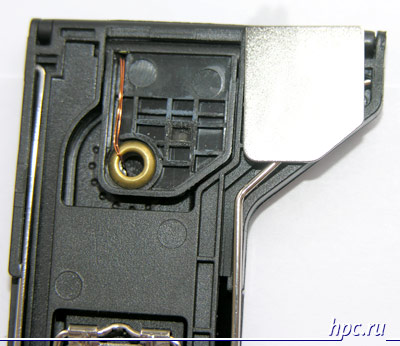
Hello, I'm yours Claudia!
That is the magnetic latch ...
Secondly, and this keyboard does not provide staff openings for the stylus. Of course, you can use decorative rings to put them in a pen (as in the photo with the Zire 72) or a small horizontal recess above the keys. But in the end, the keyboard is designed to work on a flat surface on which the stylus can and put. The rest of "Ray-807" is quite easy to use. Despite the fact that this model is more than other member of our review, it does not take up much space in your bag.

palmOne Wireless Keyboard: not just for Palm

Hello, I'm yours Claudia!
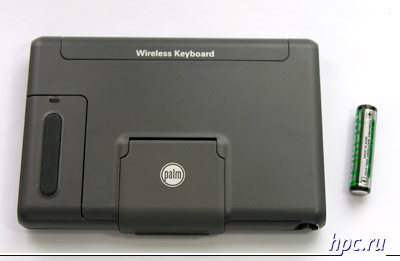
palmOne Wireless Keyboard features a interesting design. IR sensor is located on the lever, which can be raised or lowered over the CCP's left of it. It is noteworthy that this model is powered by two AAA batteries.
    Features palmOne Wireless Keyboard:
  • Platforms: Palm OS and Pocket PC (with driver UniBoard)
  • Layout: QWERTY / QWERTY
  • Form factor: folding the horizontal keyboard to work with the CPC on a solid surface, a stand for vertical or horizontal position of the CPC on the keyboard
  • Buttons (kol-vo/funktsional): 65 buttons, including: the call key applications pre-installed shortcuts keys with the ability to reprogram the user
  • IR sensor: Located in the pull-pull of a stand for PDA
  • Power supply: 2 AAA batteries
  • Dimensions and weight: 238x66x17 mm in the open position, and 188 g
  • Photo and description
  • Compatibility List palmOne Wireless Keyboard
  • Price palmOne Wireless Keyboard: $ 69

Working with the "native" Palm

The keyboard is covered with murals of additional commands, it is not surprising: it has two function keys (blue and green), and even utility Cmd. Naturally, c Palm-device works almost all the combinations that cause schedule, ToDo, contacts, calendar, creating a new document, editing it, viewing properties, deleting, and also duplicated hotkeys in the area of ​​graffiti and provide execution of commands OK, Done, Cancel. Phew! Unable to just type the letter "e", and allocate the symbols can be obtained only within a single line.
Hello, I'm yours Claudia!
Zire 72 is conveniently nestled in a steel frame - see immediately hit home.

Working with "outsiders" Pocket PC

But "plump" Toshiba e750 will not fit in the frame keyboard, it has to be put on top, why it starts a little balance, threatening to fall on the keyboard. And yet, despite the fact that palmOne Wireless Keyboard is designed for Palm-device, my Pocket PC worked fine with it - thanks to the creators of drivers. Moreover, unlike the Palm, with e750 is an opportunity to see the current status - whether or not pressed CapsLock, etc. key, which is very important for such a model, with its abundance of function keys. I think, more relevant "thin" Pocket will feel its "arms" is not less convenient than the Zire 72.

Features palmOne Wireless Keyboard

The biggest drawback palmOne Wireless Keyboard - the combined number of letters and numbers.When entering text, which are often used in those and other, the rate decreases, since all the time, we must keep track of which combination you press. However, when printing text, not including the numbers, I managed to reach a speed of 165 characters per minute (82,5% of the maximum). Thus, palmOne Wireless Keyboard - the most "speed" model of the considered IR keyboards, provided that the working text of the relatively small numbers. In terms of convenience, it may be noted duplicated on the keyboard shortcuts PDA. However, some additional commands, such as changing the brightness, it works only with palmovymi PDAs, so this will have to get used to those users Pocket PC, which will choose wireless "Dial" from palmOne.
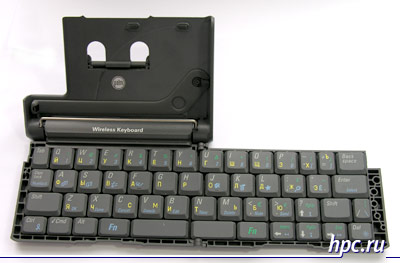
Hello, I'm yours Claudia!
Note a couple of constructive points. This model has proved to be excellent in working with non-native Toshiba e750, without requiring any additional effort on my part when interfacing the IR port on a PDA with an infrared sensor on the keyboard. The fact is that due to the location of the IR port on the spinning axis, the handheld can be positioned both vertically and horizontally - it all depends on your wishes. It is also interesting that despite the fact that reliance palmovoy "clave" is made of plastic, it is more reliable than "Ray-807" (based on metal support) holds the PDA on a flat surface.

Part Two. Philosophy Pocket Nature IRwave

Hello, I'm yours Claudia!
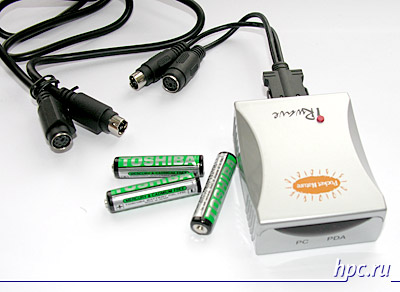
However, the engineers would get a bad mark for the fantasy, if the survey were presented exclusively keyboards for PDAs. Each user has a desktop computer has a keyboard, and it would be sinful not figure out how to use it. To do this meant the original device Pocket Nature IRwave - an adapter that connects to the PS / 2 keyboard and transmits data to the PDA through the infrared beam. Since in this case we need to be fed not only the adapter, but the very keyboard, it is unsurprising that IRwave fed directly from the three AAA batteries. After connecting the keyboard to the adapter allows you to enable PDA mode by pressing the red button. Confused with the other it is impossible, since it is only on the body IRwave.
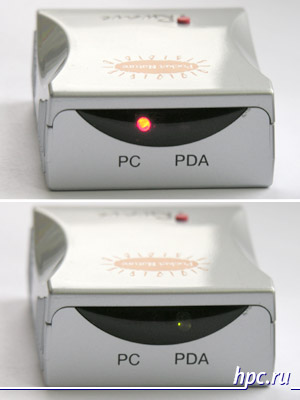
Hello, I'm yours Claudia!
PC mode, apparently intended for the adapter from PS / 2 connector, but then the logical typing on the computer itself. Descriptions of the device is not, and then our guide can not help you. Before moving on to work with PDAs, for example, that in this part will not be considered a bunch of IRwave and Palm OS, as there is currently no released drivers for its work.

Working with Pocket PC

Just an amazing feeling when typing on the keyboard of his beloved home, and the text appears on no less beloved PDA. Finally, I got a chance Babakhan the keys at full speed, not looking for the desired character and not being afraid to touch the adjacent keys. On the PDA screen characters appear with some delay, apparently, takes time does not transform into the adapter, and perhaps e750 is not keeping pace with the keyboard, but, nevertheless, the signs are not lost. Works even button the main menu! In addition, the driver can configure the action by pressing a function key. When you turn on NumLock digital layout and functions, key CAPS LOCK, Home, End, PgUp, Pg Down work. All regularly working for the benefit of the user, the beauty! One note: as in some previous cases, the selection of fragments combination of Shift and the cursor arrow is not happening. It is necessary to enable NumLock and then the arrow keys will highlight text as well as on PCs when pressed Shift.

Features Pocket Nature IRwave

Design Pocket Nature IRwave simple but neat. Requirements for the interposition of devices working with it about the same as when handling a cell phone: PDA and the adapter does not force the user to exactly one aiming an infrared port to the IR port of another, and allow some deviation from the most effective position. Radiation power is enough to establish contact between them. Or not to use IRwave? This is a philosophical question, if you want. Unambiguous lack - only a lack of drivers for the Palm OS. I hope that this - a matter of time. The rest of the adapter itself has disadvantages. For example, it costs half the price of the same "fold" for the CPC. However, for him to take a couple of full-size keyboard for the PC. Of course, such is not expensive (some models - even less than 100 rubles), but it's home to buy more, but take it on the road with no meaning. Firstly, it will take a significant place in the road case. And secondly, if you're looking for a keyboard in place, will not it be easier to find the right PC? Also, keyboards for PCs do not provide the base for the Pocket PC: need, or something of the wizard and look for a flat surface. IRwave most beneficial when you need to work exclusively with text documents, but you do not want to risk them by copying to someone else's computer. Or, if you find a suitable keyboard, which does not overburden you on the road and achieve a top speed of your entry - 100%! Price Pocket Nature IRWave - $ 49.

Part Three. Dental ray or Pocket Nature "Ray-BT"

Exchange of data with a PDA via infrared port this year ispolyaetsya a dozen years. It was 12 years ago at the Macworld trade show to the public was presented to the unforgettable Newton. By the standards of the IT world, this method of wireless data - just a fossil mastodon. Not surprisingly, the first conversation on the use of Bluetooth-keyboard began with the release of the first machines with this protocol.

Pseudo-marketing retreat

However, in our country, they somehow do not gain popularity. And you-the CCP started to actively sell the whole year 3 back, what can we say about not cheap handheld wireless keyboard. Theoretically, the Bluetooth standard for what is called the "standard" that a PDA can connect it to any BT-keyboard. But who in this situation have to write drivers for the keyboard firms, for example, Logitech? That's right, the one who receives from the sale most of the profits - the company itself. And what is the company increased sales in Russia keyboards by 1%? Clearly not worth it to distract programmers to check the compatibility of the driver keyboard with a PDA, and, always with a Cyrillic keyboard layout. But for "MakTsentr" this decision is already profitable. Keyboard Pocket Nature - its means, and profit from their sale is enough to give the job to programmers to write one more driver.

Pocket Nature Ray-BT

Hello, I'm yours Claudia!
Ray-BT keyboard comes with a cozy cheholchikom
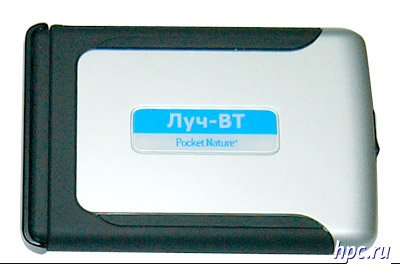
So there's a new "Ray". By the size of the model Luch-BT "similar to" Ray-807 ". Open the latch and make sure it's still not twins. Firstly, as a power source uses two AA batteries format, moreover, is mounted on the body diode, which flashes when you turn on the keyboard (there is a separate button). This concern about the current state is clear. Bluetooth is too hungry to leave it unattended. At this design features do not end there.
Hello, I'm yours Claudia!
Beam-BT in the folded state
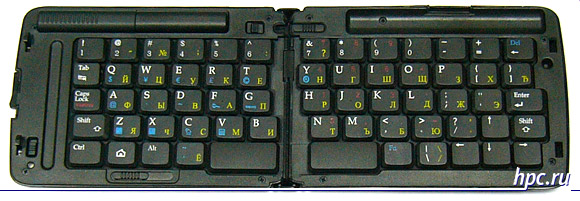
Lever on the bottom left of the keyboard shift left half to the right and another one (located at the top, almost in the middle), we fix the halves.You can even work on my knees! However, do not use it on a flat surface of scary - the latches hlipenkie.
Hello, I'm yours Claudia!
Beam-BT revealed - shift left halves Pickup
So, part of the layout shifted, so that you can take and adapt postavochku for PDAs, which hides in the end of the keyboard.
Hello, I'm yours Claudia!
    Features Pocket Nature "Ray-BT":
  • Platform: Pocket PC 2002/Windows Mobile 2003/2003SE/Phone Edition, Palm OS 5.x and smartfnony Symbian OS (while preparing an article for publication the number of compatible platforms, replenished by Symbian OS v8.0 (Series 60) 2nd Edition - cm . News - Ed.)
  • Layout: QWERTY / QWERTY
  • Form factor: folding the horizontal keyboard for a PDA on hard or uneven surfaces, with support for handhelds
  • Button (number / functional): 63 keys, including shortcuts applications;
  • BT-sensor and indicator: operating at a maximum distance of about 4 m, whatever the orientation of the PDA to the keyboard, two-color indicator Bluetooth-connection
  • Meals: Work on two AAA batteries
  • Dimensions and weight: 142 x 95 x 21 mm Weight without batteries - 180 g
  • Description and photos
  • Price Luch-BT ": $ 110

Work with Palm

For the tests, "golubozubogo" beam has been involved all the same Zire 72. Installation of the driver, as in previous cases, is made over the previous driver, so to work simultaneously with two keyboards, infrared and Bluetooth - no luck. I must say that in the case of this machine, I was blown away by the simplicity keyboard. Run UniBoard, then Zire 72 runs on their own Bluetooth, finds the keyboard and ready to go. Bravo Palm OS! Bravo driver developers! At such moments, you know, why are still cranks that can live without Windows Mobile. For the sake of experiment I tested, from what distance can be printed on the keyboard - it turned out that gets a maximum of 4 m. Furthermore, if the stuff a few characters out of reach of the CCP, then return to the zone "tooth contact," we can expect that they will be displayed on the screen. Unfortunately, further work revealed glitches, which are clearly program origin and treated with the release of the new driver. The fact that they are treated, I am sure, as the Pocket PC to come. For example, the often slow keys Shift, to print the text in large letters. And to enter letters, and sometimes had to the contrary, with all his might utaplivat keys. Of the four hot keys, combined with the basic, one did not respond to clicks. However, in fairness, I note that the driver has an opportunity to "hang" launch any application installed on an additional shortcut. In addition, no problems entering all characters, including all sorts of $, €, ©, ® and @, as well as the letter e.

Working with Pocket PC
Hello, I'm yours Claudia!
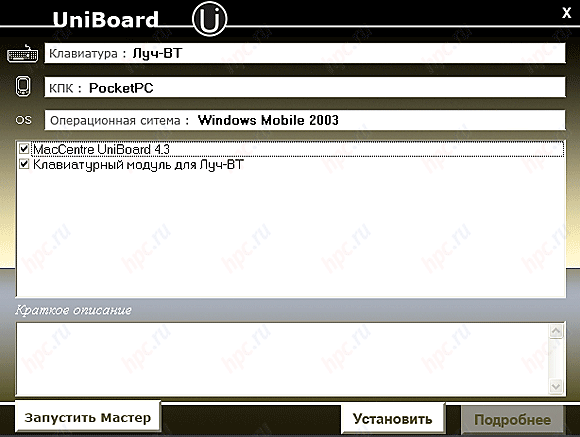
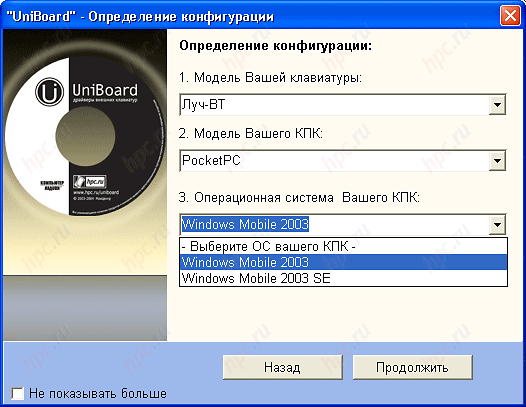
Interface is the same as driver version UniBoard already 4-I
Hello, I'm yours Claudia!
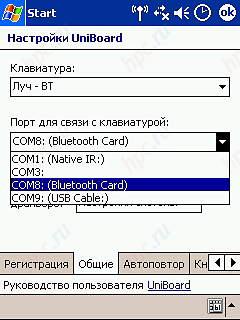
Pocket PC to communicate with the Ray-BT "programmers developed UniBoard version 4.3. When you install the PDA models are not offered a choice, it is sufficient to specify only the operating system - WM2003 or WM2003SE. Pro Pocket PC 2002 does not mention. Apparently, a "MakTsentr" resources are not limitless.Habitually choose the new keyboard in the CCP (the old course were, at any time you can switch to them) and the port. On the Toshiba e750 driver tells us that Bluetooth card depends on the 8 th of a COM port.
Hello, I'm yours Claudia!
Keyboard "moved" to SOM8
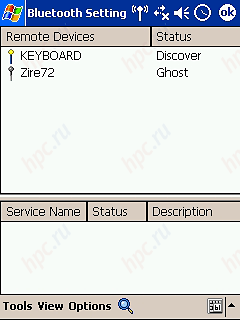
And then begins the most difficult stage - to connect the PDA to the keyboard. Somehow, the pair are not always able to "reconnect". Perhaps here too there are gaps in the driver or just to say a relatively rare incidence of e750.
    I have things working in the following sequence of actions:
  1. key on the keyboard
  2. include Bluetooth-adapter on your PDA
  3. find a Bluetooth-manager or an application, replacing it, to search for devices
  4. find the keyboard and connect to it
  5. include UniBoard (if you include before, errors may occur)
  6. open the application and start working.
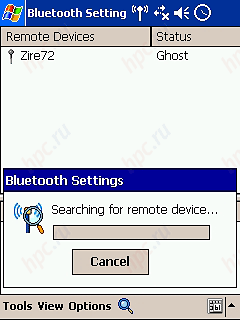
Hello, I'm yours Claudia!
Along the way, was discovered lying near Zire 72 ...
Hello, I'm yours Claudia!
But the keyboard and Ray-BT: Who is looking for, will always find! ..
As for a PDA running Windows Mobile 2003, then the pair with it, "Ray-BT" worked "with a bang: properly carry out their tasks under the default hot keys (mail, contacts, Today, tasks), carefully print all the characters and the letter "e" excellent switched to the upper and lower case. In short, after the connection problems have arisen.

Features of "Ray-BT"

This model - the undisputed leader in terms of print speed - 160 characters per minute (80% of maximum). In this case, unlike palmOne Wireless Keyboard, its user will not experience difficulties with a set of digits. True, "Ray-BT" missing keys cancel the action - ESC or Cancel. If the manufacturer will complete the driver to integrate it as a convenient connection to Palm OS and clarity of both the Windows Mobile, something will come a great keyboard. Will not have to worry about too much bright light in the room and the positioning accuracy infrared transmitters. Of the benefits of "Ray-BT" can be identified ergonomics, providing the opportunity to work as a solid surface, and on his knees, a soft key travel, functionality and usability, and good battery life from one set of batteries (for the week of testing our sample "is not exhausted). Moreover, despite the reasonableness of design "Ray-BT" as a whole, it has one slight drawback - it actually stand for PDAs. By virtue of the fact that it has no permanent attachment to the body handheld, it is not so easy to extract from the "pockets" in the end and you can finally lose if time does not fix the keyboard or not to remove the back. In general, not the best solution.
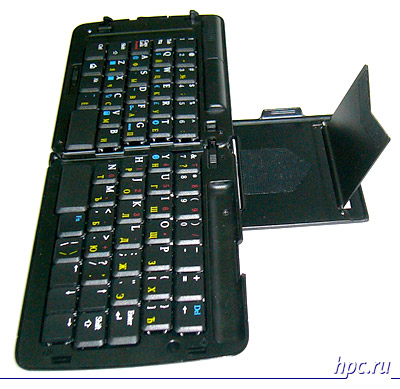
Hello, I'm yours Claudia!
Beam-BT: support for the CCP is not the best solution ...
In other respects - the use of Bluetooth protocol opens up broad prospects. In addition to devices running Palm OS for their turn to connect waited for Smartphones on Symbian OS: Driver MacCentre UniBoard for them is already available. So now once bought the keyboard is also suitable for PDAs and phones. Despite the fact that "Ray-BT" is quite expensive - $ 110, this keyboard is worth the money.Subject to further improve the software golubozubaya "clave" will only strengthen its market leadership.

Conclusions

Common words in this case the limit is difficult, so accustomed to read only the conclusions nevertheless suggest that scanned the entire text. And for those who bravely came to end Tell me to say goodbye to "klava" for a single device. In today's relative diversity and soft-supported UniBoard (single keyboard driver for all of the above-mentioned models), you can choose the keyboard that you like, so that it no longer depends on the brand manufacturer of your PDA and do not pay when he was replaced by a new model every time a a new keyboard. If you compare the only solution on the basis of the IR port, then palmOne Keyboard Wireless can be called a very "high-speed and convenient in terms of design the infrared sensor model. Of special note is a device Pocket Nature IRwave: while not in itself a complete solution, it allows you to choose a keyboard "for themselves." Maybe someone will want large keys, and someone wants to have an ergonomic folding design. In general, the triumvirate (PDA, keyboard, and IRwave), of course, come a little bit bulky, but more flexible in terms of functionality. Separately, I want to note and Bluetooth-keyboard "Ray-BT" supports a more modern and convenient way to transfer data. Greater than those of competitors, and resistance to folding will work, if not on his knees, then on a mattress in the bed or on the book. Some problems in dealing with "Ray-BT" I took to the peculiarities of the experimental sample, but no one bothers you try it in action before buying. C this decision, you will not care as directed sensors infrared port, so that we can take the PDA to withdraw, for example, to photograph an interesting scene outside the window. In the end, we live in the 21 st Century, which there may be infrared ?..:) authors, translation: