Recently, the category "Workshop" published an article devoted to the reading documents in various formats on your PDA. Judging by the heated discussion of this material in the forum, the topic is highly relevant and obviously require development. We bring to your attention the new material, which collected bypassed in the first part, but nonetheless very worthy and interesting products. At this time the paper is supplemented by personal experiences, and weighted estimates of experienced users WM PDA.
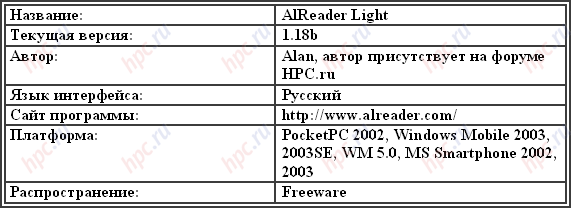
AlReader Light
The first program, which I would like to tell you - it AlReader Light.
This application is still not as well known as Haali Reader or iSilo, but has every chance to stand up to these giants of the world of pocket bookreaders in a row.
Already, the program supports many formats of books, namely: - TXT
- HTML (text only)
- FB2 (text only)
- RTF (text only)
- PRC, PDB (PalmDOC)
- PRC, PDB (zTXT mode 1)
- TCR
- DOC
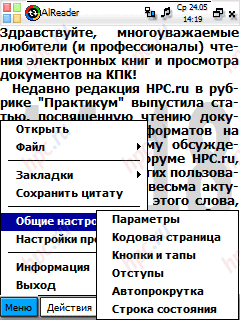
Not a bad list, is not it? However, in the current version (1.18b) can not see images in the files (of course, if the file format supports these same images), only available text. But the program is continuously refined and improved, and tested at the time of writing version 2.0 is already, at least, will show the pictures in books format FB2. Also in the second version of the forward support for reading books from the zip-archive without unpacking thereof, as is done in Haali Reader. Little time on the format. Doc. Because of its support was introduced recently, auto-coding in this format does not work (it is expected that this moment will also be corrected in the second version of the program). Therefore, if you have AlReader-om. Doc-file and saw there is what you expect, do as follows: "Menu" -> "General Settings" -> "Codepage", then double-tap (press with stylus) on the string Unicode . Most likely, then your text will be readable.
More remarkable than this reader?
Here is a list of the most interesting features: - The set of supported encodings (I counted 46)
- Ability to rotate text on the screen for 90, 180, 270 degrees
- Profile support of up to 4 pieces (each profile can customize the font "for themselves, including the size, name, bold or not, the inclusion of ClearType, character width, line spacing, and set background color, text and status bar )
- Opportunity to establish the line of the text on the right or bottom - as you wish. And make settings separately for full and normal screen
- The ability to customize the status bar (in this line you can put the current time, the amount of reading as a percentage and / or pages, 1 kB, battery charge, so as not to read before a full charge).Settings are also separately for normal and full screen modes.
- 5 kinds of auto-scroll
- Fully customizable hardware buttons on the device, including the effect of joystick Left / Right / Up / Down
- Customize tapov on the screen (you can configure taps on the left and right side of the status, as well as taps into the upper, middle and bottom of the screen)
- Customizing strokes on the screen (from top to bottom, bottom to top, left to right and from right to left)
- Bookmarks with navigation on them, the transitions on the page number or percentage of reading, searching with the ability to use templates
- Ability to save quotes (quote is currently displayed on-screen text)
- Saving reads the file as TXT or PDB in the selected encoding (although us poketovodam, PDB is not very necessary, but still ...)
- Settings are stored in files, which creates a program in the same directory as itself, so that when moving to another machine should be no problems:)
- Lovely opportunity - to put as "wallpaper" hours in order not to read and do not miss something important.
Personal impressions
Personally, I AlReader something like marathon runners. African athletes have seen? Low, thin, but vynooooslivye ... That's the program at about the same "feel to the touch." Graphics - the minimum (more precisely, only the logo at the start for a split second). No you "ryushechek", "ikonochek, skins and other decorations. One hundred percent of bare functionality. But the program "flies" as a fighter, chesslovo:). Standing on my map is not the fastest CF, TXT book in there as well. Opens a book in less than a second! And in the book more than 2 MB ... Few competitors compare. Of course, most likely, the lack of "frills" and code optimization due to the fact that the program simultaneously supports and WM-smartphones with their not too big screens, and not too powerful processors, but the fact remains - it works very fast. And if you add on to the speed of a wide range of possibilities, the further development of the reading room and excellent support from the author, then we conclude that a minimum of attention from the reading of poketovodov and sorry for the long neologism "smartfonovodov" this application can rely on.
Pros: - Speed work
- multiformat
- rapid development of the program
- excellent support from the author's work including the WM Smartphones
Cons: - not supported by pictures in the document format FB2
- not supported by reading directly from the archives ZIP.
AlReader Light - Multi great "reader", practically the only one makes it comfortable to read books in a format. Doc.
MobiPocket Reader
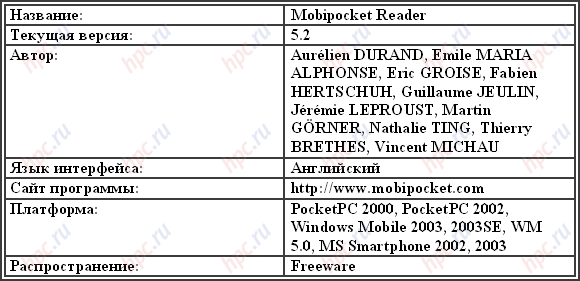
Followed hero of our review - MobiPocket Reader.
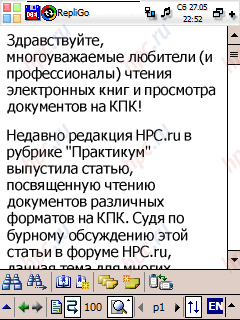
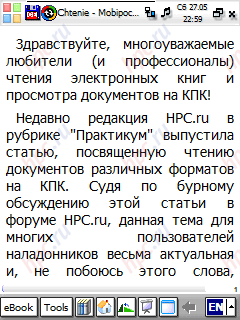
This program belongs to the category of "prefer a format that is comfortable to work you at least need a converter file format reading room, working on a PC. This application is similar to its closest competitor - RepliGo. However, he has a substantial and very different from a competitor. Firstly, less universal converter. If RepliGo converter for installation on the PC establishes a system of its own "virtual printer" on which you can print almost any document and get the output file, which recognizes the reader on a PDA, the MobiPocket no such possibility.Secondly, MobiPocket Reader as a reading room is more appropriate than RepliGo for one simple reason - it displays the fonts are not vague, in contrast to the latter.
 |
 |
Let us tell you more about this very interesting program. To get started please refer to converters and consider them. Convert the number "one" - MobiPocket Office Companion Pro 2.1. This converter will take the training to view documents on your PDA, create or view your programs Microsoft Word, Excel, PowerPoint, Outlook, Access, FrontPage and Visio. As you can see, "universality" of the program for office documents is very high. Moreover, when converting for images, local links, tables and so on. And while converter produces different files for the reading room, depending on what information you want to convert. For example, converting from Outlook, you can choose what kind of data converter will send the file ("Contacts", "Cases", "Meetings" and so on, until the mail). In this case, you may well, for example, throw in a separate folder Outlook'a any mailing list for a couple of months, to read that does not have time, to specify a converter, which encode only need a letter from the current folder, then fold the resulting file on the PDA and free time to look through it to the CPC on the way to work or study.
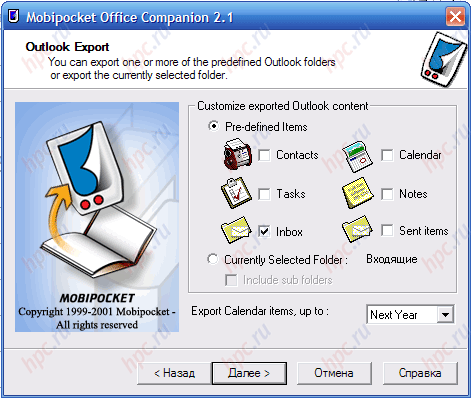 |
Interestingly, this file before shipment to your PDA, you can see on the desktop in an emulator built reading room. Convert number two - MobiPocket Creator 4.0 Home Edition.
This converter allows you to: - Create a book in just a few "clicks" the mouse
- Import MS Word files and text files
- Soctavlyat content of the book with links to chapters with built-in "assistant"
- Add a picture as the cover
- Use any of the ten preset samples to create books of various kinds (a photo album, cookbook, etc.)
- Oh, and much more:)
In short, the thing - not bad, quite suitable for the rapid distillation of the texts in the book for MobiPocket Reader'a. Convert number three - Mobipocket Creator 4.0 Publisher Edition.
Does all that and Home Edition, plus a little more, namely: - Import text in Adobe PDF format
- Protects the content of the book, using a system of DRM (Digital Rights Management)
- Allows you to insert pre-favorites in the book
- Allows you to add a book metadata (author, price, etc.).
In general, a very good application for those who want to do a professional overtake book in MobiPocket (especially when you consider the price of Publisher Edition - $ 149). So, with converters such as finished. We now turn to the actual reader.
What is interesting is it for?
Particularly include the following skills MobiPocket Reader: - Ability to embed different marks in the text (up to the drawing). The text itself you can not change, but notes stand out quite well
- The ability to insert into the document (just as you read) a reference to another document or to a point in the current document
- Skinnable Control Panel: you can put there will most frequently used operations
- Custom text color, background, selection, annotations and references to the transition
- Adjustable spacing, indented from the sides of the screen, the orientation (normal, 90, 180, 270 degrees of rotation) when the program starts
- Setting hard buttons for various actions.
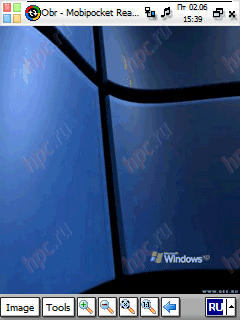
Another interesting feature of the reading room - to view the image at 1:1. More precisely, if while reading the book you come across a picture, it will be scaled on-screen. But tapnuv on it and choose Image Mode, you will be able to view the image in detail, including zoom, etc.
In addition, MobiPocket Reader lets you read files formats. Html and. Txt, but in these conditions does not make friends with Cyrillic encodings. In any case, the output I have never received a readable text.
Personal impressions
A wonderful reader with good converters. If you need to move on the PDA book or a document with internal links and images from any program MS Office, please note it on the MobiPocket Reader.
Pros: - excellent support for viewing images in a file
- multi-format converters
- great job with the notes in the document
Less: - does not display the Cyrillic unconverted documents formats, HTML and TXT
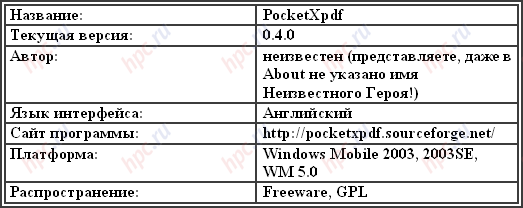
PocketXpdf
Not so long ago there was another noteworthy program for viewing files in a very common format PDF - PocketXpdf.
Most probably, a young program in our today's review. The first public release of this remarkable application was held on Dec. 30, 2005. For obvious reasons, reading PDF-documents on screens WM-devices, with their small size and resolution is not the greatest pleasure. Especially if the document has not passed the preliminary processing on the PC and, say, sent to you via email. In such a case come to the aid PocketXpdf.
Features: - Free, fast growing
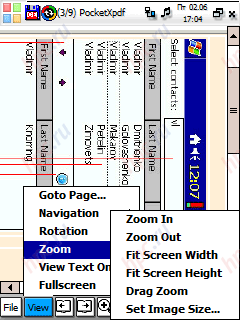
- Has an excellent mode «View Text Only», in which "released" all the graphics, leaving only the text. Switch pages in this mode instantly. Using it, you can find the right place in a multi-page document, and even then switch to the "natural" mode of displaying the document.In this switch is already on the correct page. Or not to switch, and read the "text" mode, if you do not need pictures.
- Set zoom settings: width, height of the screen, the usual increase or decrease, the interesting mode «Drag Zoom» (you yourself notes on the screen of the page, which will then be enlarged to the size of the screen).
- Mode «FullScreen» without disturbing many of the scroll bars at the bottom and right of the screen.
- Runs much faster than Acrobat Reader'a
- Allows you to configure "under a" joystick control.
A small "fly in the ointment" in the "ointment" called PocketXpdf: program, as seen from the version number is still in its early stages, so not everyone can make money as it should. In short, get, set, try and read with the help of any file. If you go, appreciate the convenience of working with her. Personally, I knocked down after an hour of use without any regret Acrobat Reader 2.0. This exhausts my personal experiences with dating PocketXpdf:).
Pros: - free
- fast
- has a unique mode of «View Text Only»
Less: - program can not work on all PDAs and communicators by early stages of development
PocketXpdf - currently the best program for viewing PDF-files on the PDA.
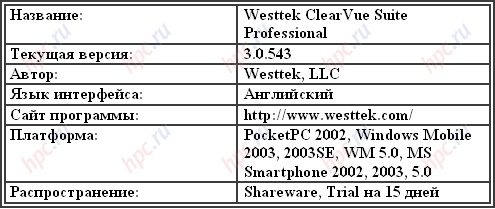
Westtek ClearVue Suite Professional
This product does not belong to the category "bookreaders, but to the number of viewers - at 100%. It's about application package - Westtek ClearVue Suite Professional.
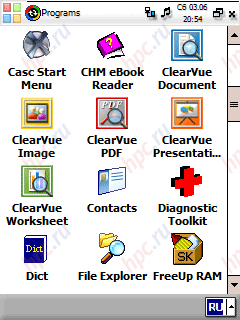
Versatile program that can display in the Pro version of unconverted files from your PC in formats Microsoft PowerPoint, Word and Excel, as well as view images, PDF files and even print them on some printers. Owing to the nature of our current reviews we look only to the two programs of this set - ClearVue Document, and ClearVue PDF.
 |
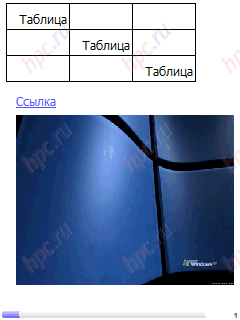
ClearVue Document opens fine Documents MS Word (. Doc and. Rtf). Displays links, images, tables, formatting, and displays the correct. You can adjust the zoom on the comfort value for you, including the Page Width and Whole Page («page width" and "entire page").To move through the document you can use either side scroll bar, or Screen Drag. In general, all the good programs: display all, and displays correctly ... But here it is in this "correctness" and lies the greatest disadvantage in using ClearVue Document. To read the text you have to drive the page from left to right, because there is no such function as "pruning the text to fit the screen, and if the scale page so that it is entirely fit on the screen, the text becomes unreadable.
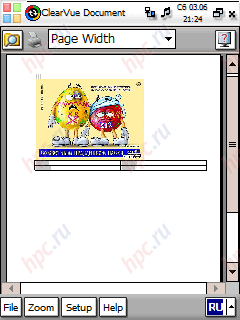 |
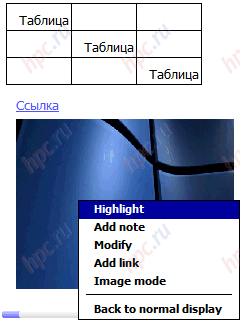
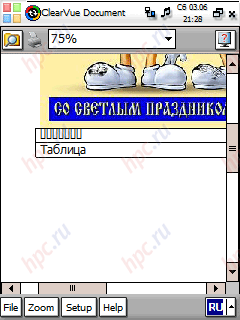
Also because of the "absolute correctness of the map," there is a problem with the display text in the document lacks you have to type fonts. No way to change the "missing" fonts to "present" in the program there. So if you do not have any font, instead of the text you see only neat rectangles. In the screenshot below, the table, the top word "Table" was typed on a PC font Times New Roman, absent from the CCP, and the bottom - the font Tahoma, by default present in all the Pocket PC.
Thus, to view a document, you must at least take care that the necessary fonts on a handheld machine. As you know, you can take them directly from your desktop computer, putting on a PDA or a folder \ Windows, or \ Windows \ Fonts. Now look at the ClearVue PDF.
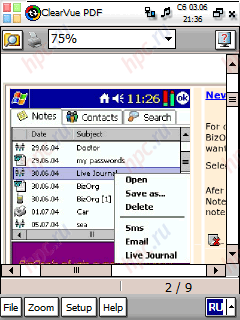 |
Interface of the program "one-in-one" repeats just considered ClearVue Document. The same minimum settings, except for scaling. And the same brand exclusively for proper display of the document. Differences, in principle, only three. First, the formats it supports all the same other than the ClearVue Document. Secondly, this program can not move the viewing area of the document with the help of Screen Drag. And finally, thirdly, the program slows preizryadno. And not only when you open the document. Movement progress bar, though very slow, accompanied by any change in the viewing area. You lifted a joystick in any direction - just wait a couple of seconds (tested on HP iPAQ h2210 with the processor at 400 MHz and the document size to 755 KB). Lifted a slider in the scroll bar - the same story. So use this program I personally would not, but not so much for this reason, but because of the presence of quite good competitors.
Personal impressions
If you are vital to look native documents in MS Word and see if this is not just text, note the ClearVue Document. But do not forget to stock up on a good set of fonts, as it is can not find the document relevant information. ClearVue PDF is a program I would recommend, or those who have nowhere to hurry, or PDA users with faster than me, by the processor.
Plus: - Icklyuchitelno proper display of documents
Less: - ClearVue Document ClearVue PDF and not very suitable for use as bookreaders in connection with an exceptionally correct display of documents:)
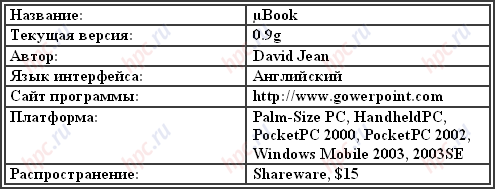
μBook
Another great member of the family "multi-format bookreaders» - μBook.
Excellent reader, for some reason is not too common among the reading part of "poketovodov. Most likely, non-proliferation is associated with some difficulty settings μBook, however, in my opinion, this program is worthy of five to ten minutes of your time to set up "for themselves", since its capabilities are impressive.
Among them: - Reading HTML, TXT, RTF, PDB and PRC
- Cyrillic support
- The ability to apply skins, use different fonts and colors
- Opportunity to make a bookmark, copy of the text to search for text
- Reading directly from ZIP archives
- Auto Scroll
- Full screen mode
- Landscape mode, even on machines with Windows Mobile 2003.
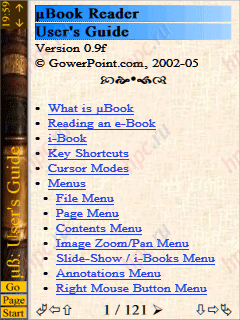 |
Little? However, to realize these opportunities, "one hundred percent." For example, if the RTF file contains links, images, tables, etc., you will see it. The links can be crossed. Similarly, in HTML: there are in your picture link, then you will see a picture, there is simply a link, then see it too. On the official website of the program to support Cyrillic, the author recommends to download and put the font Verdana Cyr, but I would not recommend doing this - very annoying to see that instead of the letter "D" appears the letter "C", and the letter "e" in general is incomprehensible squiggles ... It can do standard Tahoma. Thus, a small manual on setting up μBook to read Russian texts. After starting the program you will see "User's Guide". Click the Start button at the bottom left and in the resulting menu choose Options.
 |
Click "arrow right" after the text "1 / 2" at the bottom (it's regular page count, which means that you are on the front page of a two-page document) and on the next page, click on the link «Enter Advanced Mode». Now we are in the domain of "advanced" settings of the program. Adjusted here so much so that fans of "customize for themselves" will be something to do at night:) But now we are interested to work with Cyrillic. To do this, go to page two of the already familiar way - the right arrow at the bottom, we find on this page string Default Font. We are looking for in this line favorite font Tahoma and ... do not find it! But after the title of the Courier font can see a round icon with an arrow - it's the press.
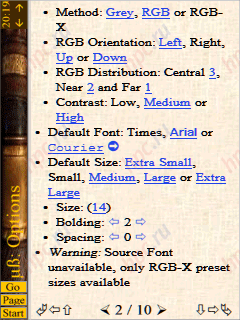 |
In the window titled Select Font select the Tahoma (or any other font, which stands with you and having the Cyrillic letters). The window was gone, and Tahoma appeared in the list of available fonts. Click on the word of Tahoma. Everything is now for our books and documents set the font with Cyrillic support.Think in this setting of the Russian language in this program over? Certainly not! The document may well contain an indication to use a different font (remember just considered ClearVue Document with "excessive correctness"?). Not to see the "squares" and "krakozyabrami" instead of text, you must configure-reader to ignore the "wishes" of the document in terms of displaying different fonts. To this end there, in the settings, go to page 8 and refer to chapter Parser. If there is a line «Ignore or Use document Font Names» Use active link, and the Ignore button is inactive, click the link just above the Save as Defaults. If Ignore is active (highlighted in blue with an underline), then first click on this link and then Save as Defaults. Well, now the problems with Cyrillic you should not. However, in Cyrillic file names will still displayed incorrectly, but this has to be tolerated. Now you can run through the antialiasing settings, thickness, size, contrast, font, line spacing and indentation from the edge of the screen, the screen orientation, colors, skins, buttons, autoscroll and more.
Personal impressions
A wonderful reader, with flexible and varied settings, and fit "for the specific user, as well as excellent support for RTF and HTML. Wonderfully done setting mode, ie the change takes effect immediately, so no need to move out of this mode in the text, to see what we're there "nanastraivali. For example, if you change the font size, it will be seen immediately in the options window. Of the minuses μBook - too few actions that can be secured for "iron" buttons on the PDA. In particular, the button will not "hang" screen rotation or increase the font. Otherwise, it's a very good reader.
Pros: - excellent display of documents in RTF and HTML
- a huge number of settings
Cons: - Too much setup for a beginner, the more that the interface is not made in Russian and English
- "Crooked" Cyrillic display names of files in archives
μBook - a great program for reading books in rtf and html formats with the ability to display images and internal links.
Still, Haali Reader ...
"The appetizer" see another program. More precisely, the modification program, already described in the first part of the review, - Haali Reader. Improved it traces the two great programmer - Alan'om and / / kld aka voodooo. Moreover, the innovations implemented by them, are so vast, numerous and diverse that, in essence, we now have another piece of software.
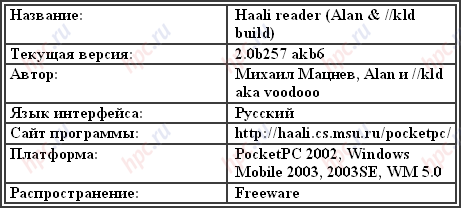 |
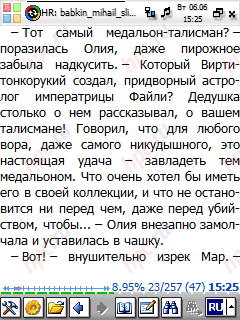
So, what can the new Haali Reader? Well, of course, all that knows how original Haali Reader. In this version are implemented: the same multi-format, reading from the archives, the rate of work. Changes were made to the basic functions of management, status bar read and display functions. In addition, the interface is now made entirely in Russian. Agree, for many this alone mean very much, but when you consider the unimaginable number of options have emerged, the "speaking in Russian" reader can not but rejoice. First, about the external changes. Cimpatichnee, in my opinion, now will look like, and the Progress Bar. Now it's called the status bar.And, if earlier in Progress Bar'e could set itself the very strip of progress in reading, digital display of the current position in the document and the length of the document, time and battery power, it is now, but you can see where the battery indicator (the band at all width of the screen type you have made an indicator of SPB Pocket Plus), as well as displaying the number of read as a percentage. In addition, the opportunity to put in the status bar any of the five controls - "Font Settings", "Next Profile", "autoscroll", "Add Bookmark" and "Configuration dictionary." Now in the status bar can be configured and fonts. Moreover, any element can be displayed in bold. That you wanted to make the time better conspicuous than the battery - totally doable.
 |
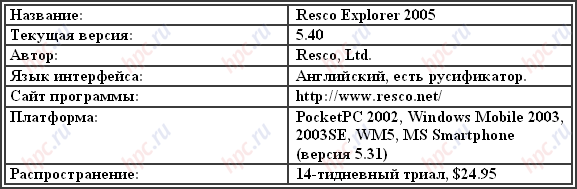
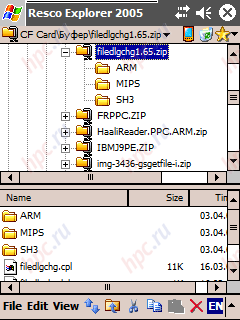
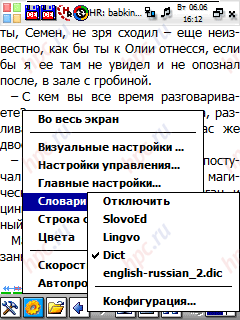
Also, you can now select and line spacing (possible values from -5 to 5, the value indicates how the interval will be reduced). Let us now change, the authors carried out modifications to the management of the program. In Haali appeared tap-zones of nine pieces. To tap into any of them can "hang" a single action (for example, on tap in the upper left corner - go to the previous page, and on tap in the center - moves to the next). The choice of actions is very large, important - do not forget, for a zone that is fixed:). Appeared and the context menu, called long tapom. Moreover, the items in it customizable. You will be able to decide what items you want in this menu. Moreover, they vary depending on the situation. For example, if no text is selected at the time of the call-up menu, then the item "Copy" in the menu, you will not find, even if in the settings menu indicated that this item should be present. Change profile settings. Now in the profile are saved not only the color settings, and font settings (name, size, "fat" or not), anti-aliasing font and line spacing. Changes have affected and exports. If before we could keep from Haali Reader just bookmark it now possible to save the settings (as Haali settings stored in the registry, then they are exported in a format reg-file, which you can then import to another machine, for example, using the file manager Resco Explorer with installed plug-in Resco Registry). It is also now possible to store the citations from the text. And, if you select "Save quotation" on-screen text was selected, then as a quote in the file is written it was he. If the selected text was not - as the quote is written all the text currently displayed on the screen. As a dictionary with Haali can now be used not only dictionaries of SlovoEd, Lingvo and proprietary format Haali Reader, but dictionaries freeware Dict (requires that a version installed Dict 1.4 or later).
 |
As you can see, the work of respected and Alan / / kld done not just big, but I would say, awesome. And all this for the benefit of us who read poketovodam. From himself and army of thousands of fans read on a PDA would like to express my deep gratitude and author of the program, and everyone who worked on the modification of the original. Thank you so much!
Personal impressions
This reader - the most favorite for me. Compound basis Haali Reader and numerous changes done by programmers at the request of the reading public, gave a new product, do not be afraid of the word, a world-class.With regard to the pros and cons of the program, the merits of Haali Reader so much, that will list all the difficult, but significant shortcomings just do not.
Naali Reader amended on Alan'a and / / kld - a great tool for reading and viewing documents, not in need of advice.
Personal conclusions
As a result of long and careful selection of programs for reading and viewing documents on the PDA I have settled down the following instances: - AlReader Light - to read books in a format doc, fb2 without images
- μBook - read files in HTML and RTF
- PocketXpdf - PDF reader
- MobiPocket Reader - for reading a variety of documents prepared in the programs of MS Office applications
- RepliGo - to read documents that are converted to a PC from some "exotic" format by printing it on a "virtual printer" (the story about her was in the first article)
- Haali Reader amended by Alan and / / kld for reading books as downloading them directly in the format fb2.zip
- iSilo, also referred to in the first review, read articles and reviews with HPC.ru on a PDA:)
I must say that these programs cover 99% of my needs in terms of reading and viewing documents. In my collection is not only support the format «doc with pictures." However, ClearVue Document, which provides it, I personally use very inconvenient. So that if necessary I'll just convert these documents to a PC in a convenient format for me to read in iSilo or MobiPocket Reader or FB2.
General conclusions
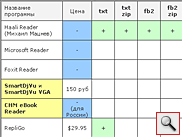
As a general summary of the two parts of the review of programs to read and view text documents on the WM-devices offer to meet with a summary table format supported by these applications. See and choose what suits you personally. However, before we give a little explanation to the table. Yellow, we noted the most honored application. Thus, the results of two articles, "Editor's Choice" received SHM Reader, SmartDjVu, PocketXpdf, iSilo, Haali Reader (Alan & / / kld), AlReader Light and μBook.
The authors, translation: