Preference for PocketPC: how will it be?

The most high-profile projects this year - certainly, the action is to develop a preference for PocketPC and Palm. How to start a project can be found at the site www.palmclub.ru, but we also take a look at the alpha version of the game, courtesy of Site PocketGames.ru Moscow Palmklubom represented by the project coordinator Andrei Kuznetsov. So, I open the letter with the coveted beta. Alpha version of the game is a file WinCE_EN_Preferance.exe, size 317 KB (not bad!). Although the version is marked as "English (EN index in the name), messages in the game are given mainly in Russian (some places only have English in the names of buttons and menus). While for the installation does not use any special equipment, they will appear later. So just drag the file in a carefully created catalog \ Program Files \ Pref \ and run it from File Explorer (or whatever, you are familiar shell).
Preference for PocketPC: how will it be?
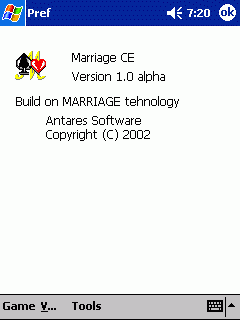
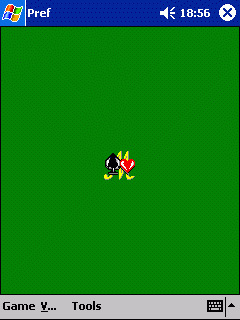
Bah, what we see! Habitual green field "Marriage" (it was used as the basis for the preference for PocketPC, I must say that in general, and the other was not), with the logo in the center of the field, and menus. From the menu, several items - Game, enigmatic "V. .." (In fact, everything is simple - it is a bullet) and Tools (with the only item About).
Preference for PocketPC: how will it be?
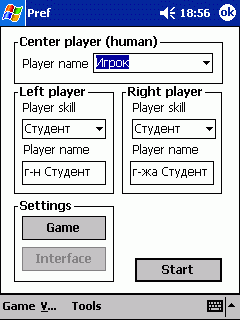
Shaking hands, select the Game, New ... A window opens the game settings. You can specify a name, select a partner (the classical student, Bachelor and Master), but if you want by clicking the Game, go to the window of configuration options. Through it.
Preference for PocketPC: how will it be?
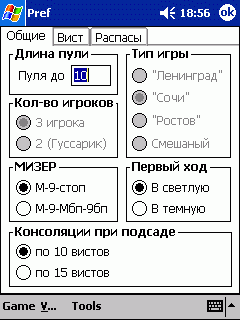
Just say that many fields have not yet active - this is future. General tab allows you to configure "Length bullets," "Game Type" (still hard-coded "sochinka, but it seems more planned and" Leningrad "," growth "and" Mixed "). The number of players still can not be customized (the field is disabled), "Miser" ("M-9-foot" and "M-9-IBE-9bp)," First Move "(" In the light "and" In the Dark ") and" Konsolyatsii when hoisted "(10 to 15, or whist, although I really like some still have not heard that they were in the prefecture sochinke ... but the thing is, age play and learn).
Preference for PocketPC: how will it be?
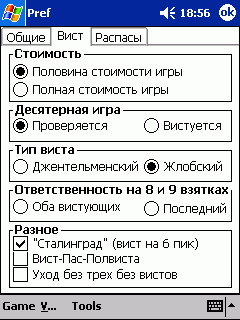
In the tab "Wist" gives the options "cost" ("Half of the cost of the game" or "full cost of the game)," Desyaternaya game "(" Checking "or" Vista ")," Type vista "(" Gentleman "or" Zhlobsky " , there is clearly not enough, but the way in the "marriage" there are only two), "Responsibility for 8 and 9 of bribes (" Both VIST "or" Last ") and" Miscellaneous "(Vist Paz Polvista", "Care no three no whist "," Stalingrad (whist at 6 peak).
Preference for PocketPC: how will it be?
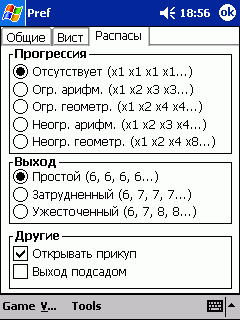
Bookmark "Raspasy" gives options "Progression (" Missing (x1 x1 x1 x1 ...)", "Ogre. Arith. (X1 x2 x3 x3 ...")," Ogre. Geometer. (X1 x2 x4 x4 .. .), "Unlimited. arith. (x1 x2 x3 x4 ...")," Unlim. geometer. (x1 x2 x4 x8 ..."), "Exit" ("Simple (6, 6, 6, 6 ...)", "difficulties" (6, 7, 7, 7 ...)", "hardening (6, 7, 8, 9 ...)") and" Other "(" Open prikup "" Exit hoisted). look, to fix something for themselves, then OK and click Start.
Preference for PocketPC: how will it be?
Traditional alignment, all in the same way as in "Marriage." Tips on the current action are displayed in the top row (and not so visible). Management and interface - familiar from the "marriage", so everything is clear right away. Until that moment I was looking forward to the game, so like a true foodie tried to delay the start of ... And rightly so. The first few minutes showed that it is precisely the alpha version. Alignment of repeats. That is, if you leave the game and run it again, we see the same cards. In any case naughty. At vosmernyh-devyaternyh games to play do not like. Rented, traded, but in the end, preferred to lose, even with very good cards (earnings before that devyaternoy game and tambourines in trumps, if I have a scenario, the only bubnushki, fold both). In the love of raspasam (both Windows-version of "marriage"), by the way, is not seen. Gear-semernaya game is played normally, albeit with nonsense, as without it (take the six-game one-trick with a decent layouts - it should be able to), but is playing. But I must say that while the picture looks like until the debugging interface and basic functions of the program (rules, interface, management, and so on) while stuck terribly truncated core, which a person (whether to simplify the process, whether to accelerate) does not play, but when am feeling that you have to spend some time on account, simply folded. Let's hope that it so far. In addition, there are visual bugs (wryly written text, lines that do not fit into the allotted them a place neprorisovki, etc.) and global strangeness (more error) - the player on the left shows is not the trump card, which really is (besides, it seems he is also changing, but here not sure). Plus, oddly bought the game rules a player does this more often, not paying attention to what, to whom came map. If passes, then you vistuete, for some reason begins to play, although I must sit in silence yourself. On misere for some reason in the field to indicate ordered the game draws a simple figure 9. A couple of times early in the game - player believes "and all, I had the once in five minutes of waiting, then stopped. In the pool is not showing the alignment (that is, "Maryazhe). With closed whist somehow see the map. According to the developers, the problems are known - and now they are still working on getting it fixed, have at least made a new design (version yet). And soon, if developers will not have insurmountable difficulties, the program will be ported to the Palm OS. In conclusion ... anyway thank you very much! Yes, let the damp. It is still buggy. There are a lot of work. But - prefecture runs on PocketPC. Cheers, gentlemen! Screenshots layouts with a few games that illustrate the typical places, you can see here, in the end. Sources, Materials:
Palm OS 5.2: some errors

There is a user environment one simple rule. It sounds so - do not take the hottest, with the heat from the heat, software, wait out the first patch. Typically this is true not only for applications but also for operating systems. Moreover, operating systems, it is generally true first and foremost. Think of the many "glitches" in the new versions of Windows. Absolutely nothing will save - if you upgrade to the new OSes recklessly defying the ancient instinct for survival. By the way, when selecting a new computer (PC or PDA - the big difference there) should not rush too. From the record "rate of fire and reliability is better to have the latter than the former. But this is a separate issue ... lived up to the first major patch and Palm OS 5.0, a new name - 5.2. (Number, number only - so much part of all operating systems, normal names they are only at the design stage, and then only the number). For corrections and talk.

Number of turning into money

Changes a lot, perhaps even too much - in the list of fixes 52 points. Why is too much? Because they have held a full and software errors should not be - at least not in such a depressing number. Although the owner of the PDA (with all new computers based on Palm OS 5 as the ROM used rewritable flash memory) is the ability to upgrade the operating system. But only if every user of the new Palm `as if engaged in enough risky replacement procedures OSes? Nevertheless, on Palm OS 5.2 should expect a more stable work ... It is fair to note - most made in the new version of OS patches does not mean that the machine with the old OSes without them will not work. Most likely, those errors that are in the operating system 5.0, does not appear and the user will not notice that his computer is not working properly with the modem (very few people connect to a PDA modem - that's the whole reason). All corrections can be divided into several groups. The first concerns the proper operation of the memory. With flash memory cards Secure Digital 128 MB or more, as recognized by the developers of PalmSource, Tunsgten T (and fixes are intended primarily for the computer) is prone to lockups. The new release of OS bug is fixed. Next - an error occurs when you exit the program and play audio files when you run the application. Also eliminated errors exchange of information between RAM and flash memory.
Palm OS 5.2: some errors
The second group relates to emulation fixes CPU 68k. That is a new release of the operating system improves compatibility with software for old computers Palm. This is good news because the new programs that are optimized for use in Palm OS 5, while not as much as we would like. The third and largest group of corrections relate to the network operating system. Judging from the extensive list of corrections, Palm OS 5 with network connectivity to work no matter. Although it is networking opportunities, the fifth version of OSes have been one of the most promising features. Thanks to them, humble handheld organizer into a network terminal and a device for mobile access to data ... Most of the patches the average user (not wanting to delve into the details of the arrangement of the OS of your computer) will not be as noticeable as a complete reorganization of the system input. Alas, but the well-known system of computers Palm Graffiti will be no more. And yet the fact that the new system, called Graffiti 2 developers, will be better than usual. Not least because it is not Graffiti, and we know of computers Pocket PC software handwriting Jot.

We've been writing - we wrote ...

It is noteworthy that more than ever about the imperfection of the system Graffiti no one spoke. In contrast, many Pocket PC users with a melancholy glances enviously at a much more simple Palm `s just because of handwriting. System Graffiti - is first and foremost, a different approach to the technology handwriting recognition.If all competing systems focus on "adaptation" (or self) of the program to the peculiarities of the handwriting of the owner PDA, the Graffiti handwriting becomes accustomed to the user. In practice, this process takes no more than two or three days. All characters Graffiti - reduced numbers and letters that have uproschennnoe mark. Learn a simplified alphabet is a hundred times easier than, say, verbatim letter, which is often compared to Graffiti. Moreover - Graffiti is the simplest and yet perhaps not the only effective tool running quickly enter information into PDAs. In a competing system, Jot, the brainchild of Communications Intelligence Corporation, also used a simplified mark characters. But if the Graffiti characters are rigidly defined by only one stroke of the pen, the Jot variants are possible. Useful, at first glance, the possibility - as you can, and write - leads to recognition errors. Letter "a" in Jot you can write in four ways, in Graffiti - one. At the same time to remember the stroke Graffiti - "roof house" - is simpler than all possible Jot.
Palm OS 5.2: some errors
No doubt, in terms of self-Jot perfect than Graffiti. In the main program handwriting recognition software for Pocket PC (except Jot there are many other programs, each of which is only approximated in the usability of Graffiti) can be pre-set the mark of the main characters. But at the operational work with the CPC is making an even greater confusion. Inscription options becomes greater and the user is forced to remember what a stroke he assumed a particular letter. Another thing, if there were a system of recognition of continuous cursive. But all systems are still only recognize input letter by letter. A weak attempt to achieve recognition of continuous tracings and are trying to ... Why is the manufacturer Palm `s refused to Graffiti? The reason is not at all hypothetical imperfections of the system. The reason for the legal intricacies of using Graffiti. After the court recognizes the copyright holder of Graffiti in its true inventor of the company Xerox, the use of "raspoznavalki in Palm handhelds is illegal. And we are deprived of the most attractive features a pocket typewriter - perfect running system handwriting ... Service Pack Operating System Palm OS 5 can not but rejoice. Operating system "matures", and together with her "grow up" and the computers of the family Palm. But that's what turns a thing ... After the change of handwriting and the disappearance of Graffiti is very difficult to find arguments that would convince users to choose Palm, and not the Pocket PC. Comparable to the cost of computers competing platforms have not so very similar features. With multimedia applications Pocket PC handles better than the Palm Tungsten T. And the stock performance - in the calculation for the future - for Pocket PC is much higher. What then must persuade customers to pay money just for Tungsten? The unusual design? Big name manufacturer? High-resolution (physical size is smaller than the Pocket PC)? It is doubtful ... The old Palm `a was a significant plus - it could lead fast tagging. Right on track to record in the address book name and phone number, drop a line memo about the meeting or about the price of a curious commodity. Now this opportunity at Palm `not to be. And for quick entries will either have to painstakingly draw in detail scribble in Jot, or call the on-screen keyboard. And, both the Pocket PC sold no worse than in the Tungsten. But on machines with the operating system from Microsoft's music and play videos. Moreover, it is much better than the Palm `s history of the competition ... Palm and Pocket PC is increasingly reminiscent of the confrontation, Microsoft and Apple. But we should not forget that Microsoft is an active player on the field of Apple (ie not just a competitor, but also a partner) and makes the Macintosh a lot of great programs. After picking the public at various exhibitions, Microsoft and Apple are working, if not together, side by side and in the same direction. And the Palm - it's not Mac. PSNew versions of currently available only for developers. Period of occurrence of updates to polzovatley not yet known. All information on Palm OS 5.2 is available in a special section on the site of PalmSource. As of version 4.1.2, you can learn about it here at this address - http://www.palmos.com/dev/programs/pdp. PSS And download a demo version of Jot from here. The authors, translation:

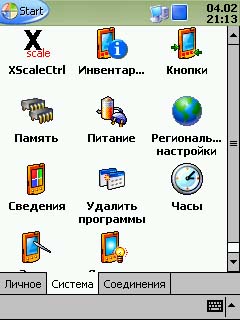
Soft-review: the race for survival on the XScale processor

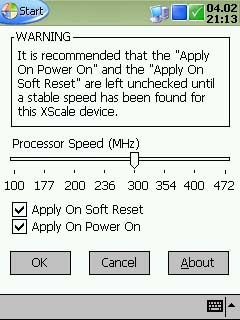
In recent years, programs for overclocking XScale, which are equipped with all the latest Pocket PC platform Pocket PC 2002, the fruit of an unprecedented speed. To date, at our disposal the following tools - Pocket Hack Master, XCPUScalar, Clearspeed, Speedstepper, Turbo Tray and XScaleCtrl. All the above have the same goal, differing only in the ways of achieving it, and, consequently, the results of the work. That's why we decided to find out which ones are of greatest interest. In the superficial study of user feedback it became clear that from this list are especially outstanding Pocket Hack Master, because of its functional completeness and Turbo Tray due to being free, compactness and convenience. About them and talk. Before you do overclock, you need to understand one simple thing: just as in the case of processors for large computer to burn the XScale is very difficult, but lose the information stored in memory, it is elementary. One has only slightly exceeded the frequency, and hard-rezet follow immediately. Therefore, before carrying out experiments on your pocket pet, save a backup copy of data and registry keys on the card. After preliminary training can begin operation. For our tests, we used RoverPC P3, high-speed analog U.S. HP iPAQ 1910. It is for these low-cost but highly-selling machines based on Pocket PC programmers create these tools. In addition, the cost handheld slowest XScale-processor, and their example will increase the speed of demand and particularly noticeable. I must say that during testing because it exceeds the rate in experimental instance had a hard rezet, but the information was restored by the foresight of the stock backup. Backup data, I contrived, thanks to proprietary utilities eBackup, which is located in ROM PDA. Also had to use Resco Registry to create a copy of the registry. I want to warn you that I have, even after a recovery fails to run some programs (such quite a bit, but still), and therefore rely on the backups are not worth it. No effect (a drop screen brightness, hard rezet, unstable work, and so on), pocket computer to run only at 300 MHz. On it I decided to stay. For performance testing I used the programs VOBenchmark 2.12 and PocketMVP.8P with. Avi-files of the following characteristics: resolution - 240x194, the total number of frames - 8365, FPS - 25 Audio Bitrate - 56 kb / s, frequency - 24 kHz, the total length - 0.5:34 min. During the determination of the speed of the PDA for the purity of the experiment, I intend to cut off WisBar and Animated Today, as well as shut down all running programs. The tests were conducted three times, the final result, I took their average. So, let's begin. To begin, define the starting performance of "typewriter" without overclocking.

Coft-Review: Race to the processor XScale. Arrival of the second

We continue to acquaint you with the tools for overclocking XScale. Not so long ago there was a new program to increase the productivity of Pocket PC devices based on this processor - XScaleCtrl v1.4.0 This program - camaya new among the many released now "overlokerov. However, in comparison with others, its release is not done much noise. Nevertheless, XScaleCtrl is worthy of a separate story, especially when taking into account its low price - $ 3.50.
Coft-Review: Race to the processor XScale. Arrival of the second
Interestingly, the application is installed not in the selected folder, as it was with Pocket Hack Master and Turbo Tray, but in the system settings, so the curious friend, get to your PDA, hardly able to launch a new "toy" and inadvertently overclock your say, RoverPC P3 to 472MGts (namely, this is the limit of overclocking with this program). Thus, you are insured against unexpected hard rezet. However bad that the program is no option like "disable overclocking a 300MHz" because of the unfortunate error, you can lose all your data, exceeding the allowable threshold. The rest - everything is very bad. Take, for example, tools of the program. This is a nice set for a young overlokera: there are 8 of the CPU frequency, and recovery options desired value after the soft-rezet and the inclusion of the handheld, and at every step of the hazard warning of the event ... Also worth noting is that there are two versions - regular, for all machines based on XScale, a demo version which can be found on our website, and the so-called XScaleCtrl for Dell Axim. These PDAs Russia has not yet arrived, so this edition of the program is not a special interest for us. Suffice it to say that with its help-wavelength 300MHz Axim 5, Senior CPC range, can be overclocked to 500 MHz.
Coft-Review: Race to the processor XScale. Arrival of the second
With regard to subjective impressions, I softinkoy quite liked, but as you know, in the utilities of this kind are the most important is not the interface or features, but the final result, so pay more for testing. His technique, as well as a description of tests and "guinea pig" Rover PC P3 can be found in the previous review.

Soft-review: translation software for Pocket PC

Topic of artificial intelligence has long been haunted by the natural. Well, like a human being, without any intermediaries, to find common language with the machine. However, while in the unequal struggle wins artificial intelligences: direct and undeniable, so, so that the human becomes clear - to further understanding as to the moon:) You might ask - what am I doing? - Yes, all the same thing, about ordinary computer translation of the text on the creation of which employ lots of people. Of course, to call this work can not be in vain, because the quality of their work is very slow, but improving. Yet to date the text issue such applications, above all understanding and the laws of human logic. We can only dimly guess what the story has undergone the processes of artificial intelligence piece of literary work. However, we must admit that with the lighter version of the text translators cope much better. We're following the theme of our site, we'll talk about programs for machine translation on a PDA. Cuzim subject area and say that it will focus on software for Pocket Pc-machines, but about the only two currently available at the disposal of Russian PDA users of the Russian-English translator Pocket PROMT 4.0 and Socrates CE 2.0. For greater clarity, trace the evolution of the degree of PROMT, starting with version PROMT 1.5.

More information about interpreters

Language Support: talk to the Pocket PC in Russian

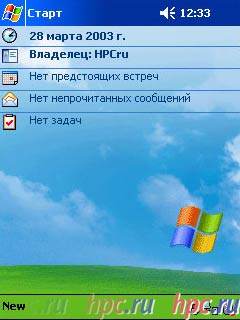
Last week, Ectaco, well-known producer of like pocket translators, has released a shareware crack Own Language Support for handhelds based on Pocket PC, full version of which we immediately decided to test at an editorial HP iPAQ 5450. Once conquered the size of the source code - only about 1 MB. Moreover, it appeared that the program occupies only 26 Kb (!) Memory for storing data, but, as promised in the description, in operational weighs almost 3 MB. So, install it. After rebooting machine menu Today looks like in Russian:
Language Support: talk to the Pocket PC in Russian
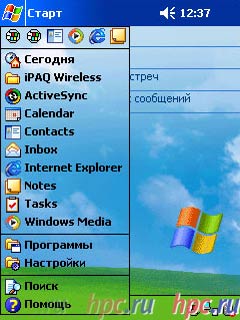
Go ahead. The site developer promised that the "Language Support will provide a Russian translation of system messages, names of buttons, menus, tips, system folders and other components of the operating system Pocket PC". However, as soon as I clicked on the "Start" button, there was a slight embarrassment: some applications like calendar, contacts, mail, notes and tasks which, in my opinion, not that it was difficult to translate, remained intact:
Language Support: talk to the Pocket PC in Russian
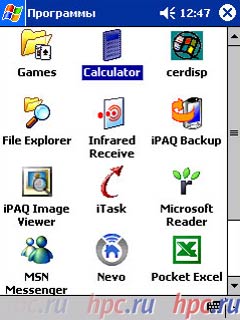
Well, come on. Next stop - click "Programs." There is still more interesting: it is clear that the standard application iPAQ transfer is not possible (I mean the iPAQ Backup, iPAQ Image Viewer), but that's why were not Russified standard folders and programs under Windows: games, calculator, and a conductor?
Language Support: talk to the Pocket PC in Russian
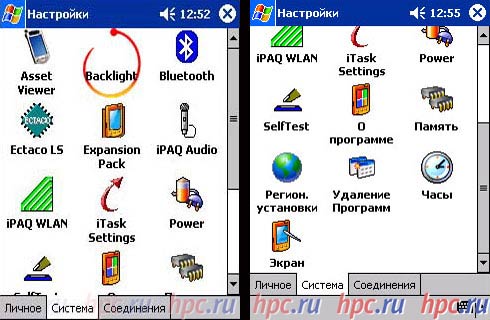
Go to Settings menu - the same claims as to the "Program". However, let's not ignore the incomplete transfer of the individual components of the OS. Full Russification, according to representatives of Ectaco, will appear as soon as possible, with the release of new versions of the program. However, in the current version of the "Preferences" discovered bug: when you install the localization disappeared icon Backlight, leaving only the memory of himself, that is the proper inscription, when clicked, though, everything works.
Language Support: talk to the Pocket PC in Russian
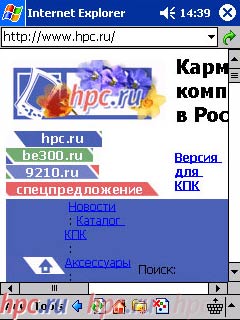
Ectaco site reads as follows: "Language Support customize your Pocket Pc, so that you can browse the Internet - websites and write letters in Russian, as well as work with the national currency, use the national format of date and time." About all of this is nothing to say: no complaints in the work is not revealed. Native HPCru - he performed Language Support - HPCru;)
Language Support: talk to the Pocket PC in Russian
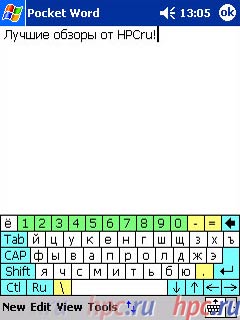
Now for the virtual keyboard. According to developers, "a special keyboard with Russian layout, you can use in all applications where you need to enter Russian characters. The keyboard has a convenient auto repeat function symbols, you can adjust the speed of character input and the value of a pause before repeating. And what about Russian virtual keyboard, the developer must say a special "thank you".Made it even better than "native" English: unlike the latter, each group of keys has its own color, so much easier to navigate:
Language Support: talk to the Pocket PC in Russian
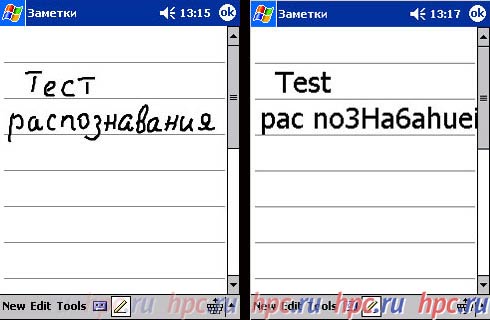
A separate item in the list of additional features I should module LSPen, which extends the capabilities of the standard Letter Recognizer-well and allows to enter Russian characters, based on the rules of transliteration. First, let us explain: module LSPen - a Russian version of English Letter Recognizer. Recall that the latter (recognition text entered by hand using a stylus) "understand" English-only text, but with the help LSPen you can work through this program in Russian. About the quality of recognition no complaints - it is about the same as when working with English text (it all depends on the degree of "wear" on your screen and underscore).
Language Support: talk to the Pocket PC in Russian
And finally, one more time. If you decide to test a demo version of Language Support, you know that registration reminder localization can become your nightmare - almost every moment in whatever application you were (and even during the game), it pursues you and with persistence worthy of a better application offers "you know what" ;-) So, that's all you can tell at this point about the Language Support. Let's summarize. Pros: stable job, a comfortable keyboard. Cons: Russification incomplete, missing icons Backlight, obsessive "registrilka. However, Ectaco assures that the next version of the Russian language will prevail, and the missing icon will be found. And according to developers, wait for the next version will have until the summer ... Available for the full version of localization Language Support developers asking $ 19.95. The authors, translation:

AirSetup for Pocket PC: downloading the software from the air

How often have you had to deal with programs for desktop PCs without installer? Is it convenient to first copy the files, then manually create all the necessary labels and place them (and to correctly uninstall a program, we must remember where some files are)! - Clearly, it is inconvenient. That's why some time ago for the rapid spread of software for handheld computers needed to be, at least, a computer programmer. And what a great little helper is worse? - Nothing, - said St. Petersburg's software company and Spb Software House has released a utility AirSetup. This is a program for the desktop, creating installers for handhelds based on the finished *. cab files. Before you test a unique overview of new items. When you use the willy-nilly, have to deal with all the keys, therefore, give a complete list of them and talk about the purpose of: - appname - name of the program for which you are creating an installer - cpu - here is meant for a PDA with a processor which will install the software. Very useful feature - cveryaet type of processor installed in the PDA when creating the installer (it happens that the installable program can "go" only one type of processor, but on the other - no). - Cab - here should indicate the name of the *. cab file for its subsequent conversion of installation *. exe file - readme - a reference to a file whose contents will be automatically shown when you start the installation. Also pretty handy thing (you can, for example, insert the short description of the functions of the program or any important details that need to be taken into account when working with it). The file must be in the format *. html. - Out - therefore the name of the file to be created - eula - an indication of the file with a license to install the software. The file must be formatted in plain text (*. txt), which can create even in Notepad on Windows. - Installdir - PDA folder where you want to install the software. The key is optional (if no default folder will be a file with the name of the program itself). - Nocustomdir - using this option allows you to prevent users from installing applications in a folder other than specified when creating the installer key installdir. The key is also optional. Now, shared his impressions of working with the program and at the same time try to understand how it is necessary and convenient to use. About the need. Useful AirSetup, most likely either the developers or the sellers or distributors of software. However, the "highlight" of the program lies in its optimization technology, Over the air (wireless Internet), which is actively used by various sites, including the famous online shop www.handango.com. And really - a way to install software may become more popular. Why do I have a Pocket PC with internet access, say, Pocket PC Phone Edition, to spend time installing software through the desktop, where you can download them directly to the handheld? But everything is not so simple. The fact that the software that is distributed in the form of *. cab files, there are some serious drawbacks.