Keyboard LEOSync QuickPAD

Introduction

Long wanted to test the keyboard, which can be connected to the PDA. And now, thanks to the site and the company HPCru MakTsentr, such an opportunity! I was holding LEOSync QuickPAD.

Completion

In plain white OEM box I found: - camu keyboard - Quick Start Guide - a floppy disk with drivers v.1.0. Just want to say that LEO Systems, Inc. is not the manufacturer of this product. OEM manufacturer of this keyboard is DATACOMP ELECTRONICS CO., LTD. Furthermore LEO Systems, Inc. This keyboard sells more, for example, iBIZ Technology. So, what is of itself, this keyboard?
  • Weight (300 g), size (260X120X30 mm).
  • Polnofunktsionalnaya keyboard with 62 keys and ergonomic design.
  • 6 programmable hot keys.
  • Meals: 3xAAA alkaline batteries.
  • Hours: 400 hours in a print mode / 1200 hours standby.
  • Has a Serial Port for connection to the PDA.
  • Made using mechanical switches Cherry. Without the "clique".
Keyboard LEOSync QuickPAD
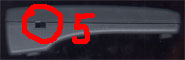
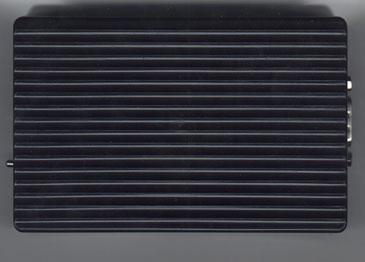
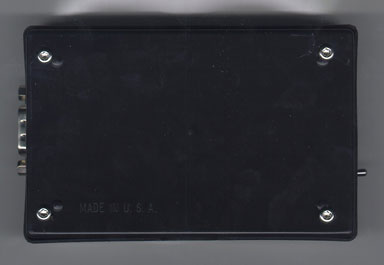
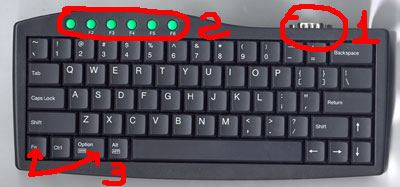
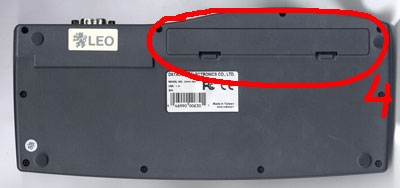
The pictures show views from the top, bottom, right. Numerals indicate:
  1. Serial port
  2. Soft keys F1-F6
  3. Fn key and the Option, are used for programming F1-F6. Option still works as a Start button in Windows CE.
  4. The battery compartment (3xAAA)
  5. Power Switch

Testing

From the keyboard of the software for Windows CE and PALM. I immediately ran into a problem. "Claudia" was equipped with software-Trial: (! 15 minutes of work and restart the program. I contacted customer support and they sent me a normal software for PALM, and for Windows CE is not sent, I sent a second letter asking to send me a normal software, and they began to demand money for it! Here's the text of the letter: Dear Mr. Andrej: According to my knowledge, the WinCE software does come with the package instead of the trial version. I don't know what happened with your case, still that we can give you the price quote if you would like to purchase from us!! It became clear that I have, perhaps, an error occurred while packaging and keyboard was equipped with "wrong" software. However, they tied me to the official distributor of LEO in Russia - company Mosk. That's when me and helped:). I tested this keyboard on multiple platforms: Windows CE (Casio A-20, Casio E-100), Palm, Psion. On all devices keyboard works! The keys F1-F6 can be programmed input sequences up to 30 characters (without software) and challenge programs (with the use of proprietary software, only under Windows CE). Well, now, first things first ...

Windows CE

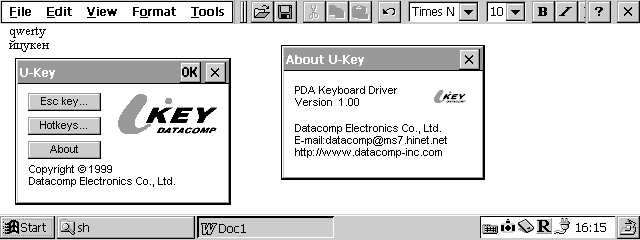
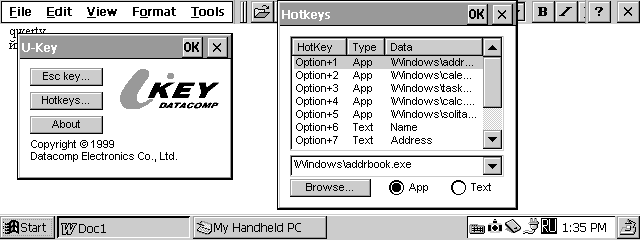
Began testing for Casio Cassiopeia A-20. Put program. All of them worked. The program is an opportunity to set hot keys, temporarily disable the external keyboard. In this case, the keyboard CASIO, of course, is not disabled. With the Russian ... WORKS! You can enter easily in Russian! Just switch the keyboard layout you need using the built-in keyboard. Tested with Paragon LE and RussKey.
Keyboard LEOSync QuickPAD
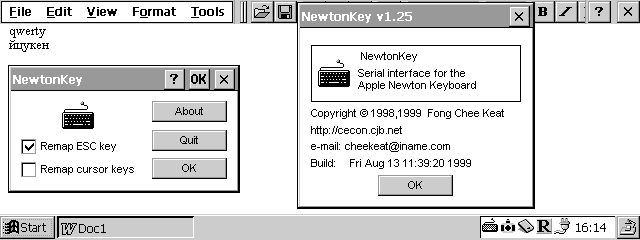
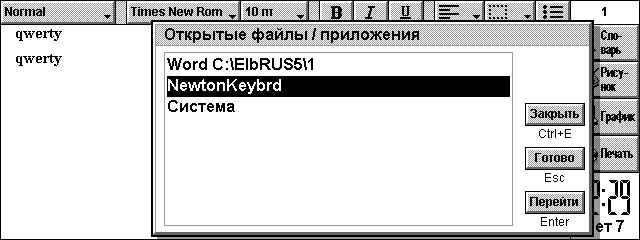
Then tried to use the program NewtonKey. With this keyboard driver also worked and it was possible to enter Russian letters! The only drawback - the inability to program the hot keys, well, well ...
Keyboard LEOSync QuickPAD
Inspired by the first successful experience, I took the test keyboard CASIO E-100. The keyboard works, but typing was possible only in English! No tricks have not helped! Need to rewrite the keyboard driver.

Palm

For PALM company, which manufactures the keyboard, did not bother and supplied its products freeware program KeyZ 1.0.4. There is a regular version and a version for Hackmaster. What can I say? You can print in English. For the Russian press have to rewrite the program.

Psion

The firm LEO Systems, Inc. did not plan their product for use with the PSION. So there are no alternatives, and to use Newton Keyboard driver for PSION device. It supports all devices running EPOC.
Keyboard LEOSync QuickPAD
Well, I think, with bezklaviaturnymi devaysa all clear! And here at PSION "clave" is, maybe in Russian will print? Okay, put the program. Began testing. Similar result. For the Russian press have to rewrite the keyboard driver.

Conclusion

What can I say? Keyboard itself - quite a decent product. Easy, neat, compact. The software allows you to type in Russian only on Windows CE HPC, HPC / PRO. On all other PDA printing is available only in English! To overcome this limitation have to rewrite the keyboard driver.

Dignity

The ability to print documents on a normal, full-size keyboard.

Shortcomings

Can not print in Russian for Windows CE PsPC, PILOT, PSION. The high price (around $ 80). Keyboard LEOSync QuickPAD courtesy of MakTsentr. The authors, translation:

Connecting a PS / 2 keyboard to the PDA

Using an external full size keyboard when working with a PDA (especially bezklaviaturnym) is a very attractive possibility. For this purpose we can use, for example, LEOSync QuickPAD or Newton Keyboard. But these solutions are too expensive, and carry a keyboard too hard. That's a thought about using a standard keyboard for the IBM PC AT (this stuff everywhere abound). I propose to convert PS / 2 keyboard -> RS232.

Copyright

All rights to the diagram and text of the program belong Olaf Kaluza. All rights to this text belong to Andrei Knyazev (DOOMka). Allowed to use them for personal purposes, for my own pleasure. Undesirable to copy this page and the translation into other languages ​​without permission. Undesirable to copy a CD-ROM or other dissemination of information from this page. If someone's in trouble or break PDA - it's entirely your own problem.

Introduction. The principle of operation. Scheme.

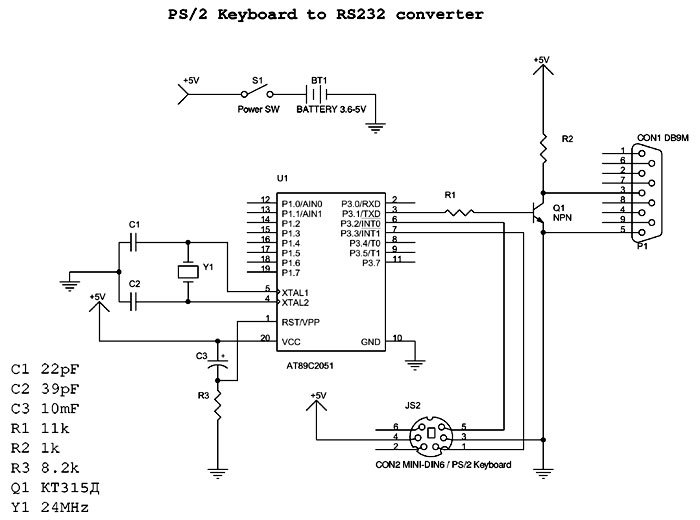
I've been wanting to make such a device. Thoroughly searching the Internet, I came across a page Olaf Kaluza Connection PC AT keyboard to PalmPilot (in Russian, original in German). Here's what you need! However, in the original scheme is an inaccuracy in the numbering of the findings DIN keyboard connector, and I needed to connect a PS / 2 keyboard. So, I changed a little scheme. In addition, to get exactly the items I could not, therefore, in my scheme shows slightly different values. So here's the scheme:
Connecting a PS / 2 keyboard to the PDA
For printing, it is better to use the scheme in PDF. The scheme using a microcontroller ATMEL AT89C2051 (AT89C2051 PDF, AT89 Series PDF) and is extremely simple. To connect the keyboard uses two signal DATA and CLOCK (for details, see Interfacing the PC AT Keyboard). SCAN codes generated by the keyboard are converted to ASCII characters using the program recorded in the microcontroller U1. The inversion of the signal is achieved by transistor Q1. Chain of C3, R3 is used for Power-On Reset (reset / initialization at power). Circuit C1, C2, Y1 - the clock generator of the microcontroller. It is important that the quartz frequency was 24 MHz, because the program is written in a calculation on it! The scheme is not critical to the component values, transistor inverter - ANY low-power NPN transistor (Olaf used BC547). To power the keyboard and the controller must be 5 volts, but it is possible to use lithium-based battery of sufficient capacity. In my design uses a lithium battery with a capacity of 1.2 A / h, located directly on the circuit board.

Manufacturer

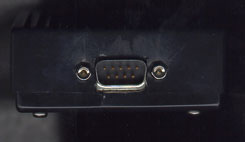
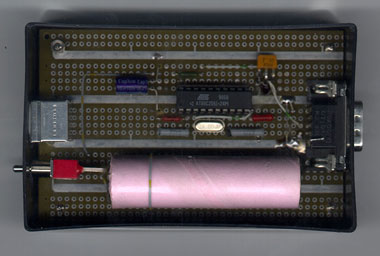
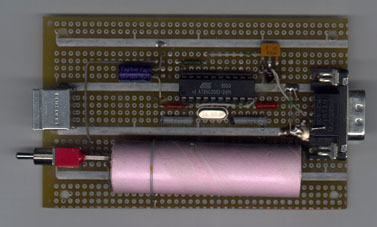
Naturally, you need to start with a complete set. I bought a "Chip and Dip" MPU ATMEL AT89C2051-24PI for 67 rubles and a block with 20 pins him for 1.60 rubles. Susekam digging in, I found a transistor, capacitors, resistors, switch and battery. All connectors and quartz at 24MHz, I vypayal of faulty circuit boards. PCB was reluctant to do so installation was on the board to simulate circuits. All farm stuffed into a bar of soap for 8.26 rubles.Here's what happened:
Connecting a PS / 2 keyboard to the PDA
It only remained to program the microcontroller. Programmers are expensive, the cheapest I found was worth $ 95! I made a deal in the company CTC-MK microcontroller programmed for 20 rubles:)! For this purpose it was necessary to come to the office of the firm and to bring chip and software on diskette. For firmware needed to use the BIN file from palmtasta2.zip. Everything!

Jobs

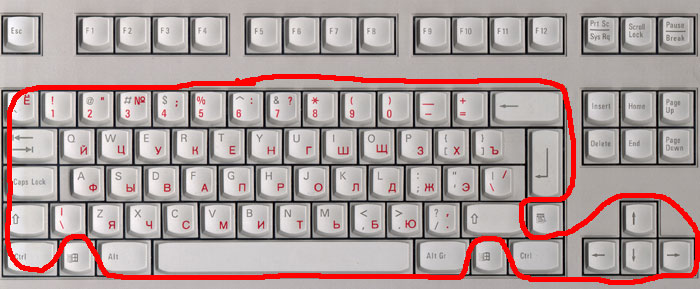
With proper installation of the scheme should work immediately and requires no setup! Input area (cultivated converter keys) inside the highlighted area in the photo.
Connecting a PS / 2 keyboard to the PDA
Not processed Ess, F1-F12 and other special keys (Start, etc.). Signal processing keyboard coming to the RS232 using a program (driver) to connect the Newton keyboard, specific for each type of PDA. For Palm, you can use KeyZ. For this PSION Newton Keyboard driver for PSION device. For Windows CE - NewtonKey. All programs are FREEWARE! No problem, you can enter Russian text in Windows CE HPC and HPC / Pro PDA (for more detailed information, see Keyboard LEOSync QuickPAD).

Conclusion. Conclusions

So, for an amount of about 300 rubles (plus, of course, the cost of the keyboard), we obtained an external full size keyboard worth $ 60-80. Very good! Expand the capabilities of this keyboard can be achieved by improving the code of the microcontroller (not bad to introduce support for Esc, F1-F12 keys, and Start). Take any comments, suggestions and additions. The only request! Do not ask: "Why am I not running the scheme?". Take it AS IS (as it is)! Updates, errors, additions will be posted on the page Keyboard Project. The authors, translation:

Semiconductor memory on the march

Where does the light when you turn off a light bulb? If we reject the philosophy, the answer is: no matter where he was going away, it simply does not exist anymore. The same can be said about most types of memory: when the power of its content is lost. Although it was previously necessary non-volatile memory retains its contents without power, is now a need to increase as people's desire to invent a more simple ways to store and transmit information between computers, hand-held "electronic secretaries, digital cameras and multimedia devices. New technologies allow us to make such a memory device smaller, lighter, high-speed and cheaper than ever before.
Semiconductor memory on the march
All the new memory device based on technology CompactFlash, DataFlash, SmartMedia and Memory Stick from Sony is based on Rom. If memory (RAM) - a random-access memory, the ROM (ROM) - read-only memory. The title reflects one of its properties - you can not change the stored information in it. Another important feature that distinguishes ROM from RAM, is that in order to save the contents of ROM does not require power. In memory storage elements which serve to store, consume a small current to maintain its state (enabled or disabled), and ROM status of these elements is fixed and can not be changed. That's why sometimes called ROM indelible nonvolatile memory: its content remains unchanged when the power is off. Initially, the information in the ROM should have been "written" directly on the chip in the manufacturing process for application of the masking layer, becoming its constant part, as well as in CD-ROM CD-ROM. This technology requires a fairly high cost, and in addition, such information can not be replaced, even a slight change of data stored on the chip was leaving a lot of time and money.
Semiconductor memory on the march
A more flexible approach was implemented with the creation of programmable ROM (PROM - PROM), similar to CD write-once (CD-R). In the manufacture of these chips require more voltage for writing data than recording them in memory. At higher voltages the data are burned in different areas of memory on the chip. Recorded data thus can not be changed, but the process of making crystals with different contents is fairly simple. Then came the turn of erasable (programmable) EPROM (erasable read-only memory - EPROM), similar to CD-RW discs (CD-WR). It already has the ability to record information in memory, but if you want to make changes, will erase all data on the crystal and repeat the recording process again. The next important step was the creation of electrically erasable programmable read-only memory (EEPROM - EEPROM), working like a PROM, but have a major advantage: erasing the information in it is simple supply signal with a higher (compared to normal) stress. The result is a ROM whose contents can be changed directly in the process. It is used to store various data on the programs BIOS (Basic Input / Output System) settings to configure the printer.

A gift of fate?

All this brings us to the currently applicable in the flash memory (sometimes called flash ROM or flash RAM). Flash memory on a plan remains very close to the EEPROM, but it has one key advantage: for it does not require a higher voltage than is used in computers or digital cameras (usually from 3 to 5).
Semiconductor memory on the march
As with all ROM erasure of information in the flash memory cycles write / erase limited. In the early models of these devices allow the execution of only a few tens of thousands of write cycles, but some new developments are suitable for execution of millions of cycles or more. Flash memory has become the main type of memory for the BIOS, used in computers and modems, because it makes it very easy to perform upgrades of these devices. You simply download the file from the Web-site of the manufacturer, and then run a utility that erases the previous contents of memory, and makes it new information. You can also perform writing and erasing information only on selected sections of the crystal, so that some of this memory can be protected, while others undergo changes. This provides the opportunity to reboot the system if in the process of modification of mistakes were made.
Semiconductor memory on the march
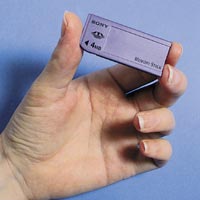
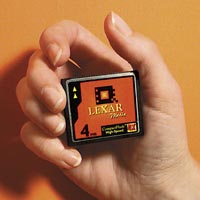
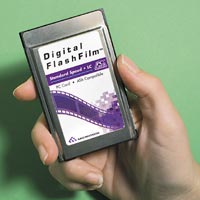
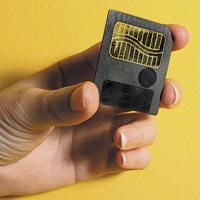
These features of flash memory make it extremely attractive for applications in portable equipment such as hand-held "electronic secretary" and digital cameras, in which users would like to change some of the data, leaving the rest unchanged. Some portable devices as a replacement set of memory standard 3.5-inch floppy disk, but it is a mechanical device memory is large, with limited capacity, and consumption of energy is quite large (which reduces battery life). For comparison: the device Memory Stick from Sony has a high speed, consumes significantly less power and can store up to 32 megabytes of information (more than 20 floppy disks). There is another approach in which a miniature hard drive is placed in the housing PC Card (PCMCIA). Although this method allows you to store large amounts of data (from 500 MB to 1 GB) at a lower cost per 1 MB, it requires a slot Type III (the equivalent of two jacks Type II) and in an active state is a memory device consumes approximately ten times more power than flash memory. Flash memory has several advantages compared to these mechanical magnetic storage devices. It can be manufactured in much smaller volume of the shell and consumes much less power. In addition, in this semiconductor memory no moving parts that can be easily damaged. This design makes the flash memory more resistant to possible careless handling when working with portable devices. Board flash memory can serve as a removable storage media for portable devices. However, a more difficult problem is data transfer to a regular computer. A common solution to this problem is to create a reader PC Card, who is connected to the input board flash memory, and output connector is inserted into a standard slot PC Card Type II. For desktop computers without PC Card slots, there are readers that connect to parallel, SCSI-and USB-port. Some readers even allow you to use memory cards of different formats. The disadvantage is the lack of a unified standard for the implementation of flash memory for portable devices. If you have two portable devices, then they can use cards of different types. Several different designs boards currently competing for the right to become the standard. DataFlash. This method involves placing a flash memory card PC Card Type II, which facilitates the exchange of information between any devices with connectors Type II. To simplify the use of such memory cards for desktop computers, they perceived the system as a standard hard disk drive IDE.However, compared to the small size of many digital cameras and handheld devices the PC Card still quite large. Therefore, DataFlash cards are generally used in large professional digital cameras, where their size does not play a big role. SmartMedia. This fee is a small format, also known as the SSFDC (Solid State Floppy Disk Card, board semiconductor floppy disk), has a size of about 43x38 mm - less than half the usual business card - and the thickness of wafers, ie, only 0.77 mm . For cards in this format, there are several different adapters, including the adapter PC Card, installed in the slot PC Card. You can also use the floppy disk adapter for SmartMedia, allowing the computer to read data from the device to read from a floppy disk in the absence of slots PC Card. CompactFlash. These boards have about the same size as SmartMedia, but they are slightly thicker, about 3.3 mm. This is partly explained by the fact that they are circuits of the memory controller with a standard interface IDE. As a result, manufacturing cost rises, and with less memory, CompactFlash card is more expensive than SmartMedia. However, when the amount of memory of 16 MB and above the cost of these two cards is roughly the same. Because the CompactFlash card contains its own controller, the costs of making readers and adapters are much lower than that reflected in market prices. Thus, the PC Card adapter for SmartMedia usually costs about $ 80, and the price of an adapter for CompactFlash card is only $ 15 Memory Stick. This new device developed by Sony. With dimensions of 21,6 x50, 8 mm and a thickness of 2.8 mm, it looks like a small plate of chewing gum. For boards such format from Sony releases the adapter PC Card, and an adapter that plugs into the parallel port. Indelible-volatile memory has come a long way from the BIOS ROM chip for the first computer company IBM. Advantages of advanced flash memory, allowing both read and write, not limited by the fact that a surprisingly small and rugged, you can put a lot of megabytes of data. In addition, it allows you to quickly and easily transfer large amounts of information between different devices.
Types of Flash Memory
Format Size

GoVox digital voice recorder for Palm III

One of the things that do not have enough Palm platform is the lack of a voice recorder. GoVox solves this problem with minimal increase in weight and size. How Does it Work?
GoVox digital voice recorder for Palm III
GoVox replaces the conventional plastic cover from the Palm III (IIIx, etc.) and has built a very thin, digital voice recorder. Built-in microphone, in my opinion, is quite sufficient for this purpose sensitivity. Built-in speaker loud enough. The truth is not possible to adjust the volume, but it almost is not required. Controlled by a standard tape recorder for the buttons (start, record, rewind, etc.) so you spend time on development to occur. To start recording just press "record". Press it again and recording stops. You can write as much as memory allows (8 minutes, or 99 records). This device is not in my possession for a long time and I was not able to score all 8 minutes. But I managed to make multiple entries. I think this should be sufficient.

Disadvantages:

One of the challenges I faced was that GoVox not tell how many posts written. He does not have an indicator showing which of the 99 recordings you are listening to. It seems that this additional feature can increase the size of the device, and not such a big disadvantage. So, this thing makes it easy to record / play messages, and also reduces the amount of things that come with a carry. I liked it. If I'm going on a journey - always fasten GoVox to record their ideas.

Strengths:

1) Ease of use. 2) Adds much needed functionality to the Palm-y.

Disadvantages:

1) When wearing, my PalmIII not fit in the standard case. 2) There is no indication of the record number. Price - $ 54.95 on March 9, 2000.

Review of Xircom SpringPort 56K Modem GlobalACCESS

Xircom SpringPort Modem GlobalACCESS-56 is the best choice for owners of Handspring Visor, who are looking for an inexpensive way to connect your device to the Internet.
Review of Xircom SpringPort 56K Modem GlobalACCESS
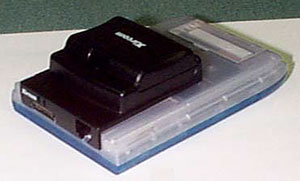
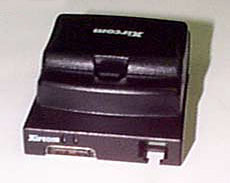
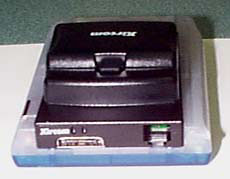
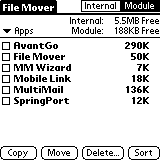
This is a standard modem is made ​​of black plastic on top of the shell are two lights that show connection status. Xircom company has made ​​a very smart move: use a standard modem phone jack (do not have to worry all the time, no matter how lost plug connectors for PCMCIA-modem ). In addition, next to the phone jack is for GSM-cable that supports standard GSM 900/1800/1900 (cable is available separately). In the modem is somewhere half a megabyte RAM, containing the program and AvantGo MultiMail Pro II, which is installed automatically when you connect the module to the Visor. Individual settings and information stored on the Visor and disconnecting SpringPort. To the modem attached utility called File Mover, which allows you to save or delete files from the RAM module (available about 188 KB of free memory).
Review of Xircom SpringPort 56K Modem GlobalACCESS
The device operates from 3 AAA batteries. I have worked extensively with the device for two days: check email, visited websites available for the Palm - the batteries are not very flat. They are located in a removable battery compartment, but I see no reason to shoot this compartment, especially since the Visor with the connected modem still does not fit in a leather case. Perhaps, more spacious and flexible cover is quite acceptable to both. In general, if the compartment disconnect when the modem is not necessary - the device will be much lighter and more compact. But even if it is done, the module will still exceed the housing Pocket PC.
Review of Xircom SpringPort 56K Modem GlobalACCESS
In conclusion, very pleased with the device. The modem worked flawlessly and never had any problems with the interruption of communication. Modem weighs very little and, in my opinion, to use a Visor module connected SpringPort very convenient also because it may extend the CCP

Pros:

- Small size - e-mail program and browser are attached

Cons:

- Removable battery compartment can bring some inconvenience Sources, Materials:

The practice of using batteries for Pocket PC

How to choose the right power for your PDA

This article - the sources of power for your PDA. The more you know about batteries, the better for you. Especially if you use a wireless connection or if you have one of those energy-modems, which can shorten the battery life of up to 20 minutes.
The practice of using batteries for Pocket PC

The classification of power sources

Known two types of batteries: no charge and battery.
Nepodzaryazhayuschiesya (batteries):
Batteries:
  • Alkaline - Alkaline
  • Lithium - Lithium
  • NiCad - Nickel Cadmium
  • NiMH - Nickel Metal Hydride
  • Lithium Ion - Lithium batteries yonnye
  • Renewable Alkaline - Alkaline batteries

Power source

There are two main options related to our topic: Voltage (V) and capacity (milliamp hour (mAh)). Tension - a force with which the battery generates current, capacitance - the amount of electrical energy, which selects the battery under certain discharge conditions, expressed in mA / h. This means that if you have two batteries of 1,5 V, one of which is capacity of 2000 mAh, and another - 2500 mAh, the battery with a capacity of 2500 mA / h under the same load currents will be working longer. That does not mean that elements with higher capacities work better. Depending on the load batteries behave differently. Memory cards and modems are a heavy load for power supplies. If you enable large loads observed voltage drop on the new alkaline batteries, because they react to bursts of energy consumption is not as good as lithium, NiSad and NiMH batteries.

Milliamp hour (mAh)

Most of the PDA consumes about 200 mA / h. CPC - 3-volt device, and two AA batteries just give a total of 3 volts. Divide the battery capacity (2600 mAChch for two AA alkaline batteries) to power consumption and you'll get at work. If you are using energy-intensive components, such as card PCMCIA, do not forget that battery life is reduced. This formula does not apply to alkaline batteries. They are estimated by the manufacturer, usually up to a limit point, but the PDA stops working well before this deadline.

Voltage

Voltage - similar horsepower in the engine. We compare the 4-cylinder car with 120 hp with a truck with 250 horsepower, pulling a heavy boat and trailer. While both beautifully moving on a horizontal surface, the power of the car becomes insufficient when driving on a hill. At the same speed both vehicles should pull trailer up the hill with the same force. But one of them has a greater capacity for the job. The same applies to power supplies. PCMCIA card for their work requires 5V-supply. Therefore, although 5-volt source would be more convenient, it is necessary to convert the voltage 3-volt power source PDA in a 5-volt. In this case, the work is harder in these conditions, the element quickly, "sit down".

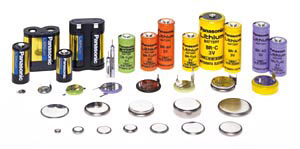
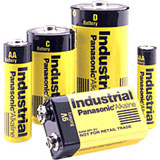
Alkaline Battery (Alkaline)
The practice of using batteries for Pocket PC
Alkaline batteries are statistically stable. Batteries are available with the options typically 1.5 V and 2600 mA / h. They have a long shelf life (90% after five years), but begin to "sit down" from the first moment of use. Rated voltage of 1.5V, but during operation it is reduced. Since the dilution rate is constant and known, you can measure the voltage and determine how much time the battery to work. This - the principle of the control program supply CE Power Manager. Capacity of alkaline batteries is almost exhausted at approximately 0.9 V. Your PDA will not work at such a low voltage.This point should be considered when using alkaline batteries. For what the lowest voltage of the CPC will work? Approximately 1.1V. But there is a positive side, you can take the "dead" batteries from your PDA and still used where it takes less current consumption (eg portable CD-player, etc.). Batteries of different manufacturers differ from each other, they react differently to the peaks of power consumption. When using a new alkaline batteries when attaching a modem or memory card to display a warning for reducing power supply voltages, it is likely that these batteries are not very well do their work. And before you curse your device, try different batteries. This is especially true for some batteries, nominal voltage which is equal to 1.2V.

Lithium power source (Lithium)

Many companies produce lithium batteries. These power supplies have a long shelf life (90% in 10 years). Lithium batteries maintain a constant voltage throughout the battery life, and work well with large loads. Like alkaline, they have high power (2600 mAChch), and their starting voltage - 1.5V. Lithium batteries work as long as they do not run down almost completely so that you can use almost all the rated battery capacity. When these batteries die, they die quickly. Due to the fact that their discharge characteristics are not known CE Power Manager, the program does not work with these batteries. She tells you that the battery is still good. But by the time the CE Power Manager says that the batteries are hooked, you're already on the verge of switching to backup power. Depending on your PDA, it should not be a problem. The most that you can lose - data that is stored in memory, but the information is recorded on a nonvolatile media CPC should not be lost. Of course, we should always remember the timely synchronization with your desktop PC and backups.

Nickel-cadmium rechargeable batteries (NiCad)

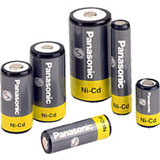
NiCad (nickel-cadmium power sources) - the most commonly used batteries today. They have many good features, and they work for a long time. You can buy batteries, NiCad and charger available, and use them instead of batteries AA.
The practice of using batteries for Pocket PC
They are much more expensive than lithium and alkaline batteries. Nickel-cadmium power sources work just as well as lithium batteries, but they do not die so quickly. Their rated voltage - 1.25V, and they keep it for life batteries. They respond well to peaks of energy consumption, which means ensuring reliable operation in different applications. Available in different brands of batteries, Radio Shack, for example, offers a battery life of 650 and 850mA / h. Nickel-cadmium batteries have several disadvantages. Their power - far less power, lithium and alkaline batteries, and they have high self-discharge - up to 10% during the first 24 hours. Also, in order to get the full potential of the battery, you need every time ensure that they are fully discharged. Another drawback - it's "memory" effect, which consists in the enlargement of the crystalline formation of the working substance battery and, consequently, a decrease in active surface area and the actual battery capacity. As crystals grow, the nominal battery capacity decreases with time. (For a complete discharge of batteries leads to the unbundling of crystalline formations and increase the real capacity of the battery.) And, finally, the information for the fighters for a cleaner environment: nickel-cadmium power sources of heavy metals - cadmium, which is a major pollutant.

Nickel-metal hydride power (NiMH)
The practice of using batteries for Pocket PC
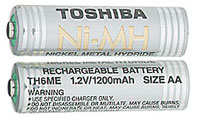
The next popular type of rechargeable batteries - nickel metal hydride (NiMH) batteries. Developer NiMH batteries are attractive because they have the energy density is much higher than that of NiSad. For example, at one and the same size NiMH battery has twice the capacity than NiSad battery power. Like NiCad, NiMH batteries hold the rated voltage for very long, and then quickly sit down. NiMH batteries, as well as NiCad, do not respond to spikes in energy consumption, level of self-discharge NiMH batteries have approximately 1.5 times greater than that of NiCad, the number of charge / discharge cycles less (about 500), plus they generate more heat during charge. Despite all these shortcomings, the nickel-metal hydride power gained enough market share. People using the battery, do not think about the expiration date (though self-discharge and is critical for recharging). They are interested in power and energy. Unlike nickel-cadmium batteries with their effect of "memory", NiMH batteries when frequent charging only work better. Besides, they do not contain heavy metals.

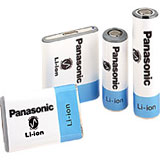
Li-yonnye power supply (Li-Ion)

The practice of using batteries for Pocket PC
After a rough start in the commercial market, Li-yonnye power begin to gain popularity. Li-yonnye batteries are a combination of the best qualities of NiSad and NiMH. They have low self-discharge, they are environmentally friendly, these power supplies there is no "memory" effect, and they have a large number of charge / discharge cycles. In addition, they respond well to peaks of energy consumption. The chemical composition of these sources of power makes them the easiest of all the batteries in that they have the highest energy density. Since the composition of the battery is changeable Lithium-yonnye sources are difficult to operate. Therefore, the batteries contain internal circuitry that controls the temperature of the element during charging. The scheme also limits the maximum current charge and discharge. In this regard, lithium batteries yonnye - one of the most expensive batteries for PDAs.

Chargers (Chargers)
The practice of using batteries for Pocket PC
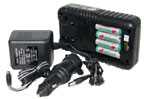
Chargers - more complex devices than most people think. First, the charger must provide the necessary current for optimum charging. Secondly, it must limit the voltage to prevent "recharge." Third, the charger must be able to balance the charge current in order to avoid high temperatures during charging. Too high temperature and gases released during charging the battery - the disastrous conditions for the battery. In addition, the charger should take into account self-discharge the battery at full charge it. It's just that, resulting in NiCad and NiMH batteries lose 10-15% of charge within 24 hours after fully charged. To reach full charge, the charger should reimburse it self-discharge. Since the chemical composition of different cell types is different, it is important that the charger was specially created for each type of battery. This is the reason that for each battery in your house - your charger: for telephone, computer, PDA, etc. When using the chargers are not designed for this battery, you risk damage or even blow up something.

Battery depletion

It is known that the PCMCIA-modem devastatingly affect the performance of batteries PDA.They require up to 5.8V for normal operation at 5.2V minimum. Why? Phone companies use a standard analog telephone signal amplitude of 3-6B. Persuaded phone companies to lower the standard around the world is impossible. And by the way, even software modems should make this phone a signal. Wireless devices also entails a quick waste of battery power. Requirements modem we are not considering. When dialing a cell phone require 4.8V or more. Do not expect the batteries on your PDA, they will pull a wireless modem. Now let's talk about color. All devices are CE 1.0 have monochrome screens. HP first entered the market with color screens. It was followed by Sharp, and now most manufacturers follow this model. Energy consumption in the device with a color screen about the same as that of a monochrome handheld with the backlight on. For this reason, most color handheld uses a NiMH or Li-yonnye batteries, not alkaline. Sources, Materials:
Rag keyboard

Rag keyboard
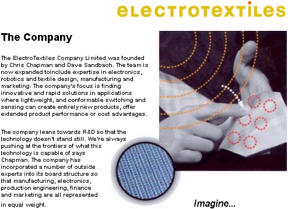
Every year more and more people fall into a very delicate situation, not allowing them to part with all sorts of gadgets. If even ten years ago, a man with the notebook was a symbol of rapidly working businessman, now with the need to constantly carry around one or another mobile device is facing so many. The same Palm or PocketPC long been perfectly acceptable substitute for traditional laptops. Not to mention cell phones, with which their owners can not leave. Fortunately, over time, portable gadgets are becoming less and less cumbersome, turning into a miniature toys that you can easily put in a pocket and forget about them - until they need them. However, miniaturization has its downside. The main problem is that the less one or another device, the less comfortable at a keyboard. Agree to write a detailed e-mail using the same mobile phone - the problem is highly nontrivial. Not many better things to handhelds that do not support handwriting recognition. In many models have to enter it using the virtual keyboard that appears only on the screen. Of course, to any serious laptop can connect and a full keyboard. But even the most compact of them - double up - still rather cumbersome, and you have to try to hit a button the size of a fingernail. His solution to this problem suggested that the British company Elektex, developed a technology for the conclusion of e-filling in the usual rag cloth. In particular, they have been created and the rag keyboard - a piece of cotton, silk, velvet or any other material woven into the electrical wires. When you click on certain areas of tissue changes the electrical conductivity of the system. Thus, any keyboard can be applied directly on a piece of cloth. The advantages of such a cloth keyboard is obvious. It, say, you can easily roll up and put in a pocket. Almost without taking up places at the right moment it can turn into a full-sized keyboard, freeing you from a headache and making it easier for typing. Incidentally, the new device is not afraid of water, so that the rag keyboard may be safely spill beer, coffee and other drinks - it will be nothing. New device, an interest in a lot of manufacturers. Already lektex received more orders (in particular, there is a large order for Palm'ov) than the ability to meet with all their technological capacities. That says only one thing - soon revolutionary invention will appear in our shops. Sources, Materials: