 |
CAM a password
Connect devices over the air
Wireless communication is gradually becoming in our lives and in our computers and mobile devices. More recently, infrared arouse admiration - should be the same! through the air, without wires - mysticism, but now it is commonplace, but still outdated - many nose gate! We now have a new fad - the wireless network when the wall is not a hindrance, and the wires under your feet (or hands) do not interfere. In the mass is still, however, is still making slow progress - the wires are still cheaper to go out, but on the horizon rapidly materialized ghost bright future when all devices within a single office or apartment, including telephones, computers, televisions and microwave ovens will be linked in a network of invisible threads. That's what most of these filaments, we are now and we'll talk.
Bluetooth - another communication standard, which predict a bright future. If we believe the promises, predictions, and already a fact, shortly Bluetooth wireless modules will appear on all devices, including refrigerators and microwaves. Unfortunately, this standard is somehow hard to go out of its infancy. More than a year talking about him, but many more of his eyes and something not seen before. Thus, a high-speed microwave standard that allows data transfer at up to 10 meters. Bluetooth operates at a frequency of 2,56 Ghz and is able to simultaneously connect up to 8 devices. This standard does not require any skills from the user - as the only Bluetooth-enabled devices converge at a certain distance, they immediately share information and establish a small network. Bluetooth module is small and consumes about 1 mW of energy, which is not very much, even for mobile devices. Time to talk about the advantages and disadvantages of Bluetooth. The biggest advantage of this standard is that for communication devices is not required line of sight - the device begin to "see" each other as similar to each other at a certain distance.This standard transcend even the walls and it can be used to create small networks in the apartment, and for example, the compound of a handheld computer with a mobile phone can be done at all without removing the last say, out of pocket. Unfortunately, in practice it is much more complicated and lack of properly written programs and drivers for Bluetooth-enabled devices is creating a situation where the advertised ease of using it grows into a big problem ... Well, for example, if one device "sees" another, and then it - no . Here and go, smash his head, where the dog is buried - setting a minimum. On the other hand it is omnivorous Bluetooth could become one of its drawbacks. Suppose, in a room sitting at the negotiations for a number of people with Bluetooth-enabled devices. Provided that all the devices "see" each other, but you need to pass information to, say, a business card to a specific person, you may have problems in finding this man. In this case, infrared communication may be more convenient. At the same time, Bluetooth is still much more expensive than the IR port, although the promise that the situation should be in the near future to correct a little bit. Theoretically, nothing prevents the manufacturer to include both device communication standard, because, in fact, they are designed for different things. So yes, it is, in practice, and is, in any case, the first devices equipped with Bluetooth, such as PDAs or mobile phones. But unfortunately while Bluetooth is not so developed to gain popularity. For our country, its development, in particular, hampered by the fact that it has not yet received the state license though, I note, nowhere in the world licensed to such frequencies are not required. But, I think, to have little time ...
Another wireless protocol on the market, call names very much tongue-and at the same nezvuchnoy acronym for IEEE 802.11b. His friend, the advertising name sounds like an abbreviation Wi-Fi Wireless Fidelity or wireless impeccable and the people it is called Radio Ethernet. Commercially available, and along with popular, this format was in 1999 with the release of AirPort - the device lets you connect your computer to the Internet or local area network without wires. Standard that allows data transfer speeds of up to 11 megabits per second at distances up to 300 meters. Operates on IEEE 802.11b frequency of 2.4 gigahertz, which is close enough to the Bluetooth. Simply put, Wi-Fi transforms Ethernet into a wireless network status and is ideal for creating small local networks in those places where it is impossible to lay cables, for example, if a company has two offices located across the street ... Each of the radio outlets may, depending on the software installed serve as the end point of reception of information and hub. For handheld devices and laptops are available adapters, that's just not all necessary. For example, computers, Palm, for which there are also adapters for IEEE 802.11b is not "incarcerated" for work in the networks of Ethernet, but for the Pocket PC such an accessory in the form of Compact Flash can be a very useful thing, and greatly facilitate the work. IEEE 802.11b is not a competitor to Bluetooth, after all, in fact, they are designed for completely different tasks and, more importantly, for entirely different devices. Direct competitor of IEEE 802.11b is another interesting standard called Home RF.
In fact, Home RF is the same as IEEE 802.11b, only in a more advanced version. If Radio Ethernet is designed specifically for data transmission in computer networks, the HomeRF can connect together, and computers and phones, streaming video and audio.In essence, Home RF is a symbiosis of the previously described technologies Wireless LAN and rapidly growing wireless technology, DECT. Home RF group developed Home Radio Frequency Working Group (WG), which includes more than 50 companies.
Apparently, this standard can be called a home and suitable for a particular small digital microcosm within their own apartment. By the way, it works everything is at a frequency of 2,4 Hz - nothing like? The only restriction until the Home RF is that the information is transmitted at a speed of 1.6 megabits per second, so obviously no match does not go from 11 megabits to the case of IEEE 802.11b. On the other hand for the house-it can be more and do not need - where and how you drive the data with a similar rate, the more so as long as Home RF is more favorable price. Developers, of course, also do not sit on the ground and is on the way Home RF 2.0, which will provide speeds up to 10 megabits per second, but then when there will be! Remember the story with USB 2.0 - which still spoke of him, and now look at your computer - what standard it used for? Surely even 1.0. Therefore, a good spoon for dinner and talk about the updates can last for years!
IRDA
In fact, IrDA - is an international organization that develops and implements wireless standards. IrDA provides wireless connectivity to devices that otherwise would have used for similar purposes of the cable. To connect via IrDA device must be in direct line of sight of each other (an infrared beam emitted by a 30 ° cone) and away from full contact to one meter. Transmission speed ranges from 9600 bps to 16 Mbps. The popularity of the communication standard is explainable - the cheapness and ease of use. No need for any wires - brought the device to each other and in the bag, and implementation of such a port in the unit cost producer in the $ 1 ... Advantages and disadvantages of this method of communication are clear. Of the shortcomings of most, perhaps all, you can call one for communication devices must be in direct line of sight. Plus, some types of lighting (eg solar) may interfere with communication, as used, though invisible to the eye but luminous flux ... The next limitation - it's communication range, and a meter is not always enough. The main advantage of the same - the price, until now, as you know, continues to play a major role in the calculations of producers and serve the promotion of the format. LOS, may also be a plus - in the first place, this condition provides a simple physical security of information transmitted - to catch her because of all the limitations of infrared connection is problematic. (Except that try to "fit in" with the receiver anywhere within the 30 ° cone :-) And with the third party, often require communication between two specific devices, which provides a brilliant infrared connection. And the price, and a small power consumption, and compactness, and versatility make the IR port is ideal for our brothers pocket. On large computers, he already looks unforgivable remnant of the old - and slow and, in general, not very convenient, considering the condition of line of sight ... |
IEEE 802.11b
 |
 |
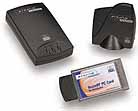 |
| HomeRF USB Adapter and PC Card Adapter |
Problem
Despite the reasonableness of each of the formats, divorcee use technology and differentiation in the use of the frequency of a used one and the same, and therefore may be even very serious problems associated with the intersection of information flows. All three methods operate on the principle of separation of the frequency channels. In this case, Bluetooth and Home RF «jump" from one channel to a certain pattern in the spectrum of 83.5 MHz .. IEEE802.11b divides the spectrum into crossing the 22 megahertz channels and already-nm transmit information. Understand what is happening in the room during simultaneous operation of all three standards, we can imagine 84-hour lane freeway at rush hour. On it goes a lot of small cars, which occupy less than one band, but nonetheless famously rebuilt from one to another (Bluetooth), there is heavy tracks with enormous vans that take up several pages, but rarely moving from their seats - are currently in their Right at cruising speed and everything (IEEE802.11b), but there are also all kinds of vans, small trucks, "Gazelle" and "Bulls", which, despite the fact that cars are much more, behave less rude, trying to cut and also jump from band to band (Home RF). Presented? Now tell me, whether in this case, to avoid accidents? This is now a major, but if she decides to Bluetooth, the creators of the Home RF and Wi-Fi in no hurry to agree - it was too dense, they are competitors, and the attention of computer companies, more and more pulled in toward the latter.Outcome ...
When it's bright future and we will completely abandon the wiring is not clear, but now there is a choice and, if correctly formulated problem and a certain level of funding, the solution could be found, although the universalization not yet in sight. Nevertheless, from the infrared port does not want anyone to refuse - it was too much desire to save money, and the use of Bluetooth and Wi-Fi is limited nedorabotannostyu technology and high price. What would be good - brought the printer to the computer, and it is already connected ... Hey, would be enough patience .... The authors, translation:His words climb
Probably not less than one third of questions in different conferences on the Casio BE-300, concerning search dictionaries for this machine. Unfortunately, to date no positive responses questioning had been received. The only dictionary on the BE-300, and he is working, judging by reviews, "through time" - a built-in E-Book reader Haali Reader, designed primarily for the translation of words in the text of the book itself. Now the situation has changed. The company "Information" developed a version of its vocabulary Context, adapted for "Beshka" and offered it to us for pre-testing. The first thing that attracts attention - an unusual installation process. Need to migrate to BE-300 folder and the executable file from the archive, then run already on the PDA, this executable file. Let me remind you that the built-in file manager is not able to run applications, so we had to use third-party applications, such as GSFinder. However, the developers promise to make the final version of the usual installer. However, after installation there is a feeling that the first pancake turned out not lumpy. The program interface is in Russian, so it is easy to use, even if you do not know English.
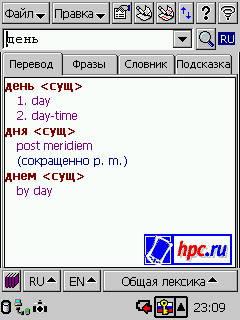
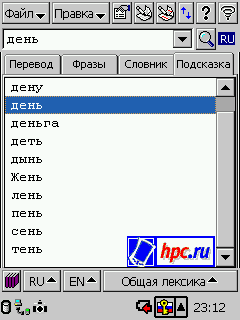
The program window is divided into two main parts: the string to write, and the field to display the search results. The dictionary operates in four modes: translation, phrases, vocabulary, hint. If you activate the tab "Translation", simply enter the desired word and click "Search" (this little button with a magnifying glass to the right of the input string word). In the field, we obtain the result. Incidentally, in the Anglo-Russian-English dictionary, which got us to test more than 60 thousand words, but the search takes about two seconds. Search results are highlighted, so read them pretty comfortably. When searching dictionary takes into account not only the words you entered but also its possible morphological changes. So that for example, the search results for the word "day" as follows:
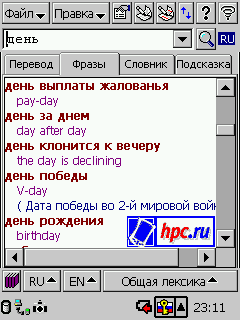
You can then click on the tab "Phrases and vocabulary will give a list of stable expression, in which the word" day "with the translation. The compilation of this list, it takes about eight seconds.
Mode "vocabulary" is automatically activated when you use the "Quick Search". It allows you to enter only the first three or four letters of the word, and then choose the end of the list. They can also be used as a normal dictionary, where all the words arrayed in alphabetical order. "Hint" is needed in the event that dictionary could not find the word you wrote. In this tab you can view a list of related spelling words, in case you make a mistake in spelling.
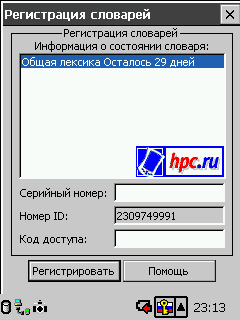
At the very top of the screen is a menu bar. Here you can change the settings of the program: to specify the font glossary and a search string, choose the direction in which tab to move if the word is not found, and turn on the speed dial.Here you can register your dictionaries (the program you can connect an unlimited number of dictionaries that can be found on the website of "Information"). Edit menu allows you to add in any dictionary your own articles or edit existing ones. Nearby are the "hot keys" for writing articles for users. Under the window of search results - a line for dictionary management. You can connect the new dictionary, select a language pair and one of the thematic dictionaries for it. The direction of translation (from Russian into English or vice versa), the program determines automatically by the first letter entered by the user.
In general, the vocabulary seems to be very successful and easy to use, with one exception. I would very much like to see when you turn it looked clipboard, if it contains text (words), copy it into the search box, and immediately gave the result. However, the current version is unlikely to last and, hopefully, in the following, this function will be realized. In the rest - use a dictionary a pleasure. Now the main thing - how to get a dictionary. In the coming days crack for Casio BE-300 RussKey BE 2.0 will be completed by the license for the dictionary. A couple of weeks dictionary Context will appear on the CD with language. Context for the BE-300 can be purchased separately in stores, "The computer in the palm." Roughly the price is $ 10. The authors, translation:
 |
| Here is the Pocket Context for BE-300 |
 |
 |
| Search by keyword phrase |
 |
| Context helps you find the right word |
 |
| There may be any number of dictionaries |
Quarta Russian MUI for Pocket PC 2002 - локализация для Pocket PC 2002
Российская компания Quarta Technologies любезно предоставила редакции HPCru эксклюзивный на нынешний момент материал. Это система поддержки русского языка для карманных компьютеров Pocket PC 2002 Quarta Russian MUI. Уникальность продукта в том, что по информации, полученной от представителей компании Quarta, продукт позиционируется не для розничной продажи. Разработчики собираются поставлять ее только OEM-производителям и корпоративным заказчикам. А жаль, потому что система нам показалась очень удачной, из-за чего мы и решили о ней написать. Quarta Russian MUI, на наш взгляд - это "то-как-оно-должно-быть" в русификации Pocket PC 2002.
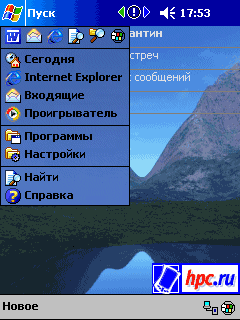
Итак, дистрибутив весом чуть более мегабайта подготовлен к установке. Это так называемая RAM-версия, устанавливаемая в ОЗУ КПК. Ставим. Разработчики сразу предупредили, что во время установки в региональных настройках должен быть выбран русский язык, иначе система локализации не "встанет". Так и было сделано. После перезагрузки - на экране "обрусевший" вариант Today с меню "Пуск" вместо "Start".
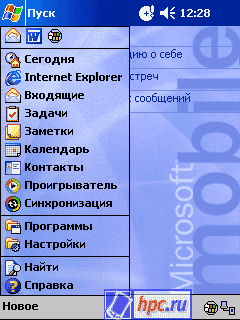
Первое, что бросается в глаза: в меню стало меньше программ. Там только "Сегодня", "Internet Explorer", "Входящие" и "Проигрыватель". В меню "Программы" - только стандартные системные приложения (Word, Excel, калькулятор и т.д.). Происходит это от того, что после установки локализации в папке Windows появляется папка "Меню Пуск", из которой и берется содержимое главного меню. Восстановить его содержание можно, просто перетащив сюда ярлыки из Start Menu.
Интересно, что на Casio E-200 в отличие от iPaq меню Пуск уже совсем не сокращенное, а полное. Впрочем, эксперимент не совсем чистый, поскольку русификатор был установлен на абсолютно чистую Каську, а iPaq был уже хорошо нагружен различными приложениями.
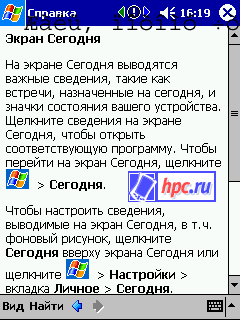
Русификация действительно полная. Переведены названия программ, все пункты меню и все системные диалоги. Для начинающих пользователей, безусловно, ценно то, что полностью переведена вся справочная система. Вот так это выглядит:
Ввод символов кириллицы осуществляется только с помощью экранной клавиатуры, кстати, цветной и довольно симпатичной с виду. В ее настройках можно выбрать два размера клавиш(если клавиши больше, не помещается ряд цифр) и включить "жесты" - прочерки вверх-вниз, влево-вправо, заменяющие клавиши "Space", "Shift", "Backspace" и "Enter".
Авторы, перевод:
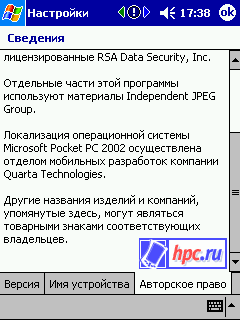 |
| Разработчики вписали себя в сведения о системе |
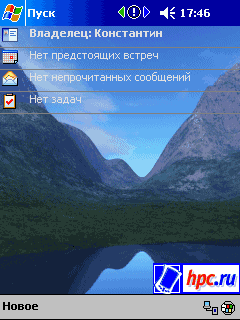 |
| Пуск вместо Start |
 |
| Меню русское, но сокращенное |
 |
| Старт-меню на Cassiopeia E-200 |
 |
Встроенные приложения
Все остальные приложения из стандартного набора Pocket PC 2002 тоже щеголяют русским интерфейсом. Конечно, специфические приложения компаний-производителей остаются без перевода.  |
| Перевод интерфейса Word |
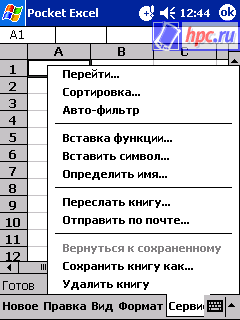 |
| А вот так выглядит меню Excel |
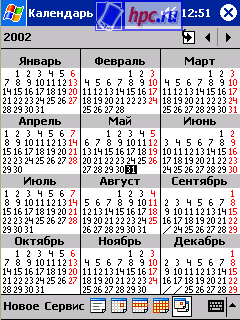 |
| Календарь |
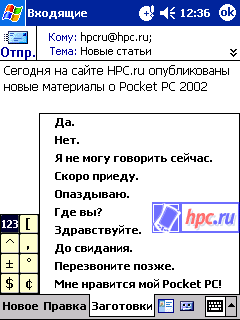 |
| Локализация почтового клиента |
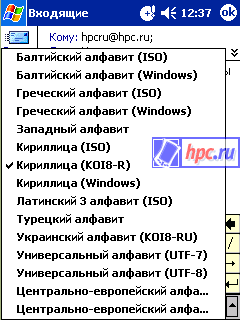 |
| Список доступных кодировок |
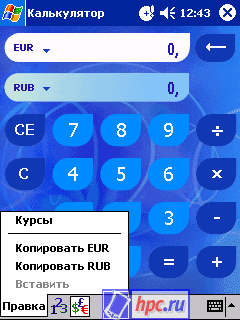 |
| Калькулятор и конвертор национальных валют |
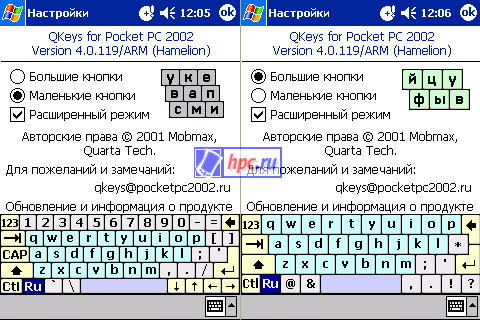 |
| Вот такие красочные клавиатуры в Quarta MUI |
Внутреннее устройство
Локализация работает на редкость надежно и "безглючно". Практически единственная неприятность (если не считать опустевшего меню Пуск) - в настройках аппаратных кнопок из списка приложений исчезли все установленные ранее программы. Причем сами настройки сохранились, и список программ для удаления с машинки ничуть не поредел. Еще не понравилось, что нельзя отключить перевод интерфейса (оставив клавиатуру). Впрочем, эту возможность и возможность динамического переключения между пользовательскими интерфейсами на различных языках разработчики собираются реализовать в следующих версиях. Кроме того, русификатор работает на удивление быстро: нет никаких задержек по сравнению с "чистой" машинкой, в то время как при использовании других систем локализации КПК заметно "притормаживает". Дело в том, что Quarta MUI предназначена именно для Pocket PC 2002 и работает не по старой схеме. Обычно движок системы локализации занимается подменой ресурсов (в которых содержатся данные для формирования пользовательского интерфейса, в частности, надписи на кнопках и в диалогах) некоторых системных библиотек. Сам движок находится в оперативной памяти и подменяет ресурсы "на лету", что заметно замедляет работу системы в целом. Главная проблема в том, что надо знать, в какой момент подменить какой ресурс. А для этого приходится лезть в текущие процессы (работающие программы, библиотеки) полухакерскими методами. То есть "обманывать" ОС, чтобы получить в нужный момент права доступа к определенным процессам. Понятно, что сам подход несколько порочен, однако для ранних версий Windows CE ничего лучше придумать не удалось. Собственно и современные русификаторы продолжают использовать этот подход. Кроме того, дополнительная нагрузка на оперативную память и процессор возникает при запуске отдельных локализованных программ (например Word). Решение же Quarta Technologies оказалось простым и эффективным. В Windows CE для Pocket PC 2002 есть функции, специально предусмотренные для решения вопросов локализации. Они позволяют просто указать системе, что ей нужно использовать не стандартные файлы ресурсов, а находящиеся в таком-то месте в памяти (не оперативной, а выделенной для хранения файлов). Функции, надо сказать, недокументированные, но отнюдь не закрытые и вполне работоспособные. Надо было лишь копнуть поглубже. Достаточно совсем небольшого программного кода, чтобы указать системе, какими файлами ресурсов ей пользоваться. Ну и, конечно, самих файлов ресурсов с русским языком. В результате русификация проходит на уровне самой системы, без использования каких-либо дополнительных приложений. Отсюда быстрота и надежность работы. В "рабочем" состоянии русификатор требует около 2.5 Мб оперативной памяти. В общем, система локализации оставляет отличное впечатление, в основном благодаря своей основательности и продуманности. Работает она безупречно и остается только пожалеть, что большинство пользователей ее так и не увидят. Что ж, другим разработчикам есть к чему стремиться!  |
In an environment of moderation and accuracy
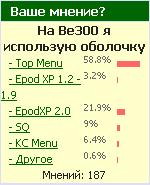
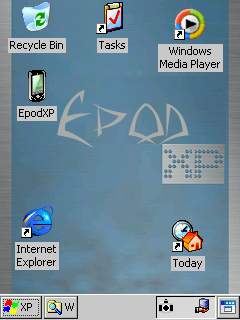
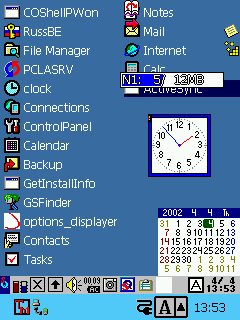
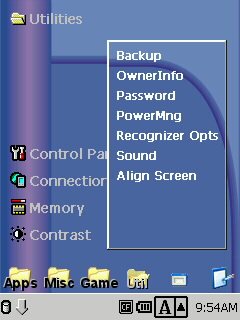
Casio BE-300 Pocket Manager in their own unique CPC, because it can be almost completely rewritten GUI - graphical user interface (that is what we're seeing on screen machines, then using what we have to BE-300 exchange information ). This opportunity and took advantage of some developers to create their own casings for "Beshka. The result was four separate and completely finished product, between them and divided to vote (and preference) of users. Thus, standard envelope - Top Menu, designed in the style of Windows CE.NET EpodXP, one of the first emerging alternative shells L'agenda SQPL and misunderstood KC Menu. Here is how to allocate votes:
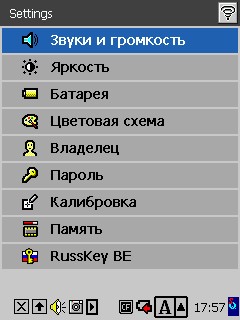
Tell me what you have installed a shell and I'll tell you who you are. If you follow this rule, it turns out that users BE-300 - people are mostly calm, thorough and conservative. They do not yearn for change, alien to them thirst risk (the risk to get more glitches than pleasure). They are satisfied that in the Top Menu can not easily add shortcuts to applications, hosts and the absence of the normal task switcher (can, however, to use separately installed applets). In addition, many users choose Top Menu because of the possibility of Russification (including, and Russification interface).
In second place EpodXP 2.0. I think that those 3.2%, which is now used by older versions of this shell, soon will pass no less "buggy" 2.0, if only among these users BE-300 is no fan of endless open windows when you try to start Internet Explorer. Those who choose EpodXP, sensitively catch the wind of change and extend to the new. In fact, the owners of earlier versions were able to see firsthand how some would look externally Windows CE.NET, when the machines with the OS in nature was not yet. The familiar Start button in the lower left corner of the screen, Taskbar, System Tray, Windows Media Player, desktop with shortcuts to programs and screen Today, as in the machine with the Pocket PC, - that's what gets to those who dare to set EpodXP. True, gets together with some firmware glitches and occasional lockups. In this latest version is still much more reliable than previous ones.
In third place - SQ - the golden mean for calm and practical. This shell - a custom desktop, where you can add labels, not only programs but also frequently used documents, quick menu to display applications, a convenient switch tasks, the ability to "hang" beautiful "wallpaper", an excellent built-in file manager with a function to launch programs.
At the last place was KC Menu - choice of eccentrics. It is difficult to say why this shell is not very popular. Perhaps the reason is that the KC Menu pay ($ 5), although, to be frank, that in Russia very few people stop - there is a warez. Maybe KC Menu gained so few votes because there are no any additional software, as in the installation package, the other shells.There's just a pretty picture on your desktop (you can change) and a folder to store shortcuts.
Well, despite the many cries of rage against the Top Menu in various conferences, programmers (and designers) Casio - ahead. Incidentally, the number of polkonnikov likely to increase when the famous Russian users (but totally unknown to us :-) sites will Top Menu, not working on Windows CE 3.0 (truncated), and the Windows CE.NET (also, however, truncated). More details about the various shells for the Casio BE-300 can be read here, here and here. PS Please do not take seriously my characteristics of users:) The authors, translation:
 |
 |
| Top Menu |
 |
| EpodXP |
 |
| SQPL |
 |
| KC Menu |
Symbian OS smartphone: what's what
Introduction
 |
The story of Symbian OS
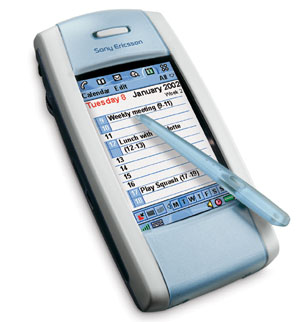
Operating System Symbian OS (EPOC 32) was developed by Symbian - a joint venture firms Motorola, Ericsson, Nokia and Psion-based Psion Software division of Psion. Later they were joined by company Matsushita, Kenwood, Fujitsu, Siemens and others. The first release ("Release») EPOC 32 in April 1997 marked the birth of a new generation of operating systems based on extensive experience in the industry the company Psion handheld mobile devices. For thirteen years before, in 1984, the company Psion has invented a personal organizer. With sales of the next model - Organiser II - corporate and private clients with more than one million units. This model had an 8-bit CPU, and could be programmed in assembly language or BASIC-like high level language OPL (Organiser Programming Language). Since 1991, a series of devices under a common brand Psion Series 3 Take a personal digital organizer popular and affordable mass-market device. The new OS is called SIBO (SIxteen-Bit Organiser), often it is also called SYMBIAN OS16. In the system of SIBO was first applied technology is the core allocation and application interfaces into separate components, which subsequently became an integral and important part of the 32-bit SYMBIAN OS. However, since most of the core system was written in assembly language, but also because of the restrictions for 16-bit architecture x86, SIBO system could not be used anywhere except processors x86. Graphical frontend SIBO was an object-oriented, and built-in editor and translator of the language OPL allows them to be directly on your PDA. Platform SIBO A myriad of applications. At the same time for the corporate market has been developed industrial terminal WorkAbout, first introduced in 1995. Total sales of devices has exceeded 1.5 million units.In the period of greatest popularity in the share of Series 3 accounted for 35% of world market organizers. One major reason for this was the convenience and functionality of applications SIBO, reliability and efficiency of multi-tasking operating system (which throughout its existence was virtually no errors found), high quality built-in ROM software, long battery life and stylish design firm.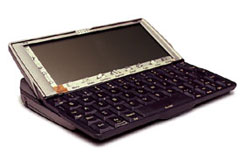 |
Goal of creating a Symbian OS (SYMBIAN OS 32)
Attractiveness to Users
Mobile devices are intended for personal use. They should be easy to use, and always provide information on demand (the principle of "Instant-On"). System graphical user interface and firmware must be attractive and intuitive. An efficient multi-tasking. Power management should allow the computer when you switch instantly restore the state in which he was at the time off without the long process of booting the system. When replacing the power source (batteries) data should be preserved. Software in ROM should be of the highest quality. These lessons the company learned Psion back in time Organiser II, when the majority of desktop PCs were running DOS, a "portable" computer was the size of a diplomat. Suite of applications - a critical factor for creating attractive from the standpoint of the end user. SYMBIAN OS applications are designed with the expectation and the beginner and professional. About ten major applications and the entire operating system had to fit in a ROM, which amounts to about 1 / 10 of the average application for the PC. Such a compact has been achieved by the highest degree of reusability, the use of object-oriented design, C + + language and the tight junction development teams dealing with various aspects of the OS and applications. Digital communications are widely used in today's world. SIBO architecture was designed for organizers who are independent units, which only rarely had to communicate with other devices for data backup. Devices based on SIBO well have existed without connection to a PC.Currently, communications using the Internet, fax and mobile phones has become commonplace, and synchronized with the data on the desktop, at home and at work, has become extremely important for mobile devices. Mechanisms of synchronization and data sharing were originally built into the Symbian OS.Attractive for OEM-manufacturers
OS Series devices Organiser and SIBO was used only in products of companies of the group Psion. Symbian OS was designed from the outset in order to license a wide range of telecom equipment manufacturers. The main requirement was portability for different types of processors. This, in turn, required the use of high-level language, which could simply be transferred to another platform. Assembly language is used only for implementation of components, which is especially important for speed of execution. In Symbian OS is also widely used abstraction from a particular type of equipment that make it easier to adapt for different variants of a single processor architecture. Despite the fact that SYMBIAN OS is a portable system as the main platform was chosen by Symbian architecture ARM. ARM architecture is exceptionally efficient RISC-strutura providing optimal ratio of performance / power consumption - which is especially important for devices that must operate for weeks on one set of batteries. In addition, through effective use of chip area and correct the company's policy ARM Ltd in respect of licensing ARM architecture provides the best ratio performance / price. ARM architecture licensed these "whales" as Intel, Nokia, etc. Mobile devices are no standards for screen size, keyboard shortcuts, or digitizer. Producers receive complete freedom to create any types of devices, any price range, size and weight. Symbian company made a strategic decision to make a clear separation between the graphical user interface (GUI) and other components. For devices that require non-standard means of user interaction, graphical interface system and applications can be modified or completely redesigned. For example, it will easily adapt to any size and screen resolution, absence / presence of a touch screen, etc. Compared with other platforms it will allow manufacturers of devices based on SYMBIAN OS to create devices with "branded" look and feel of hardware. SYMBIAN OS is an international operating system. Platform SIBO was localized for the UK and the U.S., almost all the languages of Western Europe, and parts of Eastern European languages: Czech, Hungarian, Greek and Russian. IN SYMBIAN OS built-in support for 16-bit encoding UNICODE and special means of data entry to adapt to the languages of Asia and the Far East, such as Japanese, Chinese, Korean and Thai.Attractive to developers
In order to develop efficient applications using a wide range of advanced development tools. The main requirement was a 32-bit OS, since the writing of applications for SIBO (as for DOS / Windows 3.1) required a significant effort to overcome the limitations in the 64K at the size of the segment caused by using 16-bit architecture to x86. SYMBIAN OS is fully 32-bit, there is no support for older 16-bit programming interfaces (API) is missing. Symbian provides a wide range of development tools for SYMBIAN OS. Program in standard C + + language are created on a PC using an interactive development environment Microsoft Visual Studio and emulator. Then the source code is recompiled and transferred to a PC based on ARM processor with the compiler GNU C + +. It is also possible to develop applications in OPL (similar to the BASIC language), whose roots go back in the days Organiser II. There is also the possibility of writing Java programs using any of the existing development tools for the language Java. On creation of development tools for Symbian OS announced by companies such as Metrowerks (known for its tools CodeWarrior), AppForge (presented the means to develop software for Symbian OS language Visual Basic) and Borland, traditionally strong in the field of visual development tools.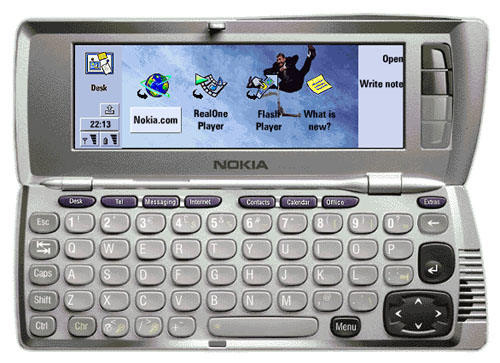 |
Development History SYMBIAN OS
| Version | Release date | Features | Where Used |
| Release 1 | April 1997 | First edition. The new OS with a set of office applications. | Psion Series 5 1.00 ROM |
| Release 2 | July 1997 | Released a package for PC EPOC Connect, fixes some bugs, added the application EasyFax | Psion Series 5 1.01 ROM, PsiWin 2.0 |
| Release 3 | November 1997 | Email applications are included and the Web, support for remote access and TCP / IP | Geofox One, PCC Synergy |
Pocket PC Phone Edition 2002: a white car black
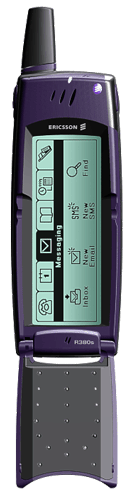 |
Private life of a single user
Do not believe that gloomy, almost apocalyptic preface. Life is amazing and beautiful.Personal computers are improved, and the means of cellular booming. And no Microsoft is not able to prevent it, because she participates in the race for the rights of a running horse ... I like the user does not care what system will be my device. The main thing is that it worked properly and fully carry out his duties. Even a PDA I chose on principle - "that all take it, I will." However, in the Palm and not believe what is now a little bit sorry. Around the same principle is ready to select and communicator ... My requirements are (again as an ordinary user, not as outstanding in all respects, the author of brilliant papers - do not think that God knows what) are modest, and even primitive. The first - the communicator must be small in size, lightweight, long-lived source of autonomous power supply. The second - at negligible amounts device screen should be just a huge (at-oh-so from), and if this is impossible, at least not too small. The third - the connection should be carried out without any kind of problems, and the cost of services - tend to zero. Fourth - I do not even have to worry about the installed device in the processor, memory and other nonsense ... Ask any intelligent car owner, who only knows how to drive, but does not delve into the car kishochkah, about some technical details of the device of his car. In addition to horsepower and speed, it is unlikely that he knows ... If it is, of course, Lada, but something more dignified ... So, I want my device was not a Lada! The fifth and sixth stand in a separate paragraph, since in fact it is the number "one" and "time-with-plus." Thus, the fifth - the price of the communicator must be so small that I could easily buy it, but not so low that I no longer respect themselves ... In Paris, for example, mobile phones, worth 400 euros give for 1 euro. Condition - The conclusion of the contract with provider. I want to because it was in Russia! But this is a separate issue ... Finally, the sixth - control communicator should be as simple as possible at all. I do not want to know anything about the software installed and some special methods of its use. There is a text editor, I have to write it as I write, first picking up a handheld Psion. There is a mail program, I should be able to use it the same way as the use thereof on the desktop. And so on. Do not get me wrong, if I am a regular user of the communicator, I and the chief buyer of your bullshit. If I am the main buyer, I will certainly make money (option "steal" emphatically swept aside). If I earn, I'm in the same breath and work. And to work, keep in mind the wisdom of the desktop version of Windows in parallel to comprehend the mysteries of control communicator - can do it just inveterate geeks. Which, in turn, is unlikely to earn good money so easily spend on a trendy mobile device ... Outlining a range of requirements, take a look at the proposals today. Who of the contenders for monopoly of the market has moved more often? Who among them will become tomorrow the same "family father", which for all of us is Mr. Gates?A look at the trinity
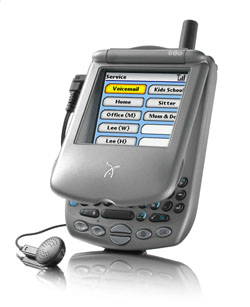
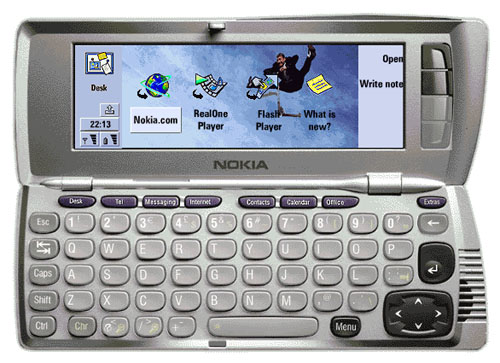
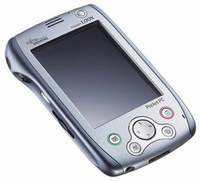
Three major platforms can be arranged as follows - Palm OS and communicators on its base, a consortium of Symbian OS and EPOC, Microsoft and its Windows CE operating system for PCs Pocket PC 2002, as amended Phone Edition.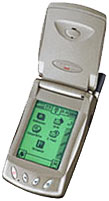 |
 |
 |
 |
Cheerful prospects
Whatever we say today about the competition, EPOC, and Pocket PC 2002 Phone Edition (and the main battle is between them), but suprotiv Microsoft chances consortium Symbian little. Remember the same cynical truth - that money can not buy, you can buy a lot of money? Available: Microsoft focuses much capital. Cause and investment opportunities are practically limitless ... It is not excluded that after a while, a company belonging to the opposing consortium, will conclude a truce with MS or even go into the camp of the current competitor. So be it - you know perseverance BG. By the way, if Henry Ford's name was Bill Gates, the pipeline would necessarily proprietary technology. And the world is still produced cars would be a single brand - "Ford." Plus a few thousand stamps handmade small-batch assembly ... But until that happens, we will observe the peace process carnage. We have something with you from this fun. The farther into the forest, the cheaper the phone ... Just imagine, "Ford" instead of, God forgive me, "Lada ... And what Henry Ford did not name Bill Gates? The authors, translation:
Subscribe to:
Posts (Atom)