Alternative shell for Casio BE-300

First thing that new users Casio BE-300 Pocket Manager, adding machine, - Top Menu - an interface developed by Casio. And almost all of it causes resentment: "ugly, uncomfortable, you can not add shortcuts to programs, it is difficult to switch between running applications." On the forums are often accused of Casio in that it is, saving on hardware, save on UI design, but probably does not matter how and why the Top Menu happened so unfortunate. Importantly, it has something to replace it. To date, at our disposal, there are two popular shell, completely changing the appearance of your BE-300, and makes everyday communication with Kaskiv "easy and enjoyable.

EpodXP

This envelope implies a radical change of the standard Top menu supplied. After installation (on which below), the interface will seem very familiar: an almost ordinary Windows, only on a small screen. There is a button Start, a few shortcuts on the desktop (including My Computer, which in BE-300 is called Epod), real Taskbar and System Tray. Online users can search and download three versions EpodXP - 1.2, 1.4, 1.5. Consider the last.

Installation

Alternative shell for Casio BE-300
Installing EpodXP on Casio BE-300
Installing EpodXP harder than usual installation by double clicking on Setup.exe. This shell is fully substitute for the standard menu, BE-300, so that will be installed under the guise of Restore the saved files on a PC. To do this, go into Safe Mode ("OK" + "Reset"), to calibrate the screen, chosen from the on-screen PC Connection, and then in the same name the program select menu Tools> Restore and point the way to the pre-unpacked *. bin-file with EpodXP (extension *. bin files are, where the backup is stored information from machines). After Restore machine will reboot and will need to rewrite her file tahoma.ttf, which allow you to view Russian web pages in the directory \ Windows (not in Windows \ Fonts). Incidentally, this directory is stored in RAM, so that when you restart this font file is erased. Out - write it in the Nand Disk \ Patch. There are two ways to install EpodXP: if a memory card to download this one file, but if it is not - this.

Interface

Alternative shell for Casio BE-300
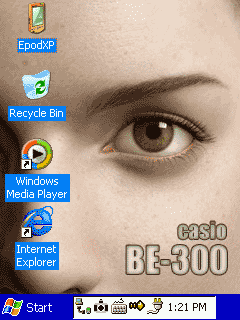
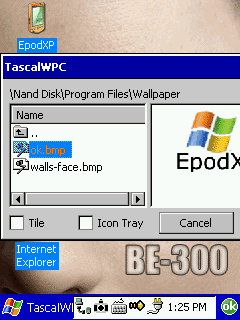
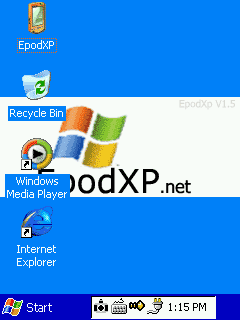
Appearance EpodXP
Externally EpodXP - almost real desktop Windows, only on a small screen. In the upper right corner of the icon EpodXP - analog to all the familiar My Computer. Just below the Recycle Bin (which, however, still does not work, files are removed immediately and permanently). Next two shortcut - Windows Media Player and Internet Explorer. On the desktop you can add your own shortcuts (by the way, they can create built-in Explorer, it is called GSFinder, and put them in need WindowsDesktop). In the lower left corner of the usual button Start, right of the Taskbar and System Tray. In the System Tray are important for icons Task (manager of open source applications), SipSelector (switch virtual keyboards), watches. Taskbar, like in "big" Windows allows you to switch between running applications. True, the buttons on the Taskbar so small that they pretty hard to get, not to mention the fact, to read what is written there.

Programs

Open menu Start. First the bottom - the button "Suspend" - the software off the power. Fun, just do not understand why you need. Next comes the line Run, allowing you to run programs with additional parameters. In Settings - Configuration Taskbar'a and almost "real" Control Panel.
Alternative shell for Casio BE-300
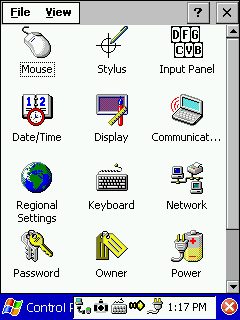
Control Panel in EpodXP
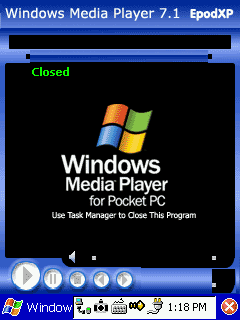
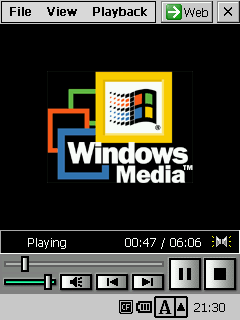
Adjust the Taskbar can be reduced to the possibility to remove the clock and hide himself Taskbar. Later, however, have both should try to, he "went" back - will need to get into the millimeter strip that remains of it on the screen. Control Panel from the first glance strikes the abundance of possible settings, but soon discover that the work is not all. Operates icon Stylus, which runs the screen calibration utility (a standard, working from Top Menu). Date / Time, of course, allows you to set the date, time and alarm. Display controls the standard color schemes (EpodXP of 22). Communication starts the dialog to configure the remote connection. When you click Regional Settings again find ourselves in setting the date / time. Network - the same thing and Communication. Password appropriately sets the password to activate, Owner - information about the owner, the Power you can see the battery level and set the parameters of cutoff. System shows the graphics memory is full (unfortunately without the exact numbers), here you can switch between running applications and close them. Volume & Sounds on / off "squeaker" and adjusts the headphone volume. Next in the Start Menu folder, follow Favorites (sync with your desktop computer I failed), Documents, and the most interesting - Programs. Go to Start> Programs> Accessories. There is a calculator from a standard kit, a software synthesizer midi, notebook and Paint (the last two functions are the same for a similar program for a desktop PC, except that Paint can not save images in JPEG and GIF). EpodXP has a built-in tools for connecting with both PCConnect supplied with the BE-300, and with Microsoft ActiveSync. True, personally I never managed to get the BE-300 to connect to a PC via PCConnect. With ActiveSync - works, but there is a problem with installing programs, as you have to manually transfer programs from an archive file with the extension *. cbea on the BE-300 and run it there. Application for connection to a PC are on the menu Start> Programs> Connections. In the Start> Programs> Multimedia is a Microsoft Media Player 7.1. In my opinion, it MP3 files sound better than the standard Music Player. Big minus - to close his account only through the task list.
Alternative shell for Casio BE-300
Windows Media Player 7.1
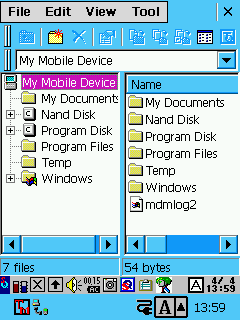
The menu offers four standard PIM applications, which can also be used without installing EpodXP: Calendar, Contacts, Notes and Tasks. The only thing to add - a glitch with the phasing out the window in EpodXP it is not minimized. The Settings menu is the same tools that can be found in the Control Panel, add only the files of backup (Backup) to a memory card. Much more useful in the menu Start> Programs> Utilities. In the Advanced folder for editing the files of the control panel (you can remove broken or duplicate icons). FlushReg records the image of the registry to the memory card. Here is a utility for remapping system buttons (Rocket Button and seven on-screen buttons to quickly access). Very useful (at least for writing this review) was utility CaptCE, which makes screenshots BE-300 (they are placed in the root directory). Next icon - a very good File Manager - GSFinder. Dvuokonny interface (like on your PC): the left tree of directories on the right the current folder. GSFinder able to view the files in tekstvom mode and run executable files.
Alternative shell for Casio BE-300
In EpodXP can be set, for example, that such
PalmTweak (Ptweak) can associate files with specific extensions to the relevant programs, set the system font, adjust the amount of virtual keyboards on the list. A SipSelector allows you to switch between the virtual keyboard. One of the most important applications - Task. This utility will need to switch between active applications, they are closed (to choose from: the current one, all or all except the current one) or "murder" of system processes. Wallpaper changing images that serve as background for your desktop (optimally, if the picture is the size of 240x320 pixels). Very well done utility Search. You can search for files by name, type, date, size and their content.

Problems

Alternative shell for Casio BE-300
That such
Despite all its beauty and versatility, EpodXP, unfortunately, is not without glitches. Here are a few that occur in the first few minutes of use: the already mentioned problem of synchronization through PCConnect, Internet Explorer does not start when the Facelift, nearly half of the applications did not wish to minimize, in most dialog button "OK" is outside the screen, so that its press have to drag windows. Another problem - the removal of installed programs. In order not to wash their hands and then edit the registry to the Windows folder to run the program menu.exe, then you will see Top Menu from the standard "kasiynogo" set, which has a corresponding function. In addition, sometimes EpodXP just hangs (especially if you run several programs, among them - Windows Media Player). Treated with a reboot.

SQPL

The second popular shell compensatory means dull standard Top Menu. When downloading shows multifunctional desktop with shortcuts to programs and interchangeable "wallpaper". Moreover, if put into the internal memory SQPL BE-300, is employed only 7 MB, which is certainly much nicer than when you install EpodXP, who "eats" about 12 MB. Memory is also loaded with SQ is less.

Installation

Put it in place of the standard package, and on top of it, so there is no difficulty in Safe Mode and Restore. Just run setup.exe. Then you can either run from SQPL Top Menu, where she (SQPL) "hangs" like any other application, or even replace it with a Top Menu using "ChgShell" from the archive SQPL. That is the very "ChgShell" install more difficult. Needed in the directory Nand Disk or on a memory card in the Program Files directory create a folder "ChgShell" and rewrite it all the files from the archive, except ChgShell.exe, which is copied to the Nand DiskProgram Files. Next, start using the File Manager GSFinder (also included) the file. I have a button labels were unreadable, so empirically discovered that pressing need at the bottom left button. Then reboot, after which the screen once you meet SQ.

Interface

Alternative shell for Casio BE-300
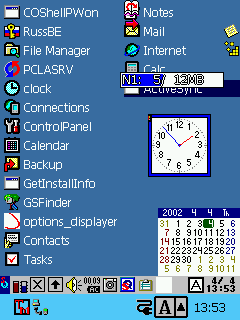
Appearance SQPL
SQ screen consists of two main parts: the "desktop" with icons for programs and the taskbar. After installation, the desktop two pages, they can "turn over" with the button with a red arrow at the top of the screen. The first thing that catches your eye - a bunch of icons of programs.All these labels are stored folders Nand Disk \ Program Files \ SQ \ 1 (first page) and Nand Disk \ Program Files \ SQ \ 2 (second page). Accordingly, by adding or removing icons in this folder, you can regulate what appears on the desktop. You can also create folders "3", "4" and "5" (no longer) and increase the number of pages of the desktop. In addition to the links on the desktop are clock (you can move and make transparent), light (if memory cards are two of them) of free space on Flash-memory and a calendar. What, however, very small, moreover, no such useful function as an opportunity to press the stylus on the number and go to the task list that number. Calendar, a clock and an indicator of memory can be removed from the screen.
Alternative shell for Casio BE-300
That's set looks SQ
At the taskbar, the first button on the left is the options menu, where exactly you can customize the desktop, the volume, adjust the settings using a memory card, change the "wallpaper". A great convenience - Button closing the current application (to the right of the taskbar). More to the right - an icon call Task Manager, then a mute button and battery indicator. Optionally, add a button for creating screenshots for Call Clip Menu (need it for text editing and allows you to virtually "push" the buttons SHIFT, CTRL, ALT, copy, cut and paste text or object).

Programs

Alternative shell for Casio BE-300
GSFinder
Actually its programs in the SQ almost no - it's just the shell. Another thing is that for this shell there are so many plug-ins. Most important, of course, File Manager GSFinder (see above). Plug-ins are also an analog clock on your desktop. In addition, an archive with the SQ is already referred to the program to spoof the Top Menu and Registry Editor. Yet there are plugins that allow to use as "wallpaper" desktop pictures in JPEG, or move the icon Next Page (flipping to the next page) with its default location, where it overrides the application icons in the other corner of the desktop.
Alternative shell for Casio BE-300
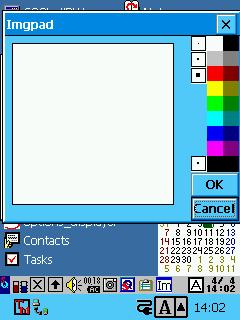
Another nice programm from a kit - FusenMini. This is a utility for creating notes. Moreover, the notes can be both printed and painted: the Image tab is Imgpad - tiny color planshetik for drawing. In addition, the kit provides a tool for creating screenshots. In the SQ you can get and semblance button Start. Used for this programm Simple Menu, an icon which can be placed in the taskbar. Its labels are in the folder \ Nand Disk \ Program Files \ SQ \ S (by the way there, you can not just put shortcuts of files, but entire folders).

Problems

Any problems caused by just installing the SQ I have not noticed. All that comes with her complete works as it should. Standard applications are working flawlessly. The only trouble - SQ strange indicates the amount of memory. Instead of 16 MB of internal flash-disk on the display 12 MB, but instead pointed to indicators of the amount of CF-cards, by contrast, is usually higher than the real one.

Total

It's safe to say that EpodXP, and SQPL offer a decent alternative to the standard shell from Casio. The most valuable innovation - the ability to add shortcuts on the desktop. In both more convenient to do this work with the open programs, both finally just looks nicer. Which one to choose - a matter of taste.EpodXP - multimedia-oriented shell with built-in player, audio files, more complex (and therefore beautiful) in terms of graphic design. SQPL easier to use, safer. It is more convenient to close the active application. In general, if you do not feel sorry for resource machines (if there is a memory card) it is better to put EpodXP, as the more "advanced". If the CF-card is no better place SQPL - the internal memory is nothing other than EpodXP simply will not fit. PS When the material has already been prepared, a new version of EpodXP 1.9. Article about how it differs from previous versions, read the next few days. The authors, translation:

Multimedia capabilities Pocket PC Casio BE-300

Casio BE-300 - not only "library pocket". This yet record library together with videoarkhivy. This affordable "Kaskiv" capable play music and skip movies. Our article devoted software somewhere through which can turn BE-300 within audio and videoplayer.

Audio

At the moment, for BE-300 has four programs to play different types of audio files. Three of them prednazanacheny for files *. mp3, one - for MIDI compositions. Windows Media Player, like "adult" printable desktop reproduces files *. wma.

Music Player

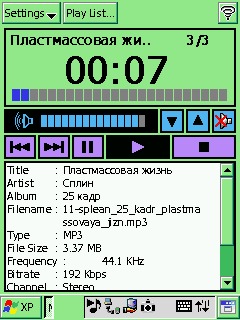
The standard program that can be installed from a CD out of the box, which sold the BE-300. Number of user settings is minimal: you can include an infinite repetition of the list of tracks and make the screen automatically switches off when you start playback.
Multimedia capabilities Pocket PC Casio BE-300
Standard Music Player
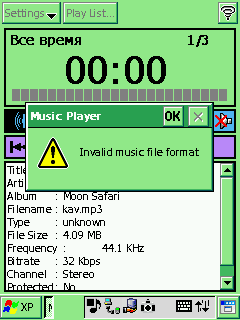
Sound is quite decent quality (of course, for such a device). Net, deep (on extremely least at 160 kbps) with pronounced basses. Generally in region basses Music Player sounds in my opinion better than another two programs. Joystick can regulate loudness (upwards-downwards) and switch between komozitsiyami in playlist'e (rightwards-left). Button "OK" works as Play / Pause, "Esc" as Stop. Inconvenient that Inhibit relocate "in mid songs. Accounts listen entire composition entirely. Filenames and titles songs in Russian Music Player displays correctly. Need only to in system was installed Russian font Tahoma. Generally program works stably but I occurred next "glitch: after rename one from files (expansion remained former) Music Player ceased perceive its type as" MP3 ", wrote that file type unknown and refused reproduce, stating" format unsupported ". Moreover, ceased playable files with bitrate below 160 kbps. Not helped and reinstalling Music Player. Problem "cure" only after rollback factory reset.
Multimedia capabilities Pocket PC Casio BE-300
Files with low bit rate sometimes does not want to sound

XAudio

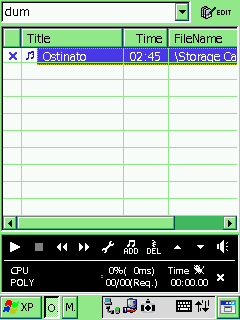
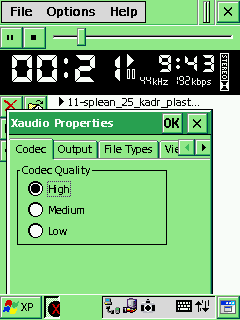
XAudio has the widest range of settings, including MP3 players for the BE-300. First thing noteworthy - setting playback quality ("Codec quality"). Has three levels qualities: than level below the less loaded processor and consumed energy. Moreover all employees our editorial converged that at average level sound better than high. At level high somewhere disappear basses and conversely greatly crawl treble. Sound becomes sharp and unnatural albeit purer than level medium. Generally same sound quality produced negative impression. Even on "high" all songs audible quiet rustle and crackling sound too reverberating. Incidentally, quality quite decent to listen somewhere road. In program there option create lists tracks (Playlist), but trying conservation such list BE-300 error message and list not created. During playback can choose from two codecs. I really special difference in sounding noticed. Can associate MP3-files XAudio, but firstly this acts only until reboot secondly on files albeit appears corresponding icon opens by double clique they anyway unwilling. Another option - blocking Autodisconnect typewriter. But disable screen purposes energy savings Xaudio impossible.
Multimedia capabilities Pocket PC Casio BE-300
In many settings XAudio
XAudio does not display the information from the ID3-tag MP3-file, so it is unknown how it relates to the titles of songs in Russian. But accurately known she generally unable open file in title whose there Cyrillic characters. Overall well conceived but poorly realized program. Sound quality not too high, yes and half useful functions not working.

Windows Microsoft Player

WMP of all known "big" Windows. True, functions considerably less.
Multimedia capabilities Pocket PC Casio BE-300
Windows Media Player
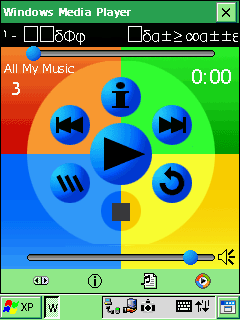
By the way, WMP - the only program that has problems with the installation. He will not operate standard shell Casio - lacks some libraries contained in installation kits shell EpodXP. WITH other hand this only program for BE-300 which allows listen files *. wma. Sounding very pleasant - absolutely pure without interference. True for my taste, sound too "flat". Well audible only mids low and high feebly. Nevertheless, the music on Windows Media Player listen pretty nice. In the category "convenience of the interface" WMP - the undisputed leader among other programs. All the necessary buttons are large and are located in the center of the screen. You can also use (and most assign) the hardware buttons to control playback. Apparently, so you can always enjoy the beauty of the appearance of the WMP, the developers have not made it possible to turn off the screen. Windows Media Player - the only program where you really are, and normally work playlist'y. In addition, she is able to "skip" song information from ID3-tag. Files with Russian names WMP opens without problems, but with Russian titles of the songs turned out very interesting. One appears as needed, another - "krakozyabrami. Here's how:
Multimedia capabilities Pocket PC Casio BE-300

MiMIDI

Say about the program from virtually nothing. It should vosprooizvodit files in MIDI, but in practice it does not. MiMIDI find files of a certain format, adds them to the playlist, but when you click "Play" - silence.
Multimedia capabilities Pocket PC Casio BE-300
Click here and answer silence

Video

Despite the fact that watching video on the BE-300 and all Pocket PC - the lot of strong spirit (well, if at all will understand what happens on a tiny screen), for the Casio Pocket Manager has three programs that allow you to "put the TV in pocket. "

Movie Player

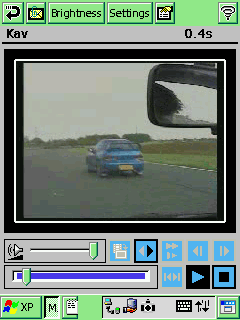
Movie Player - another standard multimedia applications supplied with the Casio. It works with files of their special format CMF. Get this file can be from any video formats AVI, MPEG1, MPEG2. To this end, the disk has a program Casio Mobile Video Converter. Enjoy it very easy: just specify the source file and the folder for the destination file to specify the resolution and sound quality for the final file.Then transfer the resulting video in a folder \ Nand Disk \ My Documents \ Movie or \ Storage Card \ My Documents \ Movie. If you put our film in another location, Movie Player it simply will not find. The result here is a picture:
Multimedia capabilities Pocket PC Casio BE-300
Movie Player
Settings in the program is not too much: you can turn on auto-repeat clip, adjust the brightness. Theoretically, there are still menu to select the playback speed, but whatever the figure was not there, the speed is always the same. Image can be scrolled and forth, back and a button to capture a still image. Another possible directly from the program send the current movie file via email.

DivXPlayerCE

I hasten to add that, despite the alluring title, this program opens the file format of MPEG4 rare. In most cases thrown out the inscription on the incompatibility of the audio codec and video does not play. But the program scans files *. mpg. True, when you play a little brakes, which is not observed when using third "viewer" PocketTV.
Multimedia capabilities Pocket PC Casio BE-300
In DivXCE beautiful movie
In the settings it is possible to enable caching (this is especially true when working with the IBM Microdrive), configure the hardware keys to control. You can make the clip starts immediately when you open the file. There is even a 10-channel equalizer. The image can be rotated 90 degrees and increasing.

PocketTV

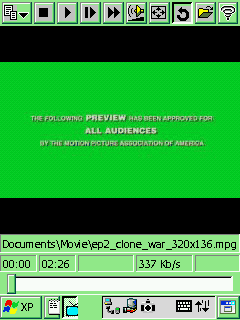
The most convenient (probably why and paid) video player - PocketTV. He is able to view and *. avi, and *. mpg, although the file open dialog about the AVI format is nothing written. Nevertheless, experience shows that this format is supported.
Multimedia capabilities Pocket PC Casio BE-300
General view of PocketTV
Options - set. Configurable sound quality (and, if you include mono, you can even specify which channel to play: right or left). You can adjust the image size, specify where to turn during the transition to full-screen mode. There is a color adjustment, contrast, brightness (all with the ability to rollback to the default setting).
Multimedia capabilities Pocket PC Casio BE-300
Full-screen mode in PocketTV
Now, about the quality. Honestly, in all three programs sound and picture quality is so low that finding differences is difficult. In my opinion, if you convert to a format CMF (for Movie Player) somewhat deteriorated image sharpness. To a large extent, by the way, poor image quality due to the slowness of the screen. Sound too leaves much to be desired and absolutely incomparable with quite decent sound individual mp3-songs (probably due to the fact that the playback program lowers the sampling rate, so that the picture is not "retarding).

Total

So, clearly we can say that the BE-300 - quite a multimedia machine that the more pleasant because of its cost. In terms of audio playback for her no claims.Both the standard Music Player, and Windows Media Player adequately discharged their responsibilities, and the choice between them is rather a matter of taste. True, if you want to listen to the WMA, is possible only WMP. The sound quality in both programs is close to the quality on the desktop. Both fairly easy to use interface and the ability to control the hardware keys. Since video is not so rosy. First, the CPU is rather weak, and secondly, the screen is absolutely not suitable for displaying fast moving images. In addition, another very "cheese" program to display video, except, perhaps, PocketTV (on it and paid). This program can be used at least to brag to friends that in your pocket you put this VCR. The authors, translation:

Put your stylus, get read!

Pocket PC, you can rightly be called an informer or a hand-held electronic reference book. If there is enough memory in it can "drive" a big encyclopedia, like Britannica, Eleventh, and always keep it handy. But still remain the most sought after program for reading electronic books. Thanks to its capabilities, small machine carries the slogan "library in your pocket" of the advertising field in practical. Has long been noted that the personal computer in general and in particular laptop has taught us to write. The once moribund (the fault of the phone) epistolary genre was revived and taken new forms. The share fell back pocket computer needs to read. And, to read anywhere, any spare moment, in any suitable location. Not everywhere can also open the book. The queue is inconvenient, the service is inappropriate. Mayas in the transport crush, the book and hold a challenge. A Pocket PC with its tiny size - no problem. You do not have to bend corners of pages, look around the place where stopped last time. And the book itself is very easy to change. In my PDA, for example, "live" just three dozen books that I planned to read the next two weeks (it should be the same once to educate ourselves - otherwise, and you die fool and an ignoramus). Any of them can be opened depending on the mood. Any of them can easily find the desired location - pertinent to the case of a quote or memorable expression. Any of them could benefit or entertainment. In my pocket typewriter missing any, as, probably, in your ... Program for reading electronic books must meet a number of basic requirements. They should not be demanding, as most PDAs do not have the budget nor excessive memory or excessive computational power. They should be able to recognize all running formats, ranging from simple text, ending special. In this case, it is desirable that text files do not require any prior preparation - conversion or processing. Well, for interest under a typeset book, which itself is then read? The book - it's a surprise and unexpected discovery, if you like - a gift to yourself. Finally, the reader should have a specific service - ability to scroll the text is not on the whole page, and transfer one or two last lines in the beginning of the next page. Smooth scrolling text (if not disgusted like a mockery of his own eyesight). Indicator of progress on the text (if there is no scroll bar, as in programs for the desktop and Pocket PC). Opportunity to expand the screen on 90 and 270 degrees (to keep the machine horizontally, replacing the portrait page orientation to landscape). Remembering the location in the text, which finished reading last time. Automatic partitioning of the text into chapters. Built-in file navigator, able to recognize the Russian names of files and display them on screen in full, without abbreviations. Memorizing a list of recent reading. The choice of screen fonts, sizes, colors, letters and background. Ability to connect dictionary for quick translations of the text or at least help with his writing. Option "prescription" readers as "reading room" by default. Technology support Clear Type, which improves the on-screen representation of text (looking for someone better). And so on. As you can see, the requirements are not so small (on the stable operation without deadlocks and lock the system no longer speak). But the programs are sufficiently under the requirements of appropriate, a little bit. More precisely - not quite. Not yet, but something approaching a marked ideal is already there ... Perhaps we should describe the most popular and perfect "reading room" separately for each of the platforms of PDAs. But we will not do this, because the computers of different families used the same program, originally written for one platform and then ported to the others. Principal differences between these programs cross-platform versions are not (the program, then, in effect, one), but in detail there are some discrepancies. For example, for computers with a monochrome screen is impossible to change the color of the letters and background (which is natural), and programs for machines with color screens are significantly larger.However, "reading room" - utilities that tend to be small. For them, there will always be the case even in congested any nonsense (like "Pocket» Doom `a) car ... Here it should be noted that in recent years the situation has changed insignificantly. Major changes in the e-book reader - the correct work with Russian texts even not Russified computers. Typically, high-quality "reading room" equipped with its own, a set of loadable fonts, able to work with Cyrillic code table (not just Unicode) and therefore have little dependence on system fonts. True, free software (or, God forgive me, cracked), of which the network a huge number, often fall to the end user is not in full - without the software installer and the same screen fonts. But the very simplified installation, the program is enough to rewrite the flash memory CCP to provide its on-screen shortcuts, and - you can read books.

Book reader for handheld machines to Windows CE / Pocket PC / Pocket PC 2002

... It is thus installed one of the best (and, incidentally, the most simple) programs for reading e-books on computers, Windows CE - «reader» Haali Reader. It works on any computer - on old typewriters that is running Windows CE versions earlier on the popular Pocket PC, on modern Pocket PC 2002 and is rapidly gaining popularity inexpensive models from Casio, computer BE-300. By the author - Michael Matsnev. The current version 1.0 build 166 from April 1, 2002 is here. Merits of the program enough. The main of them - a very stable job and a small amount of "reading room". Plus the opportunity to connect the dictionary (on the Internet you can find the module of the Anglo-Russian dictionary, which has only one drawback - it is "too heavy for a pocket memory machines). Plus the option to rotate the screen image. Plus automatic partition of the text into chapters. Plus almost all of the above requirements for the program for reading electronic books, which are implemented in Haali hardly any to the full. There trifling problem with the indicator move in the text. It is implemented as a strip with notches marking the position of the heads. As the scrolling text bar is filled. Simple and very clear. But the portrait (normal) orientation of the screen bar crawls to the last line (in any case, my BE-300). It's okay, easy to read books in a full-scale horizontal screen mode in which the indicator is displayed correctly, and this coincidence is not fatal (leafed through before the page - all things). But it turns out somehow inelegant ...
Put your stylus, get read!
Here's what you can do with Haali Reader
And from the obvious advantages still want to note the absence in many programs, e-book reader Haali ability to work with archives zip. Very convenient - the book can be compressed, saving much computer memory, which in handhelds ever missing. Yes, and tinker with texts downloaded from the network, it is often compressed in a format zip, is not necessary. Personally, I like this feature Haali Reader liked the most. How pleased and the quality of the program, and the fact that this is our, Russian, and not some overseas program. By the way, step by step instructions on how to install and more information can be found here. Among the other discoveries of recent times, of which mention only in passing, is, perhaps, to note the package MobiPocket, consisting of a layout application of e-books, working on a personal computer - MobiPocket Publisher 3.0, and reading programs for Pocket PC MobiPocket Reader, supplemented by an emulator of the "reading room "for the PC. The complex is very attractive. Page creators of this program is here). You can mark up the book, to supplement it with illustrations, see the result in a software emulator, "reading room" on the screen of a desktop machine, then rewritten into the memory and PDAs - to enjoy, enjoy, enjoy.
Put your stylus, get read!
Just not too much fuss? And whether they should have - these colorful illustrations? Someone might say - are needed. Then another question - have used the program Adobe Reader, which is just and is able to display not only text but also the illustrations? Only when needed, right? When the PDF format imposed by the manufacturer of this or that "glands", a description which is more convenient to distribute electronically, rather than on paper. Voluntarily use the Adobe Reader for some reason do not want to ...

Digression

Here there is a secondary theme: what should be the e-book. Do it all the elements of design, koi are present in traditional paper version? The answer is ambiguous, even for a PC that has resources, including disk storage and display capabilities of information on the monitor spare. It seems to be a bad thing to see a book such as it exists on paper. On the other hand - why? We do not seek to get close and feel of your homepage to a paper album? (If you have tried - would not use hyperlinks to specific web-page elements). Pocket PC display problem illustrated text is more acute. Small screen imposes severe limitations - just look looks like web-page in the browser Pocket IE (or Opera - for machines Psion), to understand what is at stake. Should not be discounted and the purely Russian specifics. The same MobiPocket Reader is available as a free program, based on the purchase of paid users of electronic books. We like the market (e-literature) simply does not exist, although the popularity of network libraries out of competition. On these networks the collapse of the literary texts are laid out in a "pure" - without any kind of registration and pictures. But these are the texts you and me, first of all, and are interested in! By the way, is not whether our attitude to the book as a text, a means of transmission of literary thought in time and distance lies a clear failure on the Russian market for various types of comics? Comic books as reading material (reading material right?) For adults, and not as a tool for the formation of the first artistic (art right?) Impressions in young children ... Far we opened a theme programs for reading e-books for PDAs. But it is not surprising. We are witnessing the emergence of a new means of disseminating information - e-book itself. Moreover, not only witnessing, but a measure of strength, as consumers and readers are involved in this process. Hence the new challenges that confront us in full ... In the days of Gutenberg's people did not sleep nights, thinking over the place of books in the culture of the era. It suffices to browse the originals or reprints of medieval books, preparation and printing of which took even months - years ...

MobiPocket Reader for Nokia 9210, EPOC and Palm OS

Let us return to our sheep. "Book readers» MobiPocket Reader, but its status of free software (Publisher, and software emulator for the PC is also free), features and more multiplatform (in particular, have a version for the Nokia 9210 Communicator and other devices based operating system, EPOC fifth version). The program works with text in a format prc, which is most popular among users of Palm. Consequently, there are no problems with converting or any additional operations books for typewriters Palm. Incidentally, with the release of MobiPocket Reader Palm computer owners is hardly the first time (pardon my mistake if it does not) have a program in design and functionality came close to the PC software Pocket PC. Another thing is that this experience can not only encourage supporters most democratic platform to replace the computer, how to strengthen them in their allegiances. Use any simple "reader" for the Palm much more convenient than monstrous MobiPocket Reader. The disadvantage of the program notes, and computer users Psion.For these remarkable handheld machines there is not much "bookreaders" electronic books. But, like all software for Psion, they are distinguished by their quality.
Put your stylus, get read!
The text is displayed in multiple columns ...
For a wide screen or Revo Psion 5mx MobiPocket Reader can be configured so that the text of the book is displayed in several columns (two columns - the optimum size) ... However, this possibility is unlikely to be relevant. It's all the same "bows" - optional decoration, nothing to ease reading books do not add.

EBook for EPOC

... But the awkwardness of the above programs and the absence of a fundamentally new functions do not turn away users from Psion proven, and many favorite programs from EBook. In the world of Psion, the program takes the same position as the world's Palm - Aportis (supporting said prc format and the format of pdb). A nice feature is its quality EBook Russification (the Psion with the Russification of things are better than others - even the owners of popular Palm, in my opinion, sometimes have a lot to be envied). There is also a full set of normal e-book reader - the one that we have identified above. So much change has happened here ...
Put your stylus, get read!

Book reader for the Palm

No significant changes in the camp of the Palm. New programs, of course, look out. Naturally, the most in demand are well spent and freeware programs that do not impose any special requirements for the design of electronic books. In the list of most popular - classics iSilo, CSpotRun, AportisDoc Reader, ReadThemAll, survivor Teal Doc. Here, perhaps, and all ... I do not know whether the owners will enjoy the latest Palm software MobiPocket Reader (version for Palm), but the most important and is already on the "stale" innovation in the operating system Palm OS I have the opportunity to rotate the screen. A similar function - a sign of any modern "reading room" and any modern PDA. For example, users of Psion, thanks to this opportunity, turn their computers into something like an open paper bag - easy or not, minor matters, but how funny ...
Put your stylus, get read!

About Casio PocketViewer

Put your stylus, get read!
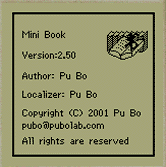
As usual, the apologists for this platform, argue that a better device for reading books there. Programm MiniBook can do it with comfort. Number of lines - from 12 to 14 on the screen. Up to 9 books in the format txt. Uzhatie the injection - about 70%. The size of files - not limited to (at least not less than 1.2 MB). Bookmarks, search. The program takes about 60 kilobytes.

And finally ...

Since I use a typewriter Casio BE-300, that in some way consider myself to users of the platform Pocket PC (at least in part). Well, except of course the good words about these computers, I can add a little rabid critics ... What's wrong with me do, but the charms of Clear Type I feel incapable. So as not gaze at the screens laptop and handheld computer, no matter how I try to convince themselves of the merits of advanced technology from Microsoft, and the result is always the same - "red" rabbit eyes and a strong desire to call the developers on the head ...Well it is, in fact, is it? " Only refused to display on a CRT, but his eyes gave miserable holiday, and here inhuman test in the form of the Clear ... Or my computer wrong? Or ... one of two things ... Now a few words about the best today, "iron" the implementation of e-books. That is, to put it simply, what to buy a computer just for reading. After weighing all the pros and cons, questioning many people, I came to the conclusion that the best "Iron-reader" - a computer Palm. And, whatever - with monochrome or color screen. Inconvenience can deliver only the inverted light monochrome models, but only in low light conditions. Everything else is working with Palm is not worse than other PDAs. Strange thing - not the most powerful platform, something is not able (in terms of multimedia applications), and in many ways remains the best. Truly, there is no ideal computers. But some handheld machines disadvantages become advantages. In Palm - Easy operating system and has low programs for computing resources ... In order not to inadvertently offend the owners of machines "Zyshscht, I note - Psion were and remain excellent computers, including e-book reader. Just why, you say to me, their producer, this great, you know, Brit, strangled with his own hands own child? So far in the head does not fit ... The authors, translation:

Russian hill Casio BE-300

Among the portable computer has its own favorites and there are outsiders, have brilliant brain and is impassable, stupid, have a luxurious and handsome men are modest hardworking. Pocket PC Casio BE-300, I would attribute to the category of pets. Like anything special, the modest performance, the modest capabilities. But - in looks, intelligent design, quality of performance. And finally, the price! "Beshka" - the most affordable family computer Windows CE, if you do not take into account outdated, stale machine, koi are lying on the shelves of some stores for years.
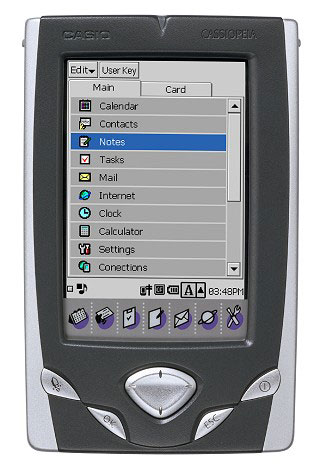
Russian hill Casio BE-300
For only two hundred and fifty (value in Russia ranges from 235 to 275 dollars in America - $ 199) receive all the charm of a pocket machines with the operating system from Microsoft - color, sound, access to software that is difficult to compare with the utility for PCs Palm, as it is difficult to compare the bike with the car. (Although the rides and then, etc.). Low price BE-300 stimulates demand. Today, this computer is knocked out champions in sales, despite some design constraints that affect the quality of consumer machines. Among these restrictions (we will not call them flaws, because on closer examination they turn out to be virtues) color screen on the passive matrix, the MIPS processor family with a clock frequency of 166 MHz, the lack of system dynamics (music you can listen through the plug stereotelefony, but in other cases will have to accept Avian voice buzzer), a small operating system Windows CE 3.0 RAM - only 16 megabytes. But on the other hand passive matrix is durable, economical (not so much battery power as active matrix) and does not spoil the image, if not to mess with video playback, where the screen BE-300 markedly retarding. CPU speed enough for the eyes. Sonic possibilities when you connect headphones (How else to listen to music on the small machine) does not yield capabilities of the most expensive Pocket PC. But the most striking advantage of the BE-300, which is difficult to overestimate, is a built-in slot, CompactFlash Type II. Add memory to this machine easier than ever (and cheaper than cheap), because the CF card format, one of the most affordable, ubiquitous (there are no difficulties with the acquisition), and universal in their application (via kopeck adapter slot PCMCIA card into a removable hard drive for notebook and without any kind adapter - in storage for a digital camera, if he is fit to work precisely with the cards CF). As someone, but I solid and quite compact CompactFlash cards like more than a tiny MultiMediaCard, or SmartMedia. Next, perhaps, only Memory Stick from Sony ... But a separate conversation about cards ... Initially there were difficulties with the software. BE-300 is endowed with only a truncated version of Windows CE, so the program has to fit specifically. However, today the question of "exhausted" - on the Internet you can find everything from the serious business applications, to bright toys. It would be the desire and patience. And would the money because the most interesting programs have the status of the business - for a family of computers Windows CE (Handheld PC, Pocket PC, Pocket PC 2002) is an established practice. All of the above - and low cost, and balanced performance, and good design - led to the popularity of the Casio BE-300 is growing by leaps and bounds. Indeed, a great machine ... Problems only with Russification. Does not understand "Beshka" in Russian. As they say, or "Be" or "metal". Asian arrogant little thing.

The first crack

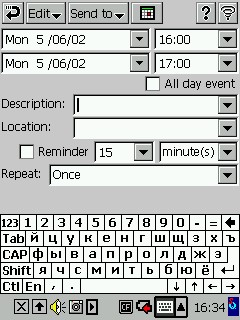
No, the main difficulties are over. First Russifiers out long ago, are widely used and effective work, more or less suitable. More precisely, since - some more useful than others, because Russifiers not so much, and quality - one, two and obchelsya. For seventy days to communicate with BE-300 I've tried everything that helps your computer to cope with our great and mighty.As a result, stopped at a native Russifier from MakTsentr RussKey BE version 1.0b, which the machine was equipped with originally. Opportunities in the program, distributed through, by the way, for money, not so much: Russian on-screen keyboard and work with Russian encoding programs. But it's something. You can keep records in a regular Notepad `e, we can make a name in Russian letters in the address book. Plus, the absolute majority of English-speaking programs, which can be anything to write or make - crack almost completely eliminates the problem of "washing your do not understand" in any applications ... Except for one of the most important - the browser Internet. Even with language ability fasten goggles (small screen, then "Beshka" a little) and see copied in memory of the CPC web-pages has remained a pipe dream ... From the visible (at least - I) deficiencies may be noted foci localization during the installation of patches (patch `s) to the system (they conflict with RussKey BE, which is prescribed in the same directory Patch) and a considerable quantity on-screen keyboard. That is, Russian keyboard is exactly the same space as the Latin and staff - about 40-45% of the screen. Despite the pleasant kind of keys and bukovok on them, it is "not good". I mean - was not good, since the first version of the localization is history ...

Double second

Whatever RussKey, but it allowed some "Russify" interface, BE-300. I say this with a grain of self-irony, since it does not Russification, but sheath SQ and Russian captions Tabs programs on the desktop ... But the eye something nice! Russian we humans or not?
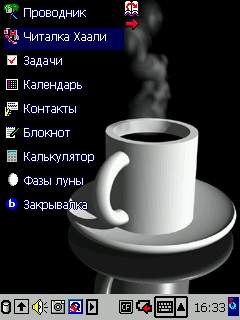
Russian hill Casio BE-300
Speaking of shells. Native interface Casio BE-300 design refinements do not differ. The manufacturer positions its product as a modest on a handheld computer for the corporate market. Or let's say: afraid of his own courage, a manufacturer of machine positioned as a portable recorder and means of access to stored information from a large computer, because not much faith in the prospects' Beshka. Okay - miscalculated ... But the interface was made Spartan stressed that the personal (the most personal of personal) machine totally unacceptable thing ... One of the first distinguished Japanese programmer (entuzist loner?) Tatsuya Sakamoto. His program of SQ in the current English version 4.10 (although the Japanese already have a version 4.20) still remains the most popular shell for the BE-300. Another popular shell - KCmenu II (set in the shell for the desktop BE-300 and software for the desktop, allowing you to create and install the PDA additional themes desktop) - it's nice to look at, but resource-intensive (it takes a lot of memory) and does not allow you to rename labels. Many commercial tools or slightly embellishes regular interface BE-300, or reshapes his appearance. But the SQ is as attractive of all - including those due to its status as freeware. On the famous EpodXP already written a lot. This is an alternative operating system for the BE-300, for which there are (I do not know - in the plural or singular) your Russifiers. I like this EpodXP seemed cumbersome and awkward. Tried it and was relieved demolished ... But this in no way is not a sentence! This - personal opinion. Very good that someone is working on their versions of operating systems, games and programs for the Casio BE-300. Overtake MakTsentr programmers, I, as a user, just say thank you. The money will pay if it is for that ...
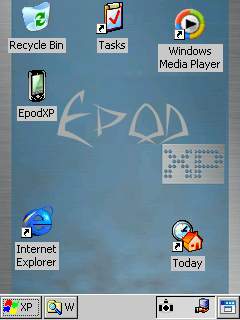
Russian hill Casio BE-300
The next version of localization of MakTsentr RussKey version 1.11b from the first version differs only in the size of the onscreen keyboard (and perhaps some small things that I have not noticed, because, I confess, they are not particularly sought out).When you call a Russian keyboard remains free two-thirds of the screen - and it is convenient to write, and re-written. At the same time the value of soft keys is enough to not miss when choosing their pen. A picture bukovok on the keys is even prettier than the first version.
Russian hill Casio BE-300
In short, I liked the version 1.11. I so would have enjoyed it, and accustomed to multilingualism BE-300, and did not really rasprobovali charms browser Internet ... If not the most up to date version of localization, which has turned my "Beshka in fully Russified PDA.

Yes or no Yes - that is the question

The process of exciting and impressions are fresh ... So I decided to describe this adventure in detail. I will be happy, and you hope it is interesting. You know, I was so accustomed to its BE-300, both become deeply familiar with her, that inserting the CD into your laptop CD-ROM with language RussKey 2.0b even crossed. I wish I'd have gone atheist, did not do it ... Would be better off demolished oldest first crack. The instructions of the installation program of the new localization of this is written clearly and distinctly ... But the Chukchi is not a reader, Chukchi - a writer ... In short, did not happen. It did not leave a damn thing. The picture at startup CD drew a beautiful and crack, as they say, "did not get up." From this simple rule, such bustler like me - do not hurry. Okay, to restore the system using the previously saved backup copy (you can with the "native" CD from Casio, which comes bundled with your computer). Uninstall the old crack. Again inserted into the CD-ROM from MakTsentr ... Krrrrasota! In appeared on the laptop screen menu, a whole bunch of sweet, tasty, very nice program.
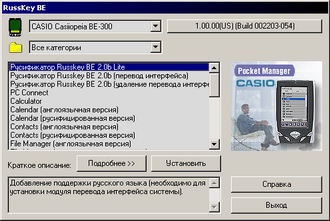
Russian hill Casio BE-300
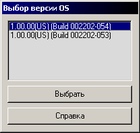
Namely - crack Lite (with a low content of nicotine? "Oh, no, that's another story), complete with a translation interface crack, uninstaller, allowing the interface to return the original form. Then - with sync-to-date PC Connect (English) version 1.00.04. Calculator - in English, of course (there is nothing to Russify). And - went we go! Calendar Russian and English (version 1.00.29), Contacts Russian and English (version 1.00.28), File Manager Russian and English (version 1.00.31), Internet browser English and Russian (version 1.00.42), email client, Mail Russian and English (version 1.00.28), video player Movie Player Russian and English (version 1.00.22), the player audio files Music Player (version 1.00.39). Enough? No, not enough. Ibid - Notes text editor is also Russian and English (version 1.00.24), graphics "smotrelka" Photo Viewer in Russian and English (version 1.00.30), a universal viewer of files of different formats, Quick View Plus English and Russian (version 6.1), Scheduler Tasks and Russian, as you might guess, English (version 1.00.24). The version number of Russian and English versions of each program are the same ... Completely forgot ... The first step before installing the installation program prompts you to select the type of handheld computer (of course - Casio BE-300) and operating system version (two versions). Check the version of the operating system is very simple - click the pen on the menu Edit, located in the upper left corner of the screen PDA, and the menu select Version.
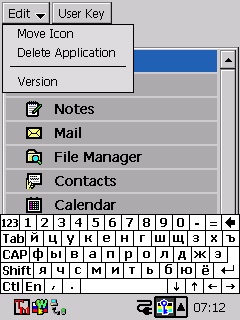
Russian hill Casio BE-300
Rewrite a paper on the first two lines - the version number of the system and its build.
Russian hill Casio BE-300
You may continue ...
Russian hill Casio BE-300
After activation, crack and restart the CPC paste machine in the "crib" and continue the installation by selecting Softonic RussKey BE 2.0b (interface translation). " While this case turns, for a moment digress to talk about programs synchronize the PDA and a large computer (in my case - laptop) ... To establish full crack, need to first install it "lite" version. No problems - if the crack was bought legally, and you have a registration card with a code of Russification, which is a combination of letters and numbers. Enter the code should be through standard software keyboard BE-300 (it appears if you click the pen on the keyboard icon in the taskbar). Register does not matter - the letters will still be capitalized. But we should not forget the dash between the groups. After activation, crack and restart the CPC paste machine in the "crib" and continue the installation by selecting Softonic RussKey BE 2.0b (interface translation). " While this case turns, for a moment digress to talk about programs synchronize the PDA and a large computer (in my case - laptop) ... All users of handheld machines have a choice of synchronization software. For example, the "Palmer" - regular Palm Desktop together with HotSync Manager or TrueSync Desktop (version for Palm). With the Casio BE-300 uses regular PC Connect for Cassiopeia or ActiveSync version 3.5 with a special utility that is installed on the BE-300. Perhaps I am a reactionary. Perhaps I am boring and even incurious man. Maybe I can not understand beauty of spectacular "blyamkalok and luminous dots ... But I do not like ActiveSync. I do not like the vagaries of the program. There are practical foundation ... I once had to "Beshka" crashed the system. Crumble like autumn leaves. White screen, my own mother ... And I took for the restoration of (thanks, was a backup system on your hard drive the computer). Active but also, you see, Sync! Reloads pocket typewriter and way and that way - there is no synchronization. (And no, as is installed on the BE-300 modules synchronize with ActiveSync "crashed" with the system). A machine, meanwhile, offers a recovery - from the card (since I always keep a backup system for CompactFlash) or directly from a large computer. And there is no synchronization. And the card is empty ... I was upset. Then I thought (this is sometimes peculiar, even to me). Took out the factory drive. Demolished ActiveSync. Installed the PC Connect. And forget about the problem as a bad dream. I know someone will say, they say, you have the wrong hands ... And I think they have me ordinary. I mean - the typical chaynikovskie hands who can not and perhaps should not be able delve into the settings to elementary install on a pocket typewriter desired program, written in memory of PDA address book or any other information. Anyway, PC Connect me sad. Watches for the "Beshka" forget to transfer to summer time - mark the correct option in the settings. With each complete reinstallation (eksperimentator!) system option is not included (if not restored from a backup, but with the factory CD-ROM) ... I live an hour later. And now - no. Now the clock on the BE-300 from and to Russian. And the option "Summer. Time" is ticked. And the menus for all major programs - are Russian. And the installation. And system messages. No, system messages, not all Russian. While in Russifier reigns a sort of freemen - each application speaks the language that he most likable. Here are the buttons on the system tray asking fluent Russian - "Yes" or "No"? Oh, dear ...

How it will be in Russian?

Immediately say - elegant. Excellent. Just super.Translation of the main applications on the Russian language does not add functionality to them, but the perception changes significantly. Non-English language users do not have to strain, digging in the pitiful remnants of the school (college) knowledge. All these Cut, Paste ... Paste - in the sense of pasta? Darkness ... Important psychological moment - Russified computer becomes closer and clearer. It becomes quite tame his, home. With him want to mess around, delving into the details. He no longer dismisses vulgar "File error", and affectionately says - "Well, what have you done, you fool" ... Well, almost. Yet the most remarkable in the new Russifier - the possibility of quick-change character through an icon on the taskbar. To enable this option, you must enter the "Options" and click the pen on the tab "RussKey BE" (tab is here now, but not in the main menu).
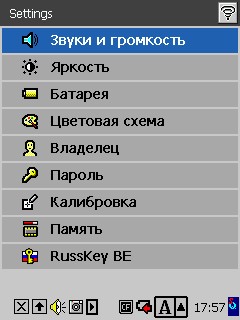
Russian hill Casio BE-300
To check the "Switch encodings" We will launch a desired soft additive, which is caused by an icon on the taskbar. By the way, the icons themselves - that russified keyboard, switch encodings - repeat, logo, the golden key on the background of the Russian flag. Switch encodings completely solve the problem with reading Russian texts in any format and in any program. For example, in the mailer. Or in the Web browser. And what is your browser? A browser works like a clock. Russian letters, pictures - everything is displayed exactly as it should be displayed. Read the text on the tiny screen of BE-300 is not easy, but there is a handy tool - switch frames. Select a frame with the text, include the mode of display frames in full screen. If you want to look at the whole page, just select the menu item "Zoom" - page will be displayed with a 50% reduction ... Understand very simply, in Internet are not so many settings, but still - the Russian-speaking and clear ... Paint the benefits of Russification address book Contacts or Tasks Scheduler is hardly worth it. Programs from elementary simple, easy to learn ... Did you know that the built-in system "raspoznavalka" handwriting Decuma (version 1.43) also understands Russian? Similarly, say - knows. However, she had understood him - in volume 15 custom faces Russian letters. Crack is nothing but the translation interface, not added to it (if I am mistaken, then I apologize), but the work (or play) with the handwriting recognition was much more interesting. The main drawback of Decuma - here is a restriction set in 15 letters. Something has to sacrifice. For example, typing soft and hard sign with the onscreen keyboard. But how cool to see how "Beshka" gets used to the handwriting of the master ... Accustomed, get used - I can see ...)

And that happy

Small flaws are (still - "yes" or "yes"?), But on the whole crack RussKey 2.0b turned out. Nothing like that is not found. And therefore pay for the crack - do not mind. Especially because it will be included with all new Casio BE-300, marketed by MakTsentr (as is now, crack version 1.11) ... Will my wishes? Will be, but a little later. In the meantime, some curious details of the "Beshkinoy" life. Manufacturer keyboards Go Type! Pro computers to Pocket PC and Palm Landware company has released a driver for Casio BE-300. Physical compatibility of system connectors BE-300 and other modern "Cassiopeia" allows you to use the "Beshka" periphery of the "older" machines. The whole problem - the drivers. Keyboard Go Type! Pro turns the BE-300 in a miniature likeness of the notebook, being at the same time, "crib" to synchronize with your desktop computer and recharging batteries. A wonderful tool. Hence the desire - to build a crack unit keyboard support and bring the party themselves keyboards, at least for the sample. Casio launches herself for the BE-300 modem (with two spare pens and a packet-screen labels included). I would like to touch your hands this fun, and then buy. Finally, the battery ... On the package "Beshka" picture an additional battery - very pleasant picture.Moreover, not only for me but for all, without exception, of owners Casio BE-300. I'll bet on anything (up to two rubles), but this accessory will be analyzed owners BE-300 in five minutes. For there is in this machine is no dirty tricks, but "skinny" battery ... With battery it would be happiness to us. Full Feng Shui in pocket-CBT. As for localization, that there is one wish - not to doze off. Not today or tomorrow in the head hard zadyshat competitors. We must try not to trample. In a broad sell crack RussKey BE 2.0 coming soon - as soon as a test program. The authors, translation:

Windows CE. NET on the Casio BE-300!

Casio, finally started to sell long-awaited CD-ROM with the update of the operating system for handheld Cassiopea BE-300 Pocket Manager. Now, "Kaskiv, thanks rewritable Flash-memory, able to work on the newest operating system for handheld computers. However, users will be available, not all functions of Windows CE.NET, which, of course, upset many fans of this machine, which after the bright promise Casio at the last COMDEX trade show expecting a full-fledged operating system with a completely overhauled user interface (bleak Top Menu irritates almost all users ). Among the major innovations that are available after the OS update, Casio calls:
  • Built-in drivers Compact Flash cards for wireless standards 802.11 and Bluetooth.
  • Pocket Internet Explorer - full (on the scale of a handheld device) web-browser. If you rely on a general description of Windows CE.NET and experience with the CPC on the OS DOT 320, one can assume that the new browser to get "Beshka will support cookies, and security protocols TLS 1.0, SSL 2.0, SSL 3.0.
  • Updated user interface. Frankly, judging by the screenshots shown Casio, does not seem that the interface has changed radically. A pity.
  • Arbitrary placement of font files. Casio site this paragraph is not very clear, but apparently it is "chip" Windows CE.NET, when large files of fonts can be placed not in a valuable built-in memory, and the expansion card.
  • Windows Media Player (only in its audio part).
  • System turn the screen 90 degrees.
It is worth the disc with the updating of $ 29 and available so far only U.S. residents. We, nevertheless, hope to get the disc in the coming days, and as soon as it appears in the wording HPC.RU, you can read a detailed report on what happens with "Kaskiv" after installing the upgrade. In the meantime, some information from the official site Casio: some questions and answers and some screenshots.
  • What applications will appear on the Windows CE.NET Casio BE-300?
  • Pocket Internet Explorer and Windows Media Player
  • And why would not other programs?
  • To save memory, we chose only two of the most popular applications
  • On what models will be installed Windows CE.NET?
  • Only on Cassiopea BE-300 Pocket Manager
  • How to get the update?
  • Need to call the order department Casio or order a CD on its website. The CD will be mailed (only if you're in the U.S.)
  • Will applications and accessories designed for the Casio BE-300 with Windows CE 3.0, working after the upgrade?
  • We recommend you contact the developer to find out whether its products with Windows CE.NET
  • What file formats will support Windows Media Player?
  • WMA and MP3
  • To be installed Pocket IE and Media Player?
  • In Flash ROM
  • How much memory will the update do?
  • Now we find out this question (zamechatelny answer, is not it? - Approx. Aut.)
Finally, some screenshots:
Windows CE. NET on the Casio BE-300!
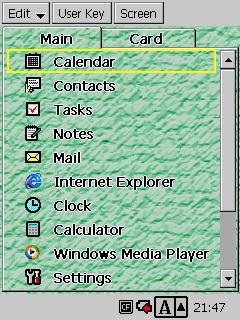
Unfortunately, the new Top Menu differs little from the old
Windows CE. NET on the Casio BE-300!
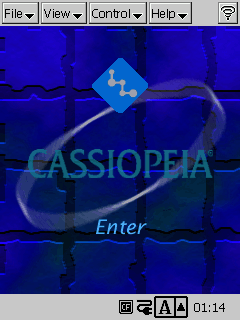
New: Windows Media Player
NET on the Casio BE-300! "Width =" 240 "height =" 320 "/>
The new web-browser seems to be more powerful predecessor
Windows CE. NET on the Casio BE-300!
Judging by the screenshot, the update includes Flash-player
Well, let's wait for the promised arrival of a disc to see how it all works. The authors, translation:
CAM a password

CAM a password
Almost all of my friends use handheld computers, but none of them uses the built-in Pocket PC password protection of data, although it could do it: their handhelds just overcrowded private information. For example, credit card numbers, PIN-codes, passwords to web sites. But at the same protection they do not enjoy ... Work with a password to Palm'e name can not be easy, it violates the principle of a PDA - to provide fast access to any information. Therefore, my friends and I carry around a pocket recording, knowing that they had no losses. In most cases we are fooling ourselves. According to a study Gartner Group, nearly 250.000 mobile phones and PDA are lost annually in the airports, and only 25-30% of them returned to their rightful owners. In recent years the development of technologies has led to the fact that computer systems can recognize and remember the difference between the retinas of different people, a form of hands, the contours of the ears, and many other physical characteristics. All this means that the biometrics (namely the so-called the technology) can bestow your mobile phones, PDAs, laptops and other devices can automatically identify its owner and not to permit access to the information to others. In other words, the case could go so far that your boss will not know you in person, and cell phone - will be.

What is biometrics?

There are two ways to give of yourself to know the system or to a stranger. The first - to give information which you possess, such as a password or pin-code. Second - using the fact that you have, for example, key or ID card. The problem of passwords is that people constantly forget them or write on a piece of paper that is then lost. ID-card and the keys have a tendency to often be lost forever. Biometric systems solve all these issues, making a password yourself. It is unlikely that you can lose yourself (unless, of course, do not overdo it with drugs, but this case is beyond the scope of this article). Even your clone can not fool a biometric scanner, because anyway there are many differences in the retina of the eyes, fingers and other important detail. Cries and lamentations of those who have stolen a PDA or cell phone - nice music to the ears of the developers of biometric technology. In 1999, sales of their equipment was $ 100 million. In 2002. According to experts from the international trade association of biometrics (International Biometric Association trade group), this figure will increase to $ 600 million. Various biometric systems can scan different parts of the body, but as soon as data collection took place, the principle of their action is absolutely identical. The computer converts the information into binary data and compares it with pre-recorded into a database model. If they match, the computer confirms that just crawled personality - the same person as the one who wrote the original code. Please note that the database keeps the underlying code, but not the image of a finger, hands, eyes or face. It's a little easier the event, but did not soothe all worries about the full disclosure of the identity that is stored in a database that plagued some users, because any hacker can break the system and get the codes of biometric scanners.

Biometrics and mobile technology

Biometrics are already widely used in the world. For example, the U.S. Immigration and adaptation of passengers (Immigration and Naturalization Service Passenger Accelerated Service System (INSPASS)) applies a system that allows use of hand geometry to verify identity and authorization of intersection of the immigration line. At airports across the country are tested scanners to detect people terrorists. Stock Exchange Stockbroker Charles Schwab uses voice recognition technology to verify their customers. While biometrics has taken strong positions in banks, airports and the secret services, and desired a tasty morsel for it still remains the possibility of using a handheld device.A dozen companies are working on integrating the retinal scanners, fingerprint and voice recognition to mobile phones, PDAs and laptops. Scanners are smaller, cheaper and become more accurate, which can be used in mobile devices, without increasing the size, weight, cost and power consumption of the latter. Voice recognition and fingerprint - the two major biometric technologies, expected to be used in mobile and wireless devices. Both of these technologies are safer than the number of PIN-codes, and can provide users with easy access to banking information, voice and e-mail and other private records without prompting for a password. Voice - the best choice for mobile phones, as in this case they do not require additional hardware. In addition, this technology is integrated into the phone. All you need to do to the system - it is written "voice print" which is as unique as fingerprints. Biometric systems that analyze the user's voice, pay attention to the type of pronunciation, tone and intonation of voice. To protect against hackers who simply could record voice owner of the device, many systems ask users to repeat a few words, chosen randomly. This is sufficient for the device to ensure the presence of a living person, rather than recording the film. Company Nuance, Trintech and Dialogic already make similar applications of voice recognition for mobile devices. In most cases, voice recognition is ideal for identifying "mobile" user, but there are cases where this technology is totally inappropriate. For example, if you wish to make a purchase from an online store using a smart phone with a color screen, you will not be very convenient to hold the device near your ear and say something to him. In this situation much easier it would be to use fingerprint scanning. Imagine a small area on the mobile phone the size of a postage stamp. It can be placed at the location where normally at your thumb when you hold the device in hand. When you take it, the scanner sends a signal to the microprocessor phone, which compares the finger man who took it with his finger the true owner. If they match, you can work with your phone on. If you do not match, the phone is locked, and sends an appropriate signal to the operator. The company AuthenTec, based in Melbourne, Fla., recently presented the technology EntrePad-sensor array size of 6.5 square mm, recognized the world's smallest fingerprint reader. It is designed specifically for mobile devices. EntrePad fingerprint scans, located directly beneath the first layer of skin, which can be stained or injured and thus distort the results. Several employees AuthenTec for testing purposes recorded their impressions, since sufficient time has passed, but it can still be see. The company is currently working with Texas Instruments to embed their technology into chips that will be used in future wireless devices. Company Precise Biometrics, Applied Biometrics Products, Fujitsu and Mytec also offer low-cost scanners, fingerprint smallest size specifically designed for use on handheld computers.

I see you, I know you

Today, when the market appears more and more mobile phones with built-in digital cameras, biometrics opens new opportunities for themselves - the human face recognition system. Company AcSys Biometrics Inc. recently announced a technology for handheld computers, and its main competitor - the company Visionics - to create a mobile version of FaceIt for wearable computers. The system was tested Visionics U.S. military police, and she used it in conjunction with GPS to scan individuals fundamental visitors in order to avoid crossing the criminals. But let us ask ourselves the question - not whether biometrics will usher in the transition of mankind in the era of total control, supervision over all and all? Who wants to live in a society where electronic devices will remember those who use them. Remember, at what time and even in some place ... Those who expect to receive some income from the biometric systems, of course, tell us what to worry about.As a conclusive argument, it cites the fact that every time you enter a PIN-code into a mobile phone, we tell the computer who we are and what are going to do. Biometrics is doing the same and has the added benefit of preventing fraud. I unfortunately can not answer this argument, but I want to know exactly - not whether biometrics can take us there, as proponents of freedom of thought, describing the unintended consequences of systems, originally created for good purpose. As an example, then you can bring social security number that is assigned to U.S. citizens. It guarantees pensions. And when his time was introduced the numbers, the state gave the promise that they will never be used for identification. Today in the U.S. without social number, you are neither able to open a bank account or visit a doctor. Now imagine that the state wants to have access to accurate information about each of us. This information is in the hands of corrupt officials can be used for blackmail. And people who realize that watching their every move, can begin paranoia. Thus, biometrics, of course, has great advantages, but does not carry a risk of introducing it in the privacy of everyone? I can not definitely answer this question. I wonder what you think about it. Sources, Materials:

Connect devices over the air

Wireless communication is gradually becoming in our lives and in our computers and mobile devices. More recently, infrared arouse admiration - should be the same! through the air, without wires - mysticism, but now it is commonplace, but still outdated - many nose gate! We now have a new fad - the wireless network when the wall is not a hindrance, and the wires under your feet (or hands) do not interfere. In the mass is still, however, is still making slow progress - the wires are still cheaper to go out, but on the horizon rapidly materialized ghost bright future when all devices within a single office or apartment, including telephones, computers, televisions and microwave ovens will be linked in a network of invisible threads. That's what most of these filaments, we are now and we'll talk.

IRDA

In fact, IrDA - is an international organization that develops and implements wireless standards. IrDA provides wireless connectivity to devices that otherwise would have used for similar purposes of the cable. To connect via IrDA device must be in direct line of sight of each other (an infrared beam emitted by a 30 ° cone) and away from full contact to one meter. Transmission speed ranges from 9600 bps to 16 Mbps. The popularity of the communication standard is explainable - the cheapness and ease of use. No need for any wires - brought the device to each other and in the bag, and implementation of such a port in the unit cost producer in the $ 1 ... Advantages and disadvantages of this method of communication are clear. Of the shortcomings of most, perhaps all, you can call one for communication devices must be in direct line of sight. Plus, some types of lighting (eg solar) may interfere with communication, as used, though invisible to the eye but luminous flux ... The next limitation - it's communication range, and a meter is not always enough. The main advantage of the same - the price, until now, as you know, continues to play a major role in the calculations of producers and serve the promotion of the format. LOS, may also be a plus - in the first place, this condition provides a simple physical security of information transmitted - to catch her because of all the limitations of infrared connection is problematic. (Except that try to "fit in" with the receiver anywhere within the 30 ° cone :-) And with the third party, often require communication between two specific devices, which provides a brilliant infrared connection. And the price, and a small power consumption, and compactness, and versatility make the IR port is ideal for our brothers pocket. On large computers, he already looks unforgivable remnant of the old - and slow and, in general, not very convenient, considering the condition of line of sight ...
Connect devices over the air
Bluetooth - another communication standard, which predict a bright future. If we believe the promises, predictions, and already a fact, shortly Bluetooth wireless modules will appear on all devices, including refrigerators and microwaves. Unfortunately, this standard is somehow hard to go out of its infancy. More than a year talking about him, but many more of his eyes and something not seen before. Thus, a high-speed microwave standard that allows data transfer at up to 10 meters. Bluetooth operates at a frequency of 2,56 Ghz and is able to simultaneously connect up to 8 devices. This standard does not require any skills from the user - as the only Bluetooth-enabled devices converge at a certain distance, they immediately share information and establish a small network. Bluetooth module is small and consumes about 1 mW of energy, which is not very much, even for mobile devices. Time to talk about the advantages and disadvantages of Bluetooth. The biggest advantage of this standard is that for communication devices is not required line of sight - the device begin to "see" each other as similar to each other at a certain distance.This standard transcend even the walls and it can be used to create small networks in the apartment, and for example, the compound of a handheld computer with a mobile phone can be done at all without removing the last say, out of pocket. Unfortunately, in practice it is much more complicated and lack of properly written programs and drivers for Bluetooth-enabled devices is creating a situation where the advertised ease of using it grows into a big problem ... Well, for example, if one device "sees" another, and then it - no . Here and go, smash his head, where the dog is buried - setting a minimum. On the other hand it is omnivorous Bluetooth could become one of its drawbacks. Suppose, in a room sitting at the negotiations for a number of people with Bluetooth-enabled devices. Provided that all the devices "see" each other, but you need to pass information to, say, a business card to a specific person, you may have problems in finding this man. In this case, infrared communication may be more convenient. At the same time, Bluetooth is still much more expensive than the IR port, although the promise that the situation should be in the near future to correct a little bit. Theoretically, nothing prevents the manufacturer to include both device communication standard, because, in fact, they are designed for different things. So yes, it is, in practice, and is, in any case, the first devices equipped with Bluetooth, such as PDAs or mobile phones. But unfortunately while Bluetooth is not so developed to gain popularity. For our country, its development, in particular, hampered by the fact that it has not yet received the state license though, I note, nowhere in the world licensed to such frequencies are not required. But, I think, to have little time ...

IEEE 802.11b

Connect devices over the air
Another wireless protocol on the market, call names very much tongue-and at the same nezvuchnoy acronym for IEEE 802.11b. His friend, the advertising name sounds like an abbreviation Wi-Fi Wireless Fidelity or wireless impeccable and the people it is called Radio Ethernet. Commercially available, and along with popular, this format was in 1999 with the release of AirPort - the device lets you connect your computer to the Internet or local area network without wires. Standard that allows data transfer speeds of up to 11 megabits per second at distances up to 300 meters. Operates on IEEE 802.11b frequency of 2.4 gigahertz, which is close enough to the Bluetooth. Simply put, Wi-Fi transforms Ethernet into a wireless network status and is ideal for creating small local networks in those places where it is impossible to lay cables, for example, if a company has two offices located across the street ... Each of the radio outlets may, depending on the software installed serve as the end point of reception of information and hub. For handheld devices and laptops are available adapters, that's just not all necessary. For example, computers, Palm, for which there are also adapters for IEEE 802.11b is not "incarcerated" for work in the networks of Ethernet, but for the Pocket PC such an accessory in the form of Compact Flash can be a very useful thing, and greatly facilitate the work. IEEE 802.11b is not a competitor to Bluetooth, after all, in fact, they are designed for completely different tasks and, more importantly, for entirely different devices. Direct competitor of IEEE 802.11b is another interesting standard called Home RF.
Connect devices over the air
In fact, Home RF is the same as IEEE 802.11b, only in a more advanced version. If Radio Ethernet is designed specifically for data transmission in computer networks, the HomeRF can connect together, and computers and phones, streaming video and audio.In essence, Home RF is a symbiosis of the previously described technologies Wireless LAN and rapidly growing wireless technology, DECT. Home RF group developed Home Radio Frequency Working Group (WG), which includes more than 50 companies.
Connect devices over the air
HomeRF USB Adapter and PC Card Adapter
Apparently, this standard can be called a home and suitable for a particular small digital microcosm within their own apartment. By the way, it works everything is at a frequency of 2,4 Hz - nothing like? The only restriction until the Home RF is that the information is transmitted at a speed of 1.6 megabits per second, so obviously no match does not go from 11 megabits to the case of IEEE 802.11b. On the other hand for the house-it can be more and do not need - where and how you drive the data with a similar rate, the more so as long as Home RF is more favorable price. Developers, of course, also do not sit on the ground and is on the way Home RF 2.0, which will provide speeds up to 10 megabits per second, but then when there will be! Remember the story with USB 2.0 - which still spoke of him, and now look at your computer - what standard it used for? Surely even 1.0. Therefore, a good spoon for dinner and talk about the updates can last for years!

Problem

Despite the reasonableness of each of the formats, divorcee use technology and differentiation in the use of the frequency of a used one and the same, and therefore may be even very serious problems associated with the intersection of information flows. All three methods operate on the principle of separation of the frequency channels. In this case, Bluetooth and Home RF «jump" from one channel to a certain pattern in the spectrum of 83.5 MHz .. IEEE802.11b divides the spectrum into crossing the 22 megahertz channels and already-nm transmit information. Understand what is happening in the room during simultaneous operation of all three standards, we can imagine 84-hour lane freeway at rush hour. On it goes a lot of small cars, which occupy less than one band, but nonetheless famously rebuilt from one to another (Bluetooth), there is heavy tracks with enormous vans that take up several pages, but rarely moving from their seats - are currently in their Right at cruising speed and everything (IEEE802.11b), but there are also all kinds of vans, small trucks, "Gazelle" and "Bulls", which, despite the fact that cars are much more, behave less rude, trying to cut and also jump from band to band (Home RF). Presented? Now tell me, whether in this case, to avoid accidents? This is now a major, but if she decides to Bluetooth, the creators of the Home RF and Wi-Fi in no hurry to agree - it was too dense, they are competitors, and the attention of computer companies, more and more pulled in toward the latter.

Outcome ...

When it's bright future and we will completely abandon the wiring is not clear, but now there is a choice and, if correctly formulated problem and a certain level of funding, the solution could be found, although the universalization not yet in sight. Nevertheless, from the infrared port does not want anyone to refuse - it was too much desire to save money, and the use of Bluetooth and Wi-Fi is limited nedorabotannostyu technology and high price. What would be good - brought the printer to the computer, and it is already connected ... Hey, would be enough patience .... The authors, translation: