 |
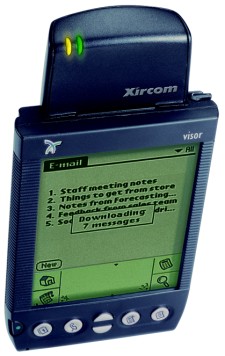
Module for wireless data transmission for the Visor
Recent programs for Windows Mobile, Symbian and Palm
Newer versions and programs in the Programs for Pocket PC (http://www.hpc.ru/soft/):
Pocket PC software
Blazar PocketPC 1.40 - Fun Arcade - Platformer (Shareware program for Pocket PC and WM). Developer: Elements Interactive BV.
Pocket PC software
Blazar PocketPC 1.40 - Fun Arcade - Platformer (Shareware program for Pocket PC and WM). Developer: Elements Interactive BV.
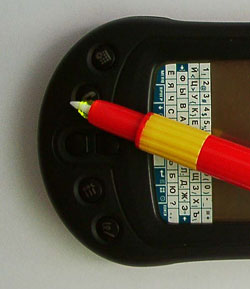
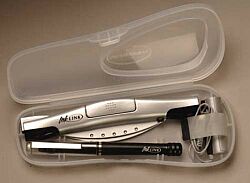
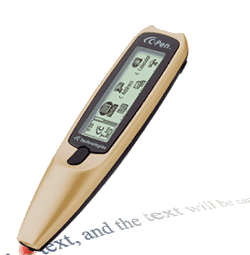
Stylus, backlit
On the eighth pilotovke Moscow, Oleg Kurapov, introducing "AGENDA" (the first PDA based on Linux), caused great excitement among the crowd, saying that its light is only called from the command line! This remarkable "technical solution" to all extremely pleased and aroused a lot of smiles ... However, if you wonder whether so seamlessly use the same Palm in total darkness? Readily believe, many would say that is not experiencing any difficulties on this issue. Keep silent, only those who do not like built-in graffiti and who use alternative methods of input information, for example, SilkyBoard.
It is for such accidents, the non-sighted owl, Moiseev and came up with "stylus with light."
 |
Secure Digital Cards and MultiMedaCard
In order to make compact devices to reduce the size of all components. This applies to the storage media, especially removable. It is difficult to make a compact record player, a CD-players, too, need a bigger pocket. CompactFlash, SmartMedia and Memory Stick have been following the attempts to make mobile devices, not just portable, but also the pocket. But there is no limit to perfection. Technological progress has made possible an almost impossible. These are two relatively new standards, Multimedia Card and SecureDigital. These cards weigh less than two grams, and the size they are similar to ordinary postage stamp. SD slightly thicker than MMC. In addition to their small size, they have a number of other remarkable qualities. Card-baby does not get damaged by heat or cold (even though the sauna is better not to take ... to anything they are there). Even a fall from a height of several feet onto the asphalt, they do not break. All this, and no moving parts and non-volatile memory ensures high reliability of data storage for many years. SD / MMC-Card issued a volume of 4, 8, 16, 24, 32, 64 and 128MB. In the near future will be more spacious designs.
In autumn 1997 SanDisk and Siemens / Infineon was represented standard MultiMediaCard. It was jointly developed by a group of 14 companies. Now the Association MMCA has grown to 90 members, among whom there are many well-known companies, including Casio, Fuji, Hitachi, HP, Mitsubishi, Nokia, SanDisk, Siemens, Symbian. Standard was created for use in various multimedia devices such as audio players, cell phones, PDAs, GPS-receivers, photo and video cameras, etc. MMC card provides quick access to data, low power consumption and high reliability. These qualities have allowed standards to attract a large number of developers and manufacturers of the very different techniques. In the market there are many small devices, the creation of which would not have been possible without the MMC. Can you imagine how big would the phone Siemens SL45 or hours-MP3-Player from Casio, if they used as a CompactFlash expansion card? It is unlikely that someone would carry such monsters. In general, despite competition from cheaper SmartMedia, MultiMediaCard found his niche in the market and has been used safely for years. But there were found willing to do even better.
April 25, 1999 Matsushita Electric, Toshiba and SanDisk have signed an agreement whose purpose was to create a standard Secure Digital. It companies within the MMCA, developing the ideas contained in the MultiMediaCard. Now the SD Card Association is already more than two hundred companies, many of whom have announced their products that use Secure Digital cards to store information. They include Alpine, Canon, Casio, Handera, HP, IBM, Kenwood, Microsoft, Mitsubishi, Olympus, Palm, Samsung and many others. The main advantage of the standard, is used cryptographic protection against illegal copying of information. In addition, Secure Digital provides copyright protection, according to methods developed in the SDMI (Secure Digital Music Initiative). Similar principles are used in standard DVD Audio. Thus, the recording industry tries to control the market of digital music. After all, digital music is very easy to propagate, even easier than audio-CD. Just copy the file and write to any other carrier. Fast-spreading standard is not satisfied with MMC media corporations because of the possibility of copying of information stored on these cards. Guide SD Card Association has repeatedly stated that they plan to push the market all the major media in use today.Miniature carriers must replace compact discs, mini discs, and even ordinary cassettes. Subject to support from the owners of media content, these plans are very real. Another favorable factor is that in the SD-slot can be placed and MMC-card (but not vice-versa). In an effort to provide customers with maximum functionality, producers certainly prefer a universal SD-slot uncontested MMC. To write-protect a mechanical switch, similar to what everyone can see on a normal three-inch floppy disk, as well as MemoryStick. This simple but effective protection is not enough cards MMC. Despite the volume indicated on the card, in fact, free space on it will be less. The fact is that according to the specifications of the standard SD, each megabyte climbs a hundred or more kilobytes. This is to ensure the infamous copy protection. Even more interesting information can be seen on the site SanDisk. In tamoshnem FAQ has this question: "Why is my SD / MMC-card actually has a smaller volume than that which is written on it." The answer is simply amazing. It explains that the MB version of SanDisk is 1000Kb and not 1024KB. It's funny that the text is called "MB SanDisk" and "megabyte Microsoft". I recall the anecdote about something that is different from a complete novice programmer :-)). 64 megabytes of SanDisk "are 60" MB Microsoft ". As a result, say, a 16MB card is only 13Mb of free space. With the price of an average of $ 10 above and to the extent of 10-20% less, you can hardly advise SD-card for regular users, not too concerned about the protection of its MP3-music, download a Napster `s or on MP3.com. Most likely, the future of this standard is associated with the recording industry. He probably will get accustomed and in the corporate market, where data protection is also important. And if he gets this recognition, the price of memory cards can fall.
In contrast, devices that support memory card Secure Digital, while few in number. Became the first compact camera Panasonic iPalm PV-DC3000. She appeared in September last year. Now the company's website has information on road and even CD-player, portable recorder, photo and video cameras. Corporation Toshiba, which also participated in developing the standard, introduced MP3-Player. And this spring in the list of SD-devices, there are three representatives of the market of handheld computers. These are two models from Palm, m500 and m505, as well as another PalmOS-device, Handera 330. In general, the trend is: cheap Taiwanese mp3-players is not quite, equipment mostly serious (car CD-player, for example, costs $ 1400). This situation is explained by the fact that the standard SecureDigital officially not ready yet. Of course, memory cards are available for a long time, and the device does not appear yesterday, but work on it continues. Until such time as the documents will not put the last point, boom, SD-compatible devices are expected.
* Secure Digital card volume of 24 and 128MB are available, but in the shops until they were found.
The authors, translation:
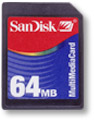
MultiMediaCard
 |
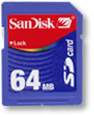
Secure Digital
 |
Devices
List of products that support the MMC, is large enough. Apparently, most of all interested in this standard, manufacturers of various MP3-players. Among them are very extravagant designs, for example, SpringBoard-module Innogear MiniJam MP3 Player for the Handspring Visor, cell phones Siemens SL-45 and LG MP-Cion MP3 Phone. Ericsson developed an attachment to a cell phone, which, again, allows you to listen to MP3-music. He also has a Casio watches WMP-1V. What do you think, what they feature? That's right, they are also the MP3-player. But the MMC-cards are used not only for music storage. There are a number of devices, including Cassiopeia EM-500, Nokia 9110 Communicator, which can record there any other information. And JVC, Thompson and Panasonic have released a series of camcorders with MMC-slot. Agfa makes cameras. But perhaps the most unusual devices are the printer NV-MPXS from Panasonic and gadgets PocketPet, developed by Japanese mobile giant NTT DoCoMo for wireless access to email. |
Prospects
Following the submission of new Palm'ov with SD / MMC-slot, we were talking about using it to increase not only memory but also functionality. More precisely, on additional devices connected to the Palm. At various exhibitions Palm presented prototypes of various devices, but mostly it was just a dummy. Probably until the work is completed on a standard Secure Digital, these devices are not submitted. The rest, apparently, the development will be to increase the amount of memory to 256MB and above. But even here there are interesting events. Not so long ago, for example, was presented a draft Secure Multimedia Card - in fact, MMC updated in line with modern realities. Moreover, he may call into question the future Secure Digital, because the technology embodied in this new standard will take into account all the latest trends, but will build on the solid foundation of proven technology and extensive customer base. Well, any competition is usually on hand to consumers. So we'll see a battle of the giants of our acceptance to you, after all, chooses all the same buyer.Prices
| MMC | SD | |
| 16 MB | $ 27.99 | $ 37.99 |
| 24 MB | $ 39.94 | * |
| 32 MB | $ 44.99 | $ 59.99 |
| 64 MB | $ 79.99 | $ 89.99 |
| 128 MB | $ 119.99 | * |
Specifications:
| MMC | SD | |
| Dimensions | 3.2 x 2, 4x1, 4 mm | 3.2 x 2, 4x2, 1 mm |
| Number of contacts | 7 | 9 |
| Voltage | 2.7V - 3.6V | 2.7V - 3.6V |
| Data transfer rate | 2Mb/sek | 2Mb/sek |
| Weight | 1.5 oz | 1.5 oz |
Palm + notebook computer Seiko = almost Notebook
 |
 |
 |
 |
 |
Royal Flash and everything else
For a start - a little personal. I often have to travel around on business. And these trips I really do not have the usual equipment - computer, scanner, printer. This problem is resolved after the acquisition of laptop and handheld computer, but only partly. Even the "packaged" technology for most domes I do not feel confident. Sometimes you find yourself in such places, where not so much about the internet on a regular phone, few have heard. A work to do (except for lack of money and most have to forget about the virtues of civilization). Of course, you can pick up a paper notebook and pencil. Tolstoy and Chekhov did not have computers (which, incidentally, explains the absence of figures of this scale in modern literature). But you get used to good quickly. After tasting one laptop keyboard or falling asleep a couple of times under the unearthly glow of the screen handheld computer (laptop to read it - and that's it), waive those electronic toys do not like. And instead of productive start to think about how it would be cool to have on hand portable equipment. Yes, it is not dragged down to the hands (and ideally - the pocket and wallet). Yes, that functionality is not inferior to full-sized counterparts. And that cost is not prohibitive, and as a human ... So what's the deal? What is there to dream? It is necessary to estimate their needs, align them with their capabilities, and - go to the store to shop. Yet there! Is wanted.
The tiny size of flash card memory to 64 megabytes or 128 is able to accommodate arbitrarily voluminous results of work per week, month or even year - unless of course you do not do graphics or digital photography (here the volume of stored information, and with them the personal archives, increase the order). It's almost perfect floppy, not afraid of the magnetic fields and mechanical damage (to a certain limit, of course). As with any electronic device, flash memory is subject to malfunction. Here too there are "broken sector, both on the hard drive. But the process of failure of memory does not develop. "Broken" hard drive - a dangerous thing, that and look, you will lose all saved up on your hard drive for years. Flash memory is a closed cell - just a card with a limited capacity. And there are these faults are much less likely than an accident of hard drives. The theoretical lifetime memory card - about ten years (without loss of information). Almost - more (difficult to verify because the technology is young enough). But this is so, one of the optional details of the use of flash memory cards ... Until recently, the high cost of flash memory is not allowed to treat it differently, as a specific drive for portable computers. But a digital camera, MP3 player or PDA is not sold "nekompyuterizirovannymi" users - or a mobile extension to a personal computer loses its meaning. Using a digital camera with removable memory card, it's silly not to use it, that same card and the computer. At least to try - why not? In addition to limited compared to modern disk drives, capacity and low speed (comparable to the rate of a leisurely drive CD-ROM), no other reason to refuse to work with memory cards as removable storage devices do not. In contrast, a memory card in a pair with a laptop computer - the ideal solution for backup your most important data in the "field" conditions. Imagine an external drive ZIP, CD-RW, HDD - with power and with a bunch of wires. No bags will not be enough to build this economy and no hands to dragged to the plane, train or bus. A flash memory card will not be a hindrance.Together with any adapter reader is ultraportable devices. And if the reader is made in addition to the format PC card - something ultraportable in the square.
Regarding the choice of flash memory cards, there is a ball ruled a device in the appendage which you received the card itself. That is, if the camera supports the card format CompactFlash, then the rest of the technique is better to choose exactly under this format. Benefit of PDAs (class Pocket PC) is often supplied slot CF. And together with them, and many digital cameras - Canon, Nikon, Hewlett-Packard (read - Pentax). Least likely to apply to the CF card players MP3 (more accurately - is hardly used), but the owner of this PDA neither cold nor hot. Pocket PC machines are able to play MP3 no worse than any "fleshovogo" player.
Sharpen the focus on maps of any format is not worth it. All formats are good. For example, Memory Stick from Sony feature small size, durable plastic constructs (not bent, not broken), electric write-protect switch and practical realization of the contact group. The latter is important. On the go awry insert the card into the machine - a piece of cake. Meanwhile, the mating connector (the one that is installed in the camera body or PDA) Card CF - a set of contact needles. Hurt them very easy, to repair without disassembling the computer or camera is very, very problematic. But there is the CompactFlash and one distinct advantage. This is the way, the cheapest and most popular among the manufacturers of miniature peripherals format. By purchasing a handheld computer equipped with a slot CF (eg, the same Casio BE-300), you get as a bonus nebesplatnogo sumptuous selection of peripherals implemented in this format. A user laptop or desktop computer an important addition to the CF card reader will be of any design. With the help of map will turn into a miniature hard drive, which is nothing to break. By the way, a couple of "memory card - reader" it is more convenient fashion now USB-shnyh charms flash memory. Card you easily rearrange your computer to the camera or PDA. Where to connect this pendant? Just hang up the keys.
Which peripherals? Network card (a couple of cards - to connect a laptop with a PDA, if to solve the problem of drivers), modem (for Pocket PC, and possibly for a laptop, if portable machine does not have built-in modem), satellite navigation module GPS (also works with PDAs and notebook), wireless communication module supporting GPRS (turns into a powerful handheld communicator GSM), wireless interface card Bluetooth. A list of more than impressive and far from complete. But two problems remain unsolved. The first, already indicated by us, driver support ... What is the use of extraordinary abilities Pocket PC Casio E-300 to work with any device USB (keyboards, modems, printers and so on), if it is not very attractive opportunities appropriate program support? Very often peripheral to the form factor CF, is designed for PDAs, does not work on your laptop, and vice versa, the device form factor PC card does not work on Pocket PC (even using a special "jacket" for the cards in this format). The second problem - the high cost of miniature devices, often from a practical point of view, unjustifiable. But here everyone decides for himself.
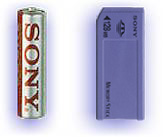
Frankly, in recent years, IBM is not very pleased with the reliability of their hard drives. For example, on my laptop ThinkPad hard drive had to be changed under warranty, although the machine itself any raises no objections. It is noteworthy Microdrive, which became apparent success of the company. Opportunities mikrovinchesterov fully appreciate the users of digital cameras. The huge size of image files high resolution restrict the autonomy of the camera. The problem of lack of capacity batteries (batteries in cameras sit disappointingly quickly) added to the problem of lack of memory ... Miniature hard drive eliminates the problem completely. On gigabyte Microdrive (the most popular models, despite the high cost) can fit hundreds of images of maximum resolution and thousands of images of low resolution (relative, of course). Anyway, in a long creative journey to bring a laptop (because of his "big" hard drive) is not necessary. A somewhat different situation with handheld computers. No, it's not in high energy consumption Microdrive - still mikrovinchester better used for storage of large quantities of documents and graphics, downloading them to your handheld machines, as necessary, and not to run programs (they, incidentally, for Pocket PC is not so much to use gigabyte drive). Problem - the hardware incompatibility. From model to model Hewlett-Packard Company provides its Jornada handheld Pocket PC class slots for CF Type I. That is, inserting a Microdrive is physically impossible. Moreover, any other PDAs in this class work with the Microdrive - a plug (worn) "jackets" or through the built-in slots. This, of course, on the iPaq and Cassiopeia, who in this respect surpass Jornada. Just think, this is the same car hi-end, which cost hundreds of dollars! And now this unfortunate limitation. Hewlett-Packard does not support the manufacturers of flash memory cards? But what has this site? Confusing ...And for the owner of the laptop mikrovinchester - is the fastest and most reliable means to transport a large number of images from a digital camera to the computer memory and, moreover, an excellent tool for backup of important documents in transit. And, just where the backup is really necessary - in unpredictable, fraught with breakdowns by various operating conditions "which have" ... If the disk drive in a small form factor, the prerogative of the format CompactFlas, then another popular addition to the handheld computer (and only to him) - Join the digital camera module - available in various formats. In particular, Sony releases photo module format Memory Stick. Structurally attached to the handheld camera - is coinciding with the dimensions of SD Memory Card, ending in a cylindrical (rotary) heads with built-in lens. Card is inserted into the slot, and Pocket PC into a full-fledged digital camera. However, the advantages of such a symbiosis is more than doubtful. The tiny body can not build a high-resolution sensor module and the considerable physical size. Hence, the main limitations - resolution of 350 thousand pixels (pictures 640x480) sensor and ISO between 50 and 100 units of ISO. In the merged cells have no built-in flash, no auto-focus mechanism - due to the use of short-optics there is no special need. The only advantage - use as a viewfinder screen PDA. But when filming on the street it turns into a disadvantage: a color-screen handheld little that can be seen. Even modern reflective displays in the practical application of losing the simple optical viewfinder, forcing the photographer was staring intently into the screen image, rather than concentrate on composition. There is a small attachable camera and non-obvious drawback - photo module occupies a slot for memory cards. As a result, to preserve the image is accessible only memory, and its machines with Windows CE-based chronically underfunded. So what comes out, attachable camera - pampering? In general, yes. But the pampering fun and enjoyable. How many of us, the users PDA, got this wonderful assistant guided only by considerations of expediency? Incidentally, the same applies to any miniature periphery (and, incidentally, to laptops). The test of "like - not like" is there in the first place. And it's very good, or computer routine would seem to us gray and flat. The authors, translation:
Flash memory cards
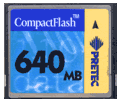
Assumed that the memory card are available only for the various gadgets - from digital cameras to handheld computers. Meanwhile, it's a universal device for storing and transferring large volumes of data. Moreover, it is very reliable (at present the most reliable) external hard drive, which in many ways to give odds to any disk and the more tape device.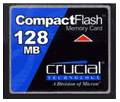 |
 |
 |
Pretending to be big
In format CompactFlash (as discussed below will primarily about CF) is a great feature. In addition to memory and power supply circuits, a map of this size built-in controller. If the slot PC card (PCMCIA) laptop can be regarded as a portable version of the 32-bit bus PCI, the controller flash memory cards CompactFlash - as a miniature interface implementation ATAPI. Therefore, any memory card inserted into the adapter "PC card - CF" is recognized by the Windows operating system automatically, in a "hot" mode does not require installation of any drivers "from" and denoted in the system as an ordinary removable disk drive. It's so convenient that, having tried a couple of times, you cease to languish with the programs of synchronization between PDA and desktop machines, and copy everything that does not require any special installation - electronic texts, data, pictures - directly. Another problem - Miniature connectors for a telephone line or network cable. In the maps of the PC card is necessary to go on maneuvers, using different "tails" - Dock adapters. Same situation with miniature cards CompactFlash, although shaped connectors - for connecting adapters themselves - more brittle than connectors adapters PC card. All these facilities to work with portable peripherals does not increase, but the small size cards with interest cover any insurmountable disadvantages. Imagine a small pouch (pocket computer bag in a box - anywhere) fits, almost the entire periphery immediately for laptops and PDAs.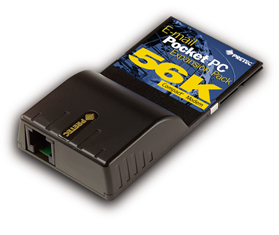 |
Eye Eye da
Format CompactFlash nice yet another device - mikrovinchesterom IBM Microdrive (and similar devices from other manufacturers). That is truly - thing, the possibility is hard to overestimate. Precision technology that mikrovinchester Microdrive fits into the body CF Type II (different from Type I only thick), implies the vulnerability of the drive, sensitivity to vibrations and shocks. But there it was! Microdrive is one of the most secure portable hard disk drives, it will handicap even the increasingly popular ZIV, despite the significantly smaller size.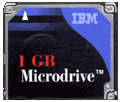 |
Typewriter in your pocket
Recently one of the world-famous (and as said Arkady Raikin, "thrice laureatny") of Culture said that the Internet completely destroyed the epistolary genre. The verdict came during a leisurely radiodiskussii, which revealed that no cultural activities or talk with him a journalist does not even have a rough idea of a personal computer. Thus, the vague information from popular newspapers. Sad, very sad. Especially because it does not. Internet should not destroy the epistolary genre. He would not destroy the epistolary genre, if only because that the Internet - this is primarily a computer. A computer - which, among other things, more and keyboard. Why a keyboard? To write. Whom to write? All and sundry, who can read, can receive our newsletter via the internet and will not be at the same time swearing, with no computer, nor desire anything about him to know ... God is with them, with grandiloquent analysts. We know that the personal computer downright provoking work with words. That any novice into a computer person's faith will inevitably begin to write - some letters, and who's diary notes, and some hits to the winds, flowing into the ranks of aspiring writers ... What do you think whose fault the current abundance detektivschikov, fiction and other martyrs of the national literature? Computer, only for him ... Would the author say about opupei Raging vytyukivat your masterpiece on a typewriter? Hardly. And we would not have. Other times, other requests. Typewriter (dream dissident graphomaniac) is no longer listed. Give us something silent, compact, and preferably the budget. Laptop in this sense does not fit - it's expensive. And the problem, he, in general, does not solve. Notebook in his pocket will not put ...
Let's talk about keyboards for handheld computers with pen input. It is clear also that the choice among small PDA keyboard. Or Psion, or ... Psion. We often buy machines with touchscreen - Palm or Pocket PC. A read-only - no success. We must also write, and, in the most unexpected places. We order and took a pocket-sized machine to use it in unexpected places? But it did not expect to get half of the computer, completely refuse to accept anything from the outside, but ready-made programs.
After trying various "raspoznavalki" under Windows CE (the latter - Decuma for Casio BE-300, not the most powerful, but small in size and fun), I came to a simple (though perhaps not correct) conclusion that there is nothing better on Graffiti today did not exist. Maybe that's it, in this simple system, handwriting, and lies the secret of success typewriters Palm? For those who do not know (though hardly any exist) to remind you the basic idea of Graffiti - a change of priorities. Namely - no computer downloading challenging comparisons nonrepeating ink strokes with the standard shapes of letters and numbers, reassign the case to the user. Each character (letter, numbers, punctuation) is associated with a simplified on-screen image that the user input information must be repeated. At the same tolerances faces are large enough - to draw a non-closed curve and eerie circle you still get the letter "O". Handwriting is produced only in a certain area of the screen, which only in some clones (from Sony and Handera) is used to display information, as in the original Palm computers play the role of the small touchpad (special purpose - to enter these same numbers and letters). In Graffiti has advantages and disadvantages (scandals surrounding authorship aside). The main advantage - get used to the Graffiti doodles very easily. Time training - day or two. Moreover, special sessions do not need, just write ... Or try to write as quickly it is unlikely to succeed. This is a clear lack of - input is only letter by letter, therefore, much slower than with normal ("iron" hardware) keyboard. Improved version of Graffiti, as well as recognition systems for Windows CE, offered a means to accelerate the input - the letters (or numbers, depending on the mode) can be entered in pairs. That is, the left side of input write a letter. Shelf software it recognizes the right of writing a second. Then, the left side of the third. And so on ... This circus. Shooting at the Macedonian ...
One need only look at price tags of Russian computer stores, and the seeming abundance of portable keyboards for handheld computers is reduced to negligible quantities. Meanwhile, releases of companies specializing in producing accessories for PDAs, crowded most exotic input devices ...
Here, let me just digress ... How often do we see in the sale of widely publicized computer news? And the "old fashioned"? Does anyone own eyes saw on the shop shelf, say, web-tablet - a touch screen computer "notebook" size, but without a keyboard? How much written as it is said, and all - by and by. Russian sellers can understand - they do not have the financial resources to reckless experiment. But - the desire to win the competition or the elementary curiosity? Really, no? Sorry.
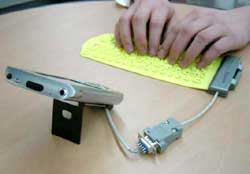
However, recently the situation has changed somewhat. Today in Moscow you can find lots of interesting accessories for small computers. For example, join (Attached) keyboard for computers Jornada (I recently talked about her). Or similar to her keyboard, connected to the system connector on the CPC. Or flexible plastic keyboard, which can be rolled into a tube, or even turn in her pocket computer (only heard about this, but he has not seen for sale).
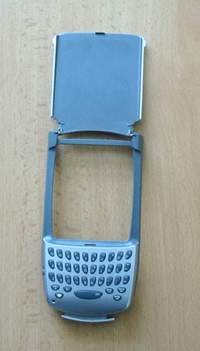
In general, for attachable miniature keyboard is characterized by very small and tiny, straight-away "kalkulyatornye, size of key buttons. Also, bold design, irregularly shaped buttons (in the sense of - brace, intricate), easy connection to a PDA and a lack of policy support for the Russian language. By the way, referred to the Jornada keyboard just russified. It is sold MakTsentr, which means that about Russification once again you can not ask. "The Germans" (in the sense of - "stray foreigners) there are practically no, and if any, and come across, then very soon begin to" speak "in Russian ... Is it convenient to work with the tiny buttons? No, it is inconvenient.Not to say that I have tried all this detail, but I have lying around a miniature keyboard for cell phone Chatboard Ericsson. Its dimensions are roughly the same size with the smallest attachable keyboards for PDAs. If you need to win more than two words are better with this nonsense is not messing around ... While other tools still do not. And how many have to enter information into your phone? Room, yes hooligan SMS-ku ...
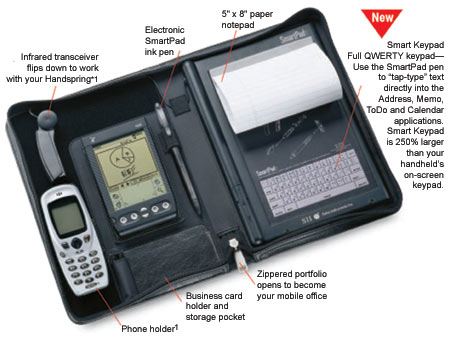
Structurally the keyboard from Landware similar to the regular, on a personal computer. Notebook size, cover, which is tilted position into a cradle for the CPC. Several function keys work in any system - from the Pocket PC, to Casio BE-300 (really, about the BE-300 I only know the information on the manufacturer). Produced and modification for the Palm - a variety of options for old and new machines. When folded the keyboard is as good as in the open. But not as portable as the Palm Portable Keyboard, since the sum only cover, and the base is monolithic ...
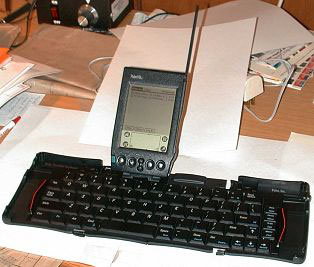
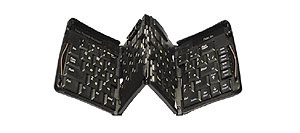
But the Palm Portable Keyboard is indeed folded. Skukozhivshis four times, she turns into an aluminum "cigarette case", echoing the shape of a Palm `. This keyboard "crib" can not serve, but in no less convenient than the Go Type! And at the same time very affordable. Watching where, of course. And looking for some machines. I really liked the version with an adapter that allows use Palm `ovsky Portable Keyboard option in conjunction with a computer iPaq. What's the point? Version of this keyboard for iPaq anything except plug, not different from the Palm `-native, and is worth three times as much. But, again, depending where. We are talking only about MakTsentr. In other places for foldable keyboard would have to lay out even very tangible money ...
With this adapter iPAQ easily connects to the keyboard, Palm Portable, as seen in the photo. Only on the handheld itself to install the keyboard driver UniBoard version 2.10 or higher, as developed in MakTsentr. How great keyboard work? In my opinion, just like the keyboard of my laptop, that is - okay. The keys small, but the step is quite standard. Touch-type can not promahivayas and specifically taking aim. If you take a PDA and a keyboard, you get a portable system with a small screen, simple text editor, but with a long battery life and a familiar input method. Besides all this facilities can be pulled out of his pocket and placed directly on the table in the train compartment. And no one would bother with silly with questions - "how many megabytes your computer." That they have not seen the calculator?
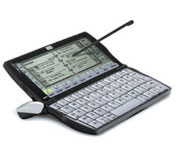 |
Pure Writing
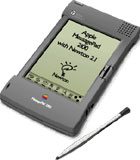
The fact that each family has its own computer system of handwriting, no secrets, there is no secret and that no such system assigned to it, hope is not justified. The situation is particularly serious in the most advanced "pickpockets" - a Pocket PC (that 2002, that without it tsifiri, all is one). Whoever took up a handwriting recognition program, the results are insignificant. The computer adapts to the handwriting tuzhitsya, overloading the memory, and straining his modest computing power, but on recognition of individual letters is not coming. Does not understand the CPC fused to write, much less hurried cursive script in which characters merge into reduced to verbatim Your strokes. Meanwhile, a brief history of the CCP industry remembers the example of successful implementation of handwriting. It almost forgotten about already fairly Newton `s production company Apple. This computer by today's standards too big, and obviously not "skorostrelen. But some of its features former owners of Newton `s who have passed on modern machines, remembered with nostalgia. For example, the organization of the display of information (in a text editor screen scrolls like an endless roll of paper - had only to finish by the end of the virtual page), or the same system of recognition ... Today it is hard to believe, but four years ago, Newton was able to really adjust to the handwriting of the owner and was able to recognize even sloppy cursive ...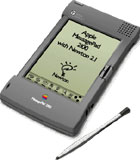 |
| Venerable Newton |
The keyboard in the virtual
Although Graffiti piece is comfortable, but most of us still writes with the onscreen keyboard. At a certain skill set speed almost equal speed printing on a conventional keyboard (only four times, but that does not count). But even here not without a fair fly in the ointment. Too small screen size in computer format Palm-size. And the pop-up soft keyboard larger than the screen can not do nothing, and it is little more than a matchbox on its longest side. This is the first. Second - the lack of the keys, no borders (which is understandable) and as a result, tactile feedback. When you write a quick operation keys perceive subconsciously. And here ... There are, of course, the acoustic signals - sound embedded in the CCP dynamics, ringing out at every touch to virtual keys. But this peep more hampered than helped (so the sound is usually turned off). Another problem - the screen space, which occupies the software keyboard. Text editor (scheduler, address book, spreadsheet) is small, and since the screen itself is small handheld computer. Keyboard "eat off" from 30 to 45 percent of screen space. Well, if the editor has built-in auto-scroll - is only the cursor is moved off-screen keyboard, as the current window immediately scrolls up. But the programs with fixed windows, text entry - in the same scheduler - scrolling is impossible. Must act "to the touch, then calling, then removing the keyboard. There is not quite the usual ways of entering information. One of them - the use of Graffiti by specially arranged keyboard. In this case, the input area of the glued paper with designated buttons (Silkyboard), and the Palm `s installed software support. Enter the letters made the stylus - as with the standard virtual keyboard.Another method - the use of supportive programs, like the system of T9, used in mobile phones to create SMS messages, and filling in the telephone book. In this case, use either Graffiti, either on-screen keyboard, and the program selects the most commonly used letter combinations, allowing you to write a whole syllables. T9, as experience shows, for us, still exotic, because for such a method of text entry should be a strongly accustomed. But Silkyboard - a very real way out. According to the testimony of many users - it is really handy thing, because it is a cross between virtual and real keyboard: more palpable over the keys of the sticker somehow easier to aim and hit, and the printing speed increases significantly. The latter, incidentally, has been proved experimentally in the past year on the second pilotovke Moscow Palmkluba. Bit winner in the competition for the fastest way to enter text to 117 characters per minute! Enjoyed it just SilkyBoard. For skill has been awarded a cute folding keyboard, which we describe below.Buttons, buttons, buttons in a row
 |
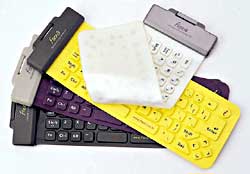 |
| Flexible Keyboard for Palm |
 |
 |
Big keyboard to a small computer
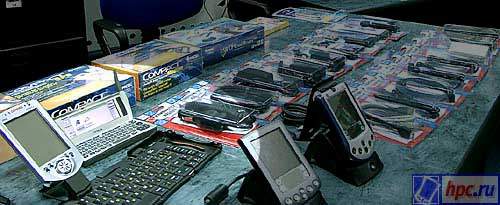
Full-sized keyboard for PDAs is not so much. We've known (and popular), two - Go Type! Pro from Landware and Palm Portable Keyboard (former Stowaway). First released in two versions - with the prefix Pro the title and without it. The difference - in the electrical wiring through which the keyboard can be used to recharge the battery instead of the standard PDA "crib" - if you connect the power supply to the keyboard connector. And that is very convenient - you write, and machine charges.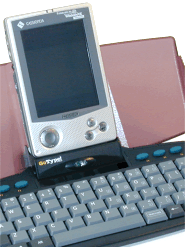 |
| Go Type! Pro from Landware |
 |
 |
A few words after
What will happen to computers Palm - we'll see. (I think that anything bad they do not do). But the Pocket PC, it seems, will soon dispense with portable keyboards - where there is no need keyboard hiking, miniature. The fact that the Casio E-200 already has bus connectors USB.Theoretically, these PDAs can work with any peripheral USB, including a keyboard - full size, from the desktop. How is the driver support at the moment, I do not know. While that all PDAs with the operating system from Microsoft eventually will recognize the device USB, almost sure ... Leave it "almost" as a safety net. Thought overseas legislators computer whimsical fashion. Will come up tomorrow, any voice input, and we - maysya. But personally, I'm ready for it. Very much interested. The authors, translation:
Subscribe to:
Posts (Atom)