EBook in Russian!

Here come the happy moment when the users of the program for reading electronic books EBook can enjoy your favorite reader in Russian! MyPsion.Ru proudly presents the full language version of the program.
EBook in Russian!
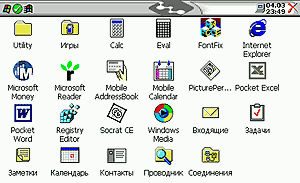
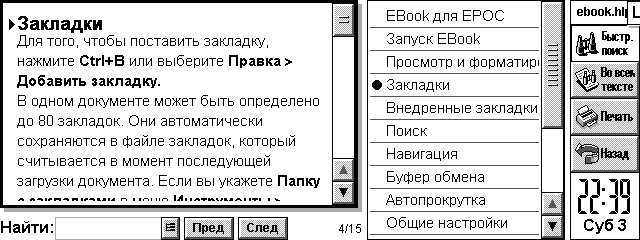
This is the first contribution to the promotion of software for EPOC by its Russian translation (meaning foreign software). Russified as the entire interface EBook, and its help file. Use and enjoy! Native language always looks nicer. EBook - a program for reading electronic books. It allows you to keep on their handheld machine library favorite books, which will always be with you. Convenience of the existence of e-books can not be underestimated. They can be any number, and they will not take place. Any book is always at hand and instantly available for reading. They are always able to fill your leisure or free time. A program EBook make pleasant reading books fun. EBook Features include: support for compressed and flat files Aportis Palm DOC (. Prc and. Pdb); support TCR-documents, support for text documents, automatic recognition of file format, scaling the display font, auto-scroll mode, moving through the scroll bar, up in the buffer and a file; advanced tools work with tabs, 80 tabs on documents, automatically recognize the file format Palm DOC and TCR on devices with ER5; introduction of favorites in the style of Palm DOC; keeping tabs Palm DOC; support for different fonts in the format EPOC (. gdr), allowing to use any font, interactive help, it takes little memory and works fast.
EBook in Russian!
Help File EBook also completely Russified. Home EBook located at http://www.geocities.com/ebookepoc/. There you can download the software (installation file includes support for multiple languages, including the now Russian). By the way, who do not mind the money, he can register (registration is 10 UKP) - you'll be the first from Russia who has registered it:) This wonderful program is well worth the money. And to be legitimate users - always an honor. Of course, in this great cause localization of software will not stop. At this time, preparing the Russian version of the program SwitchOn (it is already available as a beta for registered users). And it is followed by others. Sources, Materials:

How to speed up data entry in the PDA?

One of the significant deficiencies handheld computers is that you can quickly enter text. The struggle for the elimination of this deficiency is in two directions: constructive - the development of compact connected keyboards and software - to develop programs and input methods to accelerate the input of alphabetic information into handheld computers. The first way we will not be considered here because, from my point of view, when it lost the main advantages of using handheld computers: the portability and mobility. Currently applied in the basic input methods: keyboard and "Graffity" (recognition of handwritten characters) have one common drawback, limiting the speed of input: the impossibility of fused input. In addition, the traditional location of the letters on the virtual keyboard (QWERTY) just is not conducive to an increase in the rate of input, since such an arrangement of letters has been developed under desyatipaltsevy input, and not under the data input with the stylus.
How to speed up data entry in the PDA?
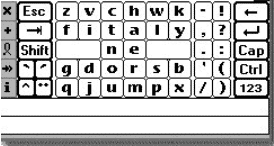
The program Fitaly, developed under the Palm OS and Windows CE attempted a placement of letters, which according to the authors, reduces the movement of the hand with a pen input alphabetic characters, and increases the overall speed of data entry to 50 c / min. Demo version is available at www.fitaly.com, cost $ 25.0 Development Company Textware Solutions
How to speed up data entry in the PDA?
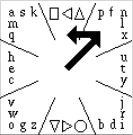
The program QuikWriting, in addition to a peculiar arrangement of the letters associated with the frequency of their use, implemented the possibility of fused input text by unseparated cursor movement on the letters you type. The program is designed for Palm OS and work with it should be in the working field that requires a special sticker with a picture of letters and digits. As seen from Figure 2 letters and signs are divided into 8 sectors, each separated by oblique lines. The motion of the pen is from the center of the square in Gaza, where is the letter. If the letter is located in the center of the sector, the pen is returned to the center of the square, and the corresponding letters are entered in the textbox. If the letter is not in the middle sector, the pen moves left or right on the number of sectors corresponding shift of letters about the central characters. Figure 2 shows an example of entering the letters "f". Pen moves in the sector, where the letter "f" and moves to the left to one sector, because the letter "f" is located at one position to the left of the letter "n", located in the center of the sector. The disadvantage of such a system, compared with Graffiti, a longer cycle of user training. Basic skills is easy to learn about one hour, although rarely used characters (eg punctuation) may require a longer work. Quikwriting developed a professor at New York University, Ken Perlin (Ken Perlin) soon plans to start its commercial distribution, and while the demo version is available here.
How to speed up data entry in the PDA?
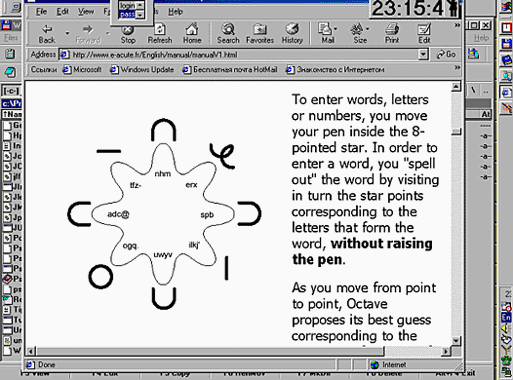
Program Octave, developed as a Palm OS has the same purpose, but their peculiarities in the arrangement of letters and input methods. The authors, translation:

The first impression from working with the utility JS Landscape 2.0 beta

JS Landscape 2.0 beta - this is a beta version of the new Landscape of Jimmy Software. Even before the release of this utility and its surroundings was called hype. Is unique in that it increases the screen resolution is a factor of 2. But how can you increase the screen resolution, if the number of elements of the matrix is ​​320x240? Jimmysoftware come up with its own technology.
The first impression from working with the utility JS Landscape 2.0 beta
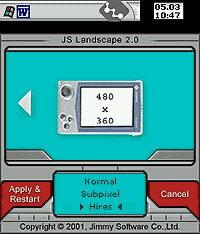
Imagine a screenshot of your desktop in Windows 9x box package Adobe Photoshop. If the menu put the 50% increase, then the window will decrease by 2 times, sharpen and see what all the fonts and icons do not look much worse than the 100% window. In the same way running JS Landscape 2.0, this operation is only carried out in real time directly on the PDA. When the pseudo-resolution screen 480h360 enough to withdraw from the eye at 30 cm and you will not notice that it only reduced the window. It should be noted that the video subsystem of the CPC is working exactly on the resolution of 480x360, it can be seen from the screenshots. Imagine a screenshot of your desktop in Windows 9x box package Adobe Photoshop. If the menu put the 50% increase, then the window will decrease by 2 times, sharpen and see what all the fonts and icons do not look much worse than the 100% window. In the same way running JS Landscape 2.0, this operation is only carried out in real time directly on the PDA. When the pseudo-resolution screen 480h360 enough to withdraw from the eye at 30 cm and you will not notice that it only reduced the window. It should be noted that the video subsystem of the CPC is working exactly on the resolution of 480x360, it can be seen from the screenshots.
The first impression from working with the utility JS Landscape 2.0 beta
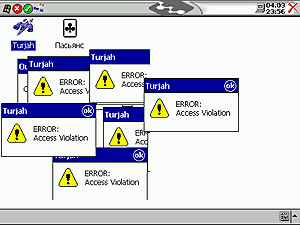
Utilities menu prompts you to select 2 modes (Portaint and Landscape) and for each you can select 3 mode resolution (320x240, 480h240, 480h360). This beta version works just fine resolution of 320x240 and 480h360. Intermediate regime stomps screen. After attempts to use the mode and intermediate resolution 480h240 240h480, fonts are reflected correctly, as well as after return to normal mode lost their calibration settings screen. Without using the stylus to reach the control panel is not possible, so you have to do a cold reset is Remove all batteries from the CCP to completely remove installed programs, and informations. You can of course solve the problem at random, randomly pressing the stylus on the screen after five minutes of this chaos, my PDA rebooted in normal mode 320x240 with all the calibration settings. I note that the full-screen applications and games do not work together with the Landscape. The first minutes of utilities have brought nothing but disappointment, until I started Pocket Internet Explorer.
The first impression from working with the utility JS Landscape 2.0 beta
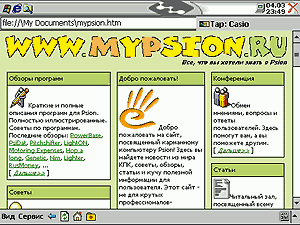
Roam the network resolution 480h360 - quite acceptable occupation. I visited their favorite sites without horizontal scrolling pages, and it means a lot, especially when using your mobile phone as a modem.
The first impression from working with the utility JS Landscape 2.0 beta
I also liked the view tables Excel, they appear correctly on the screen shows the entire piece of the page width to A4 size.Work with the Landscape in Pocket Word occupation is not remarkable, although suitable for viewing documents. Also pleased with the mapping information in the packet Pocket Outlook. All other applications are not very well suited for high resolution, so for them to switch to a standard screen mode, otherwise you can just ruin eyesight.

Installation

To obtain the JS Landscape 2.0 beta, you must write a request to Jimmysoftware, as described on www.jimmysoftware.com and a couple of hours update comes to you via email. That update, but not the full version, so you will need to purchase the first version of Landscape. Utility itself is installed correctly, and after the first run on a PDA, offers to reboot the machine. When you open a menu described above.

Support

Despite the very prompt support, Jimmysoftware promises to correct all the deficiencies only in the full version of the official, referring to the unfinished code.

Conclusions

This is a very interesting idea marred by a number of drawbacks, but it certainly will like the people who are engaged in viewing the online resource for PDA Pocket PC.

FOR:

  • Interesting idea
  • Proper application menu
  • Benefits of working with Internet

AGAINST:

  • Number of shortcomings, which lead to a cold reset
  • Mode Fault 480h240
  • The program is not free
The authors, translation:

GMovie Maker - Make your Palm multimedia

Today it is no secret that in most cases, people who buy yourself a PDA, prefer devices that run on Palm OS. However, when it comes to increasing the capacity of operating systems, few would argue that the Palm OS is at the end of the list. As a 16-bit OS, it is clearly inferior to devices on platforms of Windows CE or EPOC. One drawback is the lack of Palm multimedia. Windows CE devices can play video files recorded on the IBM microdrive. But can it Palm? Probably not. And the main reason for the lack of such opportunities lies in the fact that the PalmOS has always been the operating system for advanced organizers and more. Software product gMovie Maker of Generic Media, as its creators say, "breathe" new life into old Palm Pilot'y. In conjunction with gMovie Player it will turn Palm into a multimedia device. Author of this article has tested the program. Here is a brief report about it.

gMovie Maker

gMovie Maker - an application that converts the color video, animation and the usual image format gMovie for viewing on the devices, Palm OS. Surprising that gMovie Maker can convert almost all popular media file types. See for yourself, here is a list of supported file format: Animatsiya: GIF, Macromedia Flash, FLC Images: BMP, JPEG, Photoshop, PICT, PNG, Targa, TIFF Video: AVI, DV, MPEG-1, Quicktime is quite an impressive structure. The first thing that tasted author of the article - Macromedia Flash files with the extension. Swf. The conversion process, he said, could not be easier. Opening the application, he chose the file to your hard drive. Then made a few necessary facilities. Incidentally, one of the options allows you to select the number of colors of the converted file, it can be in color, black and white or have 4 or 16 shades of gray. You can also set and the image size in pixels. Now all that remains - this is to click "convert" ("convert") - and a few seconds. Swf file size is 75Kb will be converted to 12Kb. Pdb. The test program was conducted by the author on a Pocket PC IBM WorkPad c3, which is a version of IBM-Palm V with 2 MB of memory, so that the color here can be no question. Tester converted Flash-file. Pdb with 16 shades of gray, and now, to reproduce the image need gMovie Player.

gMovie Player

First you must install gMovie Player on a PDA. Following this simple procedure, open the application "Install Tool", choose our. Pdb file for transmission and sends it to the Pocket PC. Open the application gMovie Player, converted file appears in the list. Clicking on it will start playing Flash-animations. According to the author, play "works" exclusively. It is true there is no sound, no color, but the image still is not much different from that which would be on the desktop. Animation is striking in its smoothness, and graphics - cleanliness. Besides, the author tested the video files, AVI and Quicktime. They, too, everything went perfectly.

Other thoughts ..

Another potential problem that may face the owners of most of the Palm 's may be the lack of memory. Even the latest models are equipped with only 8MB. Generic Media, realizing this problem, create gMovie Player "weight" of 73 KB. Even on the test WorkPad c3 with 2 MB of the author was able to enjoy the pictures and some video files. However, for full-size files still need to expand the memory. In the case of the latest models of PDAs, this problem can be solved. For example, for the Handspring Visor, you can use an adapter MemPlug SmartMedia. Expansion Modules Springboard, SmartMedia cards can increase your memory to 64 MB Visor'a. And more .. gMedia Player does not support audio. However, this is due to disabilities Palm'ov, and not with the software gMedia. It is possible that this problem will be solved soon. Related Links:
  • gMovie Maker English Windows (v1.0)
  • gMovie Maker English Macintosh (v1.0)
  • gMovie Player English (v1.1.2)
Sources, Materials:

Review of the outline-programs for the Palm

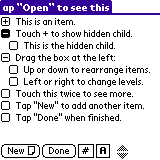
Each of us from time to time there is a need to make, long or not, a list of their cases, or, say, shopping - no need to keep in mind what has been done (bought) or not enough to see whether a check mark in front. Especially if you, as they say now has a project (especially if the project is not one). What to do this? Yes sheer trifle - a piece of paper and a pen. There are, however, several disadvantages, the main one - is absolutely necessary to have this sheet with you, so you can always check out what else needs to be done, and, most importantly, put that same check (for example, and where the same had happened to it stick ...). We must also note that this important list is very simple, if not even lose, then just lay some papers, not to mention the fact that he can wrinkle. In order to save people from these problems and have devised special programs, so-called outline-managers. On desktop computers, they have existed for a long time, there is a corresponding function, and in all your favorite MS Office. But even the use of these programs does not solve the very problem of "leaf and a pen, but only makes it easier to create and edit lists for further use away from the computer it will still have to print - do not take the same computer (even a laptop) with me to the store . Fortunately, this is not an argument for the owner Palm'a - will be with them, all sorts of paper-notes carry. To do this, he is always at hand his trusty handheld, let alone find a suitable program. In principle, for these purposes (with certain restrictions) you can use built-in ToDo, and Memo, but there is a special outline-programs that combine the functionality of the desktop with the simplicity, compactness and speed of a sheet of paper. The most popular programs Arranger and BrainForest. Less known are the Bonsai and Shadow Plan, as well as the relatively recently introduced, but had already managed to attract the attention of users of freeware-program Progect. Although this list of programs is certainly not limited to, there is still ThoughtManager, Hi-Note and others. There are also several programs with a more narrow specialization - for example, compiling a shopping list, without having to use deadlines or setting priorities. Here, I would advise to pay attention to the program ListMaker. Lists of things to collect in the road, products that you need to buy - they make it easier to ListMaker'e. It should be noted that the interface of all programs is virtually identical and very similar to text editors: the top line with the name list, and some of the controls below the main toolbar, and all the space between them, given the actual list. So apparently all the differences between the programs lie in the toolbar window and edit the properties of a list item. All these programs have the support drag'n'drop to move, and grouping of records. - 32k notes (except Progect and ThoughtMan)

Arranger

Review of the outline-programs for the Palm
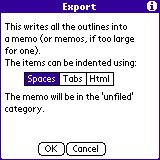
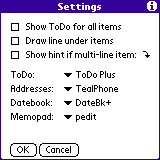
The first of these programs, Arranger, stands out among its competitors more closely integrate with built-in applications. And while other programs of this review to a different extent can communicate with ToDo and Memo, but the opportunity to include in the lists contacts Address Book, Date Book event, and even records from the Expense boasts only Arranger. This is its main advantage and, simultaneously, the main drawback - apart from inserting records from the built-in programs (or rather, a reference to those records) and placing them in the tree, Arranger almost nothing he can. Generally, we can say that in terms of internal structure is very simple (if not poor) program with a limited set of features and capabilities. So nice to see it quite competitive, export / import and export to Memo format Doc, and when you export you can get the text, separated by spaces, tabs, and even in the form of HTML markup. B minus this program can also supply the absence of even a simple conduit.It's inexcusable and the fact that for a program with such a price documentation frankly not enough, apparently the author expects only experienced user, but he is unlikely to leave the program which he uses to go to the Arranger.
Review of the outline-programs for the Palm
As a result, we get a program that is almost not renewed, has a majority of necessary functions and is simply not worth the money. The only thing that allows it to locate their users, so its crown is the ability to create links to the built-in Palm-recording software. URL: http://www.olivebr.com/

Reader for Palm or ProchitayteIhVse

Reader for Palm or ProchitayteIhVse
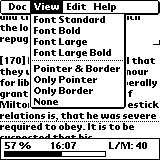
Before we talk about the program ReadThemAll, a few words about the "reader" for Palm. Reading program for Palm owe their existence to several features of Palm and its built-in applications. First, the database on the Palm - it's not a file in a general sense, it is required to transform text, and secondly, this restriction firmware MemoPad on the amount of one record. At one time, an auspicious coincidence, appeared format, which de facto has been recognized as a standard document format for Palm. It seems it was originally designed by Aportis, but I could be wrong. Despite the fact that this format supports compression of certain files on your device it is very simple. It is possible that this is what helped him win a populyarnost.Mir does not stand still and the need for users to preview files with complicated oformaleniem and formatting such as HTML or Microsoft Word, and the need to edit them, led the engineering team to invent their own formats, but nevertheless, the de facto standard means that the Doc file is supported by almost all programs. Despite the progress in computer technology, the process of reading e-books are not much different from reading a paper book - the same page, the same paging, but with the buttons. To make here is something new, the developers are making a program to automatically read or paging someone how convenient it is called. The most obvious method used in most programs - is the auto-scrolling. With a certain periodicity text is shifted by a certain number of points up, adding the bottom line as necessary. By the way, do not consider for a serious statement, but paper books might well be too is also available in rolls, and the consumer would have two coils, one of which was fastened to a motor with adjustable speed. When I first tried to include auto-scrolling to a certain program CSpotRun, I noticed two unpleasant features, later confirmed by many people. The first relates to the hardware. I do not know how the later models, but on my Palm IIIxe text in the process of movement is shaking very tiring thereby eyes. The second is related to features of the reader. When you read, using this method, the eyes are forced together in a horizontal motion associated with reading the lines and move more, and together with the text up, but after reading this line to move to much greater distance down. to the next line. Perhaps this can be used to, but I could not and refused to read such a method is practically the next day. There were other attempts relizovat automatic reading. For example, the program PanaRead. There's the basic idea is that at a certain rate me with the words printed in large type. Despite various improvements, such as slowing down the show at the meeting point or the end of a paragraph, a way needs to be improved and I would not call it too comfortable. In addition, large print was only the Latin and the question to the developer about the possibility of adding other fonts, he replied that there is none. By the way, but then he mentioned that the programmer on this project, according to him was Russian. So for me the auto-theme to scroll has been closed until such time as discussing the potential ways of scrolling with a colleague, did not appear the next idea. With an approximate speed of reading the sequence of lines of text from top to bottom. Upon reaching the last line at the bottom of the screen from top to continue the withdrawal. But it is necessary to read a few lines before. To this end, the user is given a landmark - a small corner, moving to the right of the text. All of this gives an unexpected effect. Reading is very similar to normal when the lines are located sequentially on the page but at the moment when the user in the ordinary case, press the button to display the next page and move upward glance, he should just look up to transfer. To distinguish between new and old lines in place of their division is shown dotted line. If you have a specific need, it mozhzhno off as well, and index.Disabling allows the user to choose their own style of reading. In the process of development, when more or less can be opened with the program files, I read a few major books and came up with some observations. First, during prolonged reading eye gets used to the speed and methodically tends to increase. I remember that at the end of a novel she has reached all of some transcendental values, which I have for some reason can not reach. But the novel was very interesting and perhaps it is related to this. Second, the small screen Palm'a so many possible broken-killed for a small amount of text to climb on it, in this case, wins its size. This is due to the fact that the ordinary reading of the lines are fairly long and the height of the page - too. Therefore, the eye must travel quite long distances. Here, and in either case has to do gorazdno smaller eye movements, but perhaps that little bit more often. There is still notable for one thing. If we choose the largest font, line, consisting now of the Russian language for an average of two words can be read without any gorizontaelnogo eye movements that can once again significantly increase the speed. A few words about the interface and program management. It is obvious that the management of the "reader" should be double - both with the stylus, and only with the buttons. Originally I also wanted to eliminate the use of four buttons launch which, in my opinion, should always perform their basic functions. Therefore, the result was a somewhat unusual way to control that not everyone fell in love, especially the current polzovtelyam CSpotRun'a. There is a pop-up panel that displays the current information - the position of a percentage rate and the current time and, in addition to signal its emergence in the transition mode, "pause." From the reading mode to pause mode shift by pressing "up". Further pressing the "up" reduces reading speed, remaining in the pause mode. Pressing the "down" returns to "read" and further pressing down increases the speed of reading without indication. This choice of operations related to the fact that it seemed logical to make a complete stop when the user does not have time and do not stop reading when there is a certain reserve and speed can be increased. In addition to the above keyboard controls are the other possibilities, starting with the menu, zakanichaya pressing the stylus. For users of Sony Clie provides management with Jog-Dial. From the opportunities presented in other "reader", I realized until just search. In fact, many would like to see here and bookmark and more easy to navigate, especially when the documents are very large and the step of one percent moves in too great a distance. Really would add to the site of discovery of documents on external media, if I may say so, MemoryStick example. In addition, the letters come with an improved self myself scrolling or slightly alter it. All these proposals, I am very glad, because I think that together we will make the program even better. The only thing most of the proposals contradict the request to keep the program size small. The program is called ReadThemAll (Read them all), although there were other options, perhaps more successful. When the idea came up, I have not had experience developing for Palm. Therefore, he sent a proposal, first author of a freely-available software CSpotRun, and then at razrabotchkov iSilo. The lack of response in the first case and too standard in the second, made me learn to develop a Palm. ReadThemAll falch.net developed using version 2.1, which was then free for noncommercial use, the current version 2.5 - 30-day trial. Incidentally, a few words about it, this suspension of prc-tools (gcc, pilrc), appearance and functionality is very reminiscent of Microsoft Developer Studio (although she herself had written in my beloved Delphi). I personally I liked it a lot more than CodeWarrior.In conclusion, I say again, that despite its simplicity, the reader for the Palm may qualify for entry into the five most commonly used by the user, because in my experience I can say that after the first few weeks of the wild delight of owning this wonderful device when I put on it almost everything and thought I had done with the aid of it something beautiful and wonderful in the end went mostly to consume information, rather than its creation. A book - it is not only a source of information, but also food for the soul, so read more and despite the myriad of books, ProchitayteIhVse! (ReadThemAll) Authors translation:

Spreadsheets on your PDA

Spreadsheets - the program used by almost all, without exception. Everyone is familiar with Excel, Lotus, QuattroPro and their capabilities. There are several analogs of these programs for handheld computers. Author of the article decided to hold a small study to compare their capabilities. As a test device made ​​by the following PDAs: - Casio Pocket Viewer PV-S450 (built-in application Tables / Pocket Sheet)