VReader5 or leisure at Psion

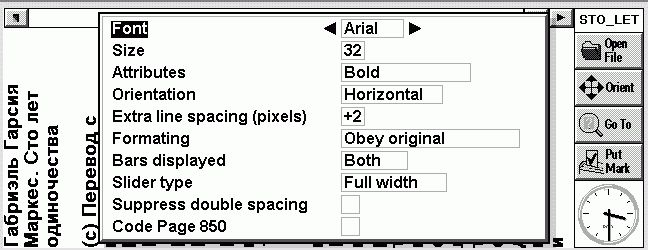
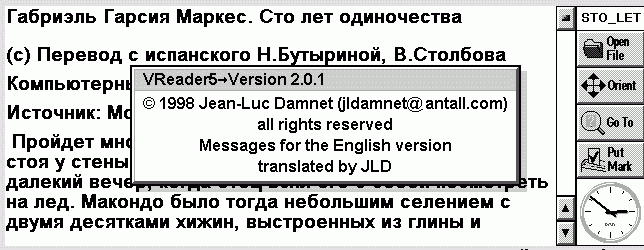
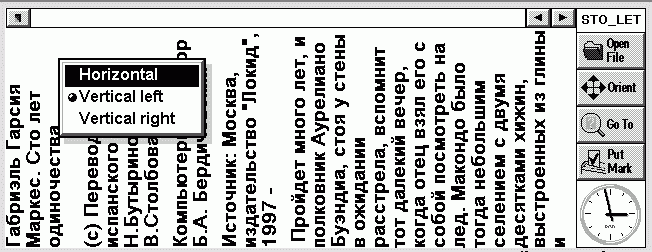
Judging by the statistics of users' requests for programs to read books VReader5, the latter was, is and will be one of the most popular for EPOC. What is the reason? And why use a PDA for reading electronic books became so tempting? The answer is simple - this compact, convenient solution that is always at hand. Of course, so far, none of the CCP does not replace the printed product, but there are situations (eg, long waits, tube, ride the subway) when the usual number of books is not, and uncomfortable with her fiddle, and here it comes to the rescue Psion. Psion small (especially one of the latest models - Revo), it can be carried with you everywhere. You choose the layout of text on the screen (referring to rotate the image 90 degrees), the rate of auto-scroll (Vreader allows it), the font. All you have to do is download it to a couple of books and ... entertainment is provided to you. The question is - what about the desktop machine? Well, every man to his own taste. For example, I hate reading on a large computer - your eyes get tired, the body is numb, rapid fatigue. And there, and until the headache is not far away. And on the Series 5mx, I read more than a dozen books and hundreds of articles and do not regret it. The current version of VReader5 for Series5 suitable for Revo. The only thing you have to sacrifice - this is what all the tabs will not fit in the window. Hopefully, that will soon be a version for Psion Revo. We need only to fill up the author VReader5 letters. Vreader now developed and maintained by Frenchman Jean Luc Damnation (Jean-Luc Damnet). On his personal page you can find versions in different languages, as well as links to the largest digital libraries. File Russification and lots of books in Russian are on the site Akayev.
VReader5 or leisure at Psion
"V" in the program name means "vertical". This is one way of reading - vertically, holding the Psion as a book. In my opinion, it is not very convenient, but someone surely will love :-)
VReader5 or leisure at Psion
In addition, in recent versions has increased the number of supported formats: from ASCII, TCR up Aportis Doc (the format used in Palm Pilot). These files have a resolution *. PRC and *. PDB. Many texts in these formats can be found at MemoWare. Of course, VReader can read the usual *. TXT files. In the current version there is also a function QuickFind, which lets you quickly find the relevant text. Number of bookmarks, unfortunately, is limited to 10 (compared to 80 at "rival" - EBook), which looks a bit strange, but what VReader able to automatically scroll the text (and, at different speeds, which you yourself and define), with more than offset this small drawback. If you have a desire to make himself into a book format Aportis Doc, which is more compact than a standard TXT, then check out the page and download the EBook utility MakeDoc.
VReader5 or leisure at Psion
According to the authors of the program future versions VReader5, will maintain files Adobe Acrobat PDF. In my opinion, this is the best program for reading electronic books for the Psion. The main competitor - EBook, and try it, perhaps, for you it will be a more appropriate solution. Download the latest version VReader can get it here from the site of TUCOWS. The authors, translation:

Utilities for PDA

Utilities for PDA - a relatively new area for Russian programmers. However, as the "stock" ultra-systems, the number of different utilities is growing.

Oleg Lebedev abroad for many years there is a huge Web-sites that are hundreds of thousands of utilities, but in Russia, given the limited amount of actual ultraportable PC market utilities impair localization and package versions for Windows (because they can be quickly transferred from the medium Windows 95 on Wednesday, Windows CE). But today the situation has changed. Utilities come to the fore. We prepared a summary of the most interesting developments of Russian programmers for the major platforms: EPOC / Psion, PalmOS and Windows CE.

EPOC / Psion

"Context" 1.0

Price $ 30

Synchronization via infrared for Palm and Visor

Synchronization via infrared for Palm and Visor
I like that the developers have removed the mountain of wires from our homes and offices through the establishment of a network of 802.11. But nonetheless, these wizards look at me and sigh when I ask them how to synchronize my Palm via infrared. "I think you can do it, but with big problems," - answered me, most of them. The desire I had, and I thought I must be crazy not to try to implement it. If my laptop can receive email and visit web-pages, using a wireless connection, then, why am I forced to use expensive, heavy cables to synchronize your Visor? After a little research, my conclusion was: I do not have to suffer so. I can not stand aside and to synchronize wirelessly. And I'm not talking about IrDA only for those lucky ones who have Palm OS 3.5 with the necessary built-in libraries. Fortunately, even if you have earlier versions of the Palm or Visor, starting with OS 3.1., You may well be able to impress your friends and colleagues to connect via infrared. And here's how to do it.

Palm OS 3.1. vs. OS 3.5

The latest version of Palm OS 3.5.2 includes IrDA-libraries, which allow users to synchronize their data with IrDA - compatible PC and desktop PC via an IR port. (Although, they do not tell how to do it.) Palm with upon OS 3.5 includes a model IIIx, Vx, VIIx, and m100; two models Visor - Prism and Platinum - are also supplied with an installed OS 3.5. If you have an earlier device upon OS 3.1, you can begin to think that it's time to part with $ 19.95 to make the upgrade to your Palm to version 3.5. Visor users are in a difficult position, they are unable to upgrade versions of Palm OS. Does this mean that the owners of the Visor will not be able to exchange information via infrared, and that the owners of the Palm will have to upgrade the entire system to implement synchronization? No, it's not, because there is free IrDA patch, which can be downloaded from Palm. He will provide you with the necessary system software. Below I will detail the patch and software necessary for connection. But first stipulate which computers can be synchronized. For HotSync, you must have two factors.

What can I sync?

IrDA HotSyncing works with most modern PDAs. If you have a PC-based platforms, Win 95 or Win 98, and is, in the presence of IR, it's all right. Win 95 modules may require a driver update IrDA. However, the machine based on Win 98 comes with all necessary software. By the way, from one reader, I learned that Windows 2000 do not allow for IR synchronization IrDA HotSync. Now you need to make sure is installed on your PC, HotSync Manager v.3.0. Macintosh PowerBook can also be synchronized if these are new models that comply with IrCOMM 1.0. They include the following series of PC: PowerBook 3400, 2400, and G3. Older model PowerBook Type 190, 5300, and 1400 using the protocol "IRTalk", which allows Mac `s communicate only with each other, but no more. (I'm glad that it has in the past!) Laptops G3 PowerBook IrDA-compatible, but they can not communicate with older IRTalk PowerBook. Models 2400, 3400 and earlier G3 and include IrDA, and IRTalk. So that they can transfer files via infrared with both old and newer models of PowerBook. If you have any questions regarding the capabilities of your Mac communicate via infrared port, see the "IR-Macintosh: IrDA-compatible is it?" Specialists from Apple. Importantly, remember that you need in the IR sync with PDA, and IRTalk only good for file transfer Mac-2-Mac. As for iMacs, then you probably remember that the early models had the infrared port. The first two versions of the iMac (Bondi Blue) referred to as the corrected models A and B, and they support IrDA, but not IRTalk. Later models of iMacs do not support infrared communication of any one type.Finally, I read that some mobile phones have IrDA - Compatible ports and can communicate with other devices. I have not tested this functionality, but it would be interesting to know of any successes using this technology.

Configure your Palm

Now, when you decide which device to synchronize with your Palm, it's time to configure the PDA for IR communications. (Visor users should skip this section and go to "Configuring a Handspring Visor", because the installation program for these devices varies). If you have a Palm, start by downloading the patch for the Palm OS. This archive consists of four files. Set three of them on your Palm: AMX.prc, IrLib.prc, and SerlrCommLib.prc. If you prefer, you can set up a fourth file, SerlrPanel.prc, but it is not necessary. Now you are ready to install software that allows two devices to synchronize. I have successfully tested the demo version IrLink 1.5. This application has several convenient features: the ability to sync via infrared, detection devices and Auto Sync. There are a few things you should know about IrLink. First, version 1.5 does not work with the Palm upon OS 3.3. So, if you use upon OS 3.3, you'll have to wait for the release of version 1.6. Second, you load a 30-day demo version. It is fully functional, but requires payment in the amount of $ 19.95 after the expiry of the allotted Verma. But there is some good news: IrLink works equally well with the Palm and Visor, Mac and PC. Now you have installed the patch and Palm IrDA software IrLink. Open IrLink, and mark the item "Redirect cradle". Now all you have to do - is to select the configuration of your PC, and soon will first transfer data via infrared. Incidentally, I recommend that you disable the "Beam receive" (Infra-Red Beam), located in Preferances> General (dropdown menu)> Beam receive. This is due to the fact that there were cases when, during the infrared transmission appeared message "Waiting for sender" ("Waiting for sender"). This kind of message will not hurt anything, but get on your nerves.

Configuring the Handspring Visor

Even if the Visor uses essentially the same software Palm OS, there are several notable differences in the preparation of devices to exchange information via infrared. First of all, is the result of the availability of USB. First, download patch Palm OS IrDA, make sure you are installing only the file SerIrCommLib.prc, the remaining three files to remove. If you accidentally set them on your Visor, then perhaps you would have to restart the computer using Reset. If you have installed on SerIrCommLib.prc Visor, I have for you is some good news. Download the free software for IrDA BeamSync. Here you will find two versions: English and Japanese, select the language of your choice and read the file ReadMe. BeamSync no different "widgets" which are at IrLink, but it is not worth $ 19.95. Unfortunately, I could not find BeamSync, working with the Palm PDA, so if you know more about it, write. After installing BeamSync restart the computer using the drop-down menu bar Preferences. You can enable or disable the device away. When the device is turned on, simply place the IR port of your Visor in front of the infrared port on your PC, and sync to start in normal mode. It is very easy. As well as for users of Palm PDA, I recommend that you disable the "Beam receive" (Infra-Red Beam), located in Preferences> General (dropdown menu)> Beam receive.

Setting up a laptop with Windows

OK, now our PC is ready to receive the IR beam. Only a few adjustments, and wireless data transmission will begin.
Synchronization via infrared for Palm and Visor
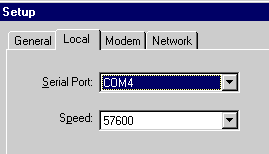
First, open the "Infrared Monitor" panel and click the tab "Options". Check all four items, including item "Enable Infrared Communications" ("Resolution on the infrared link).I found that for some reason HotSyncing works much better when the item "Limit Connection Speed" ("The speed limit communication) are also marked. Usually I set the speed in "4Mbps" despite the fact that synchronization will never pass so quickly. Now click OK. Next, you must open the "HotSync SetUp" on the desktop of your Palm. Open the tab "Local" and set the Serial port - COM4. Speed, which I usually set here - 57,600 bps. Click OK. Everything is ready. Now you can initiate synchronization via infrared.

Installation on a Macintosh PowerBook

To synchronize with wt, make sure the control panel "Infrared" is installed and along with the "IrDA Tool" and the extension "IrDALib" active. If your Mac IrDA-compatible, then these components must already be installed.
Synchronization via infrared for Palm and Visor
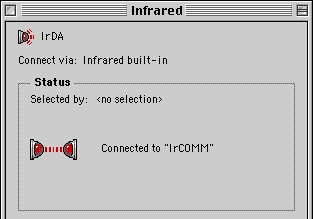
Open Control Panel "HotSync Software Setup", which is part of the software desktop of your Palm. Open the tab "Serial port Settings", and replace the local port ("Local setup") to infrared ("Infrared Port"). Speed, which I have installed here - "as fast as possible", ie speed as possible. It's time to rejoice!

Look, ma! No wires!

If you use IrLink 1.5, then you run HotSync from the application by clicking the "Local". Make sure that the item "Redirect Cradle" is checked, and that the infrared ports of both devices are located opposite each other. Owners Visor, using BeamSync, must first make sure that the application is running, and then run HotSync. I used this setup to install the files, synchronize data and even download data from AvantGo from the Internet. Since I use a Visor, I have a good a USB cradle, through which information is exchanged very rapidly. When it's convenient, I use it. But it often happens that the cradle is located far away from my PC, in such cases I use the infrared connection. A sense of freedom that gave me wireless connection, just fantastic. Sources, Materials:
Universal printer drivers

All is well in the EPOC in terms of text processing. The best word processor of all PDAs, rich text processing, the ability to install fonts. But with the seal of the Russian-language text - not very. That is, if you want to print is not a desktop computer, but directly to the printer (via adapter for parallel port or infrared port), then we can say a bad thing. Memberlist localization RusPsion have drivers for printing to multiple printers, but they are few. In addition, the printer must be Russified hardware. Therefore, a large number of users are "in flight". In November 2000, the company MakTsentr announced the release of the universal printer drivers platform EPOC ER5, ie machines for Psion Revo, Revo +, Series 5mx, Series 7, netBook, MC218. Naturally, MyPsion.Ru could not pass by such an event and asked MakTsentr drivers for testing. Division of mobile development MakTsentr courtesy of drivers, and the result was this review.
Universal printer drivers
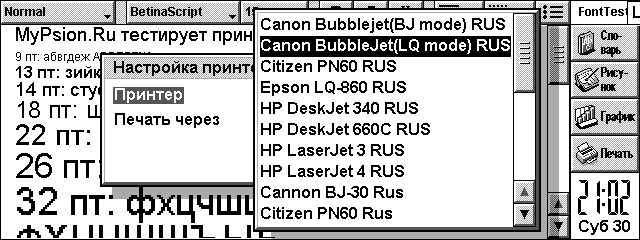
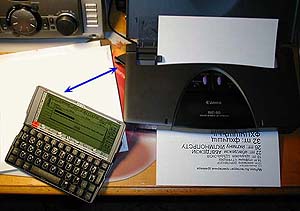
The list of supported printer models, we see support for: Canon BubbleJet modes LQ and BJ (the models BJ / BJC 30/50/70/80/85), Citizen PN60/PN60i, Epson LQ-860, HP DeskJet 340, HP DeskJet 660C , HP LaserJet 3, HP LaserJet 4. This list, of course, not limited to these models. The instruction set of the same type of printers the same manufacturer, as a rule, always the same, which allows you to print and in other models (for example, you can print on any HP LaserJet models, etc.). Printer drivers for the Russian-language press have the ending "RUS", it is necessary to use them for printing. Testing was conducted on Psion 5mx and inkjet printer Canon BJC-80 (data transfer via infrared port) on plain paper. The printer side has an infrared receiver (also known as the transmitter), which can be rotated by some angle. To place the CPC and the printer is recommended so that the infrared ports of both perpendicular to each other formed an angle less than 30o, and the distance between the devices did not exceed 0.5 m. The photograph shows the location of the blue arrow infrared ports of both devices.
Universal printer drivers
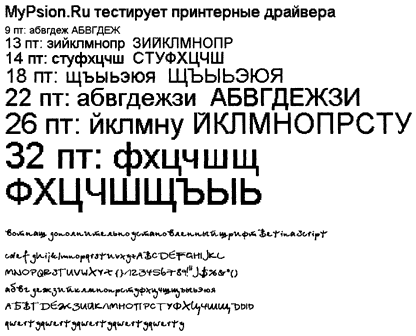
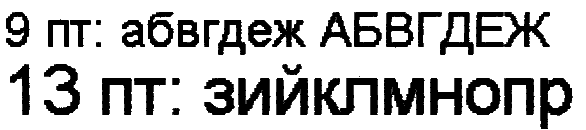
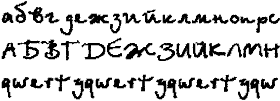
Printing is in graphical mode. And it means nothing, as that way you can display any fonts! They just get out of the screen. However, it should be borne in mind that the EPOC operating system used point font (as opposed to a Windows vector fonts) that with increasing size show their pointness throughout the "glory", namely, the point of becoming very apparent squares. Nevertheless, the usual font size for printing - it's 12.9 points (points, or Friday), and in such amounts maktsentrovskie drivers print very, very good idea of ​​what we now verify. Note that in contrast to the fonts, graphics, images are printed correctly by any driver: Whether or not they russified, paragonovskimi, psionovskimi or maktsentrovskimi - it does not matter. Therefore, we do not test print image, it is important to only print out exactly the Russian text. As you know, Psion PDAs with the standard localization has three fonts: Arial, Times, Courier. More precisely speaking, the CCP has three of these fonts (in the Western European version) hard-wired into the system and replaces them with a crack on the Cyrillic version. You can, however, and most with enough experience to produce their own additional fonts. It was interesting to see how drivers would behave in this case, and so I made an extra Betina Script font and installed it on your PDA. True, the font is this - as if handwritten, so it is very tortuous and at low resolution by itself does not look very good. But no matter: the main thing we check - whether it will look correct when printed, and beauty in this case - minor matters.Constituted a small text file with the alphabet and different sizes of letters (font Arial), and also not forgetting the additional font Betina Script, insert a piece of paper into the printer and begin testing. For comparison, print and take more paragonovskie drivers that included localization RusPsion. The resulting piece of paper with a printout was scanned in the same printer (scanning head) and here is what I got.
This is a common form of printing using the driver MakTsentr, "Canon Bubblejet (LQ mode) RUS".
Universal printer drivers
As you can see, when you print it looks exactly like on the PDA! All fonts have specified dimensions, and below we even see that the custom font Betina Script, not included in the standard package, also opened the way and had to look.
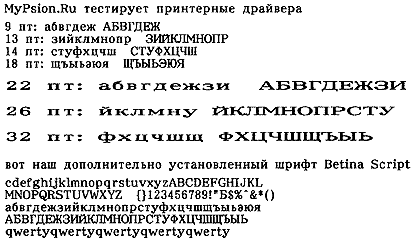
And here is the result of printing the same file when using the driver that came with the Paragon RusPsion, "Canon BJ-30 Rus".
Universal printer drivers
This driver uses a built-in printer fonts. Thus, the Russian text will appear only if the printer is Russified hardware. In addition, we see that the driver ignores the many parameters and the result is not possible to manage any font size (only two options: normal and wide) or a headset, you can not also use additional fonts installed. However, the quality of the tracings of each letter in this case is much higher, as used by built-in printer fonts that are much higher quality than screen fonts Psion. Now back to our drivers, and a closer look at the results of their work.
Universal printer drivers
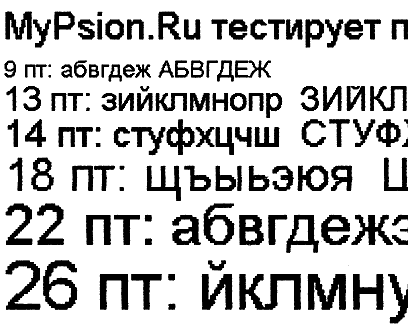
This is approximately a twofold increase (more precisely, not increase, and higher resolution scanning). It is clearly seen that the size of 9 and 13 look very clearly Fri, sizes 14-22 at the usual reading look pretty acceptable (the squares are not very noticeable when reading, when the sheet is in the hands or on a table), but starting with 26 points already clearly visible "components" font. If you increase the scanning resolution result even more (up to 360 dpi) and consider the first two dimensions, we see here is a picture ("increase" to 5 times):
Universal printer drivers
Components of the squares, though noticeable, but do not forget that this strong increase. If you just podnesete sheet of paper close to your eyes, then the points you make out only if you will look very carefully. Well, finally, here is how the font looks like our Betina Script by threefold "increase":
Universal printer drivers
Font reproaching himself, the relative size is small, but tore it right: as was ordered in print. With regard to print speed, it is exactly the same as when you print from any other driver. In this case, it is limited by the speed of data transmission via infrared. For the test was printed one page of plain text from the editor with Word and paragonovskogo maktsentrovskogo drivers.Print time was similar and amounted to 1 min 50 sec (plus or minus a few seconds.) But during this test, it became clear that different drivers behave differently in the final result. When you do print preview in the editor, Word, then he (the editor) makes the breakdown of the pages and shows you how to look like a piece of paper after printing the text. So, if you print through the driver MakTsentr, this is exactly what the result will look like. In the case of the drivers RusPsion proved that the principle of WYSIWYG ("what you see, then get") does not work: "What You See" does not correspond to "What You Get". Instead of one page has turned and a half, and the fonts are not consistent with the ordered (however, this has been mentioned above). Universal printer drivers are not tied to a particular crack. They can work with Elbrus, and with RusPsion'om. And can work without any localization, as well as any "localizators and print any fonts. Elbrus users can get drivers for free (meaning, users of earlier versions of Elbrus, as with version 2.02 drivers are included in his set), and the rest - just purchased for $ 10, which is quite correct price. Drivers are protected from copying by reference to the UID machines. Available and a demo version, where there is a limitation in print: only one page at a time. Assessment of drivers for the five-point scale MyPsion.Ru: excellent. Sources, Materials:

Complex is to use Pocket PC?

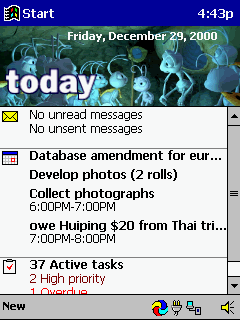
"Pocket PC is complicated to use" - so many discouraging others from the Pocket PC. Once I gave one my friend Cassiopeia EM500 and the only thing in this case said that the "Start" button in the upper left corner. Of course, that there are more interesting things in the operating system, Pocket PC, which it would be nice to know more than knowledge of the location of "Start" button, but it's enough to start using it. The interface of this operating system very similar to the version of Windows for desktop computers, allowing users to intuitively "feel" the program and data stored on PDAs, are becoming readily available. You do not believe me? Let's look together ...

Start button and menu

Like a desktop "relatives", the Pocket PC OS is the start button, when pressed, start menu appears. The only difference - we see it in the upper left corner, not the bottom. The reason for this is that usually people read from top to bottom, left to right, so it is more natural to place the button there. For the same reason moved watches from the lower right corner to upper right. As in the desktop versions of Windows, start button available at any screen resolution. You never lose it.
Complex is to use Pocket PC?
Start menu looks very familiar. Pay attention to the part circled in red marker. It consists of three sections. 1.Bystry access to your favorite applications, user

EBook in Russian!

Here come the happy moment when the users of the program for reading electronic books EBook can enjoy your favorite reader in Russian! MyPsion.Ru proudly presents the full language version of the program.
EBook in Russian!
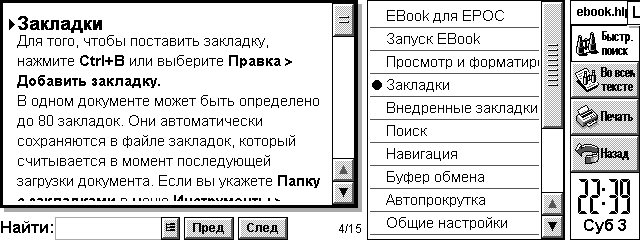
This is the first contribution to the promotion of software for EPOC by its Russian translation (meaning foreign software). Russified as the entire interface EBook, and its help file. Use and enjoy! Native language always looks nicer. EBook - a program for reading electronic books. It allows you to keep on their handheld machine library favorite books, which will always be with you. Convenience of the existence of e-books can not be underestimated. They can be any number, and they will not take place. Any book is always at hand and instantly available for reading. They are always able to fill your leisure or free time. A program EBook make pleasant reading books fun. EBook Features include: support for compressed and flat files Aportis Palm DOC (. Prc and. Pdb); support TCR-documents, support for text documents, automatic recognition of file format, scaling the display font, auto-scroll mode, moving through the scroll bar, up in the buffer and a file; advanced tools work with tabs, 80 tabs on documents, automatically recognize the file format Palm DOC and TCR on devices with ER5; introduction of favorites in the style of Palm DOC; keeping tabs Palm DOC; support for different fonts in the format EPOC (. gdr), allowing to use any font, interactive help, it takes little memory and works fast.
EBook in Russian!
Help File EBook also completely Russified. Home EBook located at http://www.geocities.com/ebookepoc/. There you can download the software (installation file includes support for multiple languages, including the now Russian). By the way, who do not mind the money, he can register (registration is 10 UKP) - you'll be the first from Russia who has registered it:) This wonderful program is well worth the money. And to be legitimate users - always an honor. Of course, in this great cause localization of software will not stop. At this time, preparing the Russian version of the program SwitchOn (it is already available as a beta for registered users). And it is followed by others. Sources, Materials:

How to speed up data entry in the PDA?

One of the significant deficiencies handheld computers is that you can quickly enter text. The struggle for the elimination of this deficiency is in two directions: constructive - the development of compact connected keyboards and software - to develop programs and input methods to accelerate the input of alphabetic information into handheld computers. The first way we will not be considered here because, from my point of view, when it lost the main advantages of using handheld computers: the portability and mobility. Currently applied in the basic input methods: keyboard and "Graffity" (recognition of handwritten characters) have one common drawback, limiting the speed of input: the impossibility of fused input. In addition, the traditional location of the letters on the virtual keyboard (QWERTY) just is not conducive to an increase in the rate of input, since such an arrangement of letters has been developed under desyatipaltsevy input, and not under the data input with the stylus.
How to speed up data entry in the PDA?
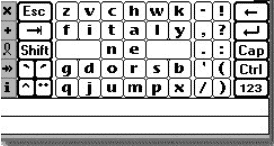
The program Fitaly, developed under the Palm OS and Windows CE attempted a placement of letters, which according to the authors, reduces the movement of the hand with a pen input alphabetic characters, and increases the overall speed of data entry to 50 c / min. Demo version is available at www.fitaly.com, cost $ 25.0 Development Company Textware Solutions
How to speed up data entry in the PDA?
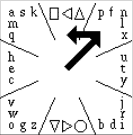
The program QuikWriting, in addition to a peculiar arrangement of the letters associated with the frequency of their use, implemented the possibility of fused input text by unseparated cursor movement on the letters you type. The program is designed for Palm OS and work with it should be in the working field that requires a special sticker with a picture of letters and digits. As seen from Figure 2 letters and signs are divided into 8 sectors, each separated by oblique lines. The motion of the pen is from the center of the square in Gaza, where is the letter. If the letter is located in the center of the sector, the pen is returned to the center of the square, and the corresponding letters are entered in the textbox. If the letter is not in the middle sector, the pen moves left or right on the number of sectors corresponding shift of letters about the central characters. Figure 2 shows an example of entering the letters "f". Pen moves in the sector, where the letter "f" and moves to the left to one sector, because the letter "f" is located at one position to the left of the letter "n", located in the center of the sector. The disadvantage of such a system, compared with Graffiti, a longer cycle of user training. Basic skills is easy to learn about one hour, although rarely used characters (eg punctuation) may require a longer work. Quikwriting developed a professor at New York University, Ken Perlin (Ken Perlin) soon plans to start its commercial distribution, and while the demo version is available here.
How to speed up data entry in the PDA?
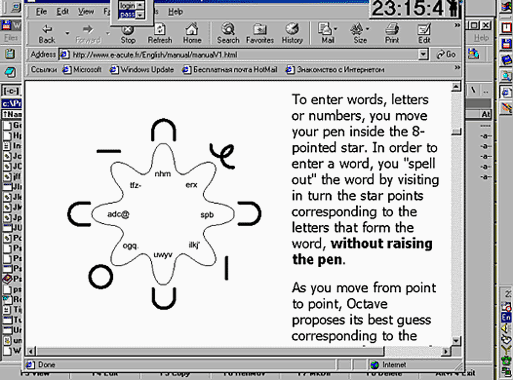
Program Octave, developed as a Palm OS has the same purpose, but their peculiarities in the arrangement of letters and input methods. The authors, translation: