Universal printer drivers

All is well in the EPOC in terms of text processing. The best word processor of all PDAs, rich text processing, the ability to install fonts. But with the seal of the Russian-language text - not very. That is, if you want to print is not a desktop computer, but directly to the printer (via adapter for parallel port or infrared port), then we can say a bad thing. Memberlist localization RusPsion have drivers for printing to multiple printers, but they are few. In addition, the printer must be Russified hardware. Therefore, a large number of users are "in flight". In November 2000, the company MakTsentr announced the release of the universal printer drivers platform EPOC ER5, ie machines for Psion Revo, Revo +, Series 5mx, Series 7, netBook, MC218. Naturally, MyPsion.Ru could not pass by such an event and asked MakTsentr drivers for testing. Division of mobile development MakTsentr courtesy of drivers, and the result was this review.
Universal printer drivers
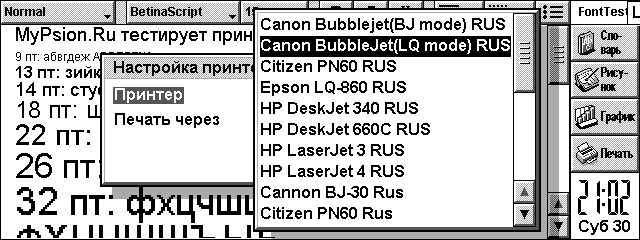
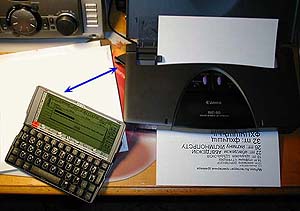
The list of supported printer models, we see support for: Canon BubbleJet modes LQ and BJ (the models BJ / BJC 30/50/70/80/85), Citizen PN60/PN60i, Epson LQ-860, HP DeskJet 340, HP DeskJet 660C , HP LaserJet 3, HP LaserJet 4. This list, of course, not limited to these models. The instruction set of the same type of printers the same manufacturer, as a rule, always the same, which allows you to print and in other models (for example, you can print on any HP LaserJet models, etc.). Printer drivers for the Russian-language press have the ending "RUS", it is necessary to use them for printing. Testing was conducted on Psion 5mx and inkjet printer Canon BJC-80 (data transfer via infrared port) on plain paper. The printer side has an infrared receiver (also known as the transmitter), which can be rotated by some angle. To place the CPC and the printer is recommended so that the infrared ports of both perpendicular to each other formed an angle less than 30o, and the distance between the devices did not exceed 0.5 m. The photograph shows the location of the blue arrow infrared ports of both devices.
Universal printer drivers
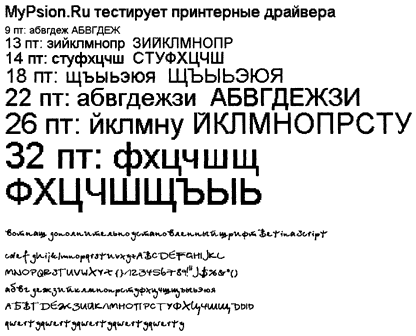
Printing is in graphical mode. And it means nothing, as that way you can display any fonts! They just get out of the screen. However, it should be borne in mind that the EPOC operating system used point font (as opposed to a Windows vector fonts) that with increasing size show their pointness throughout the "glory", namely, the point of becoming very apparent squares. Nevertheless, the usual font size for printing - it's 12.9 points (points, or Friday), and in such amounts maktsentrovskie drivers print very, very good idea of ​​what we now verify. Note that in contrast to the fonts, graphics, images are printed correctly by any driver: Whether or not they russified, paragonovskimi, psionovskimi or maktsentrovskimi - it does not matter. Therefore, we do not test print image, it is important to only print out exactly the Russian text. As you know, Psion PDAs with the standard localization has three fonts: Arial, Times, Courier. More precisely speaking, the CCP has three of these fonts (in the Western European version) hard-wired into the system and replaces them with a crack on the Cyrillic version. You can, however, and most with enough experience to produce their own additional fonts. It was interesting to see how drivers would behave in this case, and so I made an extra Betina Script font and installed it on your PDA. True, the font is this - as if handwritten, so it is very tortuous and at low resolution by itself does not look very good. But no matter: the main thing we check - whether it will look correct when printed, and beauty in this case - minor matters.Constituted a small text file with the alphabet and different sizes of letters (font Arial), and also not forgetting the additional font Betina Script, insert a piece of paper into the printer and begin testing. For comparison, print and take more paragonovskie drivers that included localization RusPsion. The resulting piece of paper with a printout was scanned in the same printer (scanning head) and here is what I got.
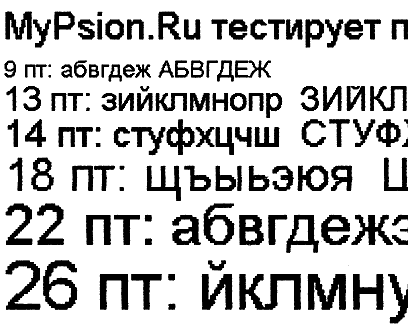
This is a common form of printing using the driver MakTsentr, "Canon Bubblejet (LQ mode) RUS".
Universal printer drivers
As you can see, when you print it looks exactly like on the PDA! All fonts have specified dimensions, and below we even see that the custom font Betina Script, not included in the standard package, also opened the way and had to look.
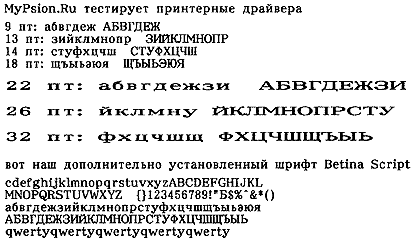
And here is the result of printing the same file when using the driver that came with the Paragon RusPsion, "Canon BJ-30 Rus".
Universal printer drivers
This driver uses a built-in printer fonts. Thus, the Russian text will appear only if the printer is Russified hardware. In addition, we see that the driver ignores the many parameters and the result is not possible to manage any font size (only two options: normal and wide) or a headset, you can not also use additional fonts installed. However, the quality of the tracings of each letter in this case is much higher, as used by built-in printer fonts that are much higher quality than screen fonts Psion. Now back to our drivers, and a closer look at the results of their work.
Universal printer drivers
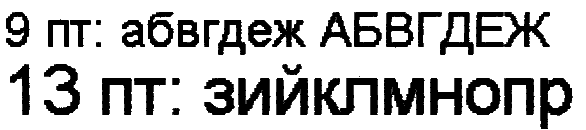
This is approximately a twofold increase (more precisely, not increase, and higher resolution scanning). It is clearly seen that the size of 9 and 13 look very clearly Fri, sizes 14-22 at the usual reading look pretty acceptable (the squares are not very noticeable when reading, when the sheet is in the hands or on a table), but starting with 26 points already clearly visible "components" font. If you increase the scanning resolution result even more (up to 360 dpi) and consider the first two dimensions, we see here is a picture ("increase" to 5 times):
Universal printer drivers
Components of the squares, though noticeable, but do not forget that this strong increase. If you just podnesete sheet of paper close to your eyes, then the points you make out only if you will look very carefully. Well, finally, here is how the font looks like our Betina Script by threefold "increase":
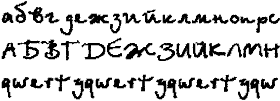
Universal printer drivers
Font reproaching himself, the relative size is small, but tore it right: as was ordered in print. With regard to print speed, it is exactly the same as when you print from any other driver. In this case, it is limited by the speed of data transmission via infrared. For the test was printed one page of plain text from the editor with Word and paragonovskogo maktsentrovskogo drivers.Print time was similar and amounted to 1 min 50 sec (plus or minus a few seconds.) But during this test, it became clear that different drivers behave differently in the final result. When you do print preview in the editor, Word, then he (the editor) makes the breakdown of the pages and shows you how to look like a piece of paper after printing the text. So, if you print through the driver MakTsentr, this is exactly what the result will look like. In the case of the drivers RusPsion proved that the principle of WYSIWYG ("what you see, then get") does not work: "What You See" does not correspond to "What You Get". Instead of one page has turned and a half, and the fonts are not consistent with the ordered (however, this has been mentioned above). Universal printer drivers are not tied to a particular crack. They can work with Elbrus, and with RusPsion'om. And can work without any localization, as well as any "localizators and print any fonts. Elbrus users can get drivers for free (meaning, users of earlier versions of Elbrus, as with version 2.02 drivers are included in his set), and the rest - just purchased for $ 10, which is quite correct price. Drivers are protected from copying by reference to the UID machines. Available and a demo version, where there is a limitation in print: only one page at a time. Assessment of drivers for the five-point scale MyPsion.Ru: excellent. Sources, Materials:
Complex is to use Pocket PC?

"Pocket PC is complicated to use" - so many discouraging others from the Pocket PC. Once I gave one my friend Cassiopeia EM500 and the only thing in this case said that the "Start" button in the upper left corner. Of course, that there are more interesting things in the operating system, Pocket PC, which it would be nice to know more than knowledge of the location of "Start" button, but it's enough to start using it. The interface of this operating system very similar to the version of Windows for desktop computers, allowing users to intuitively "feel" the program and data stored on PDAs, are becoming readily available. You do not believe me? Let's look together ...

Start button and menu

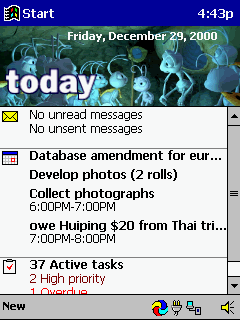
Like a desktop "relatives", the Pocket PC OS is the start button, when pressed, start menu appears. The only difference - we see it in the upper left corner, not the bottom. The reason for this is that usually people read from top to bottom, left to right, so it is more natural to place the button there. For the same reason moved watches from the lower right corner to upper right. As in the desktop versions of Windows, start button available at any screen resolution. You never lose it.
Complex is to use Pocket PC?
Start menu looks very familiar. Pay attention to the part circled in red marker. It consists of three sections. 1.Bystry access to your favorite applications, user

EBook in Russian!

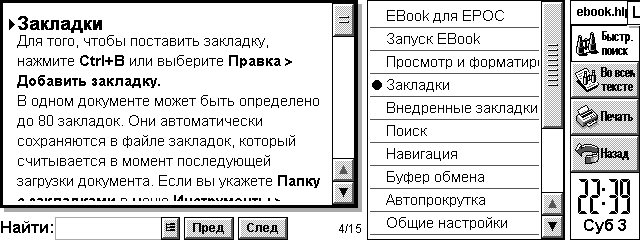
Here come the happy moment when the users of the program for reading electronic books EBook can enjoy your favorite reader in Russian! MyPsion.Ru proudly presents the full language version of the program.
EBook in Russian!
This is the first contribution to the promotion of software for EPOC by its Russian translation (meaning foreign software). Russified as the entire interface EBook, and its help file. Use and enjoy! Native language always looks nicer. EBook - a program for reading electronic books. It allows you to keep on their handheld machine library favorite books, which will always be with you. Convenience of the existence of e-books can not be underestimated. They can be any number, and they will not take place. Any book is always at hand and instantly available for reading. They are always able to fill your leisure or free time. A program EBook make pleasant reading books fun. EBook Features include: support for compressed and flat files Aportis Palm DOC (. Prc and. Pdb); support TCR-documents, support for text documents, automatic recognition of file format, scaling the display font, auto-scroll mode, moving through the scroll bar, up in the buffer and a file; advanced tools work with tabs, 80 tabs on documents, automatically recognize the file format Palm DOC and TCR on devices with ER5; introduction of favorites in the style of Palm DOC; keeping tabs Palm DOC; support for different fonts in the format EPOC (. gdr), allowing to use any font, interactive help, it takes little memory and works fast.
EBook in Russian!
Help File EBook also completely Russified. Home EBook located at http://www.geocities.com/ebookepoc/. There you can download the software (installation file includes support for multiple languages, including the now Russian). By the way, who do not mind the money, he can register (registration is 10 UKP) - you'll be the first from Russia who has registered it:) This wonderful program is well worth the money. And to be legitimate users - always an honor. Of course, in this great cause localization of software will not stop. At this time, preparing the Russian version of the program SwitchOn (it is already available as a beta for registered users). And it is followed by others. Sources, Materials:

How to speed up data entry in the PDA?

One of the significant deficiencies handheld computers is that you can quickly enter text. The struggle for the elimination of this deficiency is in two directions: constructive - the development of compact connected keyboards and software - to develop programs and input methods to accelerate the input of alphabetic information into handheld computers. The first way we will not be considered here because, from my point of view, when it lost the main advantages of using handheld computers: the portability and mobility. Currently applied in the basic input methods: keyboard and "Graffity" (recognition of handwritten characters) have one common drawback, limiting the speed of input: the impossibility of fused input. In addition, the traditional location of the letters on the virtual keyboard (QWERTY) just is not conducive to an increase in the rate of input, since such an arrangement of letters has been developed under desyatipaltsevy input, and not under the data input with the stylus.
How to speed up data entry in the PDA?
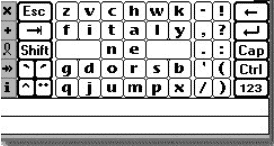
The program Fitaly, developed under the Palm OS and Windows CE attempted a placement of letters, which according to the authors, reduces the movement of the hand with a pen input alphabetic characters, and increases the overall speed of data entry to 50 c / min. Demo version is available at www.fitaly.com, cost $ 25.0 Development Company Textware Solutions
How to speed up data entry in the PDA?
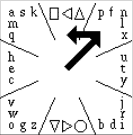
The program QuikWriting, in addition to a peculiar arrangement of the letters associated with the frequency of their use, implemented the possibility of fused input text by unseparated cursor movement on the letters you type. The program is designed for Palm OS and work with it should be in the working field that requires a special sticker with a picture of letters and digits. As seen from Figure 2 letters and signs are divided into 8 sectors, each separated by oblique lines. The motion of the pen is from the center of the square in Gaza, where is the letter. If the letter is located in the center of the sector, the pen is returned to the center of the square, and the corresponding letters are entered in the textbox. If the letter is not in the middle sector, the pen moves left or right on the number of sectors corresponding shift of letters about the central characters. Figure 2 shows an example of entering the letters "f". Pen moves in the sector, where the letter "f" and moves to the left to one sector, because the letter "f" is located at one position to the left of the letter "n", located in the center of the sector. The disadvantage of such a system, compared with Graffiti, a longer cycle of user training. Basic skills is easy to learn about one hour, although rarely used characters (eg punctuation) may require a longer work. Quikwriting developed a professor at New York University, Ken Perlin (Ken Perlin) soon plans to start its commercial distribution, and while the demo version is available here.
How to speed up data entry in the PDA?
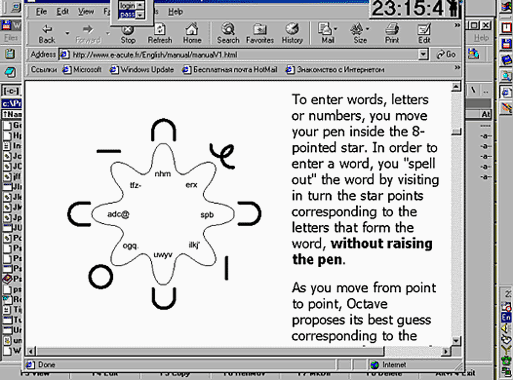
Program Octave, developed as a Palm OS has the same purpose, but their peculiarities in the arrangement of letters and input methods. The authors, translation:

The first impression from working with the utility JS Landscape 2.0 beta

JS Landscape 2.0 beta - this is a beta version of the new Landscape of Jimmy Software. Even before the release of this utility and its surroundings was called hype. Is unique in that it increases the screen resolution is a factor of 2. But how can you increase the screen resolution, if the number of elements of the matrix is ​​320x240? Jimmysoftware come up with its own technology.
The first impression from working with the utility JS Landscape 2.0 beta
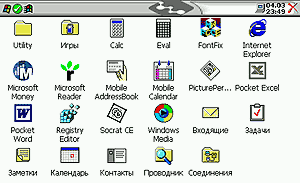
Imagine a screenshot of your desktop in Windows 9x box package Adobe Photoshop. If the menu put the 50% increase, then the window will decrease by 2 times, sharpen and see what all the fonts and icons do not look much worse than the 100% window. In the same way running JS Landscape 2.0, this operation is only carried out in real time directly on the PDA. When the pseudo-resolution screen 480h360 enough to withdraw from the eye at 30 cm and you will not notice that it only reduced the window. It should be noted that the video subsystem of the CPC is working exactly on the resolution of 480x360, it can be seen from the screenshots. Imagine a screenshot of your desktop in Windows 9x box package Adobe Photoshop. If the menu put the 50% increase, then the window will decrease by 2 times, sharpen and see what all the fonts and icons do not look much worse than the 100% window. In the same way running JS Landscape 2.0, this operation is only carried out in real time directly on the PDA. When the pseudo-resolution screen 480h360 enough to withdraw from the eye at 30 cm and you will not notice that it only reduced the window. It should be noted that the video subsystem of the CPC is working exactly on the resolution of 480x360, it can be seen from the screenshots.
The first impression from working with the utility JS Landscape 2.0 beta
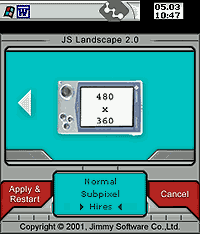
Utilities menu prompts you to select 2 modes (Portaint and Landscape) and for each you can select 3 mode resolution (320x240, 480h240, 480h360). This beta version works just fine resolution of 320x240 and 480h360. Intermediate regime stomps screen. After attempts to use the mode and intermediate resolution 480h240 240h480, fonts are reflected correctly, as well as after return to normal mode lost their calibration settings screen. Without using the stylus to reach the control panel is not possible, so you have to do a cold reset is Remove all batteries from the CCP to completely remove installed programs, and informations. You can of course solve the problem at random, randomly pressing the stylus on the screen after five minutes of this chaos, my PDA rebooted in normal mode 320x240 with all the calibration settings. I note that the full-screen applications and games do not work together with the Landscape. The first minutes of utilities have brought nothing but disappointment, until I started Pocket Internet Explorer.
The first impression from working with the utility JS Landscape 2.0 beta
Roam the network resolution 480h360 - quite acceptable occupation. I visited their favorite sites without horizontal scrolling pages, and it means a lot, especially when using your mobile phone as a modem.
The first impression from working with the utility JS Landscape 2.0 beta
I also liked the view tables Excel, they appear correctly on the screen shows the entire piece of the page width to A4 size.Work with the Landscape in Pocket Word occupation is not remarkable, although suitable for viewing documents. Also pleased with the mapping information in the packet Pocket Outlook. All other applications are not very well suited for high resolution, so for them to switch to a standard screen mode, otherwise you can just ruin eyesight.

Installation

To obtain the JS Landscape 2.0 beta, you must write a request to Jimmysoftware, as described on www.jimmysoftware.com and a couple of hours update comes to you via email. That update, but not the full version, so you will need to purchase the first version of Landscape. Utility itself is installed correctly, and after the first run on a PDA, offers to reboot the machine. When you open a menu described above.

Support

Despite the very prompt support, Jimmysoftware promises to correct all the deficiencies only in the full version of the official, referring to the unfinished code.

Conclusions

This is a very interesting idea marred by a number of drawbacks, but it certainly will like the people who are engaged in viewing the online resource for PDA Pocket PC.

FOR:

  • Interesting idea
  • Proper application menu
  • Benefits of working with Internet

AGAINST:

  • Number of shortcomings, which lead to a cold reset
  • Mode Fault 480h240
  • The program is not free
The authors, translation:

GMovie Maker - Make your Palm multimedia

Today it is no secret that in most cases, people who buy yourself a PDA, prefer devices that run on Palm OS. However, when it comes to increasing the capacity of operating systems, few would argue that the Palm OS is at the end of the list. As a 16-bit OS, it is clearly inferior to devices on platforms of Windows CE or EPOC. One drawback is the lack of Palm multimedia. Windows CE devices can play video files recorded on the IBM microdrive. But can it Palm? Probably not. And the main reason for the lack of such opportunities lies in the fact that the PalmOS has always been the operating system for advanced organizers and more. Software product gMovie Maker of Generic Media, as its creators say, "breathe" new life into old Palm Pilot'y. In conjunction with gMovie Player it will turn Palm into a multimedia device. Author of this article has tested the program. Here is a brief report about it.

gMovie Maker

gMovie Maker - an application that converts the color video, animation and the usual image format gMovie for viewing on the devices, Palm OS. Surprising that gMovie Maker can convert almost all popular media file types. See for yourself, here is a list of supported file format: Animatsiya: GIF, Macromedia Flash, FLC Images: BMP, JPEG, Photoshop, PICT, PNG, Targa, TIFF Video: AVI, DV, MPEG-1, Quicktime is quite an impressive structure. The first thing that tasted author of the article - Macromedia Flash files with the extension. Swf. The conversion process, he said, could not be easier. Opening the application, he chose the file to your hard drive. Then made a few necessary facilities. Incidentally, one of the options allows you to select the number of colors of the converted file, it can be in color, black and white or have 4 or 16 shades of gray. You can also set and the image size in pixels. Now all that remains - this is to click "convert" ("convert") - and a few seconds. Swf file size is 75Kb will be converted to 12Kb. Pdb. The test program was conducted by the author on a Pocket PC IBM WorkPad c3, which is a version of IBM-Palm V with 2 MB of memory, so that the color here can be no question. Tester converted Flash-file. Pdb with 16 shades of gray, and now, to reproduce the image need gMovie Player.

gMovie Player

First you must install gMovie Player on a PDA. Following this simple procedure, open the application "Install Tool", choose our. Pdb file for transmission and sends it to the Pocket PC. Open the application gMovie Player, converted file appears in the list. Clicking on it will start playing Flash-animations. According to the author, play "works" exclusively. It is true there is no sound, no color, but the image still is not much different from that which would be on the desktop. Animation is striking in its smoothness, and graphics - cleanliness. Besides, the author tested the video files, AVI and Quicktime. They, too, everything went perfectly.

Other thoughts ..

Another potential problem that may face the owners of most of the Palm 's may be the lack of memory. Even the latest models are equipped with only 8MB. Generic Media, realizing this problem, create gMovie Player "weight" of 73 KB. Even on the test WorkPad c3 with 2 MB of the author was able to enjoy the pictures and some video files. However, for full-size files still need to expand the memory. In the case of the latest models of PDAs, this problem can be solved. For example, for the Handspring Visor, you can use an adapter MemPlug SmartMedia. Expansion Modules Springboard, SmartMedia cards can increase your memory to 64 MB Visor'a. And more .. gMedia Player does not support audio. However, this is due to disabilities Palm'ov, and not with the software gMedia. It is possible that this problem will be solved soon. Related Links:
  • gMovie Maker English Windows (v1.0)
  • gMovie Maker English Macintosh (v1.0)
  • gMovie Player English (v1.1.2)
Sources, Materials:

Review of the outline-programs for the Palm

Each of us from time to time there is a need to make, long or not, a list of their cases, or, say, shopping - no need to keep in mind what has been done (bought) or not enough to see whether a check mark in front. Especially if you, as they say now has a project (especially if the project is not one). What to do this? Yes sheer trifle - a piece of paper and a pen. There are, however, several disadvantages, the main one - is absolutely necessary to have this sheet with you, so you can always check out what else needs to be done, and, most importantly, put that same check (for example, and where the same had happened to it stick ...). We must also note that this important list is very simple, if not even lose, then just lay some papers, not to mention the fact that he can wrinkle. In order to save people from these problems and have devised special programs, so-called outline-managers. On desktop computers, they have existed for a long time, there is a corresponding function, and in all your favorite MS Office. But even the use of these programs does not solve the very problem of "leaf and a pen, but only makes it easier to create and edit lists for further use away from the computer it will still have to print - do not take the same computer (even a laptop) with me to the store . Fortunately, this is not an argument for the owner Palm'a - will be with them, all sorts of paper-notes carry. To do this, he is always at hand his trusty handheld, let alone find a suitable program. In principle, for these purposes (with certain restrictions) you can use built-in ToDo, and Memo, but there is a special outline-programs that combine the functionality of the desktop with the simplicity, compactness and speed of a sheet of paper. The most popular programs Arranger and BrainForest. Less known are the Bonsai and Shadow Plan, as well as the relatively recently introduced, but had already managed to attract the attention of users of freeware-program Progect. Although this list of programs is certainly not limited to, there is still ThoughtManager, Hi-Note and others. There are also several programs with a more narrow specialization - for example, compiling a shopping list, without having to use deadlines or setting priorities. Here, I would advise to pay attention to the program ListMaker. Lists of things to collect in the road, products that you need to buy - they make it easier to ListMaker'e. It should be noted that the interface of all programs is virtually identical and very similar to text editors: the top line with the name list, and some of the controls below the main toolbar, and all the space between them, given the actual list. So apparently all the differences between the programs lie in the toolbar window and edit the properties of a list item. All these programs have the support drag'n'drop to move, and grouping of records. - 32k notes (except Progect and ThoughtMan)

Arranger

Review of the outline-programs for the Palm
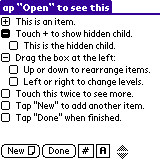
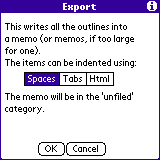
The first of these programs, Arranger, stands out among its competitors more closely integrate with built-in applications. And while other programs of this review to a different extent can communicate with ToDo and Memo, but the opportunity to include in the lists contacts Address Book, Date Book event, and even records from the Expense boasts only Arranger. This is its main advantage and, simultaneously, the main drawback - apart from inserting records from the built-in programs (or rather, a reference to those records) and placing them in the tree, Arranger almost nothing he can. Generally, we can say that in terms of internal structure is very simple (if not poor) program with a limited set of features and capabilities. So nice to see it quite competitive, export / import and export to Memo format Doc, and when you export you can get the text, separated by spaces, tabs, and even in the form of HTML markup. B minus this program can also supply the absence of even a simple conduit.It's inexcusable and the fact that for a program with such a price documentation frankly not enough, apparently the author expects only experienced user, but he is unlikely to leave the program which he uses to go to the Arranger.
Review of the outline-programs for the Palm
As a result, we get a program that is almost not renewed, has a majority of necessary functions and is simply not worth the money. The only thing that allows it to locate their users, so its crown is the ability to create links to the built-in Palm-recording software. URL: http://www.olivebr.com/